
12.3.4 Digital Human Technology [Elective]
Learning objectives
Section titled “Learning objectives”- Understand the core module structure of a digital human system
- Understand why it is not just “video generation”
- Read a minimal digital human workflow
- Build the right intuition for where digital human project complexity comes from
First, build a map
Section titled “First, build a map”A digital human system is easier to understand in four layers: “text / speech / lip movement / rendering”:
flowchart LR A["Text or script"] --> B["Speech generation"] B --> C["Lip / facial motion driving"] C --> D["Avatar / character rendering"] D --> E["Output video"]So what this section really wants to solve is:
- Why a digital human is not a single-model problem
- Why it is naturally more like a multi-module collaboration system
What exactly does a digital human do?
Section titled “What exactly does a digital human do?”The simplest explanation
Section titled “The simplest explanation”A digital human system usually tries to do this:
- Given a piece of text or speech
- Let a virtual character “say it like a real person”
This sounds like video generation, but why is it not exactly the same?
Section titled “This sounds like video generation, but why is it not exactly the same?”Because a digital human often needs to do more than “generate a video.” It also needs to make sure that:
- The spoken content matches
- The lip movements match
- The character identity stays stable
- The facial expressions and motions do not feel awkward
In other words, it places more emphasis than normal video generation on:
Character consistency + speech-driven consistency.
A better overall analogy for beginners
Section titled “A better overall analogy for beginners”You can think of a digital human system as:
- A virtual livestream host production line
Text is like the script, TTS is like voice acting, lip sync is like driving the mouth and facial expressions, and rendering is like filming the character in the final output.
This analogy is very useful for beginners because it helps you first grasp that:
- A digital human is not “a video that appears out of nowhere”
- Instead, multiple modules work together to perform the content into a video
Why is a digital human system essentially a “multi-module pipeline”?
Section titled “Why is a digital human system essentially a “multi-module pipeline”?”A very rough workflow is usually:
- Generate or receive text
- Use TTS to generate speech
- Drive lip movement / facial motion based on the speech
- Render the virtual character
pipeline = ["text", "tts", "lip_sync", "avatar_render"]print(pipeline)Expected output:
['text', 'tts', 'lip_sync', 'avatar_render']Treat this as a checklist. If any stage is weak, the final digital human will feel less believable even if the other stages work.
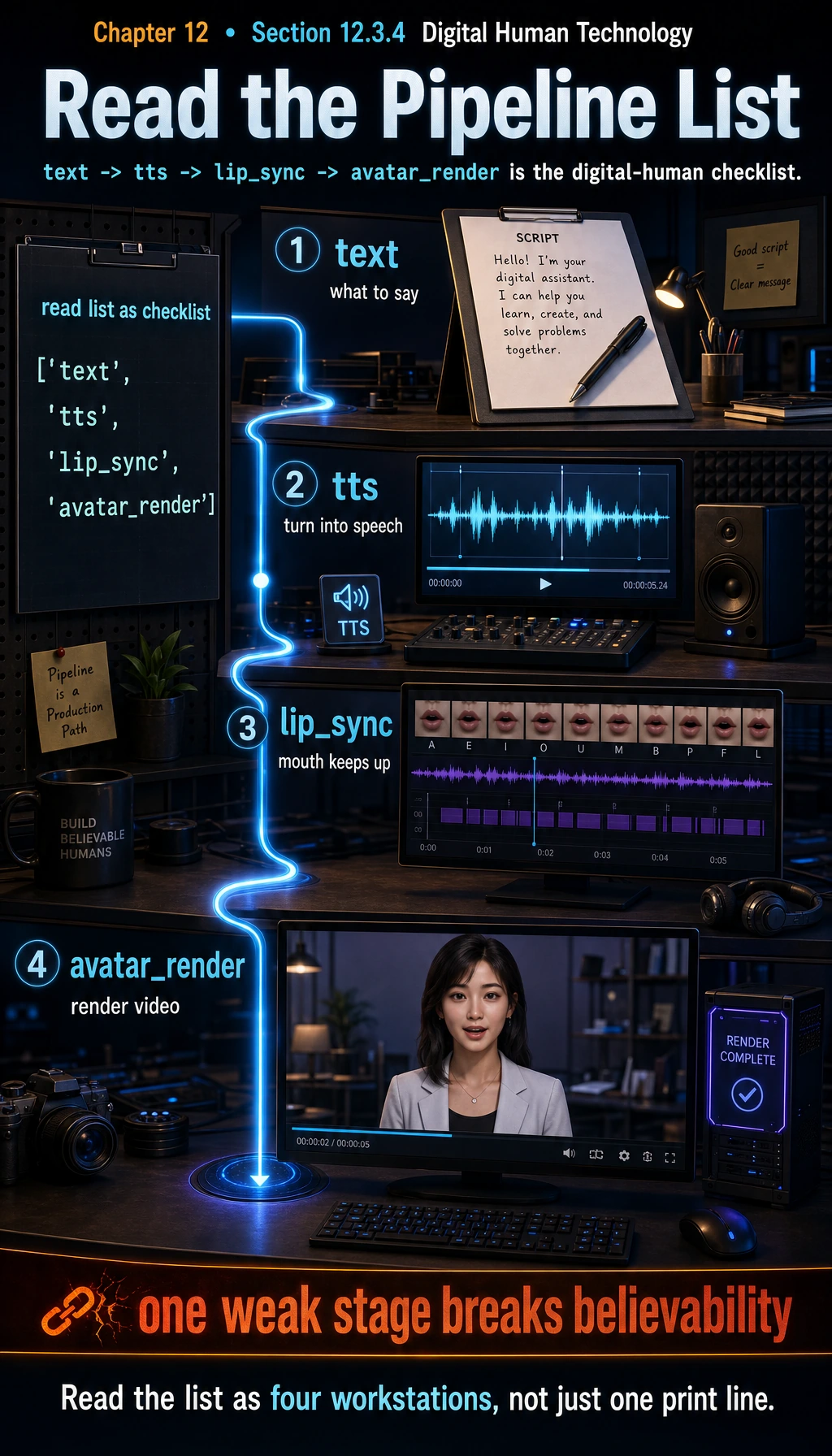
The most important thing about this simple list is that it lets you see:
A digital human is not a single black box, but a chain system.
A module breakdown table that beginners can remember first
Section titled “A module breakdown table that beginners can remember first”| Module | Core role |
|---|---|
| Text / script | Decides what to say |
| Speech generation | Decides how it sounds |
| Lip driving | Decides whether the mouth keeps up |
| Character rendering | Decides what the person finally looks like in the image |
This table is useful for beginners because it breaks the digital human from a “cool buzzword” into several more concrete modules.
The most critical step: lip sync
Section titled “The most critical step: lip sync”Why is this the core of the digital human experience?
Section titled “Why is this the core of the digital human experience?”Because users are extremely sensitive to “the mouth not matching.” Even if the voice is great and the character looks good, once the lip movements are obviously off, the whole system feels fake.
What is this fundamentally doing?
Section titled “What is this fundamentally doing?”It is:
- Taking a piece of speech as input
- Predicting the corresponding mouth movements
This is a very typical “audio-driven visual” task in digital human systems.
Why do digital humans have stricter requirements for “identity consistency”?
Section titled “Why do digital humans have stricter requirements for “identity consistency”?”In ordinary video generation, users may care more about the overall image. But a digital human usually focuses on one core subject:
- The same face
- The same character
- The same brand image
So digital human tasks naturally require more:
- Identity stability
- Detail consistency
That is why many digital human systems place heavy emphasis on:
- Dedicated character modeling
- Avatar driving
- Talking head control
A minimal “digital human system state” example
Section titled “A minimal “digital human system state” example”digital_human_request = { "text": "Welcome to the AI full-stack course.", "speaker": "female_01", "avatar": "teacher_avatar_v1", "style": "formal"}
print(digital_human_request)Expected output:
{'text': 'Welcome to the AI full-stack course.', 'speaker': 'female_01', 'avatar': 'teacher_avatar_v1', 'style': 'formal'}The request already contains more than text: it fixes the voice, avatar, and presentation style so the same content can become a consistent character performance.
This example is teaching you that:
- The input is not just text
- The system also needs a character, a speech style, and a way of presenting itself
This is why digital human projects are naturally more like a “product system” than a single-model demo.
A more complete workflow intuition
Section titled “A more complete workflow intuition”Suppose the generation process for a digital human video can be roughly written as:
- Text -> speech
- Speech -> mouth shape / facial motion
- Character template + motion -> video frames
workflow = {    "input_text": "Welcome to the AI full-stack course.",    "audio": "generated_speech.wav",    "face_motion": "lip_sync_features",    "output_video": "teacher_avatar_video.mp4"}
print(workflow)
Expected output:
{'input_text': 'Welcome to the AI full-stack course.', 'audio': 'generated_speech.wav', 'face_motion': 'lip_sync_features', 'output_video': 'teacher_avatar_video.mp4'}The output video is the last artifact, not the whole system. Before it appears, the pipeline has already created speech and motion features that must stay synchronized.
This code is not implementing a digital human. It is helping you grasp an important fact:
A digital human is a multi-stage conversion system for “text, speech, and visual rendering.”
A project checklist that beginners can remember first
Section titled “A project checklist that beginners can remember first”| What should you check first? | Why it matters |
|---|---|
| Whether the voice sounds natural | Sound directly affects the sense of human likeness |
| Whether the lip movements keep up | Users are extremely sensitive to mouth mismatch |
| Whether the character stays stable | Identity instability is very distracting |
| Whether the style is consistent | Speech, character, and copy should not feel like three separate systems |
This table is useful for beginners because it helps you break “the digital human looks weird” into several diagnosable problems.
Why do digital human projects often become harder than expected?
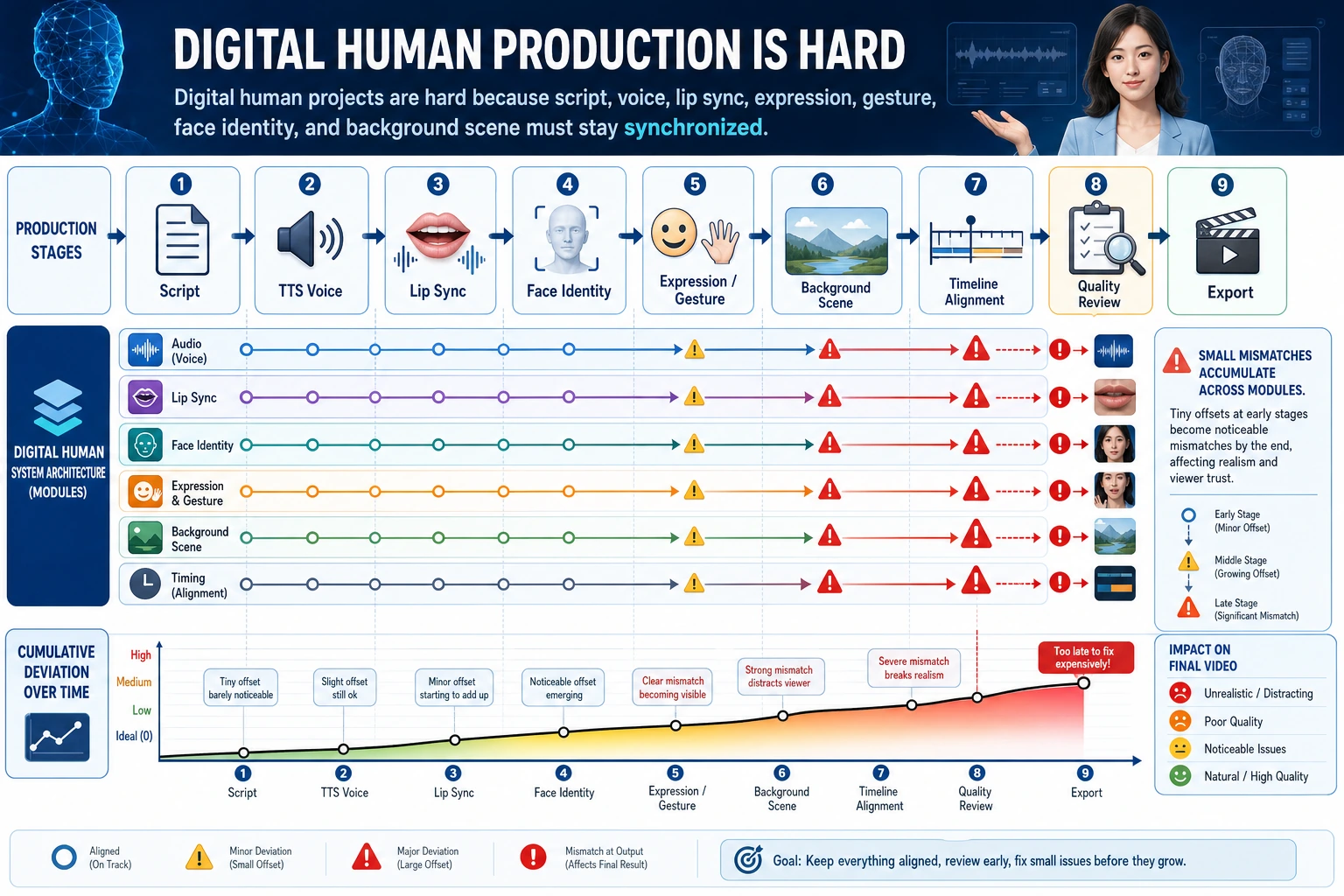
Section titled “Why do digital human projects often become harder than expected?”Errors between modules accumulate layer by layer
Section titled “Errors between modules accumulate layer by layer”For example:
- The generated text is unnatural
- The TTS voice sounds stiff
- The lip sync is slightly off
- The expressions are a bit uncoordinated
In the end, the overall impression becomes very poor.
Users are naturally more sensitive to human faces
Section titled “Users are naturally more sensitive to human faces”People are very sensitive to mismatches in “faces” and “speaking mouth movements.” This makes digital human projects often harder to get right than ordinary generation tasks.
Why are digital humans so valuable in products?
Section titled “Why are digital humans so valuable in products?”Because they are very suitable for:
- Teaching and explanation
- Customer service guidance
- Marketing hosting
- Multilingual explanations
Their value is often not in “technical flashiness,” but in:
Turning language content into a more present and immersive form of expression.
A very important engineering judgment
Section titled “A very important engineering judgment”Many digital human products do not aim for “perfect realism.” Instead, they aim for:
- Enough stability
- Enough naturalness
- Enough low cost
This is important, because if you blindly pursue ultra-high realism, cost and complexity will rise very quickly.
So in practice you often see:
- Cartoon-style avatars
- Semi-realistic characters
- Lightweight talking heads
Behind this, there is often an engineering and product trade-off.
If you turn it into a project or system design, what is most worth showing?
Section titled “If you turn it into a project or system design, what is most worth showing?”What is most worth showing is usually not:
- “I built a digital human video”
But rather:
- How text enters the workflow
- Which modules are responsible for speech, lip movement, and rendering
- Where distortion is most likely to happen
- How you trade off stability, cost, and realism
That way, others can more easily see:
- You understand digital human system engineering
- Not just a video generation demo
Evidence to Keep
Section titled “Evidence to Keep”Keep this page’s proof of learning as a small evidence card:
- Storyboard
- scene list, duration, camera/voice/subtitle/timing notes
- Asset List
- images, audio, voice, captions, clips, and source/license fields
- Sync Check
- speech-text timing, lip sync, shot continuity, or frame consistency
- Failure Check
- flicker, identity drift, audio mismatch, unsafe likeness, or export issue
- Expected Output
- storyboard or timeline artifact with review notes
Summary
Section titled “Summary”The most important thing in this section is not to memorize the phrase “digital human,” but to understand that:
A digital human system is essentially a multi-module system that combines text, speech, motion, and character rendering.
The real difficulty is not just generating a video, but making these modules finally look like one unified and believable character performance.
Exercises
Section titled “Exercises”- Explain in your own words: why can’t a digital human be simply viewed as “ordinary video generation”?
- Think about it: in a digital human system, why is lip sync especially critical?
- If you wanted to build an educational virtual instructor, which modules would be essential?
- Explain in your own words: why do many digital human products care more about “stability and cost” than extreme realism?
Solution approach and explanation
- A digital human combines generation, identity control, speech, facial motion, lip sync, interaction state, and safety. Ordinary video generation does not necessarily need to respond as a stable persona.
- Lip sync is critical because humans notice mouth-audio mismatch immediately. Even small mismatches make the character feel fake and reduce trust.
- An educational virtual instructor needs script or dialogue generation, TTS, avatar rendering, lip sync, lesson state, retrieval or curriculum grounding, safety review, and analytics for learner progress.
- Stability and cost matter because digital humans are often used repeatedly in long sessions. A slightly less realistic but reliable and affordable system is easier to deploy than an expensive system that fails unpredictably.