
9.3.2 Function Calling Explained
Learning goals
Section titled “Learning goals”- Understand the full engineering pipeline of Function Calling
- Learn how to design more robust tool schemas
- Understand parameter validation, failure handling, and error recovery
- Read a small closed loop of multi-step tool calls
- Distinguish what “the model decides” and what “the program executes”
Why dig deeper into Function Calling separately?
Section titled “Why dig deeper into Function Calling separately?”The beginner version only solves “can it call?”
Section titled “The beginner version only solves “can it call?””The simplest function calling system only requires:
- The model chooses the right tool
- The parameters are roughly correct
That is usually enough in the demo stage.
Once it goes live, harder problems appear immediately
Section titled “Once it goes live, harder problems appear immediately”For example:
- There are many tools, and the model often chooses the wrong one
- Parameters are often missing fields
- Some calls must be protected by permission checks
- How do you recover after a tool failure?
- How do you avoid infinite loops in multi-step calls?
So real Function Calling is not just a JSON structure, but an engineering mechanism.
First, understand the complete pipeline
Section titled “First, understand the complete pipeline”The standard closed loop of Function Calling
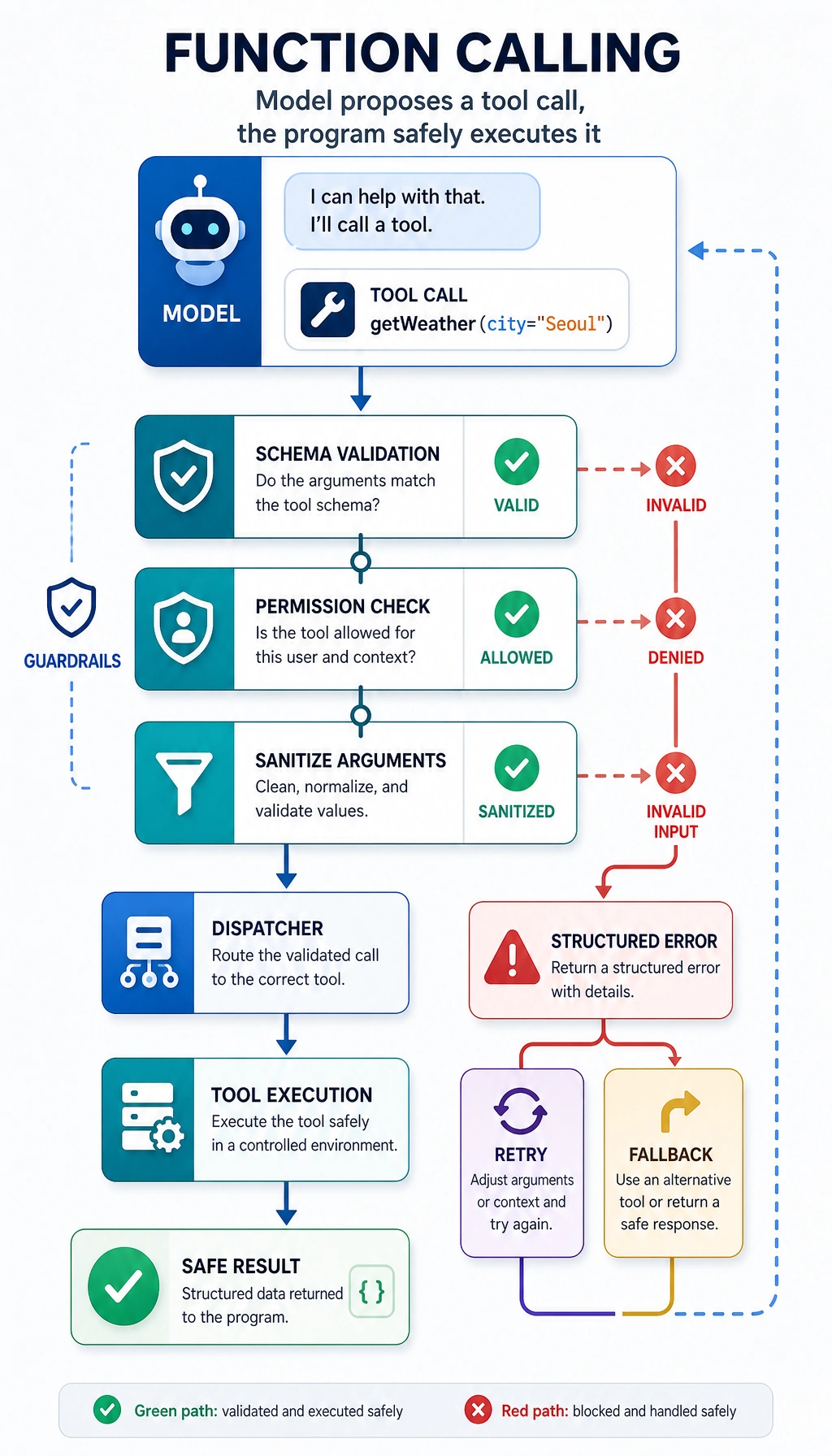
Section titled “The standard closed loop of Function Calling”flowchart LR A["User input"] --> B["Model selects tool and outputs parameters"] B --> C["Program validates whether the call is legal"] C --> D["Execute the tool"] D --> E["Get the result"] E --> F["Continue response / continue next step"]
style A fill:#e3f2fd,stroke:#1565c0,color:#333 style B fill:#fff3e0,stroke:#e65100,color:#333 style C fill:#f3e5f5,stroke:#6a1b9a,color:#333 style D fill:#fffde7,stroke:#f9a825,color:#333 style E fill:#e8f5e9,stroke:#2e7d32,color:#333 style F fill:#ffebee,stroke:#c62828,color:#333Which parts are handled by whom?
Section titled “Which parts are handled by whom?”| Step | Responsible party |
|---|---|
| Decide whether to call a tool | Model |
| Output the call structure | Model |
| Validate whether the parameters are legal | Program |
| Execute the tool | Program |
| Continue to the next step based on the result | Model / workflow / Agent scheduler |
This is a very important boundary:
The model is responsible for “decision-making,” and the program is responsible for ensuring safe and stable execution.
Why does schema design directly affect results?
Section titled “Why does schema design directly affect results?”What does a bad schema look like?
Section titled “What does a bad schema look like?”bad_schema = { "name": "search", "description": "Do some queries", "parameters": { "q": {"type": "string"} }}
print(bad_schema)The problems with this schema are:
- The tool name is too vague
- The description is too empty
- The parameter semantics are unclear
When the model sees a schema like this, it can easily get confused.
A better schema
Section titled “A better schema”good_schema = { "name": "search_course_policy", "description": "Query policy-related course documents, such as refunds, certificates, and learning order", "parameters": { "keyword": { "type": "string", "description": "The topic keyword to search for, such as refund or certificate" } }, "required": ["keyword"]}
print(good_schema)A better schema usually has:
- Clear tool names
- Specific descriptions
- Semantic parameter names
- Explicit required fields
Parameter validation: you cannot treat the model as a perfectly reliable caller
Section titled “Parameter validation: you cannot treat the model as a perfectly reliable caller”A typical error
Section titled “A typical error”tool_call = { "name": "search_course_policy", "arguments": {}}If you execute it directly:
search_course_policy(**tool_call["arguments"])the program will likely fail.
A minimal validator
Section titled “A minimal validator”def validate_tool_call(call): if "name" not in call: return False, "missing_name" if "arguments" not in call: return False, "missing_arguments"
if call["name"] == "search_course_policy": args = call["arguments"] if "keyword" not in args: return False, "missing_keyword" if not isinstance(args["keyword"], str): return False, "keyword_must_be_string"
return True, "ok"
print(validate_tool_call({"name": "search_course_policy", "arguments": {"keyword": "refund"}}))print(validate_tool_call({"name": "search_course_policy", "arguments": {}}))Expected output:
(True, 'ok')(False, 'missing_keyword')This step is not a “nice-to-have”; it is a basic line of defense for any production system.
A more complete runnable version
Section titled “A more complete runnable version”Define the tools first
Section titled “Define the tools first”import astimport operator
OPS = { ast.Add: operator.add, ast.Sub: operator.sub, ast.Mult: operator.mul, ast.Div: operator.truediv,}
def safe_calculate(expression): def visit(node): if isinstance(node, ast.Expression): return visit(node.body) if isinstance(node, ast.Constant) and isinstance(node.value, (int, float)): return node.value if isinstance(node, ast.BinOp) and type(node.op) in OPS: return OPS[type(node.op)](visit(node.left), visit(node.right)) if isinstance(node, ast.UnaryOp) and isinstance(node.op, ast.USub): return -visit(node.operand) raise ValueError("unsupported_expression")
return visit(ast.parse(expression, mode="eval"))
def search_course_policy(keyword): docs = { "refund": "You can apply for a refund within 7 days after purchase and if your learning progress is below 20%.", "certificate": "You can obtain a certificate after completing all required items and passing the final assessment." } return docs.get(keyword, "No related policy found")
def calculate(expression): return str(safe_calculate(expression))Define the dispatcher and validation
Section titled “Define the dispatcher and validation”def validate_tool_call(call): if "name" not in call or "arguments" not in call: return False, "invalid_call_structure"
if call["name"] == "search_course_policy": args = call["arguments"] if "keyword" not in args or not isinstance(args["keyword"], str): return False, "invalid_policy_arguments"
if call["name"] == "calculate": args = call["arguments"] if "expression" not in args or not isinstance(args["expression"], str): return False, "invalid_calculate_arguments"
return True, "ok"
def dispatch(call): if call["name"] == "search_course_policy": return search_course_policy(**call["arguments"]) if call["name"] == "calculate": return calculate(**call["arguments"]) return "unknown_tool"Simulate “the model decides the tool call”
Section titled “Simulate “the model decides the tool call””def mock_model(user_query): if "refund" in user_query: return { "name": "search_course_policy", "arguments": {"keyword": "refund"} } if "certificate" in user_query: return { "name": "search_course_policy", "arguments": {"keyword": "certificate"} } if "calculate" in user_query: return { "name": "calculate", "arguments": {"expression": user_query.replace("calculate", "").strip()} } return NoneChain it into a complete closed loop
Section titled “Chain it into a complete closed loop”queries = [ "What is the refund policy?", "How do I get a certificate?", "calculate 12 * (3 + 2)"]
for q in queries: print("User question:", q) call = mock_model(q) print("Model output:", call)
valid, msg = validate_tool_call(call) print("Validation result:", valid, msg)
if valid: result = dispatch(call) print("Tool execution result:", result) else: print("Call rejected")
print("-" * 50)Expected output:
User question: What is the refund policy?Model output: {'name': 'search_course_policy', 'arguments': {'keyword': 'refund'}}Validation result: True okTool execution result: You can apply for a refund within 7 days after purchase and if your learning progress is below 20%.--------------------------------------------------User question: How do I get a certificate?Model output: {'name': 'search_course_policy', 'arguments': {'keyword': 'certificate'}}Validation result: True okTool execution result: You can obtain a certificate after completing all required items and passing the final assessment.--------------------------------------------------User question: calculate 12 * (3 + 2)Model output: {'name': 'calculate', 'arguments': {'expression': '12 * (3 + 2)'}}Validation result: True okTool execution result: 60--------------------------------------------------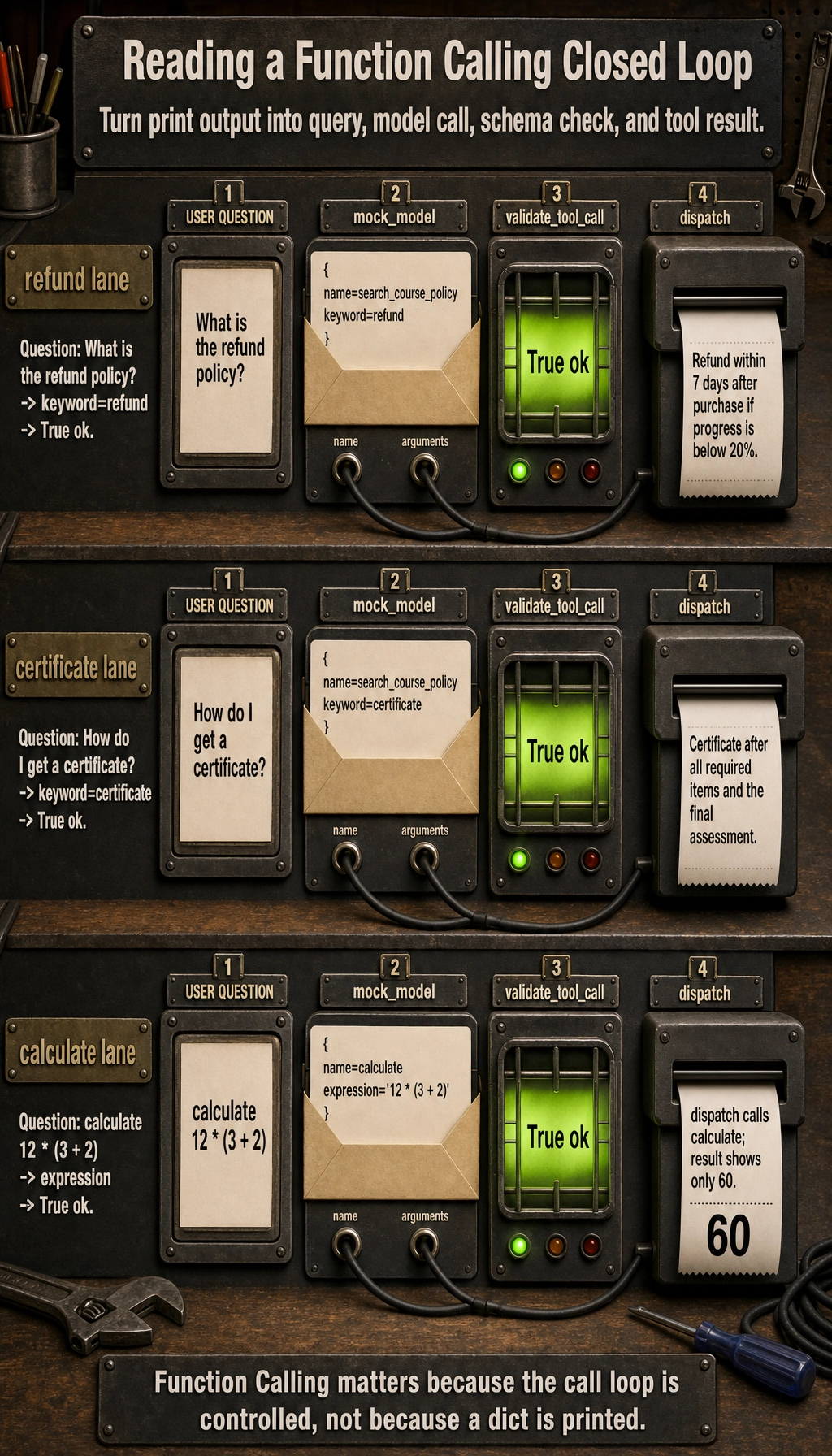
This example is already much closer to a real system than simply printing tool_call.
Where is the real challenge in multi-step calls?
Section titled “Where is the real challenge in multi-step calls?”The challenge is not calling once more, but managing state
Section titled “The challenge is not calling once more, but managing state”For example, a user asks:
“First check the refund policy, then check the certificate policy.”
At this point, the system may need to:
- Call
search_course_policy - Then call
search_course_policyagain with another keyword - Finally merge the answer
The problem is:
- How do you store intermediate results?
- When should the next step stop?
- How do you handle errors?
A minimal multi-step example
Section titled “A minimal multi-step example”def multi_step_agent(query): steps = []
if "refund" in query: call_1 = {"name": "search_course_policy", "arguments": {"keyword": "refund"}} steps.append(("tool_call", call_1)) result_1 = dispatch(call_1) steps.append(("tool_result", result_1))
if "certificate" in query: call_2 = {"name": "search_course_policy", "arguments": {"keyword": "certificate"}} steps.append(("tool_call", call_2)) result_2 = dispatch(call_2) steps.append(("tool_result", result_2))
return steps
for step in multi_step_agent("First check the refund policy, then check the certificate policy"): print(step)Expected output:
('tool_call', {'name': 'search_course_policy', 'arguments': {'keyword': 'refund'}})('tool_result', 'You can apply for a refund within 7 days after purchase and if your learning progress is below 20%.')('tool_call', {'name': 'search_course_policy', 'arguments': {'keyword': 'certificate'}})('tool_result', 'You can obtain a certificate after completing all required items and passing the final assessment.')This is why, once Function Calling goes deeper, it will eventually be combined with Agents.
Why are failure handling and recovery important?
Section titled “Why are failure handling and recovery important?”Tool failure is the norm, not the exception
Section titled “Tool failure is the norm, not the exception”In real systems, tool failures are very common:
- Wrong parameters
- API timeouts
- Network issues
- Empty data
A simple fallback for failures
Section titled “A simple fallback for failures”def safe_dispatch(call): try: valid, msg = validate_tool_call(call) if not valid: return {"error": msg} return {"result": dispatch(call)} except Exception as e: return {"error": str(e)}
print(safe_dispatch({"name": "calculate", "arguments": {"expression": "2 + 3"}}))print(safe_dispatch({"name": "calculate", "arguments": {"wrong": "2 + 3"}}))Expected output:
{'result': '5'}{'error': 'invalid_calculate_arguments'}A mature system usually does not crash just because one tool call fails.
What should you really pay attention to in the deeper end of Function Calling?
Section titled “What should you really pay attention to in the deeper end of Function Calling?”It is not about “can it call,” but “can it call reliably”
Section titled “It is not about “can it call,” but “can it call reliably””The truly important questions include:
- Is the schema clear enough?
- Is parameter validation strict enough?
- Are tool permissions layered properly?
- How do multi-step calls converge?
- Can errors be replayed and diagnosed?
The tool layer is the reliability foundation of Agent engineering
Section titled “The tool layer is the reliability foundation of Agent engineering”If the tool layer is unstable, everything above it will wobble:
- Reasoning chains
- Multi-step execution
- Memory systems
- Multi-Agent collaboration
So although Function Calling looks like “structured output,” in essence it is a key piece of infrastructure in Agent engineering.
Common mistakes beginners make
Section titled “Common mistakes beginners make”Treating schema like copywriting
Section titled “Treating schema like copywriting”A schema is not decorative documentation; it is the call boundary itself.
Executing directly without validation
Section titled “Executing directly without validation”This is very dangerous.
Having no logs in the tool layer
Section titled “Having no logs in the tool layer”Once something is called incorrectly, a parameter is wrong, or execution blows up, you will not know where the problem came from.
Tool design review checklist
Section titled “Tool design review checklist”When designing tools for real, you can first review the schema with the table below. It helps reduce problems such as “the model chose the wrong tool, the parameters were wrong, or the program executed something dangerous.”
| Check item | What good looks like | Common problems |
|---|---|---|
| Tool name | Clear verb + object, such as search_course_policy | Names like search or process are too vague |
| Description | Clearly states when to use it and when not to | Only says “query information” |
| Parameters | Every field has semantics, type, and constraints | q, data, input are too vague |
| Required fields | required is explicit | The model omits critical parameters |
| Return value | The program can distinguish success, failure, and empty results | Only returns a string, making status hard to judge |
| Permissions | Distinguish read-only, write, and high-risk tools | All tool permissions are mixed together |
The clearer the tool schema, the more likely the model is to make the right choice; the stricter the program validation, the less likely the system is to be dragged down by bad parameters.
Tool return values also need design
Section titled “Tool return values also need design”Many people only design input parameters and ignore return values. But what the Agent does next depends heavily on whether it can understand the tool result.
A more robust return structure can look like this:
def tool_result(ok, data=None, error=None, retryable=False):    return {        "ok": ok,        "data": data,        "error": error,        "retryable": retryable,    }
print(tool_result(True, data={"text": "You can apply for a refund within 7 days after purchase"}))print(tool_result(False, error="timeout", retryable=True))
Expected output:
{'ok': True, 'data': {'text': 'You can apply for a refund within 7 days after purchase'}, 'error': None, 'retryable': False}{'ok': False, 'data': None, 'error': 'timeout', 'retryable': True}This structure is more suitable for Agents than simply returning a string, because the system can decide whether to continue, retry, switch tools, or stop and explain to the user based on ok, error, and retryable.
Safety boundaries for multi-step tool calls
Section titled “Safety boundaries for multi-step tool calls”The easiest problem to run into with multi-step calls is not “failing to continue,” but “not being able to stop” or “doing something it should not do.” So at minimum, you need these boundaries:
| Boundary | Purpose |
|---|---|
| Max steps | Prevent infinite loops |
| Tool allowlist | Prevent unauthorized capabilities from being called |
| Parameter validation | Prevent bad or dangerous parameters from reaching the execution layer |
| Human confirmation | High-risk write operations must be confirmed first |
| Error classification | Distinguish retryable from non-retryable errors |
| Trace logging | Enable replay of every step after an error |
You can remember it with one sentence:
The model may suggest actions, but the program must control the boundaries.
This is also the key dividing line between Function Calling demos and real Agent engineering.
Evidence to Keep
Section titled “Evidence to Keep”Keep this page’s proof of learning as a small evidence card:
- Tool Contract
- name, description, input schema, output schema
- Permission
- what the tool is allowed to read or change
- Call Trace
- arguments, result, error, retry or fallback
- Failure Check
- wrong tool, bad arguments, unsafe action, or missing observation
- Safety Action
- validate, confirm, sandbox, rate-limit, or rollback
Summary
Section titled “Summary”The most important thing in this section is not learning to write {"name": ..., "arguments": ...}, but understanding that:
The real value of Function Calling lies in safely connecting the model’s decision-making ability to the execution ability of an engineering system.
Once you start paying attention to schema design, parameter validation, failure recovery, and multi-step state, you are truly entering tool-layer engineering.
Exercises
Section titled “Exercises”- Add another tool
get_weather(city)to the tool system in this section, and include the corresponding schema and validation. - Deliberately construct a tool call with incorrect parameters and see whether the validator can block it.
- Extend
multi_step_agent()so that it executes at most 3 steps to avoid infinite loops. - Think about this: why is Function Calling more critical in an Agent system than in a normal chatbot?
Reference implementation and walkthrough
- Define
get_weather(city)with a required stringcity, a predictable return shape such as{ok, data, error}, and validation before execution. - The validator should block missing
city, non-string values, unknown parameters, and malformed JSON before the tool runner sees the call. - A 3-step limit should stop the loop with a clear trace such as
stopped: max_steps_reached, not silently continue. - Function Calling matters more in Agents because tool calls can change external state, spend money, leak data, or start loops. Schema and validation are the safety boundary between text and action.