
E.B.1 Advanced Decorator Usage
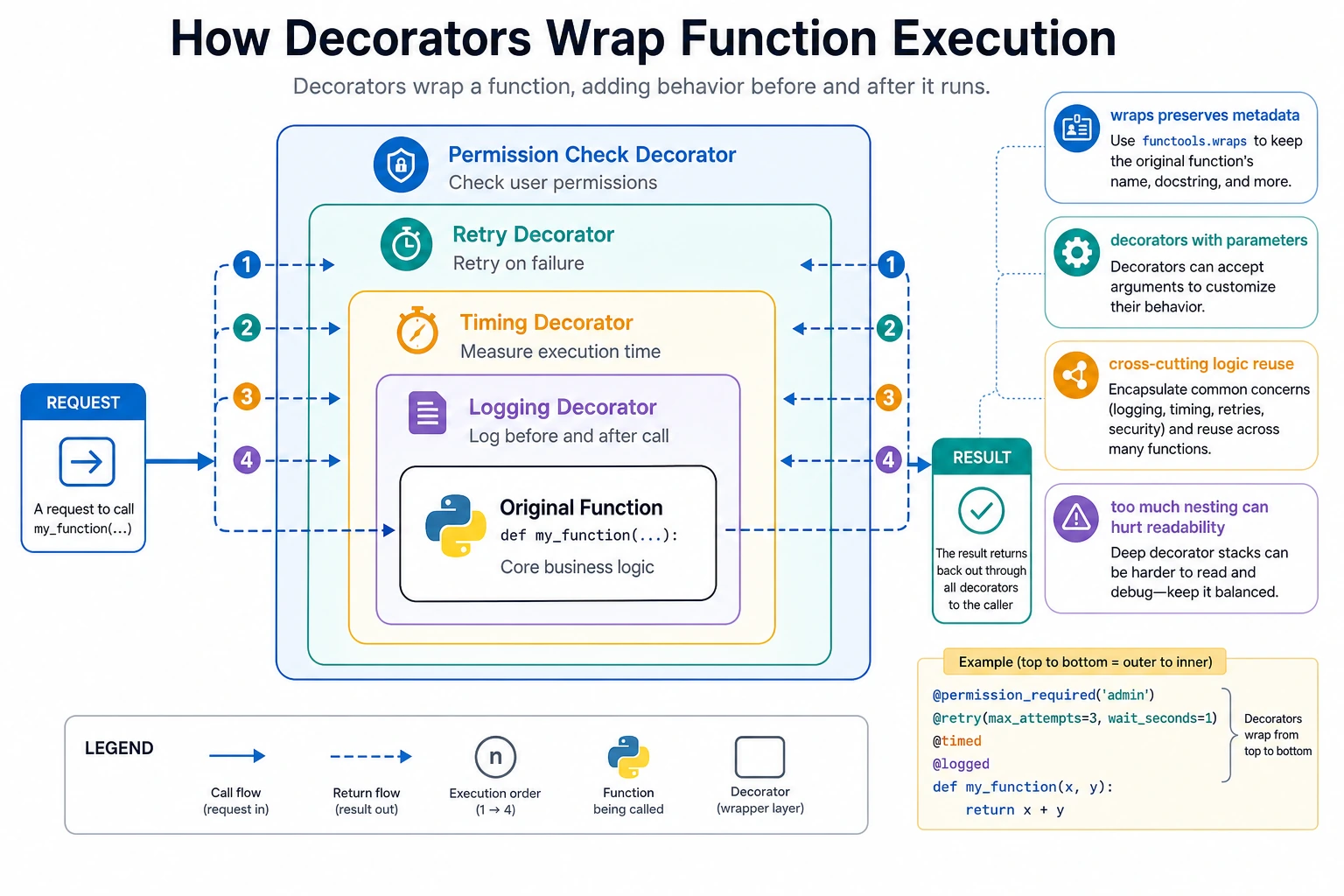
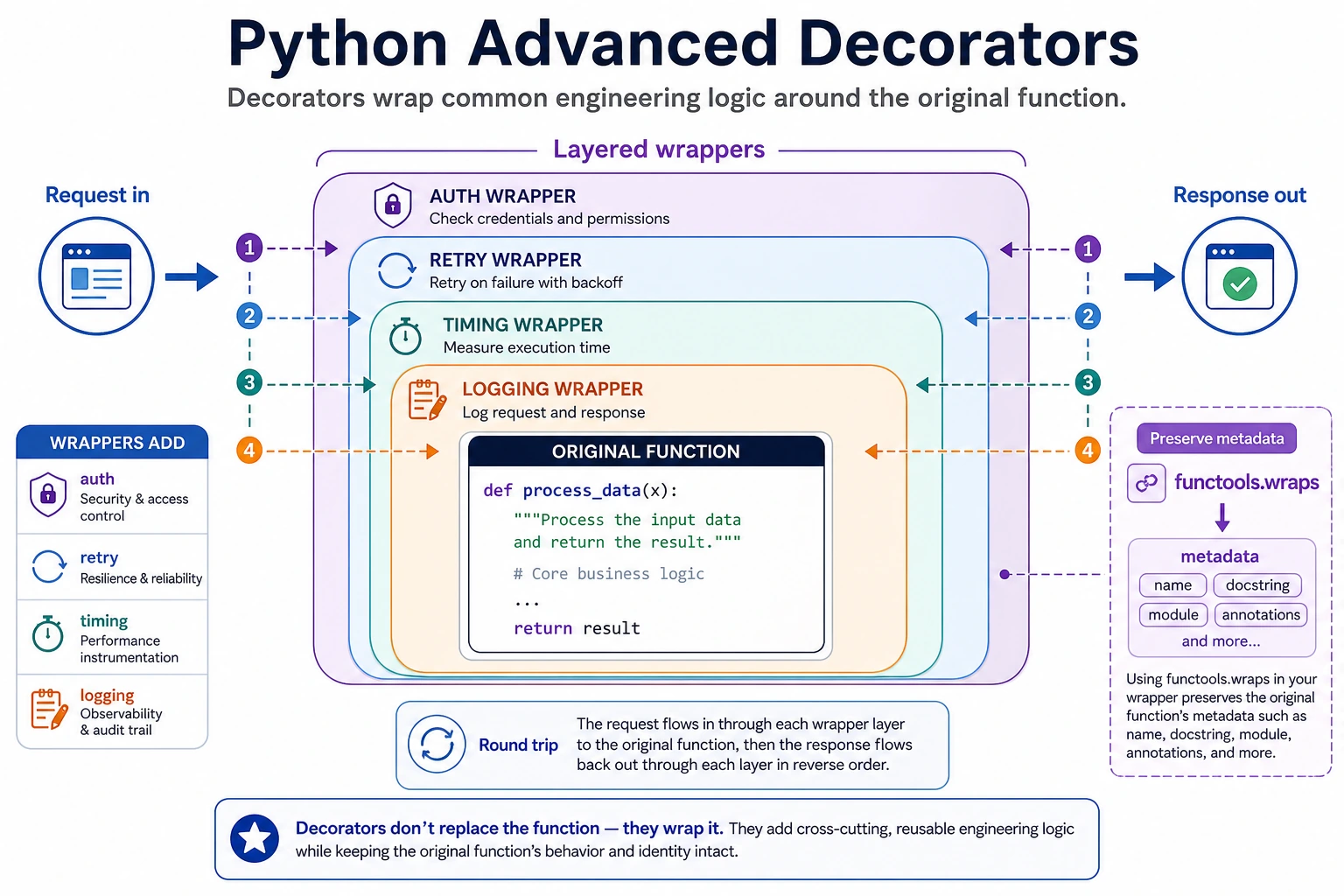
A decorator wraps a function with reusable outer behavior. Use it when many functions need the same logic, such as logging, timing, retry, permission checks, or tracing.
What You Need
Section titled “What You Need”- Python 3.10+
- No external packages
- Basic understanding of functions
Key Terms
Section titled “Key Terms”- Wrapper: the inner function that runs before and after the original function.
- Cross-cutting logic: logic needed in many places but not part of the business task itself.
functools.wraps: keeps the original function name and metadata after decoration.- Decorator order: the top decorator runs first when the function is called.
Run A Logging And Retry Decorator
Section titled “Run A Logging And Retry Decorator”Create decorator_demo.py:
from functools import wraps

def log_call(fn):    @wraps(fn)    def wrapper(*args, **kwargs):        print(f"[LOG] start {fn.__name__}")        result = fn(*args, **kwargs)        print(f"[LOG] end {fn.__name__}")        return result
    return wrapper

def retry(max_retries=2):    def decorator(fn):        @wraps(fn)        def wrapper(*args, **kwargs):            last_error = None            for attempt in range(1, max_retries + 2):                try:                    return fn(*args, **kwargs)                except RuntimeError as error:                    last_error = error                    print(f"[RETRY] attempt={attempt} error={error}")            raise last_error
        return wrapper
    return decorator

state = {"attempt": 0}

@log_call@retry(max_retries=2)def fetch_model_info(model_id):    state["attempt"] += 1    if state["attempt"] < 2:        raise RuntimeError("temporary network error")    return {"model_id": model_id, "status": "ready"}

print(fetch_model_info("demo-v1"))print(fetch_model_info.__name__)
Run it:
python decorator_demo.pyExpected output:
[LOG] start fetch_model_info[RETRY] attempt=1 error=temporary network error[LOG] end fetch_model_info{'model_id': 'demo-v1', 'status': 'ready'}fetch_model_infoThis shows three useful details: the business function stays short, retry behavior is centralized, and wraps preserves the function name.
Debugging Review
Section titled “Debugging Review”When a decorated function behaves strangely, do not start by rewriting the business function. First inspect the wrapper order, the exception types being caught, and whether @wraps preserved the function name. Many framework bugs look mysterious because decorators have changed metadata or swallowed the real error.
In AI systems, decorators are most useful around unstable boundaries: API calls, tool calls, permission checks, and metrics. Keep the decorator small enough that a teammate can predict exactly what runs before and after the original function.
Change The Order
Section titled “Change The Order”Swap the decorators:
@retry(max_retries=2)@log_calldef fetch_model_info(model_id):Now logging runs inside each retry attempt. This is why decorator order matters in service code.
When To Use Decorators
Section titled “When To Use Decorators”Use decorators for:
- Logging and tracing
- Timing
- Retry around unstable I/O
- Permission checks
- Framework registration
Avoid decorators when the wrapper hides important business logic or when one function already has too many layers.
Debugging Review
Section titled “Debugging Review”Before using a decorator in production, check whether the wrapped function still behaves like itself. The input should be unchanged, the return value should be unchanged, and the extra behavior should be visible in logs, timing output, or metrics.
A useful decorator leaves evidence without hiding control flow. If debugging becomes harder, prefer a plain helper function. The goal is not clever syntax; the goal is a repeatable way to add tracing, validation, retry, or timing around many similar functions.
Evidence to Keep
Section titled “Evidence to Keep”Keep this page’s proof of learning as a small evidence card:
- Python Pattern
- decorator, iterator, generator, concurrency primitive, or metaprogramming hook
- Code Artifact
- minimal runnable example plus printed output
- Use Case
- where this pattern improves an AI app, pipeline, tool, or server
- Failure Check
- hidden side effects, unreadable abstraction, race condition, or overengineering
- Expected Output
- small advanced-Python example with a practical AI-system use note
Common Mistakes
Section titled “Common Mistakes”- Forgetting
@wraps, then logs and frameworks see every function aswrapper. - Retrying every exception, including validation or permission errors that should fail immediately.
- Stacking many decorators until the execution order is hard to debug.
Practice
Section titled “Practice”Add a require_role("admin") decorator before fetch_model_info. Make it raise PermissionError for non-admin users, and do not retry permission errors.
Reference implementation and walkthrough
A good implementation checks authorization before the retry wrapper handles transient failures. One clean route is to place require_role("admin") outside the retrying call path, or update retry so it immediately re-raises PermissionError.
The expected behavior is:
- Admin users call the function normally.
- Non-admin users get
PermissionError. - The retry log does not repeat permission failures, because permission is not a temporary network error.