
8.1.3 Document Processing and Vectorization
Learning Objectives
Section titled “Learning Objectives”By the end of this section, you will be able to:
- Understand why RAG performance depends heavily on preprocessing
- Build intuition for document cleaning, chunking, overlap, and metadata
- Write a simple runnable example of chunking and retrieval
- Understand what “vectorization” is actually doing
Why not just “drop the document into RAG”?
Section titled “Why not just “drop the document into RAG”?”Because real documents are often long, messy, and mixed together.
For example, a PDF may contain:
- Headers and footers
- Table of contents
- Blank lines
- Heading hierarchy
- Tables
- Repeated text
If you feed it to the model as-is, common problems include:
- The context is too long and does not fit
- Important points get buried in long text and are hard to retrieve
- Too much noise hurts retrieval quality
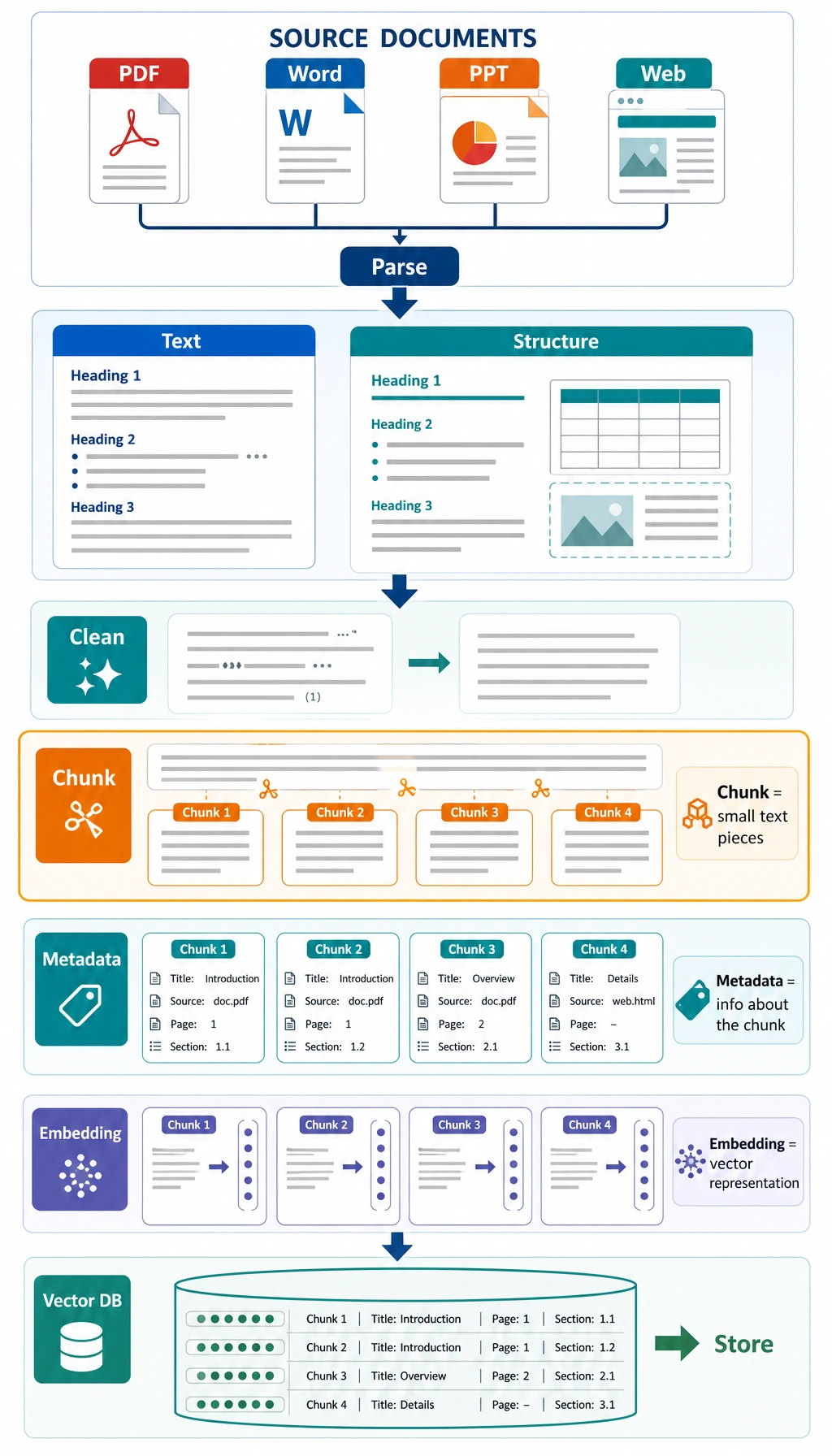
So document processing is really doing one thing:
Organizing materials into knowledge chunks that the model can find more easily and use more effectively.
The 4 common steps in document processing
Section titled “The 4 common steps in document processing”Cleaning
Section titled “Cleaning”Remove irrelevant noise, such as:
- Extra spaces
- Page numbers
- Repeated headings
Chunking
Section titled “Chunking”Split long text into small pieces suitable for retrieval.
Adding metadata
Section titled “Adding metadata”Attach information to each chunk, such as:
- Source file
- Title
- Page number
- Tags
Vectorization
Section titled “Vectorization”Turn text chunks into vectors that can be used for similarity retrieval.
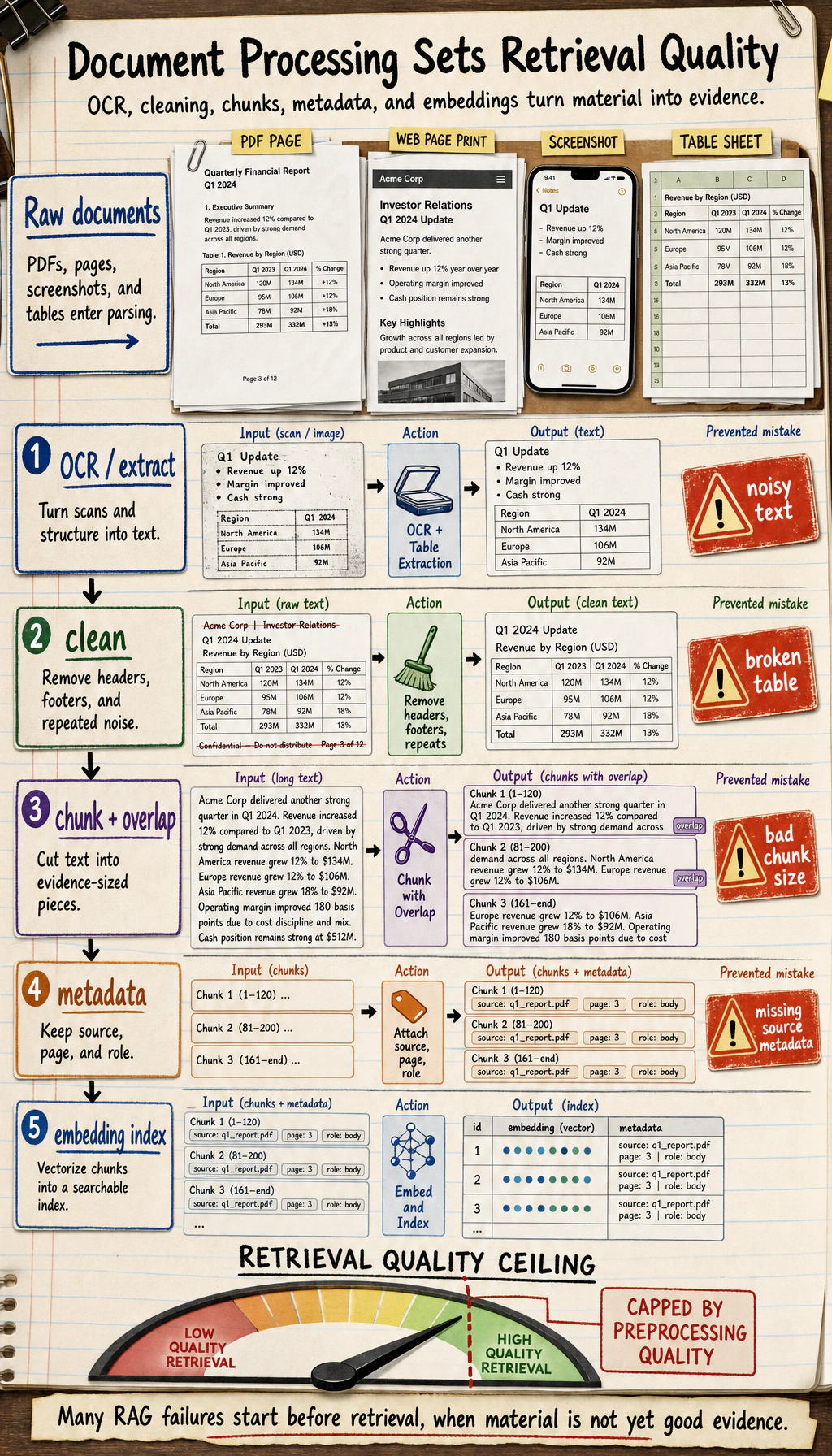
OCR, short for Optical Character Recognition, is the step that turns scanned pages or screenshots into text before cleaning and chunking.
Why is chunking so important?
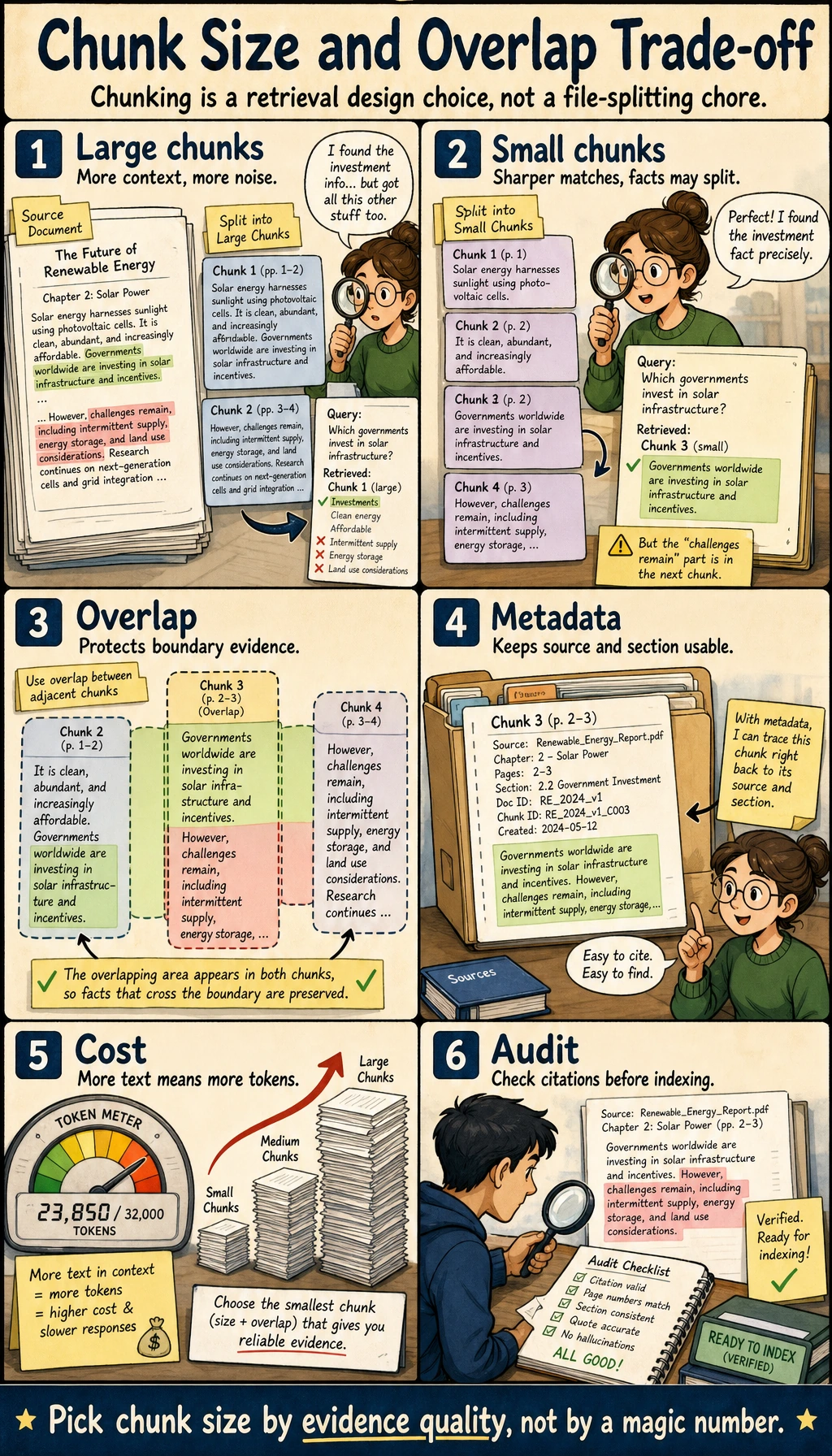
Section titled “Why is chunking so important?”Chunk size is a lot like deciding how much content to write on one flashcard when taking notes.
- Too large: too much content in one piece, retrieval becomes less precise
- Too small: not enough context, answers become fragmented
There is no single best setting, but you should always tune it for the task.
Think of it like this:
When making notes for an open-book exam, you would not paste the whole book into one giant poster, and you would not cut every single word into its own slip of paper.
A minimal runnable chunking example
Section titled “A minimal runnable chunking example”import re
text = """Refund policy:If your learning progress is below 20% within 7 days after purchase, you can apply for a refund.After 7 days, unconditional refunds are no longer supported.
Certificate description:After completing all required items and passing the final test, you can receive a completion certificate.
Learning order:It is recommended to study Python, data analysis, and machine learning first, and then move on to deep learning and large models.""".strip()
def split_into_sentences(text): parts = re.split(r"[。!?.!?\\n]+", text) return [p.strip() for p in parts if p.strip()]
sentences = split_into_sentences(text)print("Sentence list:")for s in sentences: print("-", s)Expected output:
Sentence list:- Refund policy:- If your learning progress is below 20% within 7 days after purchase, you can apply for a refund- After 7 days, unconditional refunds are no longer supported- Certificate description:- After completing all required items and passing the final test, you can receive a completion certificate- Learning order:- It is recommended to study Python, data analysis, and machine learning first, and then move on to deep learning and large modelsIf the sentences are already fairly short, you can use each sentence directly as a chunk. But more often, we combine several sentences into one chunk.
Chunking with overlap
Section titled “Chunking with overlap”Why do many RAG systems use chunk overlap?
Because information may land right on a chunk boundary. Adding a little overlap reduces the chance that context gets cut off.
def chunk_sentences(sentences, chunk_size=2, overlap=1):    if chunk_size - overlap <= 0:        raise ValueError("chunk_size must be greater than overlap")
    chunks = []    start = 0    while start < len(sentences):        end = start + chunk_size        chunk = " ".join(sentences[start:end])        chunks.append(chunk)        start += chunk_size - overlap    return chunks
chunks = chunk_sentences(sentences, chunk_size=2, overlap=1)
print("Chunking result:")for i, chunk in enumerate(chunks):    print(f"[chunk {i}] {chunk}")
Expected output:
Chunking result:[chunk 0] Refund policy: If your learning progress is below 20% within 7 days after purchase, you can apply for a refund[chunk 1] If your learning progress is below 20% within 7 days after purchase, you can apply for a refund After 7 days, unconditional refunds are no longer supported[chunk 2] After 7 days, unconditional refunds are no longer supported Certificate description:[chunk 3] Certificate description: After completing all required items and passing the final test, you can receive a completion certificate[chunk 4] After completing all required items and passing the final test, you can receive a completion certificate Learning order:[chunk 5] Learning order: It is recommended to study Python, data analysis, and machine learning first, and then move on to deep learning and large models[chunk 6] It is recommended to study Python, data analysis, and machine learning first, and then move on to deep learning and large models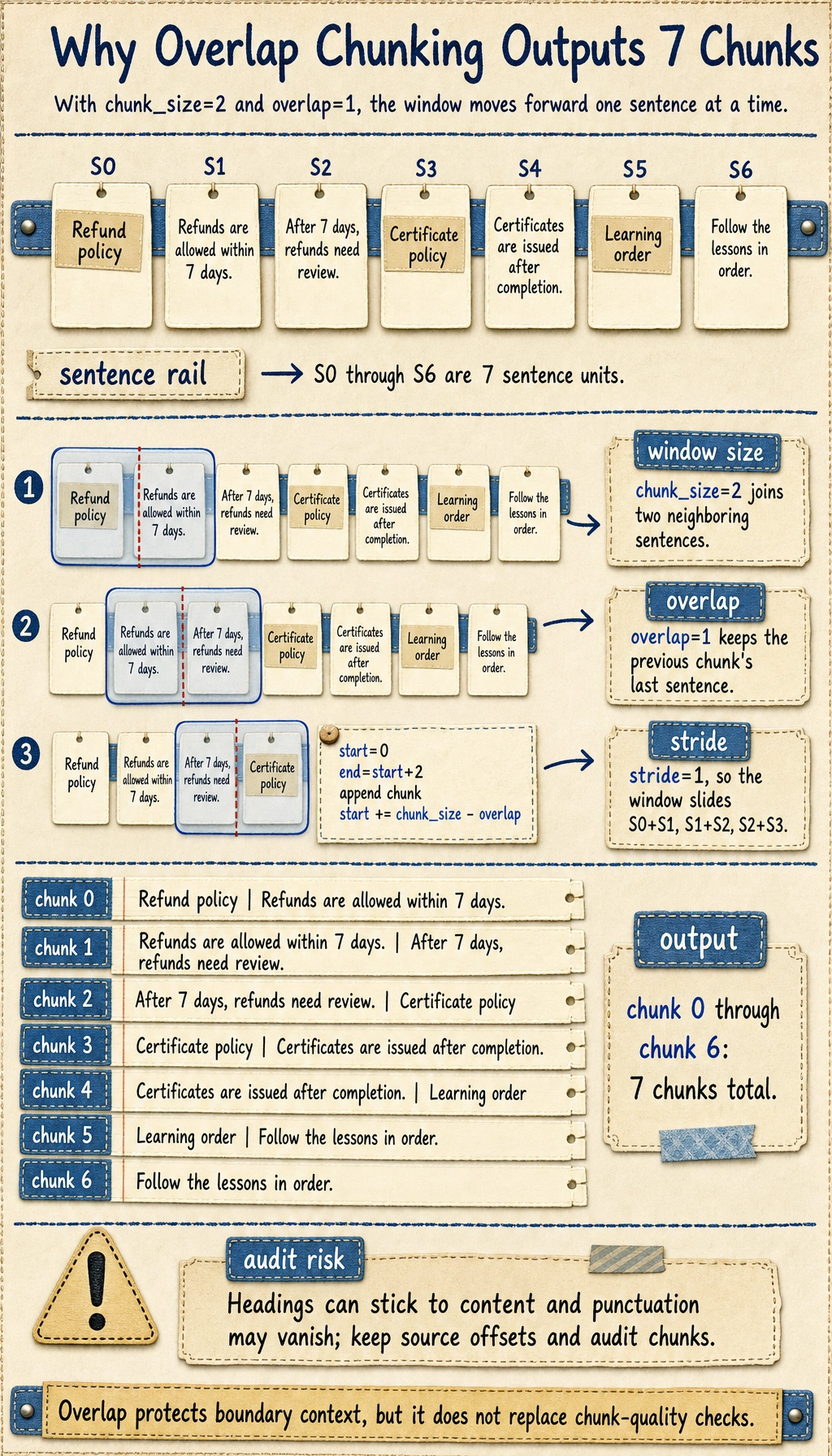
This output also shows a real limitation of naive chunking: headings can stick to nearby content, and punctuation may be stripped. In production, keep source offsets and run a small chunk audit before indexing.
Why is metadata important?
Section titled “Why is metadata important?”Many beginners focus only on the text content and ignore metadata. But metadata often directly affects retrieval and display quality.
Common metadata for a chunk includes:
source: which file it came fromsection: which section it belongs topage: which page it came fromtags: what topic it belongs to
For example:
chunks_with_meta = [    {        "text": "If your learning progress is below 20% within 7 days after purchase, you can apply for a refund",        "source": "course_policy.pdf",        "section": "Refund Policy",        "page": 3    },    {        "text": "After completing all required items and passing the final test, you can receive a completion certificate",        "source": "course_policy.pdf",        "section": "Certificate Description",        "page": 5    }]
for item in chunks_with_meta:    print(item)
The value of metadata is that it:
- Makes filtering easier
- Makes source citation easier
- Makes later UI display easier
If your goal is a “knowledge-base-driven SOP document assistant,” you need to think one step further about chunking
Section titled “If your goal is a “knowledge-base-driven SOP document assistant,” you need to think one step further about chunking”This kind of project is very different from a normal FAQ Q&A system:
- You do not just want to “find relevant passages”
- You also want to reorganize the materials into “policies / handled cases / checklists”
So when you first design the chunks, do not think only about length. Also think about “content type.”
A more stable default approach is usually:
| Content type | Better chunking strategy |
|---|---|
| Policy rule | Keep the condition, action, and exception together |
| Handled case | Keep the incident, decision, evidence, and outcome in the same chunk |
| Checklist item | Keep one operational check per chunk, so it is easy to place later |
| Procedure summary | Keep the heading and key steps |
This table is important because it helps beginners realize:
Chunking is not just a fixed text operation; it actually serves the downstream generation goal.
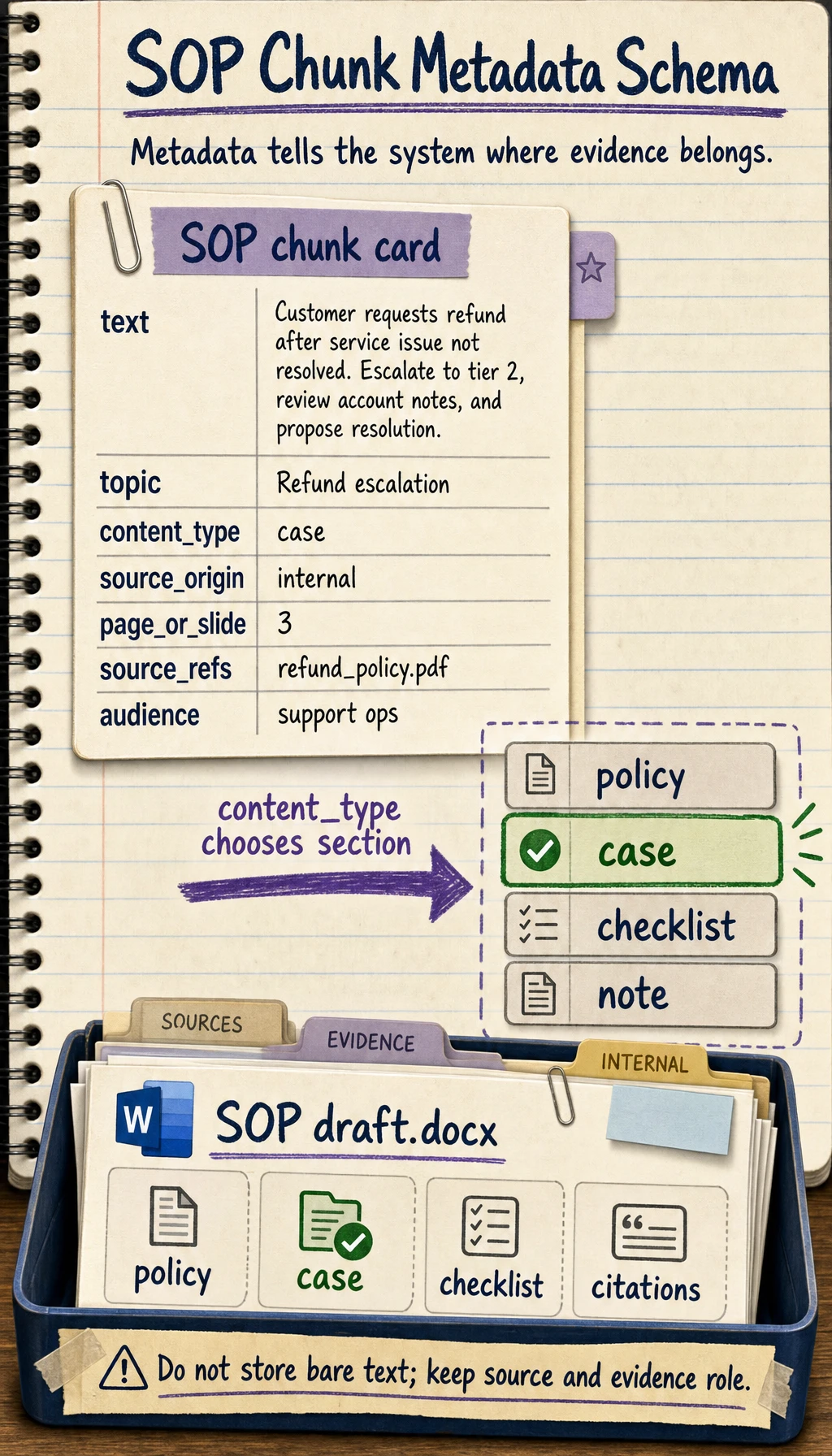
A knowledge chunk example that looks more like an SOP document project
Section titled “A knowledge chunk example that looks more like an SOP document project”sop_chunks = [ { "topic": "Refund escalation", "content_type": "policy", "section": "Policy rules", "page": 1, "text": "Duplicate billing refunds must be escalated with transaction evidence.", }, { "topic": "Refund escalation", "content_type": "case", "section": "Handled cases", "page": 2, "text": "A customer was charged twice after a failed checkout. Support verified both charges and escalated to billing.", }, { "topic": "Refund escalation", "content_type": "checklist", "section": "Review checklist", "page": 3, "text": "Confirm transaction id, payment provider status, refund window, and escalation owner.", },]
for item in sop_chunks: print(item["content_type"], "->", item["text"])The most important thing beginners should notice here is:
- Under the same topic, knowledge chunks should still be split into policies, handled cases, and checklists
- Then, when generating a Word SOP later, the system will know what belongs in which section
What is vectorization actually doing?
Section titled “What is vectorization actually doing?”The core idea of vectorization is to map text chunks into a “semantic space.”
That way, both queries and document chunks can become vectors, and then we can compare similarity.
To keep the code runnable, let’s first use a very simple bag-of-words vector to simulate the process.
import mathimport refrom collections import Counter
chunks = [    "If your learning progress is below 20% within 7 days after purchase, you can apply for a refund",    "After completing all required items and passing the final test, you can receive a completion certificate",    "It is recommended to study Python, data analysis, and machine learning first, and then move on to deep learning and large models"]
def tokenize(text):    words = re.findall(r"[a-zA-Z0-9_]+", text.lower())    cjk_chars = re.findall(r"[\u4e00-\u9fff\u3040-\u30ff]", text)    cjk_bigrams = ["".join(cjk_chars[i:i + 2]) for i in range(len(cjk_chars) - 1)]    return words + cjk_bigrams
vocab = sorted(set(token for chunk in chunks for token in tokenize(chunk)))vocab_index = {word: idx for idx, word in enumerate(vocab)}
def vectorize(text):    vec = [0] * len(vocab)    counts = Counter(tokenize(text))    for word, count in counts.items():        if word in vocab_index:            vec[vocab_index[word]] = count    return vec
def cosine_similarity(a, b):    dot = sum(x * y for x, y in zip(a, b))    norm_a = math.sqrt(sum(x * x for x in a))    norm_b = math.sqrt(sum(y * y for y in b))    if norm_a == 0 or norm_b == 0:        return 0.0    return dot / (norm_a * norm_b)
query = "How do I apply for a refund?"query_vec = vectorize(query)
scores = []for chunk in chunks:    score = cosine_similarity(query_vec, vectorize(chunk))    scores.append((score, chunk))
scores.sort(reverse=True)for score, chunk in scores:    print(round(score, 4), "->", chunk)
Expected output:
0.4714 -> If your learning progress is below 20% within 7 days after purchase, you can apply for a refund0.125 -> After completing all required items and passing the final test, you can receive a completion certificate0.0 -> It is recommended to study Python, data analysis, and machine learning first, and then move on to deep learning and large modelsThis is the most basic version of retrieval.
Real projects are usually more complex
Section titled “Real projects are usually more complex”In real RAG systems, vectorization usually uses a dedicated embedding model instead of simple word frequencies.
But the idea is the same:
- Convert the query into a vector
- Convert document chunks into vectors
- Find the most similar chunks in vector space
So do not be intimidated by the term “vector database.” At its core, it is still doing similarity retrieval, just at a larger scale and with higher efficiency.
The most common problem areas in document processing
Section titled “The most common problem areas in document processing”Chunk too large
Section titled “Chunk too large”Retrieval becomes less precise and wastes context.
Chunk too small
Section titled “Chunk too small”The information is incomplete, and the model only sees fragmented pieces.
Over-cleaning
Section titled “Over-cleaning”You also remove valuable information such as headings, hierarchy, and table structure.
No metadata
Section titled “No metadata”Later it becomes hard to explain “where the answer came from.”
Chunking only by length, not by task
Section titled “Chunking only by length, not by task”For SOP document generation projects, this can cause:
- Cases and decision evidence to be split apart
- Policies and checklists to be mixed together
- Later assembly into a fixed document format to become unstable
Document processing checklist
Section titled “Document processing checklist”After finishing document processing, do not just look at “how many chunks were generated.” Check whether these chunks can really support downstream Q&A.
| Check item | What good looks like | Common problem |
|---|---|---|
| Text cleaning | Removes headers, footers, repeated whitespace, and meaningless noise | Over-cleaning removes headings and table structure |
| Chunk completeness | One chunk can express a complete fact or a complete step | Key conditions are split into neighboring chunks |
| Chunk granularity | Can be retrieved accurately without being too fragmented | Too large is imprecise, too small is incomplete |
| Metadata | Keeps source, section, page, topic, content_type | Answers cannot cite sources or filter by topic |
| Sample audit | Randomly inspect 10 chunks by hand | Only count quantity, not quality |
The most practical approach is to first make a “chunk audit sheet.” Every time you adjust the chunking rules, randomly sample a few chunks and judge whether they are suitable for retrieval, citation, and display.
A chunk quality audit script
Section titled “A chunk quality audit script”The script below does not depend on external libraries. It is only meant to help you build the habit of checking. In a real project, you can write the audit results to CSV or Markdown.
chunks_with_meta = [    {        "id": "policy_001_01",        "text": "If your learning progress is below 20% within 7 days after purchase, you can apply for a refund",        "source": "course_policy.pdf",        "section": "Refund Policy",        "page": 3,        "content_type": "policy",    },    {        "id": "policy_001_02",        "text": "After completing all required items and passing the final test, you can receive a completion certificate",        "source": "course_policy.pdf",        "section": "Certificate Description",        "page": 5,        "content_type": "rule",    },]
required_fields = {"id", "text", "source", "section", "page", "content_type"}
for chunk in chunks_with_meta:    missing = required_fields - set(chunk)    too_short = len(chunk["text"]) < 10    too_long = len(chunk["text"]) > 300    print({        "id": chunk.get("id"),        "missing_fields": sorted(missing),        "too_short": too_short,        "too_long": too_long,        "preview": chunk["text"][:40],    })
Expected output:
{'id': 'policy_001_01', 'missing_fields': [], 'too_short': False, 'too_long': False, 'preview': 'If your learning progress is below 20% w'}{'id': 'policy_001_02', 'missing_fields': [], 'too_short': False, 'too_long': False, 'preview': 'After completing all required items and '}This script will not judge semantic quality for you, but it can quickly reveal basic issues: missing fields, chunks that are too short, chunks that are too long, and untraceable sources.
Chunking strategy comparison log
Section titled “Chunking strategy comparison log”It is a good idea to record the results in a fixed format every time you try a chunking strategy.
- Sentence-based chunking: 1 sentence per chunk. It is simple and precise, but evidence is often incomplete. Keep it only for short FAQ pages.
- Sliding window: 2-4 sentences with 1 sentence of overlap. It is less likely to cut context apart, but creates more chunks. Use it as a baseline.
- Heading-based chunking: group content under H2/H3 headings. It preserves document structure, but long sections can become too large. Use it for tutorials and documents.
- Content-type-based chunking: separate policies, cases, and checklists. It works well for SOP generation, but requires parsing or labeling. Use it for structured projects.
If you do not know where to start, it is recommended to use “heading hierarchy + sliding window” as your baseline, and then adjust based on an evaluation set.
Evidence to Keep
Section titled “Evidence to Keep”Keep this page’s proof of learning as a small evidence card:
- Query
- one user question or test case
- Retrieved Chunks
- chunk ids, scores, and source titles
- Answer
- final response with citation or source note
- Failure Check
- missing evidence, wrong chunk, stale doc, or unsupported claim
- Next Action
- chunking, embedding, reranking, prompt, or eval change
Summary
Section titled “Summary”The most important takeaway from this lesson is:
RAG preprocessing is not a supporting role; it is a major source of the performance ceiling.
If retrieval is not done well, generation will almost never be stable either. So document cleaning, chunking, metadata, and vectorization are all steps that must be designed carefully.
Exercises
Section titled “Exercises”- Adjust
chunk_sizeandoverlap, and observe how the chunking results change. - Add a text item completely unrelated to refunds into
chunks, then look at the retrieval score ranking again. - Think about this: if a policy clause spans two paragraphs, how should you design the chunks so that important information is not cut apart?
- If your goal is SOP document generation, think about why policies, handled cases, and checklist items should not all use exactly the same chunking strategy.
Reference implementation and walkthrough
- Smaller chunks are easier to retrieve precisely but may lose context. Larger chunks preserve more context but can dilute the signal. Overlap helps keep boundary information from being lost.
- The unrelated text should rank low for refund questions. If it ranks high, the embedding or scoring method is not distinguishing intent well enough.
- Use semantic boundaries first, then overlap or parent-child chunks for clauses that span paragraphs. The goal is for each retrievable unit to contain enough information to support an answer.
- Policies need complete conditions and exceptions, cases need evidence and outcomes, and checklists need clear operational checks. Using one chunking rule for all of them can cut decision evidence apart or make policy retrieval too noisy.