
3.3.8 Data Merging
Learning Objectives
Section titled “Learning Objectives”- Master
merge(SQL-style joins) - Understand
join(index-based joins) - Master
concat(concatenation) - Understand how to choose between different merging strategies
First Build a Map
Section titled “First Build a Map”Data merging is easier to understand by asking whether there is a “common key”:
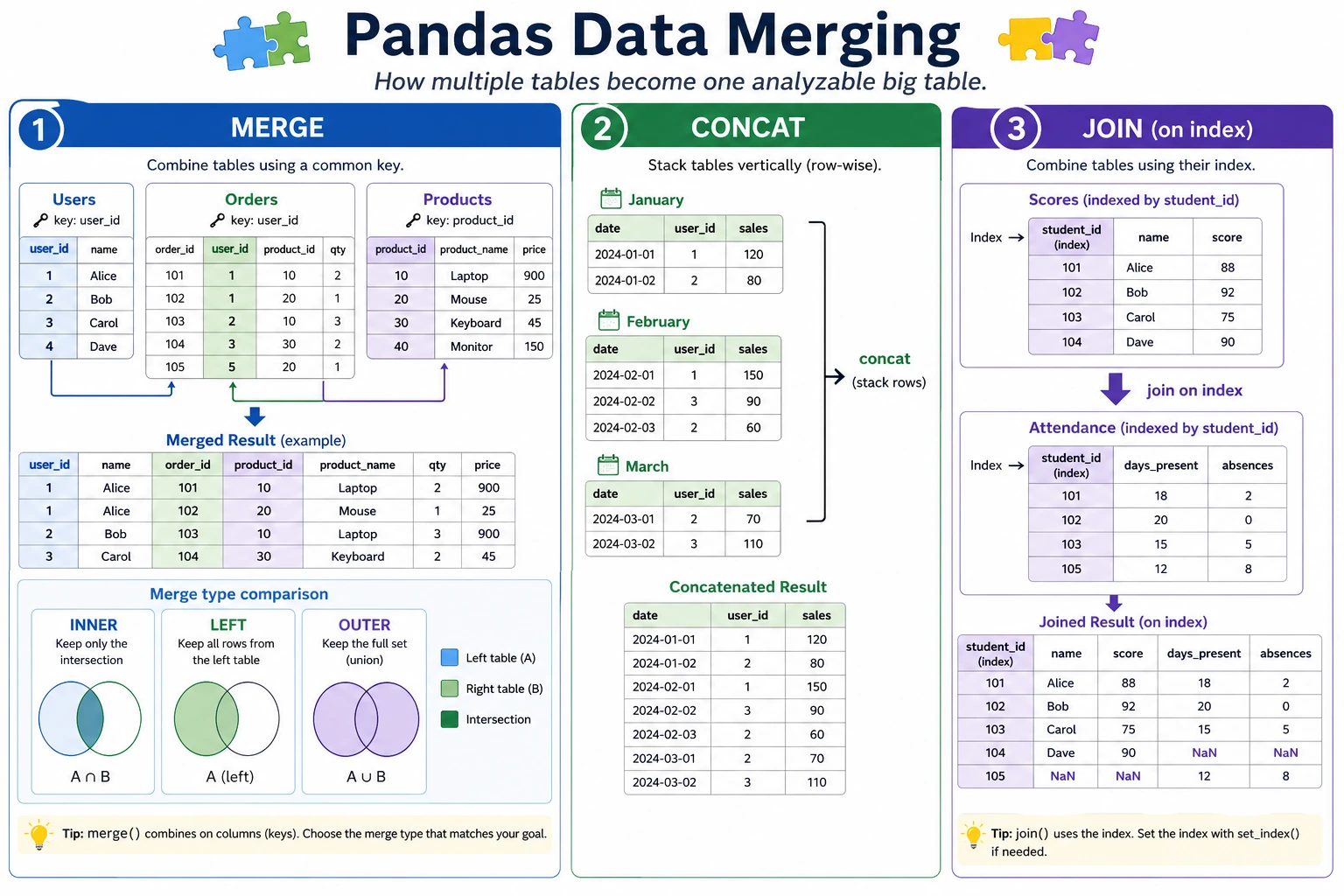
So what this section really wants to solve is:
- When should you think of
mergefirst? - When is it just a simple concatenation?
Why Do We Need Data Merging?
Section titled “Why Do We Need Data Merging?”Real-world data is often spread across multiple tables. For example, an e-commerce system may have:
- User table: user ID, name, registration time
- Order table: order ID, user ID, product, amount
- Product table: product ID, name, category, price
To analyze “what products each user bought,” you need to merge these tables together.
flowchart LR    A["User table"] --> D["Merged complete data"]    B["Order table"] --> D    C["Product table"] --> D
    style D fill:#4caf50,color:#fff
A Better Beginner-Friendly Analogy
Section titled “A Better Beginner-Friendly Analogy”You can think of data merging as:
- Matching clues from different tables to the same person or the same record
In other words:
mergeis more like aligning two records by ID numberconcatis more like stacking two tables together vertically or horizontally
This analogy is important because it helps you separate these two ideas first:
- “alignment”
- and “concatenation”
These are not the same thing.
merge: SQL-Style Join
Section titled “merge: SQL-Style Join”merge is the most powerful merging method, similar to SQL JOIN.
Prepare Sample Data
Section titled “Prepare Sample Data”import pandas as pd
# User tableusers = pd.DataFrame({ "User ID": [1, 2, 3, 4], "Name": ["John", "Mary", "Alice", "Bob"], "City": ["Beijing", "Shanghai", "Guangzhou", "Shenzhen"]})
# Order tableorders = pd.DataFrame({ "Order ID": [101, 102, 103, 104, 105], "User ID": [1, 2, 1, 3, 5], # Note: user 5 is not in the user table "Product": ["Phone", "Computer", "Headphones", "Tablet", "Keyboard"], "Amount": [5999, 8999, 299, 3999, 199]})Inner Join
Section titled “Inner Join”Keep only the rows that exist on both sides:
result = pd.merge(users, orders, on="User ID", how="inner")print(result)# User ID Name City Order ID Product Amount# 0 1 John Beijing 101 Phone 5999# 1 1 John Beijing 103 Headphones 299# 2 2 Mary Shanghai 102 Computer 8999# 3 3 Alice Guangzhou 104 Tablet 3999# User 4 (Bob) has no orders → does not appear# User 5 is not in the user table → does not appearLeft Join
Section titled “Left Join”Keep all rows from the left table:
result = pd.merge(users, orders, on="User ID", how="left")print(result)# User ID Name City Order ID Product Amount# 0 1 John Beijing 101.0 Phone 5999.0# 1 1 John Beijing 103.0 Headphones 299.0# 2 2 Mary Shanghai 102.0 Computer 8999.0# 3 3 Alice Guangzhou 104.0 Tablet 3999.0# 4 4 Bob Shenzhen NaN NaN NaN ← Bob has no orders, so NaN is usedRight Join
Section titled “Right Join”Keep all rows from the right table:
result = pd.merge(users, orders, on="User ID", how="right")print(result)# User 5 appears (name and city are NaN)Outer Join
Section titled “Outer Join”Keep all rows from both sides:
result = pd.merge(users, orders, on="User ID", how="outer")print(result)# All users and all orders appear, and missing values are filled with NaNComparison of the Four Join Types
Section titled “Comparison of the Four Join Types”| Join | Kept IDs | Meaning |
|---|---|---|
inner | {1,2,3} | rows that exist on both sides |
left | {1,2,3,4} | all left rows, plus right-side matches |
right | {1,2,3,5} | all right rows, plus left-side matches |
outer | {1,2,3,4,5} | keep everything |
A Beginner-Friendly Selection Table
Section titled “A Beginner-Friendly Selection Table”| Your goal | Safer first choice |
|---|---|
| Keep only records that match on both sides | inner merge |
| Use the left table as the base and bring in right-table info | left merge |
| Keep both sides and fill missing values with NaN | outer merge |
| Just stack several tables vertically | concat(axis=0) |
| Just place several columns side by side | concat(axis=1) |
This table is great for beginners because it reduces “many join types” back down to a few common business goals.
Merging with Different Column Names
Section titled “Merging with Different Column Names”# If the join key names are different in the two tablesdf1 = pd.DataFrame({"user_id": [1, 2], "name": ["A", "B"]})df2 = pd.DataFrame({"uid": [1, 2], "score": [90, 85]})
result = pd.merge(df1, df2, left_on="user_id", right_on="uid")print(result)Multi-Column Join
Section titled “Multi-Column Join”# Match on multiple columnsresult = pd.merge(df1, df2, on=["col1", "col2"])concat: Concatenation
Section titled “concat: Concatenation”concat is used to concatenate multiple DataFrames vertically or horizontally (no common key required):
What Should You Remember First When Learning concat?
Section titled “What Should You Remember First When Learning concat?”The most important thing to remember first is:
concatis not about “aligning keys,” but about “stitching tables together.”
So if what you are thinking about is:
- Whether user IDs match
then the method you should usually think of first is:
merge
Vertical Concatenation (Stacking Top to Bottom)
Section titled “Vertical Concatenation (Stacking Top to Bottom)”# Sales data for January and Februaryjan = pd.DataFrame({ "Product": ["Apple", "Milk"], "Sales": [100, 80], "Month": ["January", "January"]})
feb = pd.DataFrame({ "Product": ["Apple", "Bread"], "Sales": [120, 90], "Month": ["February", "February"]})
# Stack verticallyall_sales = pd.concat([jan, feb], ignore_index=True)print(all_sales)# Product Sales Month# 0 Apple 100 January# 1 Milk 80 January# 2 Apple 120 February# 3 Bread 90 FebruaryHorizontal Concatenation
Section titled “Horizontal Concatenation”info = pd.DataFrame({"Name": ["John", "Mary"], "Age": [22, 25]})scores = pd.DataFrame({"Math": [90, 85], "English": [88, 92]})
# Concatenate side by sidecombined = pd.concat([info, scores], axis=1)print(combined)# Name Age Math English# 0 John 22 90 88# 1 Mary 25 85 92merge vs concat vs join
Section titled “merge vs concat vs join”| Method | Use Case | Analogy |
|---|---|---|
merge | Join two tables by a common column | SQL JOIN |
concat | Simple vertical/horizontal stacking | Gluing together |
join | Join by index | A special kind of merge |
flowchart TD A["I want to merge data"] --> B{"Is there a common key column?"} B -->|"Yes"| C["Use merge"] B -->|"No, just simple stacking"| D{"Stack vertically or horizontally?"} D -->|"Vertically"| E["concat(axis=0)"] D -->|"Horizontally"| F["concat(axis=1)"]A Data-Merging Checklist Beginners Can Copy Directly
Section titled “A Data-Merging Checklist Beginners Can Copy Directly”When solving multi-table problems for the first time, the safest checklist is usually:
- Do I have a common key?
- Are the key types and value ranges consistent?
- Why did the number of rows change after merging?
- Is this more like “alignment” or more like “concatenation”?
As long as you think through these 4 questions first, many merge / concat problems will no longer feel like black magic.
Practice: Multi-Table Merge Analysis
Section titled “Practice: Multi-Table Merge Analysis”import pandas as pd
# Create three tables# Task tabletasks = pd.DataFrame({ "Task ID": [1, 2, 3, 4, 5], "Feature": ["Login API", "RAG demo", "Chart view", "Deploy script", "Eval report"], "Module": ["Backend", "AI", "Frontend", "Ops", "AI"]})
# Work-log table (some tasks may have multiple work records)work_logs = pd.DataFrame({ "Task ID": [1, 1, 2, 2, 3, 3, 4, 4, 5, 5], "Stage": ["Design", "Build", "Design", "Build", "Design", "Build", "Build", "Verify", "Design", "Verify"], "Hours": [2.0, 5.0, 3.0, 6.5, 1.5, 4.0, 3.5, 1.0, 2.5, 2.0]})
# Module owner tablemodules = pd.DataFrame({ "Module": ["Backend", "AI", "Frontend", "Ops"], "Owner": ["Mina", "Kai", "Riley", "Noah"], "Sprint Goal": ["Stable API", "Grounded answer", "Readable UI", "Repeatable release"]})
# Merge 1: tasks + work logstask_logs = pd.merge(tasks, work_logs, on="Task ID")print(task_logs.head())
# Merge 2: add module ownershipfull = pd.merge(task_logs, modules, on="Module")print(full.head())
# Analysis: average work hours by moduleprint(full.groupby(["Module", "Owner"])["Hours"].mean())
# Analysis: total work hours by tasktotal_hours = full.groupby(["Task ID", "Feature"])["Hours"].sum().reset_index()total_hours["Rank"] = total_hours["Hours"].rank(ascending=False, method="dense")print(total_hours.sort_values("Rank"))Evidence to Keep
Section titled “Evidence to Keep”Keep this page’s proof of learning as a small evidence card:
- Dataframe State
- columns, dtypes, row count, missing values, and sample rows
- Operation
- read/write, select/filter, clean, transform, groupby, merge, or time-series step
- Output
- resulting table, saved file, aggregation, join result, or time index view
- Failure Check
- dtype mismatch, missing data, duplicated keys, chained assignment, or wrong time frequency
- Expected Output
- before/after table sample with the transformation reason
Summary
Section titled “Summary”| Operation | Function | Key Parameters |
|---|---|---|
| SQL-style join | pd.merge() | on, how (inner/left/right/outer) |
| Vertical concatenation | pd.concat(axis=0) | ignore_index=True |
| Horizontal concatenation | pd.concat(axis=1) | |
| Index-based join | df.join() | how |
What You Should Take Away from This Section
Section titled “What You Should Take Away from This Section”mergealigns by a common key, whileconcatstitches tables together- First ask “Is there a common key?” — that usually tells you which method to use first
- In multi-table analysis, many problems are not caused by later statistics, but by failing to align the data correctly at the start
Hands-On Practice
Section titled “Hands-On Practice”Exercise 1: Basic merge
Section titled “Exercise 1: Basic merge”# There are two tables: an employee table and a department table# 1. Merge them with an inner join# 2. Use a left join to find employees without a department# 3. Use an outer join to find departments without employeesExercise 2: Multi-Table Merge Analysis
Section titled “Exercise 2: Multi-Table Merge Analysis”# Create: product table, order table, customer table# 1. Merge the three tables into one complete table# 2. Analyze which product categories each customer bought# 3. Find the top 3 customers with the highest purchase amountExercise 3: concat Concatenation
Section titled “Exercise 3: concat Concatenation”# There are sales data for 4 quarters (4 separate DataFrames)# 1. Stack them vertically into full-year data# 2. Add a "quarter" column to indicate the data source# 3. Analyze the sales trend across the four quartersReference implementation and walkthrough
- Use
innerjoin when you only want matched keys,leftjoin when the left table is the source of truth, andouterjoin when you need to inspect mismatches from both sides. - Before merging, check duplicate keys and decide the relationship: one-to-one, one-to-many, or many-to-many. Use
validate=when possible so Pandas catches unexpected duplication. - After every merge, compare row counts, inspect nulls in joined columns, and sample unmatched keys. A merge is not finished until those checks are written down.