
0.1 30-Minute AI Engineering Experience
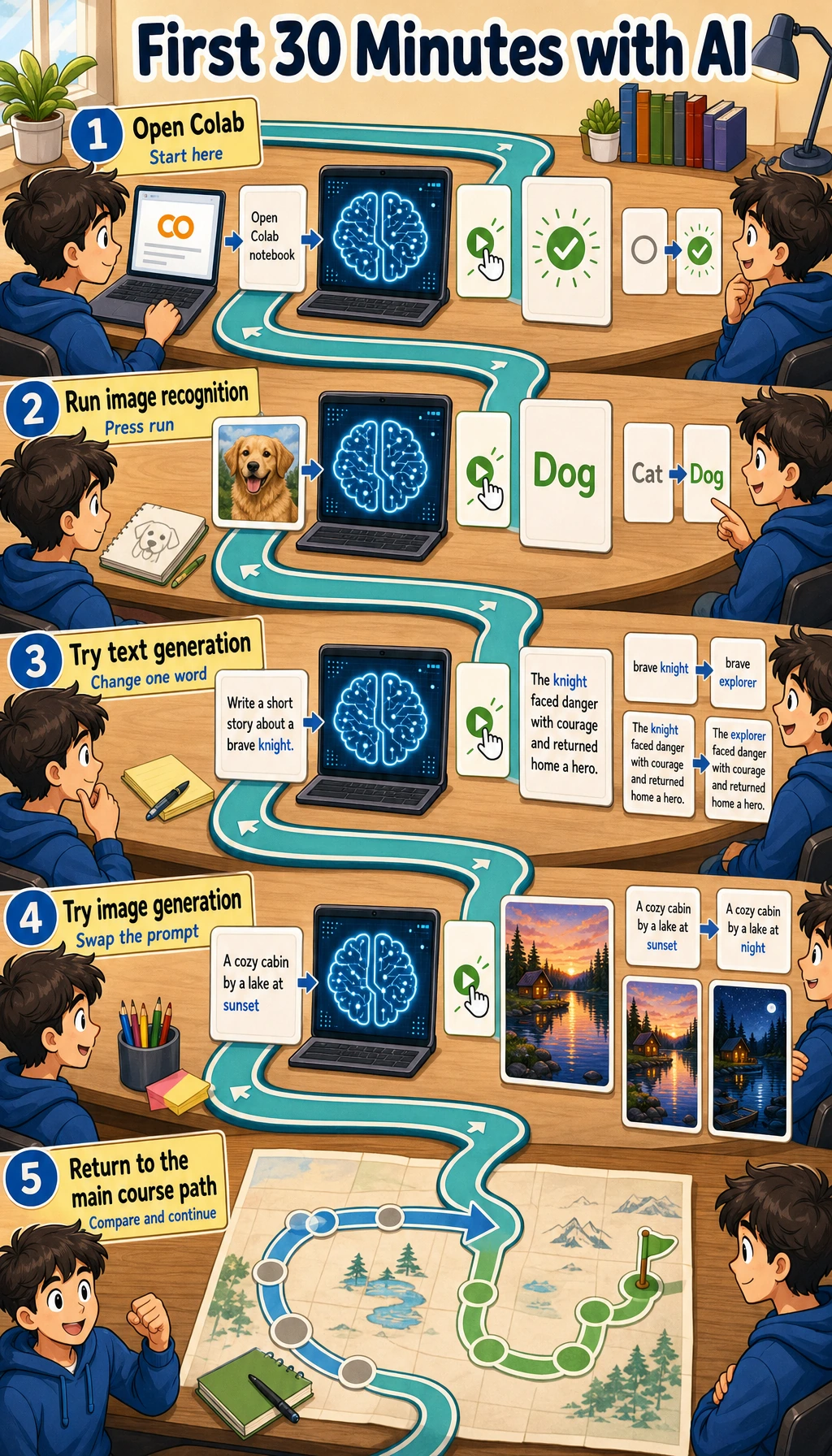
Just feel the loop: input -> model -> output -> inspect. Do not memorize terms yet.
For career transition, the first habit is not “be impressed by AI.” The first habit is to change one condition, compare the output, and record evidence that another person could inspect.
Fastest No-Code Try
Section titled “Fastest No-Code Try”Open any AI chat or image tool you can access and try:
Explain RAG to a beginner with one analogy.Then change one word, such as beginner to developer, and compare the result. Your goal is not to decide whether AI is smart. Your goal is to notice that a small input change can change structure, vocabulary, examples, and confidence.
| What to change | What to inspect |
|---|---|
Audience: beginner -> developer | Does the answer change examples and vocabulary? |
Constraint: add under 80 words | Does the model follow length and focus? |
Format: add give 3 bullets | Does the output become easier to scan? |
Evidence: add include one limitation | Does it admit what the answer cannot guarantee? |
This tiny comparison is the first habit in the whole course: never look at one output only. Change one condition, compare, and keep the better result with a note about why it is better.
Optional Colab Try
Section titled “Optional Colab Try”Open Google Colab, create a notebook, and run:
!pip install transformers torch pillow requests -q
from transformers import pipelinefrom PIL import Imageimport ioimport requests
classifier = pipeline(    "image-classification",    model="google/vit-base-patch16-224",    use_fast=True,)
image_url = "https://huggingface.co/datasets/huggingface/documentation-images/resolve/main/cats.png"response = requests.get(image_url, headers={"User-Agent": "Mozilla/5.0"}, timeout=20)response.raise_for_status()
content_type = response.headers.get("Content-Type", "")if "image" not in content_type:    raise ValueError(f"Expected an image response, got {content_type}: {response.text[:120]}")
image = Image.open(io.BytesIO(response.content)).convert("RGB")
for row in classifier(image)[:3]:    print(f"{row['label']:30s} {row['score']:.1%}")
Expected shape:
tabby, tabby cat 27.4%tiger cat 27.2%Egyptian cat 14.0%Your numbers may differ. The important shape is a ranked list of labels and confidence scores.
The status and content-type checks turn a blocked URL or HTML error page into a readable message instead of a PIL UnidentifiedImageError.
Read The Result
Section titled “Read The Result”| Beginner question | Practical answer | Deeper signal |
|---|---|---|
| What is the input? | One image from a URL | Real systems must check file type, size, source, and privacy |
| What is the model? | A pretrained image classifier | It only knows labels from its training setup |
| What is the output? | Top labels with scores | A high score is not proof; it is model confidence |
| What can go wrong? | Download, install, or model loading may fail | Reliable AI work needs logs, fallback paths, and reproducible environments |
If Colab fails, do not spend the whole day fixing it. Save the error message, continue with the no-code try, and return after Chapter 1 when terminal, Python, and environments are clearer.
Keep One Engineering Note
Section titled “Keep One Engineering Note”Create a short note with five lines:
- Artifact Name
- To be filled
- Input Tried
- To be filled
- Output Observed
- To be filled
- Controlled Change
- To be filled
- Evidence Value
- To be filled
AI is not magic here: you give input, a trained model processes it, and you inspect the output. Experienced learners should also notice the hidden engineering work: dependency install time, model download, input validation, model limits, output formatting, and how evidence is recorded. Next, set up the minimum environment.
Evidence to Keep
Section titled “Evidence to Keep”Keep this page’s proof of learning as a small evidence card:
- Mini App
- the smallest runnable AI or automation demo completed
- Input Output
- sample input, printed output, screenshot, or log
- Comparison
- one input change and the output difference it caused
- Concept Link
- which later chapter explains the hidden mechanism
- Failure Check
- API key, dependency, network, prompt, or output-format issue
- Expected Output
- a tiny but inspectable AI behavior record
Pass Check
Section titled “Pass Check”You pass this quick experience when you can point to one input, one observed output, and one controlled change that affected the result.