
9.8.2 Agent Evaluation Methods
Learning Objectives
Section titled “Learning Objectives”- Understand the difference between Agent evaluation and ordinary LLM evaluation
- Learn how to design metrics for task success, tool calling, and process quality
- Know how to build replayable evaluation samples
- Be able to use evaluation results to improve the next round of Prompts, tools, and workflows
Why Agent Evaluation Is More Complex
Section titled “Why Agent Evaluation Is More Complex”A normal question-answering system mainly checks whether the answer is correct. An Agent also needs to be judged by what it did to get there. An Agent may end up with the right answer, but if it called the wrong tool, skipped confirmation, or cost too much, it is still not a good system.
flowchart LR A[User Task] --> B[Planning] B --> C[Tool Calling] C --> D[State Update] D --> E[Final Result] B --> F[Process Quality] C --> G[Safety and Permissions] E --> H[Task Success]The Four-Layer Evaluation Framework
Section titled “The Four-Layer Evaluation Framework”| Level | Core Question | Example Metrics |
|---|---|---|
| Result layer | Was the user goal achieved? | Task success rate, human score, completion level |
| Process layer | Was the execution path reasonable? | Number of steps, retry count, loop rate, plan quality |
| Tool layer | Were the tools used correctly? | Tool selection accuracy, parameter error rate, tool failure rate |
| Safety layer | Did it exceed permissions or go out of control? | High-risk confirmation rate, refusal accuracy, rollback coverage |
In real projects, do not try to perfect every metric at once. Start with task success rate, tool failure rate, human takeover rate, and average cost. That already reveals many problems.

Building an Evaluation Task Set
Section titled “Building an Evaluation Task Set”An Agent evaluation set should come from real tasks, not from a few idealized examples. Each sample should include: user request, expected result, allowed tools, forbidden actions, success criteria, and risk level.
{ "task_id": "rag_review_001", "user_request": "Help me prepare for RAG stage review", "allowed_tools": ["search_docs", "write_plan"], "forbidden_actions": ["delete_file", "send_message"], "success_criteria": ["Cover RAG fundamentals", "Include evaluation methods", "Cite course documentation"], "risk_level": "low"}Human Scoring Rubric
Section titled “Human Scoring Rubric”The most practical method early on is human scoring. You can use a 1–5 scale to evaluate task completion, process reasonableness, tool usage, safety boundaries, and clarity of expression.
| Dimension | 1 point | 5 points |
|---|---|---|
| Task completion | Off target | Fully meets the goal |
| Tool usage | Wrong tool or missing tool | Tool choice and parameters are both reasonable |
| Process control | Loops, redundancy, hard to explain | Clear, traceable steps |
| Safety boundary | Overreach or no confirmation | High-risk actions have confirmation and fallback |
| Cost efficiency | Obvious waste | Reasonable number of steps and tokens |
A Replayable Evaluation Record
Section titled “A Replayable Evaluation Record”For Agent systems, a score without a trace is hard to improve. A better evaluation record should keep both the final score and the execution path.
{ "task_id": "rag_review_001", "run_id": "prompt_v3_model_a_2026_05_04", "task_success": true, "human_score": 4, "steps": 5, "tool_calls": [ {"tool": "search_docs", "ok": true, "reason": "found RAG chapters"}, {"tool": "write_plan", "ok": true, "reason": "generated weekly plan"} ], "safety_events": [], "cost_usd": 0.08, "main_issue": "sources were cited, but chapter links were not specific enough"}The reason for saving this structure is simple:
task_successtells you whether the user goal was achievedstepstells you whether the Agent was efficienttool_callstells you whether the tool route was correctsafety_eventstells you whether risky behavior happenedmain_issuetells you what to improve next
You can start with a very small analysis script:
runs = [    {        "task_id": "rag_review_001",        "task_success": True,        "human_score": 4,        "steps": 5,        "tool_calls": [            {"tool": "search_docs", "ok": True},            {"tool": "write_plan", "ok": True},        ],        "cost_usd": 0.08,    },    {        "task_id": "rag_review_002",        "task_success": False,        "human_score": 2,        "steps": 9,        "tool_calls": [            {"tool": "search_docs", "ok": False},            {"tool": "search_docs", "ok": False},        ],        "cost_usd": 0.19,    },]
total = len(runs)success_rate = sum(run["task_success"] for run in runs) / totalaverage_score = sum(run["human_score"] for run in runs) / totalaverage_steps = sum(run["steps"] for run in runs) / totaltool_calls = [call for run in runs for call in run["tool_calls"]]tool_failure_rate = sum(not call["ok"] for call in tool_calls) / len(tool_calls)
print(f"success_rate: {success_rate:.0%}")print(f"average_score: {average_score:.1f}/5")print(f"average_steps: {average_steps:.1f}")print(f"tool_failure_rate: {tool_failure_rate:.0%}")
Expected output:
success_rate: 50%average_score: 3.0/5average_steps: 7.0tool_failure_rate: 50%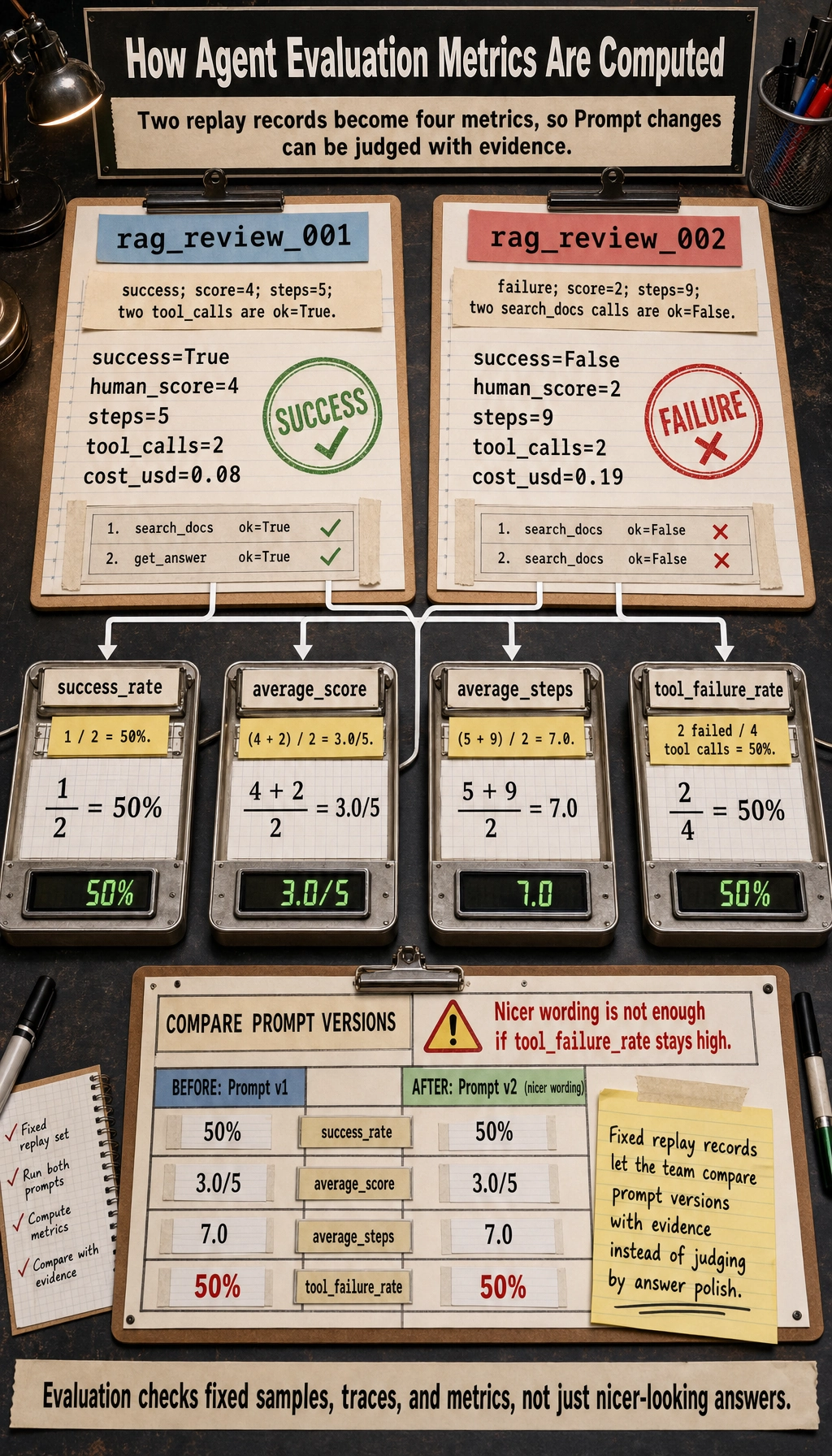
This is already enough to answer a practical question:
Did the new Prompt really improve the Agent, or did it only make the answer look nicer?
Using Evaluation Results to Improve the System
Section titled “Using Evaluation Results to Improve the System”The purpose of evaluation is not scoring itself, but guiding improvement. If tool selection mistakes are common, improve tool descriptions and routing strategy first. If plans are often incomplete, improve the planning Prompt or state representation first. If costs are too high, check for repeated tool calls or overly long context. If safety issues are common, add permission checks, confirmation steps, and refusal policies.
Evidence to Keep
Section titled “Evidence to Keep”Keep this page’s proof of learning as a small evidence card:
- Eval Cases
- fixed tasks and expected safe behavior
- Scorecard
- task success, tool correctness, trace quality, safety
- Guardrail
- policy, permission, validation, or human confirmation
- Failure Check
- unsafe tool use, prompt injection, hidden state, or unobserved action
- Next Action
- add case, guardrail, log, rollback, or refusal path
Common Misconceptions
Section titled “Common Misconceptions”The first mistake is testing only successful cases. The second is looking only at the final answer and ignoring the execution trace. The third is not having a fixed evaluation set and judging by intuition every time. The fourth is mixing model evaluation with system evaluation and ignoring tools, state, permissions, and cost.
Exercises
Section titled “Exercises”- Design 10 evaluation tasks for a “learning planning Agent.”
- Write
allowed_tools,forbidden_actions, andsuccess_criteriafor each task. - Use the 1–5 scoring rubric to evaluate one Agent output.
- Based on the scoring results, write 3 system improvement suggestions.
Passing Criteria
Section titled “Passing Criteria”After finishing this section, you should be able to design a minimal Agent evaluation set, distinguish between result-layer, process-layer, tool-layer, and safety-layer metrics, and turn evaluation findings into improvements in Prompt design, tools, workflows, or permissions.
Solution approach and explanation
- A useful 10-task set should include normal planning, ambiguous goals, missing prerequisites, impossible schedules, tool-use requirements, unsafe requests, and at least one case where the Agent should ask a clarification question.
- For each task,
allowed_toolsshould name what the Agent may use,forbidden_actionsshould state what it must not do, andsuccess_criteriashould be observable enough that another person can score it consistently. - When applying the 1-5 rubric, score the final answer and the trace separately. A pretty plan with wrong tool use should not receive a high score.
- Improvement suggestions should map to observed failures: unclear goals lead to better prompts, wrong tool use leads to tool descriptions or routing fixes, and unsafe actions lead to permission or confirmation changes.