
2.2.4 Basics of Functional Programming
Section Overview
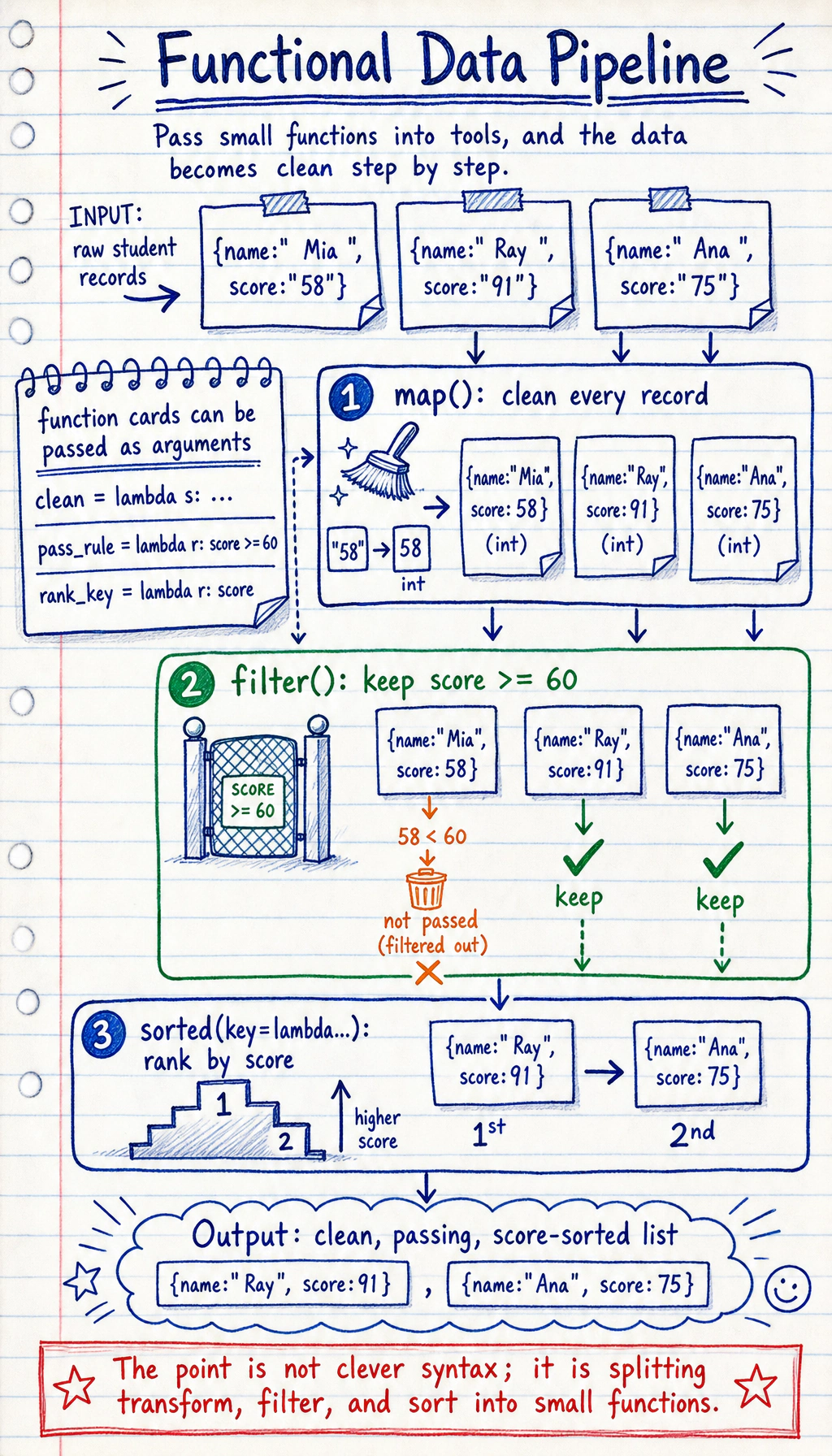
Section titled “Section Overview”This section adds more flexible ways to use functions in Python. lambda, map, filter, the key argument of sorted, and decorators often appear in data processing, framework source code, and utility functions. The goal is to understand and use them moderately, not to chase advanced tricks from the start.
Learning Objectives
Section titled “Learning Objectives”- Understand the basic ideas of functional programming
- Master
lambdaanonymous functions - Use the
keyargument ofmap(),filter(), andsorted()fluently - Understand the basic concepts of closures and decorators
You do not need to aim for “functional is elegant” on the first pass. Just know that it is often used for batch transformation, filtering, sorting, and passing custom logic into frameworks.
What Is Functional Programming?
Section titled “What Is Functional Programming?”Simply put, functional programming means treating functions as data that can be passed around and used.
In Python, functions are first-class citizens — just like numbers and strings, they can:
- be assigned to variables
- be passed as arguments to other functions
- be returned as values
# Functions can be assigned to variablesdef greet(name):    return f"Hello, {name}!"
say_hi = greet   # Assign the function to a variable (note: no parentheses)print(say_hi("Xiao Ming"))  # Hello, Xiao Ming!
# Functions can be put into a listdef add(a, b): return a + bdef sub(a, b): return a - bdef mul(a, b): return a * b
operations = [add, sub, mul]for op in operations:    print(op(10, 3))  # 13, 7, 30
Lambda Anonymous Functions
Section titled “Lambda Anonymous Functions”lambda is a one-off small function. You do not need def to define it, and it does not need a name.
Basic Syntax
Section titled “Basic Syntax”# Ordinary functiondef square(x): return x ** 2
# Equivalent lambdasquare = lambda x: x ** 2
print(square(5)) # 25Syntax: lambda parameters: expression
# One parameterdouble = lambda x: x * 2print(double(5))  # 10
# Multiple parametersadd = lambda a, b: a + bprint(add(3, 5))  # 8
# With a conditionsize_label = lambda hours: "Large" if hours >= 8 else "Small"print(size_label(12))  # Largeprint(size_label(3))   # Small
Main Uses of lambda
Section titled “Main Uses of lambda”The most common use of lambda is passing it as an argument to another function:
# Scenario: sort by a specific ruletasks = [    {"name": "Login API", "hours": 8},    {"name": "RAG demo", "hours": 12},    {"name": "Chart view", "hours": 5},]
# Sort by estimated hourstasks.sort(key=lambda task: task["hours"])print([task["name"] for task in tasks])  # ['Chart view', 'Login API', 'RAG demo']
# Sort by estimated hours in descending ordertasks.sort(key=lambda task: task["hours"], reverse=True)print([task["name"] for task in tasks]) # ['RAG demo', 'Login API', 'Chart view']map(): Apply the Same Operation to Each Element
Section titled “map(): Apply the Same Operation to Each Element”map(function, iterable) applies a function to each element in a sequence and returns a new sequence.
# Square each number in a listnumbers = [1, 2, 3, 4, 5]
# Method 1: use a for loopsquares = []for n in numbers:    squares.append(n ** 2)
# Method 2: use mapsquares = list(map(lambda x: x ** 2, numbers))print(squares)  # [1, 4, 9, 16, 25]
# Method 3: use a list comprehension (usually preferred)squares = [x ** 2 for x in numbers]print(squares)  # [1, 4, 9, 16, 25]
Practical Uses of map()
Section titled “Practical Uses of map()”# Batch convert data typesstr_numbers = ["10", "20", "30", "40"]numbers = list(map(int, str_numbers))print(numbers) # [10, 20, 30, 40]
# Batch process stringsnames = [" alice ", " BOB", "charlie "]clean_names = list(map(str.strip, names))print(clean_names) # ['alice', 'BOB', 'charlie']
# Use an existing functiontemperatures_c = [0, 20, 37, 100]def c_to_f(c): return c * 9/5 + 32
temperatures_f = list(map(c_to_f, temperatures_c))print(temperatures_f) # [32.0, 68.0, 98.6, 212.0]filter(): Select Elements That Meet a Condition
Section titled “filter(): Select Elements That Meet a Condition”filter(function, iterable) keeps the elements for which the function returns True.
numbers = [1, 2, 3, 4, 5, 6, 7, 8, 9, 10]
# Filter even numbersevens = list(filter(lambda x: x % 2 == 0, numbers))print(evens)  # [2, 4, 6, 8, 10]
# Equivalent list comprehensionevens = [x for x in numbers if x % 2 == 0]print(evens)  # [2, 4, 6, 8, 10]
Practical Uses of filter()
Section titled “Practical Uses of filter()”# Filter slow responseslatencies_ms = [45, 78, 55, 920, 880, 30, 67, 1000]slow = list(filter(lambda ms: ms >= 800, latencies_ms))print(f"Slow responses: {slow}") # [920, 880, 1000]
# Filter non-empty stringsdata = ["hello", "", "world", "", "python", ""]non_empty = list(filter(None, data)) # filter(None, ...) filters out falsy valuesprint(non_empty) # ['hello', 'world', 'python']
# Filter files of a specific typefiles = ["data.csv", "model.py", "readme.md", "train.py", "config.json"]py_files = list(filter(lambda f: f.endswith(".py"), files))print(py_files) # ['model.py', 'train.py']The key Argument of sorted()
Section titled “The key Argument of sorted()”The key argument of sorted() lets you define your own sorting rule:
# Sort by absolute valuenumbers = [-5, 3, -1, 4, -2]result = sorted(numbers, key=abs)print(result)  # [-1, -2, 3, 4, -5]
# Sort by string lengthwords = ["python", "AI", "deep", "learning"]result = sorted(words, key=len)print(result)  # ['AI', 'deep', 'python', 'learning']
# Sort by a dictionary keytasks = [    {"name": "Login API", "owner_count": 2, "hours": 8},    {"name": "RAG demo", "owner_count": 1, "hours": 12},    {"name": "Chart view", "owner_count": 1, "hours": 5},]
# Sort by estimated hoursby_hours = sorted(tasks, key=lambda task: task["hours"], reverse=True)for task in by_hours:    print(f"{task['name']}: {task['hours']} hours")# RAG demo: 12 hours# Login API: 8 hours# Chart view: 5 hours
# Sort by multiple conditions (first by priority descending, then by estimated hours ascending if priorities match)tasks2 = [    {"name": "A", "priority": 2, "hours": 8},    {"name": "B", "priority": 2, "hours": 5},    {"name": "C", "priority": 3, "hours": 12},]result = sorted(tasks2, key=lambda task: (-task["priority"], task["hours"]))for task in result:    print(f"{task['name']}: priority={task['priority']}, hours={task['hours']}")# C: priority=3, hours=12# B: priority=2, hours=5# A: priority=2, hours=8
Closures
Section titled “Closures”A closure is a function that remembers variables from its outer function, even after the outer function has finished executing.
def make_multiplier(factor):    """Create a multiplier"""    def multiplier(x):        return x * factor  # factor comes from the outer function    return multiplier
double = make_multiplier(2)triple = make_multiplier(3)
print(double(5))   # 10print(triple(5))   # 15print(double(10))  # 20
Practical Uses of Closures
Section titled “Practical Uses of Closures”# Create a counterdef make_counter(start=0): count = [start] # Wrap it in a list so it can be modified in the inner function def counter(): count[0] += 1 return count[0] return counter
counter = make_counter()print(counter()) # 1print(counter()) # 2print(counter()) # 3
# Create a logging function with a prefixdef make_logger(prefix): def log(message): from datetime import datetime timestamp = datetime.now().strftime("%H:%M:%S") print(f"[{prefix}] {timestamp} {message}") return log
info = make_logger("INFO")error = make_logger("ERROR")
info("Program started") # [INFO] 14:30:01 Program startederror("File not found") # [ERROR] 14:30:01 File not foundDecorators
Section titled “Decorators”A decorator is an elegant way to add extra functionality to a function. At its core, it is an application of closures.
Problem Scenario
Section titled “Problem Scenario”Suppose you want to add execution-time statistics to multiple functions:
import time
# Without decorators: each function needs timing codedef train_model():    start = time.time()    # In a real project, this might call a model training loop or API.    epochs = 3    for epoch in range(epochs):        time.sleep(0.25)        print(f"epoch {epoch + 1}/{epochs}: training...")    time.sleep(1)    end = time.time()    print(f"train_model took: {end - start:.2f} seconds")
def process_data():    start = time.time()    # Here we simulate an ETL-style preprocessing step.    records = ["raw-1", "raw-2", "raw-3"]    cleaned = [record.replace("raw", "clean") for record in records]    print("cleaned records:", cleaned)    time.sleep(0.5)    end = time.time()    print(f"process_data took: {end - start:.2f} seconds")
Each function has to repeat the timing code — that is annoying!
Decorator Solution
Section titled “Decorator Solution”import time
def timer(func): """Timing decorator""" def wrapper(*args, **kwargs): start = time.time() result = func(*args, **kwargs) end = time.time() print(f"⏱ {func.__name__} took: {end - start:.2f} seconds") return result return wrapper
# Use decorator with @ syntax@timerdef train_model(): """Train the model""" time.sleep(1) print("Training completed!")
@timerdef process_data(filename): """Process data""" time.sleep(0.5) print(f"Processing {filename} completed!")
train_model()# Training completed!# ⏱ train_model took: 1.00 seconds
process_data("data.csv")# Processing data.csv completed!# ⏱ process_data took: 0.50 seconds@timer is equivalent to train_model = timer(train_model).
Common Decorator Pattern
Section titled “Common Decorator Pattern”# Retry decoratordef retry(max_attempts=3): def decorator(func): def wrapper(*args, **kwargs): for attempt in range(1, max_attempts + 1): try: return func(*args, **kwargs) except Exception as e: print(f"Attempt {attempt} failed: {e}") if attempt == max_attempts: raise return wrapper return decorator
@retry(max_attempts=3)def risky_operation(): import random if random.random() < 0.7: raise ConnectionError("Connection failed") return "Success!"map / filter vs List Comprehensions
Section titled “map / filter vs List Comprehensions”| Approach | Use Case | Example |
|---|---|---|
| List comprehension | Most cases (recommended) | [x**2 for x in nums] |
map() | When an existing function can be used directly | list(map(int, strings)) |
filter() | When paired with an existing predicate function | list(filter(str.isdigit, items)) |
# When you already have a ready-made function, map is simplernumbers = ["1", "2", "3"]list(map(int, numbers))        # concise[int(x) for x in numbers]     # also fine, but slightly longer
# When you need transformation + condition, a list comprehension is clearer[x**2 for x in range(10) if x % 2 == 0]# Much clearer than list(filter(lambda x: x%2==0, map(lambda x: x**2, range(10))))
Hands-on Exercises
Section titled “Hands-on Exercises”Exercise 1: Data Processing Pipeline
Section titled “Exercise 1: Data Processing Pipeline”# Use map and filter to process the following dataraw_data = [" 23 ", "abc", "45.6", "", "78", "not_a_number", "90.1"]
# 1. Remove whitespace# 2. Filter out strings that cannot be converted to numbers# 3. Convert to floating-point numbers# 4. Filter out numbers less than 50# Hint: you can combine map, filter, and list comprehensionsExercise 2: Custom Sorting
Section titled “Exercise 2: Custom Sorting”products = [ {"name": "laptop", "price": 5999, "rating": 4.5}, {"name": "mouse", "price": 199, "rating": 4.8}, {"name": "keyboard", "price": 599, "rating": 4.2}, {"name": "monitor", "price": 2999, "rating": 4.7},]
# 1. Sort by price from low to high# 2. Sort by rating from high to low# 3. Sort by cost-effectiveness (rating/price) from high to lowExercise 3: Write a Decorator
Section titled “Exercise 3: Write a Decorator”Write a @log decorator that prints logs before and after a function runs:
@logdef add(a, b):    return a + b
add(3, 5)# It should output:# Calling add, arguments: (3, 5) {}# add returned: 8
Reference implementation and walkthrough
- The pipeline should strip whitespace, drop empty items, keep only strings that can become numbers, convert them, and then keep values
>= 50. In the sample data,78and90.1survive. - Sorting should use three separate
sorted(..., key=...)calls: price ascending, rating descending, and a cost-effectiveness score such asrating / pricedescending. - The decorator should wrap the function, print before/after messages, and return the original result unchanged. In a production answer,
functools.wrapsshould preserve the original metadata.
Evidence to Keep
Section titled “Evidence to Keep”Keep this page’s proof of learning as a small evidence card:
- Pattern
- class, exception, file IO, functional pipeline, generator, or type hint
- Code Artifact
- minimal runnable example and one realistic use case
- Output
- printed object state, caught error, saved file, yielded values, or type-check note
- Failure Check
- hidden mutation, swallowed exception, file path issue, lazy iterator confusion, or misleading annotation
- Expected Output
- small advanced-Python example with a debugging note
Summary
Section titled “Summary”| Concept | Description | Example |
|---|---|---|
| lambda | Anonymous function | lambda x: x * 2 |
| map() | Apply a function to each element | map(int, ["1", "2"]) |
| filter() | Select elements that meet a condition | filter(lambda x: x>0, nums) |
| sorted(key=) | Custom sorting | sorted(data, key=lambda x: x["hours"]) |
| Closure | Function remembers outer variables | Factory function pattern |
| Decorator | Add extra functionality to a function | @timer |