
8.4.5 Containerization and Deployment
Learning Objectives
Section titled “Learning Objectives”- Understand why LLM applications are especially well-suited to containerization
- Read the key structure of a minimal Dockerfile
- Understand the core concepts of images, containers, ports, and environment variables
- Read a small Docker Compose startup example
- Understand that containerization is not the end of deployment, but the starting point
Beginner terminology bridge
Section titled “Beginner terminology bridge”Docker becomes much less intimidating once the nouns are separated:
| Term | Beginner meaning | Why it matters |
|---|---|---|
image | A packaged runtime template, like a recipe plus ingredients | You build it once and run containers from it |
container | A running instance created from an image | This is the actual process serving requests |
Dockerfile | The build recipe for an image | It records the base image, dependencies, files, and startup command |
port | The doorway where a service listens for requests | -p 8000:8000 maps the host port to the container port |
environment variable | Configuration injected from outside the code | API keys, model names, and runtime modes should not be hardcoded |
Compose | A tool for starting multiple related containers together | Useful when the app needs a vector database, Redis, or Postgres |
The core idea is not “learn Docker commands by heart,” but “make the runtime environment reproducible.”
Why containerize?
Section titled “Why containerize?”What is the biggest hidden risk of a local script?
Section titled “What is the biggest hidden risk of a local script?”When you can run a project locally, it often depends on many implicit conditions:
- Python version
- Package versions
- System dependencies
- Environment variables
- Startup command
Once you change the person, the machine, or the server, these conditions can easily cause problems.
What does containerization actually solve?
Section titled “What does containerization actually solve?”The core value of containerization is:
Package the application together with the runtime environment it depends on.
This lets you reproduce more reliably:
- What was installed
- Which versions were used
- Which command was used to start it
This is especially important for LLM applications, because they often depend on:
- Web frameworks
- Model services
- Vector databases
- System tools
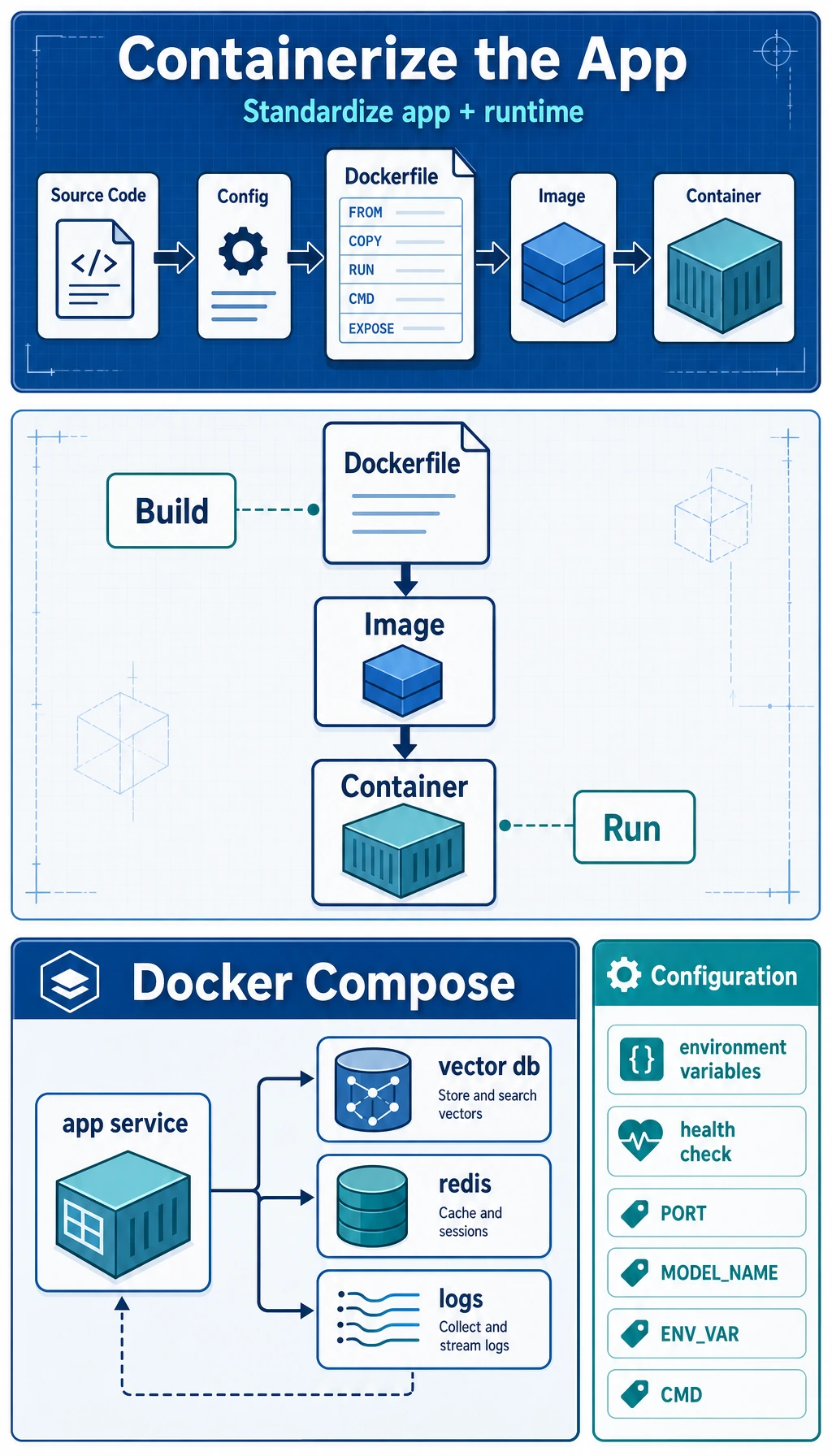
What are images and containers?
Section titled “What are images and containers?”A very practical analogy
Section titled “A very practical analogy”- Image: like a recipe + ingredient kit
- Container: the actual dish made from that recipe
In other words:
- An image is a static template
- A container is a running instance
Why is this distinction important?
Section titled “Why is this distinction important?”Because during deployment, you usually:
- Build the image first
- Then start the container
If you do not clearly understand this order, Docker commands will feel confusing for a long time.
What does a minimal Dockerfile look like?
Section titled “What does a minimal Dockerfile look like?”First, look at the complete example
Section titled “First, look at the complete example”FROM python:3.14-slim
WORKDIR /app
COPY requirements.txt .RUN pip install --no-cache-dir -r requirements.txt
COPY . .
EXPOSE 8000
CMD ["python", "app.py"]What does each line do?
Section titled “What does each line do?”-
FROM- Choose the base image
-
WORKDIR- Set the working directory
-
COPY requirements.txt .- Copy in the dependency file
-
RUN pip install ...- Install dependencies
-
COPY . .- Copy the project code in as well
-
EXPOSE 8000- Indicate the port the service listens on
-
CMD- The default command executed when the container starts
This is the core skeleton of a Dockerfile.
First prepare a small app that can actually run
Section titled “First prepare a small app that can actually run”Minimal Python service
Section titled “Minimal Python service”To make the Docker deployment example more concrete, let’s first write a very simple app.py.
from http.server import BaseHTTPRequestHandler, HTTPServerimport json
class Handler(BaseHTTPRequestHandler):    def do_GET(self):        if self.path == "/health":            self.send_response(200)            self.send_header("Content-Type", "application/json")            self.end_headers()            self.wfile.write(json.dumps({"status": "ok"}).encode())            return
        self.send_response(200)        self.send_header("Content-Type", "application/json")        self.end_headers()        self.wfile.write(json.dumps({"message": "hello from llm app"}).encode())
server = HTTPServer(("0.0.0.0", 8000), Handler)print("serving on 8000")server.serve_forever()
Run it locally first:
python app.pyIn another terminal, test the service:
curl http://localhost:8000/curl http://localhost:8000/healthExpected output:
{"message": "hello from llm app"}{"status": "ok"}Why start with this?
Section titled “Why start with this?”Because containerization is not about talking about Dockerfiles in the abstract, but about understanding them around a real running application.
Then containerize it
Section titled “Then containerize it”Matching requirements.txt
Section titled “Matching requirements.txt”This minimal service does not depend on any third-party packages, so requirements.txt can be empty, or you may even not need it.
But to stay close to a real project, we will keep the structure.
Corresponding Dockerfile
Section titled “Corresponding Dockerfile”FROM python:3.14-slim
WORKDIR /app
COPY requirements.txt .RUN pip install --no-cache-dir -r requirements.txt
COPY app.py .
EXPOSE 8000
CMD ["python", "app.py"]Run commands
Section titled “Run commands”docker build -t mini-llm-app .docker run -p 8000:8000 mini-llm-appThen visit:
http://localhost:8000/http://localhost:8000/health
and you will see the returned results.
You can also verify it from the command line:
curl http://localhost:8000/curl http://localhost:8000/healthExpected output:
{"message": "hello from llm app"}{"status": "ok"}This is the smallest containerization loop.
Why are environment variables important?
Section titled “Why are environment variables important?”LLM applications often have configurations like these:
- API Key
- Model name
- Vector database address
- Runtime mode
These are usually not hardcoded in the code; environment variables are a better fit.
A minimal example
Section titled “A minimal example”import os
model_name = os.getenv("MODEL_NAME", "demo-model")port = int(os.getenv("PORT", "8000"))
print("MODEL_NAME =", model_name)print("PORT =", port)Expected output without extra environment variables:
MODEL_NAME = demo-modelPORT = 8000How do you pass environment variables in Docker?
Section titled “How do you pass environment variables in Docker?”docker run -p 8000:8000 -e MODEL_NAME=qwen-demo mini-llm-appThis step is very important, because real deployment almost always relies on configuration injection.
To make the running service show configuration, you can read MODEL_NAME in app.py and return it from the root endpoint. The key idea is the same: code stays stable, configuration changes outside the image.
Why is Compose so commonly used?
Section titled “Why is Compose so commonly used?”Because real projects usually have more than one service
Section titled “Because real projects usually have more than one service”An LLM application may also need to work with:
- Web service
- Vector database
- Redis
- Postgres
If you write docker run by hand for each one, things quickly become messy.
A minimal Compose example
Section titled “A minimal Compose example”version: "3.9"
services: app: build: . ports: - "8000:8000" environment: MODEL_NAME: demo-modelStartup command:
docker compose up --buildThis is why Compose is very useful for local development and small-scale deployments.
Containerization does not mean deployment is finished
Section titled “Containerization does not mean deployment is finished”This is a very common misunderstanding.
Containerization solves packaging and the runtime environment
Section titled “Containerization solves packaging and the runtime environment”But going live still requires considering:
- Logs
- Health checks
- Resource limits
- Automatic restarts
- Canary releases
- Reverse proxies
A very important health check idea
Section titled “A very important health check idea”An endpoint like:
/health
is very valuable. Because deployment systems usually need to know:
Is this container alive right now, and can it accept requests?
Common mistakes beginners often make
Section titled “Common mistakes beginners often make”Putting everything into one huge image
Section titled “Putting everything into one huge image”The image becomes bloated.
No health check
Section titled “No health check”You do not know when the service is broken.
Hardcoding configuration in the code
Section titled “Hardcoding configuration in the code”Things break easily when you switch environments.
Thinking containerization automatically makes things scalable
Section titled “Thinking containerization automatically makes things scalable”It does not. Containerization is only the first step; orchestration, monitoring, and operations come next.
Ignoring local Docker disk usage
Section titled “Ignoring local Docker disk usage”If a build fails with no space left on device, first inspect Docker storage:
docker system dfdocker builder pruneOnly prune what you no longer need. In team or CI environments, it is safer to clean build cache first before deleting images or volumes.
Evidence to Keep
Section titled “Evidence to Keep”Keep this page’s proof of learning as a small evidence card:
- Service Contract
- endpoint, input schema, output schema, error schema
- Run Signal
- latency, throughput, logs, health check, or container status
- Observability
- request id, trace id, structured log, or metric
- Failure Check
- timeout, retry storm, missing log, deployment mismatch
- Ops Action
- backoff, queue, alert, rollout, or rollback
Summary
Section titled “Summary”The most important thing in this section is not memorizing Docker commands, but understanding:
The core value of containerization is standardizing “application + dependencies + startup method” together, so deployment becomes a reproducible process instead of personal machine experience.
Once you make this step solid, service orchestration and production operations will have a foundation.
Exercises
Section titled “Exercises”- Use the
app.pyand Dockerfile from this section to actually build a minimal image locally. - Add another environment variable to the service, such as
APP_MODE=dev. - Think about this: why is the
/healthendpoint important for deployment systems? - Explain in your own words: why is containerization the starting point of deployment, not the end?
Reference implementation and walkthrough
- The build should produce an image that starts reliably and exposes the expected port and health endpoint.
APP_MODEshould be read from the environment and reflected in config or logs without code changes./healthlets deployment systems know whether to route traffic, restart the container, or roll back.- Containers package runtime, but deployment still needs secrets, scaling, logs, monitoring, storage, networking, security, and release processes.