
2.1.1 Python Introduction
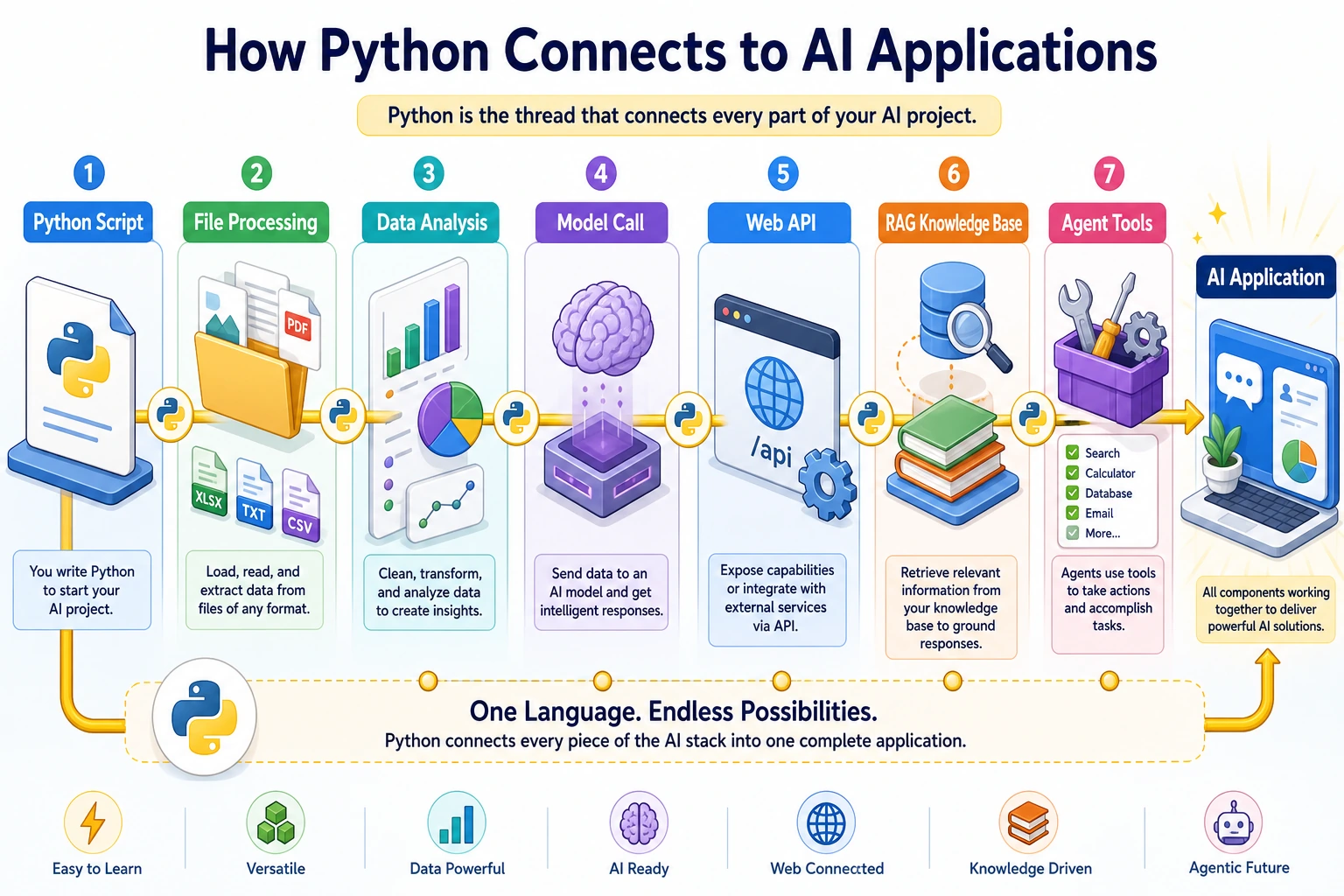
What This Section Is About
Section titled “What This Section Is About”This section is your entry point into learning Python. You do not need to master complex syntax right away. First, understand why Python is a good fit for AI, what it can do, and run your first program yourself so you can build the first impression that “code can solve real problems.”
Learning Objectives
Section titled “Learning Objectives”- Understand what Python is and why it is so popular
- Understand Python’s central role in AI
- Write and run your first Python program
- Understand the basic structure of Python code
Why Learn Python?
Section titled “Why Learn Python?”If a programming language is a tool, then Python is a Swiss Army knife—it can do almost anything, and it is easy to get started with.
First, let’s look at some data:
| Dimension | Description |
|---|---|
| Popularity | Has ranked No. 1 on the TIOBE programming language leaderboard for many consecutive years |
| AI First Choice | Almost all AI / machine learning frameworks (PyTorch, TensorFlow) are Python-first |
| Job Market | A must-have skill for data science, AI engineering, and backend development roles |
| Learning Curve | Syntax is close to natural language, making it one of the easiest languages for beginners to pick up |
In one sentence: If you want to do AI, Python is the starting point.
What Exactly Is Python?
Section titled “What Exactly Is Python?”Python is a high-level programming language released by Guido van Rossum in 1991.
What does “high-level” mean? The farther a programming language is from hardware and the closer it is to human language, the more “high-level” it is. Compare these:
| Level | What the same idea looks like |
|---|---|
| Machine language | 10110000 01100001 |
| C language | #include <stdio.h> plus a full main() function |
| Python | print("Hello World") |
To print the same sentence, Python needs only 1 line, while C needs 5 lines. This is Python’s design philosophy: simple and elegant, so you can focus on solving problems instead of syntax details.
Core Features of Python
Section titled “Core Features of Python”| Feature | Description | Benefit to You |
|---|---|---|
| Simple syntax | Uses indentation instead of braces; code reads like English | Learn faster, write less |
| Interpreted language | Run directly after writing, no compilation needed | Easy to debug, see results immediately |
| Dynamic typing | No need to declare variable types | Code is shorter and more flexible |
| Rich ecosystem | More than 400,000 third-party libraries | Ready-made tools others have built, use them directly |
| Cross-platform | Runs on Windows, macOS, and Linux | One codebase, many environments |
What Can Python Do?
Section titled “What Can Python Do?”Python is used in many areas. Here are a few of the most important:
AI and Machine Learning (the core of this course)
Section titled “AI and Machine Learning (the core of this course)”# Train a simple linear regression model with a few lines of code (sample data, runnable as-is)import numpy as npfrom sklearn.linear_model import LinearRegression
X_train = np.array([[1], [2], [3], [4], [5]]) # featuresy_train = np.array([2, 4, 6, 8, 10]) # labels (y ≈ 2*x)
model = LinearRegression()model.fit(X_train, y_train)# After training, you can use model.predict() for predictionMainstream frameworks: PyTorch, TensorFlow, scikit-learn, Hugging Face Transformers
Data Analysis and Visualization
Section titled “Data Analysis and Visualization”import pandas as pdimport matplotlib.pyplot as plt
# Sample data (in real projects, you can use pd.read_csv("sales.csv") to load your own file)data = pd.DataFrame({"month": ["January", "February", "March"], "revenue": [100, 150, 120]})
# Draw a chart in one linedata.plot(x="month", y="revenue", kind="bar")plt.show()Mainstream libraries: pandas, NumPy, Matplotlib, Seaborn
Web Backend Development
Section titled “Web Backend Development”With Python, you can quickly build a website backend that provides an API, for example:
from fastapi import FastAPI
app = FastAPI()
@app.get("/hello")def say_hello():    return {"message": "Hello, world!"}
Run the service and visit it:
- First save the code above into a file, such as
main.py. Then open a terminal in that directory and run:Terminal window pip install fastapi uvicornuvicorn main:app --reload - After you see
Uvicorn running on http://127.0.0.1:8000in the terminal, open the following in your browser:- http://127.0.0.1:8000/hello → returns
{"message":"Hello, world!"} - http://127.0.0.1:8000/docs → the auto-generated API documentation page, where you can click endpoints to test them
- http://127.0.0.1:8000/hello → returns
Mainstream frameworks: FastAPI, Django, Flask
Automation Scripts
Section titled “Automation Scripts”import os
# Example: batch rename images in a folder (create a test directory first before running to avoid FileNotFoundError)os.makedirs("photos", exist_ok=True)for i in range(3): open(f"photos/old_{i}.jpg", "w").close() # create 3 empty files as examples
for i, filename in enumerate(os.listdir("photos/")): new_name = f"photo_{i+1}.jpg" os.rename(f"photos/{filename}", f"photos/{new_name}")
# Check the result (in real projects, you can remove the test directory: os.removedirs, etc.)print(os.listdir("photos/")) # ['photo_1.jpg', 'photo_2.jpg', 'photo_3.jpg']Web Scraping
Section titled “Web Scraping”# First install: !pip install beautifulsoup4from bs4 import BeautifulSoup
# Use a sample HTML snippet to demonstrate parsing (no internet required, runnable as-is)html = """<html><body> <h1>Welcome to Learning Python</h1> <p>First paragraph</p> <p>Second paragraph</p></body></html>"""soup = BeautifulSoup(html, "html.parser")title = soup.find("h1").textparagraphs = soup.find_all("p")print(f"Web page title: {title}")print(f"Total {len(paragraphs)} paragraphs")Write Your First Python Program
Section titled “Write Your First Python Program”Option 1: Use Python Interactive Mode in the Terminal
Section titled “Option 1: Use Python Interactive Mode in the Terminal”Open the terminal (you already learned this in Station 1) and type:
pythonYou will see a prompt like this:
Python 3.11.5 (main, Sep 11 2023, 08:31:25)Type "help", "copyright", "credits" or "license" for more information.>>>>>> is Python’s interactive prompt, which means it is waiting for you to enter a command.
Try these:
>>> print("Hello, World!")Hello, World!
>>> 1 + 12
>>> "AI" * 3'AIAIAI'
>>> len("Python")6
Type exit() or press Ctrl+D to exit interactive mode.
Option 2: Write and Run in VS Code
Section titled “Option 2: Write and Run in VS Code”- Open VS Code (it has already been installed in Station 1)
- Create a new file called
hello.py(note the.pyextension) - Enter the following code:
# This is my first Python programprint("Hello, World!")print("I am learning Python!")print("1 + 1 =", 1 + 1)- Save the file (
Ctrl+S/Cmd+S) - Run it in the terminal:
python hello.pyOutput:
Hello, World!I am learning Python!1 + 1 = 2Congratulations, your first Python program is born!
Option 3: Run in Jupyter Notebook
Section titled “Option 3: Run in Jupyter Notebook”You already installed Jupyter in Station 1. Open it:
jupyter notebookCreate a new Notebook, enter print("Hello from Jupyter!") in a code cell, and then press Shift+Enter to run it.
Basic Rules of Python Code
Section titled “Basic Rules of Python Code”Before diving deeper, let’s first understand a few basic rules:
Indentation Matters
Section titled “Indentation Matters”Python uses indentation (usually 4 spaces) to indicate code blocks, instead of braces {} like some other languages.
# Correct ✅if True: print("Indented by 4 spaces") print("Same code block")The following example is intentionally wrong and will raise IndentationError:
if True:print("Not indented, Python will raise an error")Comments Use #
Section titled “Comments Use #”# This is a comment line; Python will ignore itprint("This line will run") # You can also write comments at the end of a line
# Multi-line comments are just multiple lines starting with ## First comment line# Second comment lineComments are for humans to read and help you (and others) understand the code. Good comments explain why something is done, not what is done.
Python Is Case-Sensitive
Section titled “Python Is Case-Sensitive”service_name = "Login API"Service_Name = "Search API"SERVICE_NAME = "Worker"# These are three different variables!
print(service_name) # Login APIPrint(service_name) # Error! Python has no Print, only printFiles End with .py
Section titled “Files End with .py”Python script files use the .py extension, such as hello.py, train.py, and model.py.
Python 2 or Python 3?
Section titled “Python 2 or Python 3?”Short answer: Use Python 3, not Python 2.
Python 2 officially reached end of life on January 1, 2020. All new projects and all modern libraries support only Python 3. This course uses Python 3.10+.
Check your Python version:
python --version# Should output Python 3.10.x or higherIf the output is Python 2.x, you need to use the python3 command, or check whether the Conda environment you configured in Station 1 is activated correctly.
Hands-on Practice
Section titled “Hands-on Practice”Exercise 1: An Upgraded Hello World
Section titled “Exercise 1: An Upgraded Hello World”Create a file called about_me.py and make it print your personal introduction:
print("=== Personal Introduction ===")print("Name: [Your Name]")print("Goal: Become an AI Engineer")print("Currently learning: Python programming")print("=" * 20)Run it and see the output. Try changing the content and add more information.
Exercise 2: Use Python as a Calculator
Section titled “Exercise 2: Use Python as a Calculator”In Python interactive mode, try the following operations:
>>> 100 + 200>>> 10 * 3.14>>> 2 ** 10 # ** is exponentiation, 2 to the 10th power>>> 17 / 5 # division>>> 17 // 5 # floor division (drop the decimal part)>>> 17 % 5 # remainderWrite down the result of each operation and think about why.
Exercise 3: Explore print()
Section titled “Exercise 3: Explore print()”Try the following code and observe different uses of print():
print("Hello")print("Hello", "World") # multiple arguments separated by commasprint("Hello", "World", sep="-") # connect with -print("Hello", end=" ") # no newlineprint("World")print("Price:", 99.9, "yuan")Reference implementation and walkthrough
about_me.pyshould run from the terminal and print a clear multi-line introduction. Changing the content should not require changing Python syntax.- The calculator outputs should include
300,31.400000000000002or a close floating-point value,1024,3.4,3, and2. print("Hello", "World")inserts a space.sep="-"changes the separator, andend=" "keeps the nextprint()on the same line.- If the script does not run, check the filename, current folder, Python 3 interpreter, and matching quotes or parentheses.
- Keep the command and output as proof, not only the source code.
Evidence to Keep
Section titled “Evidence to Keep”Keep this page’s proof of learning as a small evidence card:
- Concept
- variable, type, operator, input/output, branch, loop, structure, function, or module
- Code
- smallest runnable Python snippet for the concept
- Output
- printed value, type, branch result, loop trace, or returned value
- Failure Check
- type mismatch, indentation, off-by-one, mutable data, or import path issue
- Expected Output
- code plus printed result that proves the concept works
Summary
Section titled “Summary”| Key Point | Description |
|---|---|
| Python is the preferred language for AI development | Almost all AI frameworks are built on Python |
| Syntax is simple and close to natural language | Lowers the learning barrier and lets you focus on logic |
| Rich ecosystem | 400,000+ third-party libraries, with ready-made solutions for most needs |
| Three ways to run code | Interactive mode, .py files, and Jupyter Notebook |
| Indentation is the soul of Python | Use 4-space indentation, not Tab |