
3.5.1 Database Roadmap: Tables That Live Beyond One File
This chapter is optional in Chapter 3. Read it when you want to understand where real project data lives before it becomes a CSV or DataFrame.
Look at the Database Map First
Section titled “Look at the Database Map First”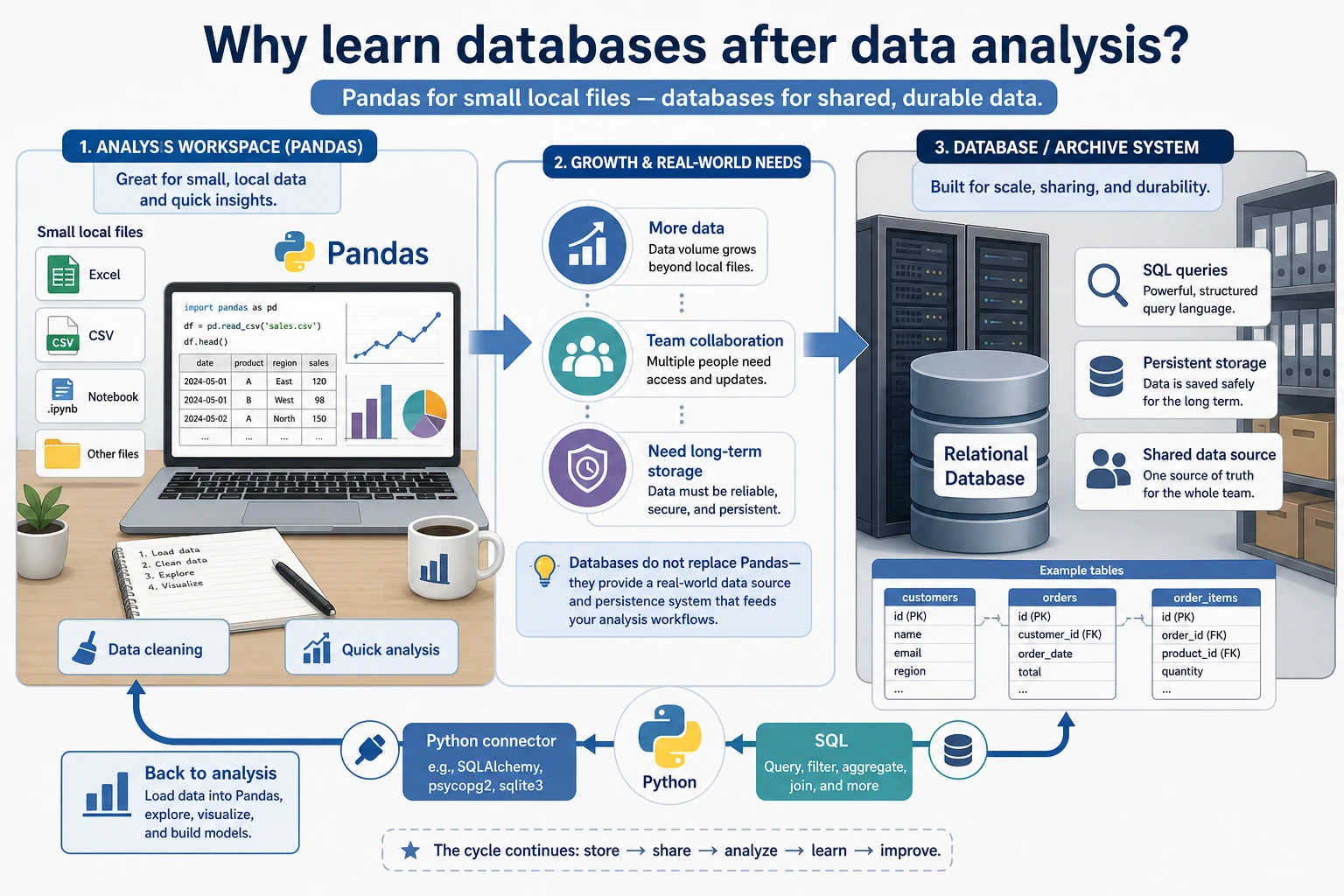
Remember the simple comparison:
| CSV or DataFrame | Database |
|---|---|
| good for one local analysis | good for long-term shared data |
| easy to move around | safer for querying, permissions, and updates |
| usually one file or one table | often many linked tables |
You do not need to become a database administrator. You only need enough database literacy to query data and connect it to Python.
Run One SQLite Query Once
Section titled “Run One SQLite Query Once”Create sqlite_first_loop.py. It uses sqlite3, which comes with Python.
import sqlite3
conn = sqlite3.connect(":memory:")conn.execute("CREATE TABLE orders (category TEXT, amount INTEGER)")conn.executemany(    "INSERT INTO orders VALUES (?, ?)",    [("book", 120), ("tool", 80), ("book", 150)],)
rows = conn.execute(    "SELECT category, SUM(amount) AS total FROM orders GROUP BY category ORDER BY category").fetchall()
for category, total in rows:    print(category, total)
Expected output:
book 270tool 80This is the database loop: create a table, insert rows, ask a question with SQL, and receive a result table.
Learn in This Order
Section titled “Learn in This Order”| Order | Read | What to practice |
|---|---|---|
| 1 | 3.5.2 Relational Database Basics | tables, rows, columns, primary keys, foreign keys |
| 2 | 3.5.3 SQL Basics | SELECT, WHERE, JOIN, GROUP BY |
| 3 | 3.5.4 Python Database Operations | sqlite3, Pandas read/write, query results |
| 4 | 3.5.5 Database Design | split tables, avoid duplication, keep relationships clear |
Evidence to Keep
Section titled “Evidence to Keep”Keep this page’s proof of learning as a small evidence card:
- Schema
- table names, keys, relationships, and sample rows
- Query
- SQL or Python database code used
- Output
- result rows, row count, or saved extract
- Failure Check
- wrong join key, unsafe query, missing transaction, or schema mismatch
- Expected Output
- query plus result table and one data-quality note
Pass Check
Section titled “Pass Check”You pass this optional subchapter when you can explain why a database is different from a CSV, write one SELECT ... GROUP BY query, and read the result from Python.
Check reasoning and explanation
- A passing answer starts from the question, identifies the table/DataFrame or query needed, and keeps the cleaning step reproducible.
- The evidence should include a small output sample, a plot or SQL result when relevant, and one sentence interpreting what changed.
- A good self-check names one data-quality risk such as missing values, duplicate rows, wrong joins, misleading aggregation, or an unreadable chart.