
3.5.4 Python Database Operations
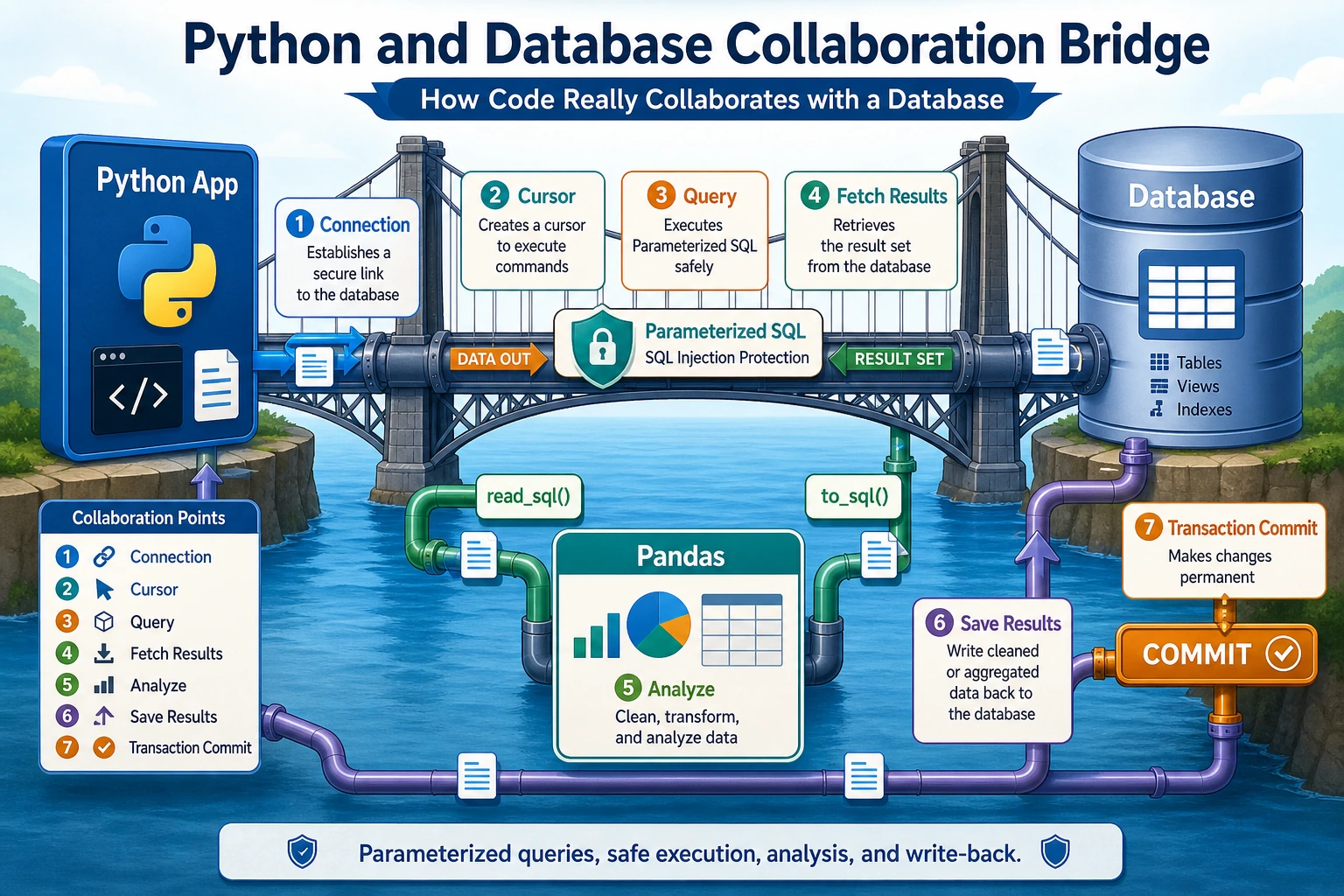
Learning Objectives
Section titled “Learning Objectives”- Use Python’s built-in
sqlite3module for CRUD operations - Use parameterized queries to avoid SQL injection
- Read database results into Pandas with
read_sql_query - Write DataFrame results back with
to_sql - Understand when SQLAlchemy becomes useful
First, Build a Map
Section titled “First, Build a Map”Think of Python database work as a flow:
flowchart LR A["Python code"] --> B["Connect to database"] B --> C["Execute safe SQL"] C --> D["Retrieve rows"] D --> E["Analyze with Pandas"] E --> F["Write back if needed"]In a full-stack or AI engineering project, this is how your app moves from “I have a table” to “I can build a feature, report, dashboard, or data pipeline.”
Acronyms and Terms to Understand First
Section titled “Acronyms and Terms to Understand First”| Term | Full name | Practical meaning |
|---|---|---|
DB | Database | A long-term place for structured data |
SQL | Structured Query Language | The language used to ask tables questions |
CRUD | Create, Read, Update, Delete | The four basic data actions used by most applications |
SQLite | SQLite database engine | A lightweight database stored in one file, useful for learning, prototypes, and local tools |
ORM | Object-Relational Mapping | A way to work with rows through Python objects instead of writing every SQL statement manually |
SQL injection | SQL injection attack | A security problem where unsafe input changes the meaning of a SQL statement |
For now, focus on one safe loop: Python connects, sends parameterized SQL, receives rows, and passes the useful subset to Pandas.
The sqlite3 Standard Library
Section titled “The sqlite3 Standard Library”Python includes the sqlite3 module, so there is nothing extra to install.
A Practical Analogy
Section titled “A Practical Analogy”Imagine a customer support tool:
- The database stores tickets, customers, priorities, and statuses
- Python is the application logic that creates, updates, and queries those records
- Pandas is the analysis layer that summarizes open tickets, response time, or workload
The value of this section is that code and database finally start working as one system.
Basic Workflow
Section titled “Basic Workflow”flowchart LR A["1. connect()<br/>Connect"] --> B["2. cursor()<br/>Create cursor"] B --> C["3. execute()<br/>Run SQL"] C --> D["4. fetchall()<br/>Read rows"] D --> E["5. commit()<br/>Save changes"] E --> F["6. close()<br/>Close connection"]
style A fill:#e3f2fd,stroke:#1565c0 style E fill:#fff3e0,stroke:#e65100Full Example
Section titled “Full Example”This example uses a small customer support ticket table. It is closer to the kind of database workflow you will meet in admin panels, dashboards, internal tools, and AI-assisted support systems.
import sqlite3
# ========== Connect ==========# Connect to a file-based database. It is created automatically if it does not exist.conn = sqlite3.connect("example.db")
# Or use an in-memory database for quick tests.# conn = sqlite3.connect(":memory:")
cursor = conn.cursor()
# ========== Create Table ==========cursor.execute("""    CREATE TABLE IF NOT EXISTS tickets (        id INTEGER PRIMARY KEY AUTOINCREMENT,        customer TEXT NOT NULL,        issue_type TEXT NOT NULL,        status TEXT NOT NULL,        priority TEXT NOT NULL,        first_reply_minutes INTEGER CHECK(first_reply_minutes >= 0)    )""")
# ========== Insert Data ==========# Method 1: direct insert for fixed demo datacursor.execute("""    INSERT INTO tickets (customer, issue_type, status, priority, first_reply_minutes)    VALUES ('Acme Co', 'login', 'open', 'high', 18)""")
# Method 2: parameterized insert (recommended)cursor.execute(    """    INSERT INTO tickets (customer, issue_type, status, priority, first_reply_minutes)    VALUES (?, ?, ?, ?, ?)    """,    ("Northwind", "billing", "pending", "medium", 42))
# Method 3: batch inserttickets = [    ("Globex", "api", "open", "high", 64),    ("Initech", "billing", "closed", "low", 35),    ("Umbrella", "login", "open", "medium", 27),    ("Hooli", "api", "pending", "high", 51),]cursor.executemany(    """    INSERT INTO tickets (customer, issue_type, status, priority, first_reply_minutes)    VALUES (?, ?, ?, ?, ?)    """,    tickets)
conn.commit()
# ========== Query Data ==========cursor.execute("SELECT * FROM tickets")all_rows = cursor.fetchall()print("All tickets:", all_rows)
cursor.execute("SELECT * FROM tickets WHERE customer = 'Acme Co'")one_row = cursor.fetchone()print("Acme Co:", one_row)
cursor.execute("""    SELECT customer, issue_type, first_reply_minutes    FROM tickets    WHERE status != 'closed'    ORDER BY first_reply_minutes DESC""")slow_open_tickets = cursor.fetchmany(3)print("Slow open tickets:", slow_open_tickets)
# ========== Get Column Names ==========cursor.execute("SELECT * FROM tickets")col_names = [desc[0] for desc in cursor.description]print("Column names:", col_names)# ['id', 'customer', 'issue_type', 'status', 'priority', 'first_reply_minutes']
conn.close()
What Should You Remember First?
Section titled “What Should You Remember First?”Remember the order:
- Connect to the database
- Create a cursor
- Execute SQL
- Retrieve results
- Commit changes when data is modified
You do not need to memorize every method at once. First master this loop.
Parameterized Queries: Prevent SQL Injection
Section titled “Parameterized Queries: Prevent SQL Injection”Wrong Way (Dangerous)
Section titled “Wrong Way (Dangerous)”# Never build SQL by concatenating strings like this.user_input = "Acme Co"sql = f"SELECT * FROM tickets WHERE customer = '{user_input}'"cursor.execute(sql)
# If the input is: ' OR '1'='1# The SQL becomes: SELECT * FROM tickets WHERE customer = '' OR '1'='1'# That can return every row.Right Way (Safe)
Section titled “Right Way (Safe)”# Use ? placeholders.user_input = "Acme Co"cursor.execute("SELECT * FROM tickets WHERE customer = ?", (user_input,))
# Multiple parameters.cursor.execute( "SELECT * FROM tickets WHERE status = ? AND priority = ?", ("open", "high"))A Beginner-Friendly Rule of Thumb
Section titled “A Beginner-Friendly Rule of Thumb”If you find yourself writing:
f"SELECT ... {user_input} ..."
pause and change it to a parameterized query.
Manage Connections with the with Statement
Section titled “Manage Connections with the with Statement”The with statement makes connection handling safer. If the block succeeds, changes are committed. If an exception happens, SQLite rolls the transaction back.
import sqlite3
with sqlite3.connect("example.db") as conn:    cursor = conn.cursor()
    cursor.execute("SELECT * FROM tickets WHERE status = ?", ("open",))    results = cursor.fetchall()
    for row in results:        print(row)
Row Factory: Access Results Like a Dictionary
Section titled “Row Factory: Access Results Like a Dictionary”By default, query results are tuples, so you need to use indexes like row[0]. sqlite3.Row lets you access columns by name.
import sqlite3
conn = sqlite3.connect("example.db")conn.row_factory = sqlite3.Row
cursor = conn.cursor()cursor.execute("SELECT * FROM tickets WHERE customer = ?", ("Acme Co",))row = cursor.fetchone()
print(row["customer"])  # Acme Coprint(row["status"])    # openprint(dict(row))
conn.close()
This is especially useful when the result has many columns and you do not want your code to depend on column order.
Pandas + Database: A Powerful Combination
Section titled “Pandas + Database: A Powerful Combination”Pandas can read from and write to databases directly. In real work, a common pattern is:
- Use SQL to filter the right rows
- Use Pandas for analysis, reporting, or visualization
Read from a Database into a DataFrame
Section titled “Read from a Database into a DataFrame”import pandas as pdimport sqlite3
conn = sqlite3.connect("example.db")
# Method 1: read_sql_query (recommended first)df = pd.read_sql_query("SELECT * FROM tickets", conn)print(df)# id customer issue_type status priority first_reply_minutes# 0 1 Acme Co login open high 18# 1 2 Northwind billing pending medium 42# 2 3 Globex api open high 64# ...
# Method 2: query with conditionsdf_open = pd.read_sql_query( """ SELECT customer, issue_type, priority, first_reply_minutes FROM tickets WHERE status = ? ORDER BY first_reply_minutes DESC """, conn, params=("open",))print(df_open)
conn.close()Write a DataFrame to a Database
Section titled “Write a DataFrame to a Database”import pandas as pdimport sqlite3
df_new = pd.DataFrame({ "customer": ["Stark Industries", "Wayne Labs", "Wonka Factory"], "issue_type": ["api", "login", "billing"], "status": ["open", "pending", "closed"], "priority": ["high", "medium", "low"], "first_reply_minutes": [22, 40, 31],})
conn = sqlite3.connect("example.db")
df_new.to_sql( "new_tickets", conn, if_exists="replace", index=False)
df_check = pd.read_sql_query("SELECT * FROM new_tickets", conn)print(df_check)
conn.close()Real Workflow: Database -> Pandas -> Analysis
Section titled “Real Workflow: Database -> Pandas -> Analysis”import pandas as pdimport sqlite3
conn = sqlite3.connect("example.db")
# 1. Use SQL for initial filtering.df = pd.read_sql_query(""" SELECT customer, issue_type, status, priority, first_reply_minutes FROM tickets WHERE status != 'closed' ORDER BY first_reply_minutes DESC""", conn)
# 2. Use Pandas for analysis.print("Open workload by status and priority:")print(df.groupby(["status", "priority"]).size())
print("\nFirst reply time distribution:")print(df["first_reply_minutes"].describe())
conn.close()A Database Collaboration Order You Can Copy
Section titled “A Database Collaboration Order You Can Copy”When Python works with a database for the first time, use this order:
- Connect to the database
- Run the simplest query
- Convert the query to a parameterized query
- Read the result into Pandas
- Write a small result table back to the database
A Practical Choice Table
Section titled “A Practical Choice Table”| What do you want to do? | Safer first choice |
|---|---|
| Filter a large table | SQL |
| Analyze, group, or plot selected data | Pandas |
| Save a cleaned extract or report table | to_sql() |
Introduction to SQLAlchemy
Section titled “Introduction to SQLAlchemy”SQLAlchemy is a popular Python database toolkit. It supports many databases and provides ORM features for web applications.
# Install# python -m pip install --upgrade sqlalchemy
from sqlalchemy import create_engineimport pandas as pd
engine = create_engine("sqlite:///example.db")
# SQLite:  sqlite:///file_path# MySQL:   mysql+pymysql://user:password@host:port/database# PostgreSQL: postgresql://user:password@host:port/database
df = pd.read_sql("SELECT * FROM tickets", engine)print(df)
df.to_sql("tickets_backup", engine, if_exists="replace", index=False)Evidence to Keep
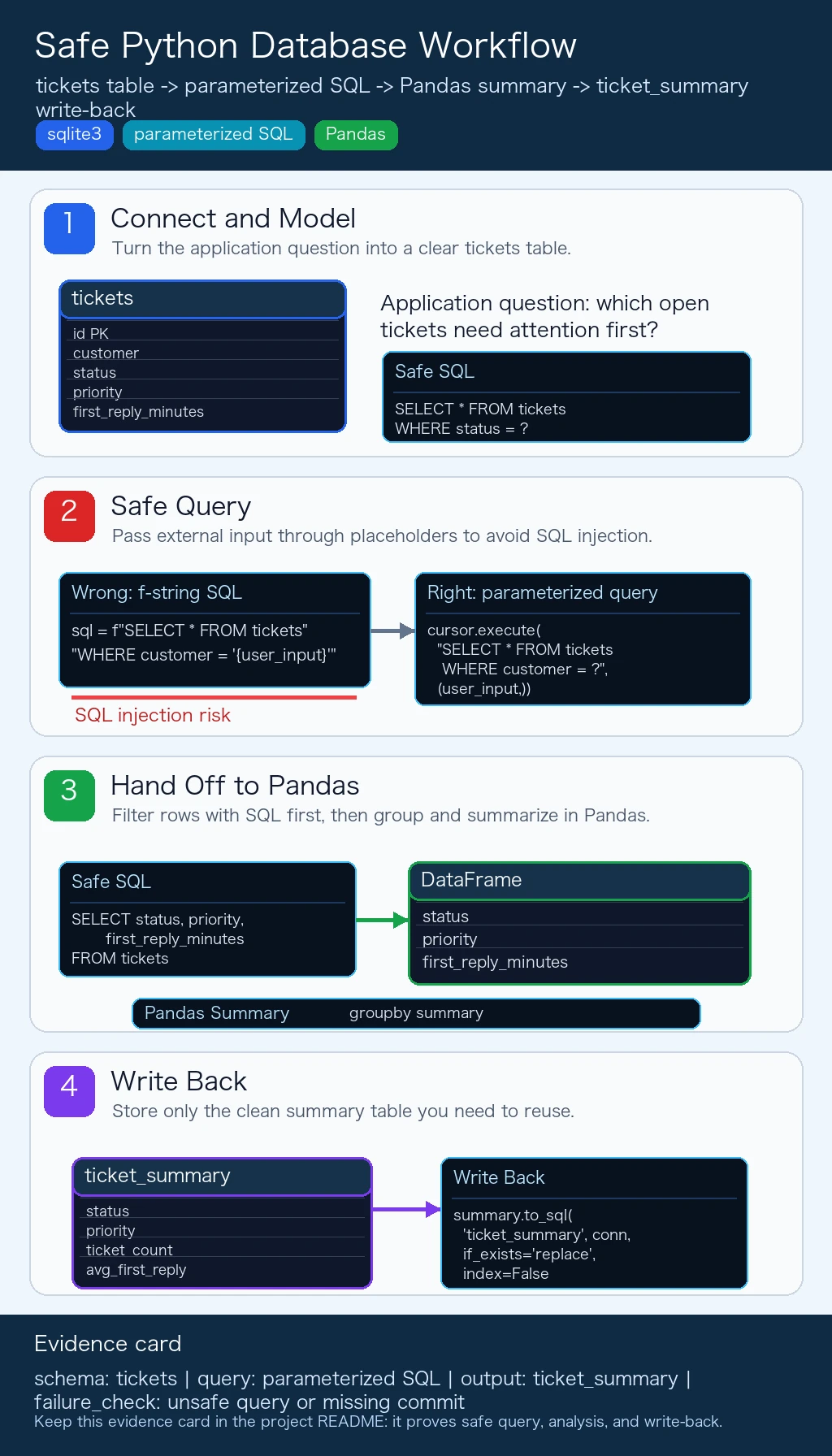
Section titled “Evidence to Keep”Keep this page’s proof of learning as a small evidence card:
- Schema
- tickets table, primary key, fields, and constraints
- Query
- parameterized SQL or Python database code used
- Output
- returned rows, row count, saved extract, or summary table
- Failure Check
- unsafe query, missing commit, wrong filter, or schema mismatch
- Expected Output
- query plus result table and one data-quality note
What You Should Take Away from This Section
Section titled “What You Should Take Away from This Section”- Python database work is the bridge between application code, stored data, and analysis
- Use parameterized queries whenever external input appears
- A reliable workflow is: filter with SQL first, analyze with Pandas, then write back only the result you actually need
Complete Practice: Customer Support Ticket Log
Section titled “Complete Practice: Customer Support Ticket Log”import sqlite3import pandas as pd
class TicketDB: """A small customer support ticket database."""
def __init__(self, db_path="tickets.db"): self.conn = sqlite3.connect(db_path) self.conn.row_factory = sqlite3.Row self._create_table()
def _create_table(self): self.conn.execute(""" CREATE TABLE IF NOT EXISTS tickets ( id INTEGER PRIMARY KEY AUTOINCREMENT, customer TEXT NOT NULL, issue_type TEXT NOT NULL, status TEXT NOT NULL, priority TEXT NOT NULL, first_reply_minutes INTEGER CHECK(first_reply_minutes >= 0) ) """) self.conn.commit()
def add_ticket(self, customer, issue_type, status, priority, first_reply_minutes): """Add one support ticket.""" self.conn.execute( """ INSERT INTO tickets (customer, issue_type, status, priority, first_reply_minutes) VALUES (?, ?, ?, ?, ?) """, (customer, issue_type, status, priority, first_reply_minutes) ) self.conn.commit()
def query_by_status(self, status): """Return tickets with a given status.""" cursor = self.conn.execute( "SELECT * FROM tickets WHERE status = ? ORDER BY priority", (status,) ) return [dict(row) for row in cursor.fetchall()]
def mark_closed(self, ticket_id): """Close one ticket by id.""" self.conn.execute( "UPDATE tickets SET status = ? WHERE id = ?", ("closed", ticket_id) ) self.conn.commit()
def priority_summary(self): """Summarize workload by priority.""" return pd.read_sql_query(""" SELECT priority AS Priority, COUNT(*) AS Ticket_Count, ROUND(AVG(first_reply_minutes), 1) AS Avg_First_Reply_Minutes FROM tickets GROUP BY priority ORDER BY Ticket_Count DESC """, self.conn)
def close(self): self.conn.close()
db = TicketDB(":memory:")
for ticket in [ ("Acme Co", "login", "open", "high", 18), ("Northwind", "billing", "pending", "medium", 42), ("Globex", "api", "open", "high", 64), ("Initech", "billing", "closed", "low", 35), ("Umbrella", "login", "open", "medium", 27), ("Hooli", "api", "pending", "high", 51),]: db.add_ticket(*ticket)
print("\nOpen tickets:")print(db.query_by_status("open"))
print("\nPriority summary:")print(db.priority_summary())
db.mark_closed(1)print("\nOpen tickets after closing ticket 1:")print(db.query_by_status("open"))
db.close()Summary
Section titled “Summary”| Method | Use case | Features |
|---|---|---|
sqlite3 | SQLite databases | Built into Python, zero dependencies |
pd.read_sql_query() | SQL -> DataFrame | Convenient for analysis |
df.to_sql() | DataFrame -> database | Writes a DataFrame into a table |
SQLAlchemy | Multiple databases and web apps | More general, supports engines and ORM |
Core principles:
- Use placeholders for values; do not concatenate SQL with external input
- Use
withor explicitcommit()/close()to manage connections - Filter with SQL first, then analyze selected data with Pandas
Hands-On Exercises
Section titled “Hands-On Exercises”Exercise 1: Ticket CRUD
Section titled “Exercise 1: Ticket CRUD”# Create a SQLite database.# Create a tickets table with customer, issue_type, status, priority, and first_reply_minutes.# Insert 5 tickets.# Query open high-priority tickets.# Update one ticket's status to closed.# Delete one cancelled or duplicate test ticket.Exercise 2: Pandas Collaboration
Section titled “Exercise 2: Pandas Collaboration”# 1. Use pd.read_sql_query to read open tickets into a DataFrame.# 2. Use Pandas to calculate ticket counts by status and priority.# 3. Calculate average first_reply_minutes by priority.# 4. Write the summary back to a new ticket_summary table with to_sql.Exercise 3: Extend the Class
Section titled “Exercise 3: Extend the Class”# Extend the TicketDB example above:# - Add an assign_ticket(ticket_id, assignee) method# - Add an add_message(ticket_id, author, body) method# - Query open tickets assigned to one person# - Export a small summary table for a dashboardReference implementation and walkthrough
For code exercises, the reference answer should show the working pattern, not just a final number.
import sqlite3import pandas as pd
with sqlite3.connect(":memory:") as conn:    conn.execute("""        CREATE TABLE tickets (            id INTEGER PRIMARY KEY AUTOINCREMENT,            customer TEXT NOT NULL,            issue_type TEXT NOT NULL,            status TEXT NOT NULL,            priority TEXT NOT NULL,            first_reply_minutes INTEGER CHECK(first_reply_minutes >= 0)        )    """)
    conn.executemany(        """        INSERT INTO tickets (customer, issue_type, status, priority, first_reply_minutes)        VALUES (?, ?, ?, ?, ?)        """,        [            ("Acme Co", "login", "open", "high", 18),            ("Northwind", "billing", "pending", "medium", 42),            ("Globex", "api", "open", "high", 64),            ("Initech", "billing", "cancelled", "low", 35),            ("Umbrella", "login", "open", "medium", 27),        ]    )
    rows = conn.execute(        "SELECT * FROM tickets WHERE status = ? AND priority = ?",        ("open", "high")    ).fetchall()    print(rows)
    conn.execute("UPDATE tickets SET status = ? WHERE customer = ?", ("closed", "Acme Co"))    conn.execute("DELETE FROM tickets WHERE status = ?", ("cancelled",))
    df = pd.read_sql_query("SELECT * FROM tickets WHERE status != ?", conn, params=("closed",))    summary = (        df.groupby(["status", "priority"])        .agg(            ticket_count=("id", "count"),            avg_first_reply_minutes=("first_reply_minutes", "mean"),        )        .reset_index()    )    summary.to_sql("ticket_summary", conn, if_exists="replace", index=False)
    print(pd.read_sql_query("SELECT * FROM ticket_summary", conn))
Walkthrough:
- The CRUD part proves state change by querying before and after
UPDATEandDELETE. - Every external value is passed through
?placeholders. - Pandas is used only after SQL has reduced the rows to the useful subset.
- A strong class solution keeps connection setup, table creation, insert/update methods, and reporting methods separate.