
8.3.8 Document Parsing and Knowledge Extraction
Learning objectives
Section titled “Learning objectives”- Understand why PDF / Word / PPT cannot be treated as plain text only
- Understand why scanned PDFs and image pages bring OCR into the pipeline
- Learn how to parse documents into structures such as “body text + hierarchy + metadata + evidence roles”
- Understand a minimal document parsing and knowledge extraction workflow
First, build a map
Section titled “First, build a map”Document parsing is easier to understand as “file -> structure -> knowledge chunks”:
flowchart LR A["PDF / DOCX / PPTX"] --> B["Text extraction"] B --> C["Structure recovery"] C --> D["Metadata completion"] D --> E["Chunking and knowledge extraction"]So what this section really wants to solve is:
- Why knowledge-base projects are not just “extract file content and you’re done”
- Why heading levels, page numbers, sections, and evidence roles all affect retrieval quality later
Why is document parsing often harder than expected?
Section titled “Why is document parsing often harder than expected?”Because the problems in different document formats are completely different:
PDFmay just be a “visual layout result,” and paragraph order is not naturally stableDOCXstructure is usually clearer, but styles and heading levels are not always consistentPPTXoften contains fragmented bullet points, unlike continuous prose- Scanned PDFs may not even give you the actual text directly
This means a truly usable knowledge base usually has to answer first:
- Was the text extracted?
- Is the order correct?
- Are headings, page numbers, and chapters preserved?
- Which parts are policies, cases, checklists, definitions, body text, or notes?
A beginner-friendly analogy
Section titled “A beginner-friendly analogy”You can think of document parsing like this:
- organizing a big box of materials into a set of cards you can flip through
If you just dump all the papers out randomly, you can still search through them later, but it will be messy. The safer approach is to organize them into:
- topics
- chapters
- headings
- evidence roles
- sources
Then when the system asks, “Find policy and case evidence for this topic,” it has a real chance of finding the right chunks.
The most common problems by file type
Section titled “The most common problems by file type”| File type | Most common problems |
|---|---|
| Wrong order, headers/footers mixed into body text, two-column layouts get scrambled | |
| Word | Inconsistent heading levels, tables mixed with body text |
| PPT | Each slide has little information but is fragmented; often need to preserve the “slide” concept |
| Scanned PDF / image pages | Requires OCR, and is prone to character recognition errors and ordering issues |
This table is especially useful for beginners because it reminds you:
- Document processing is not “one parser to rule them all”
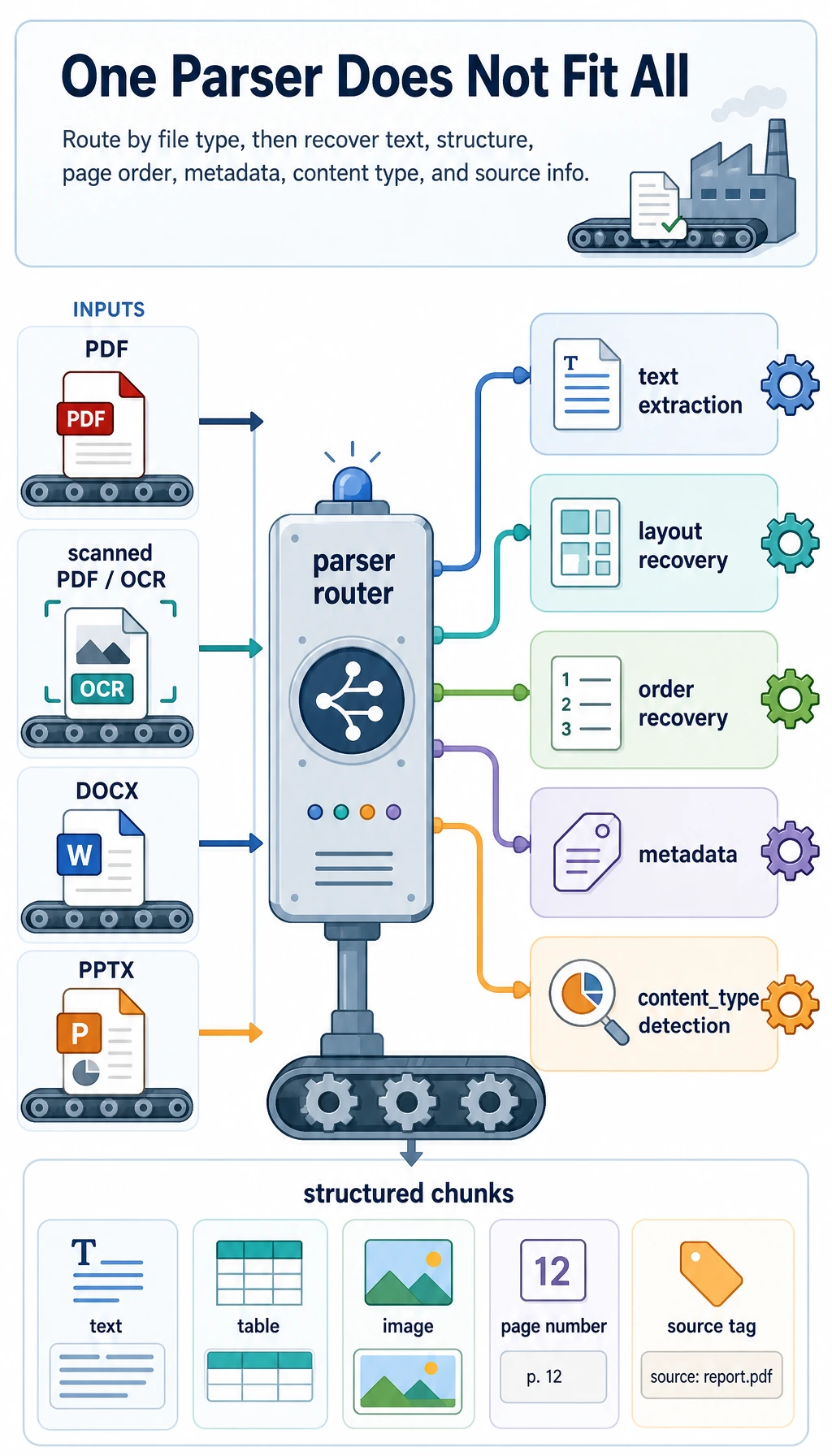
A minimal document parsing workflow example
Section titled “A minimal document parsing workflow example”The following example does not depend on a real third-party library, but it helps explain the idea of using different parsing routes for different document types.
from pathlib import Path

def route_parser(filename):    suffix = Path(filename).suffix.lower()    if suffix == ".pdf":        return "pdf_text_or_ocr"    if suffix == ".docx":        return "word_parser"    if suffix == ".pptx":        return "ppt_parser"    return "unsupported"

files = [    "refund_policy.pdf",    "handled_cases.docx",    "escalation_checklist.pptx",]
for file in files:    print(file, "->", route_parser(file))
Expected output:
refund_policy.pdf -> pdf_text_or_ocrhandled_cases.docx -> word_parserescalation_checklist.pptx -> ppt_parserThe most important value of this example is:
- it helps you build the idea of “routing” in your mind
In other words, when a file enters the system, you do not just throw it into one universal function, but first determine:
- what kind of file it is
- which parsing pipeline it should use
What does a real knowledge chunk look like?
Section titled “What does a real knowledge chunk look like?”What goes into the knowledge base should not just be:
- a raw text block
It should look more like this:
chunks = [    {        "doc_id": "word_001",        "source_type": "docx",        "section_title": "Refund Escalation Case Review",        "page_or_slide": 3,        "content": "Customer request was escalated after delivery failure and prior account review.",        "content_type": "case",    },    {        "doc_id": "ppt_002",        "source_type": "pptx",        "section_title": "Frontline Checklist",        "page_or_slide": 8,        "content": "Verify order state, refund window, prior contact, and approval owner.",        "content_type": "checklist",    },]
for chunk in chunks:    print(chunk)
Expected output:
{'doc_id': 'word_001', 'source_type': 'docx', 'section_title': 'Refund Escalation Case Review', 'page_or_slide': 3, 'content': 'Customer request was escalated after delivery failure and prior account review.', 'content_type': 'case'}{'doc_id': 'ppt_002', 'source_type': 'pptx', 'section_title': 'Frontline Checklist', 'page_or_slide': 8, 'content': 'Verify order state, refund window, prior contact, and approval owner.', 'content_type': 'checklist'}This example is especially helpful for beginners because it shows:
- what matters is not just getting the words
- but putting the words back into their source, chapter, page number, and content type
A more realistic parsing result schema
Section titled “A more realistic parsing result schema”When building this kind of system for the first time, the easiest things to miss are:
- document-level metadata
- chapter-level structure
- knowledge-chunk-level content
A safer approach is usually to divide the parsing result into three layers:
| Layer | Minimum information to keep |
|---|---|
| Document layer | doc_id / filename / source type / creation time / domain |
| Section layer | section_id / title / section path / page range |
| Knowledge chunk layer | chunk_id / text / content type / source page / evidence role |
You can think of it like this:
- document layer is like a document cover card
- section layer is like a table of contents
- knowledge chunk layer is the actual card used for retrieval and generation
The following minimal structure is a good starting point for beginners:
parsed_doc = {    "doc_id": "sop_pdf_001",    "source_type": "pdf",    "title": "Refund Escalation SOP",    "domain": "support operations",    "sections": [        {            "section_id": "s1",            "section_title": "Refund Escalation Rules",            "page_range": [1, 2],            "chunks": [                {                    "chunk_id": "c1",                    "content_type": "policy",                    "page_or_slide": 1,                    "text": "Refunds after the standard window require supervisor approval.",                },                {                    "chunk_id": "c2",                    "content_type": "case",                    "page_or_slide": 2,                    "text": "Customer request was escalated after delivery failure and account review.",                },            ],        }    ],}
print(parsed_doc["sections"][0]["chunks"][1]["text"])
Expected output:
Customer request was escalated after delivery failure and account review.The point of this schema is not that it is “beautifully designed,” but that:
- retrieval can filter on something later
- SOP draft generation can tell policy rules from handled cases
- citation traceability knows where the content came from
Why is “content type” so important?
Section titled “Why is “content type” so important?”Because your project is not ordinary Q&A, but something that needs to:
- find policy statements by topic
- find related handled cases
- then generate a Word SOP draft in a fixed format
At that point, if the system can distinguish:
policycasechecklistdefinition
then SOP draft generation will be much more stable.
A minimal “evidence type classification” demo
Section titled “A minimal “evidence type classification” demo”For your project, just knowing which page a passage comes from is not enough. You also want to distinguish, as much as possible:
- whether it is a policy rule
- whether it is a handled case
- whether it is a checklist or definition
When you first build this, you do not need to start with a complex model. You can begin with a minimal rule-based version to close the loop.
def guess_content_type(text):    if "Policy:" in text or "Approval:" in text:        return "policy"    if "Case:" in text or "Handled:" in text:        return "case"    if "Checklist:" in text or "Verify" in text:        return "checklist"    if "Definition:" in text:        return "definition"    return "paragraph"

samples = [    "Policy: refunds after the standard window require supervisor approval.",    "Case: delivery failure request escalated after account review.",    "Checklist: Verify order state, refund window, prior contact, and owner.",]
for sample in samples:    print(guess_content_type(sample), "->", sample)
Expected output:
policy -> Policy: refunds after the standard window require supervisor approval.case -> Case: delivery failure request escalated after account review.checklist -> Checklist: Verify order state, refund window, prior contact, and owner.This minimal rule-based version is not perfect, but it is very helpful for beginners to understand:
- evidence classification is not magic
- it is essentially document content classification
Hands-on: Turn Simulated Pages into Knowledge Chunks
Section titled “Hands-on: Turn Simulated Pages into Knowledge Chunks”Now connect routing, section detection, metadata, and content typing into one runnable mini pipeline. This still uses simulated page text, but the output shape is close to what you would store before embedding.
def guess_content_type(text):    if "Policy:" in text or "Approval:" in text:        return "policy"    if "Case:" in text or "Handled:" in text:        return "case"    if "Checklist:" in text or "Verify" in text:        return "checklist"    if "Definition:" in text:        return "definition"    return "paragraph"

def build_chunks(doc_id, source_type, pages):    chunks = []    section_title = "Untitled"
    for page_no, lines in pages:        for line in lines:            line = line.strip()            if not line:                continue            if line.startswith("#"):                section_title = line.lstrip("#").strip()                continue
            chunks.append({                "chunk_id": f"{doc_id}_c{len(chunks) + 1}",                "doc_id": doc_id,                "source_type": source_type,                "section_title": section_title,                "page_or_slide": page_no,                "content": line,                "content_type": guess_content_type(line),            })
    return chunks

pages = [    (1, ["# Refund Escalation Rules", "Policy: refunds after the standard window require supervisor approval."]),    (2, ["Case: delivery failure request escalated after account review."]),]
for chunk in build_chunks("sop_doc_001", "docx", pages):    print(chunk)
Expected output:
{'chunk_id': 'sop_doc_001_c1', 'doc_id': 'sop_doc_001', 'source_type': 'docx', 'section_title': 'Refund Escalation Rules', 'page_or_slide': 1, 'content': 'Policy: refunds after the standard window require supervisor approval.', 'content_type': 'policy'}{'chunk_id': 'sop_doc_001_c2', 'doc_id': 'sop_doc_001', 'source_type': 'docx', 'section_title': 'Refund Escalation Rules', 'page_or_slide': 2, 'content': 'Case: delivery failure request escalated after account review.', 'content_type': 'case'}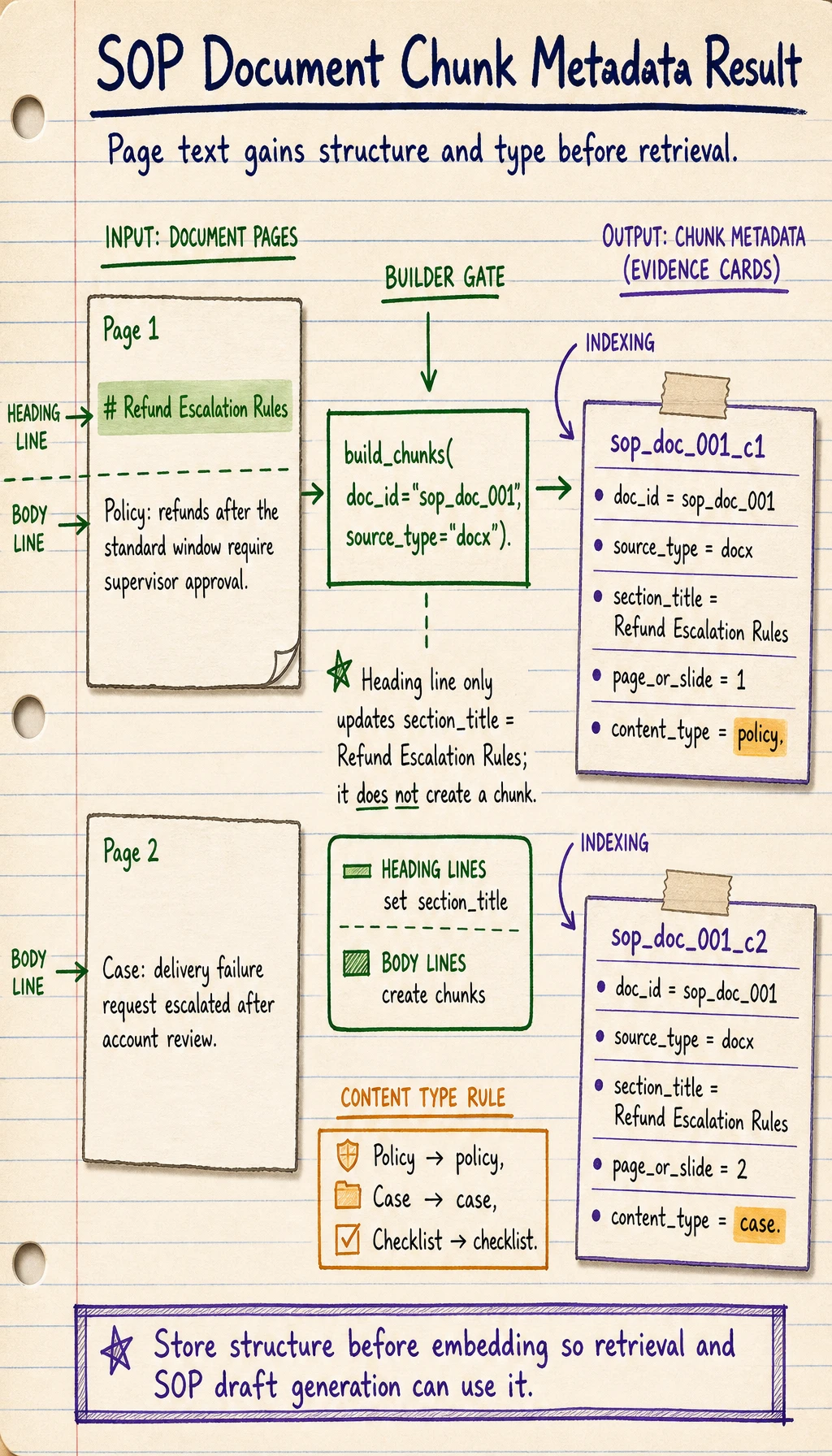
This is the smallest useful ingestion loop: every chunk carries content, structure, source, page, and type. Retrieval and SOP draft generation become much easier once this shape is stable.
Operation guide and checkpoints
A good result has two chunks, not three. The heading line should update section_title to Refund Escalation Rules, while the policy line becomes a policy chunk and the case line becomes a case chunk.
The important engineering lesson is that chunking is not just splitting text. Each chunk should keep enough metadata to be useful later: source type, document id, page or slide number, section title, original content, and a coarse content type. If one of those fields is missing, retrieval results may still look plausible, but the generated SOP draft will be harder to cite, debug, or filter.
For a stronger version, add one more simulated page that contains a Checklist: line. The expected behavior is a third chunk with content_type: "checklist" and the same current section title unless a new heading appears first.
Why do scanned files bring OCR into the pipeline?
Section titled “Why do scanned files bring OCR into the pipeline?”Because scanned PDFs or image pages are not text files at their core, but rather:
- text that looks like an image
So you need to do:
- OCR to recognize the text
and then continue with:
- structure recovery
- heading hierarchy recognition
- evidence type classification
If you later need to process many scanned SOPs, checklists, screenshots, or photographed materials, this step becomes critical.
For a related course section, see:
The safest scope control for your first implementation
Section titled “The safest scope control for your first implementation”When you first develop this module, the most common reason for failure is not that the technology is too hard, but that the scope gets too large too quickly.
A safer minimal version is usually:
- Support text-based
DOCXfirst - Then support text-based
PDF - Then support
PPTX - Finally add OCR for scanned files
The benefit of this order is:
- you can first make the structure and schema work smoothly
- you will not get stuck on OCR recognition problems right away
A parsing checklist beginners can copy directly
Section titled “A parsing checklist beginners can copy directly”When you parse documents for a knowledge base for the first time, the safest checklist is usually:
- Was all the text extracted correctly?
- Is the order of headings and body text correct?
- Was the chapter hierarchy preserved?
- Were page numbers / slide numbers kept?
- Can body text, policies, cases, and checklists be distinguished?
- Are there OCR recognition errors in scanned files?
These 6 items are higher priority than “just use a vector database first.”
If you turn this into a project, what is most worth showing?
Section titled “If you turn this into a project, what is most worth showing?”What is most worth showing is usually not:
- “We support PDF / Word / PPT”
but rather:
- What the original document looks like
- What the parsed structured knowledge chunks look like
- How policies, cases, and checklists were identified
- Where OCR or structure recovery tends to fail
That way, others can more easily see that:
- you understand the knowledge ingestion pipeline
- you are not just capable of “reading files”
Evidence to Keep
Section titled “Evidence to Keep”Keep this page’s proof of learning as a small evidence card:
- Request
- input, state, tools/context, and expected output contract
- Validated Output
- parser/schema or business-rule check result
- Trace
- model call, tool/function call, document parse, or dialogue state
- Failure Check
- invalid format, missing field, stale state, or wrong tool
- Next Action
- prompt, schema, state, API, or parsing improvement
Summary
Section titled “Summary”- Document parsing is really about turning files into structured knowledge objects
- Schema design determines whether retrieval, citation, and SOP draft generation will be stable later
- When you start, it is more realistic to get
DOCX / text PDF / rule-based evidence type classificationworking smoothly first than to support everything at once
What you should take away from this section
Section titled “What you should take away from this section”- Document parsing is not finished just by extracting text; structure and source must also be restored
- Truly valuable knowledge chunks should carry metadata such as headings, page numbers, and content types
- If your knowledge base comes from a large number of PDF / Word / PPT / scanned files, this step is one of the most critical entry points in the whole pipeline