
3.2.3 Array Indexing and Slicing
Learning Objectives
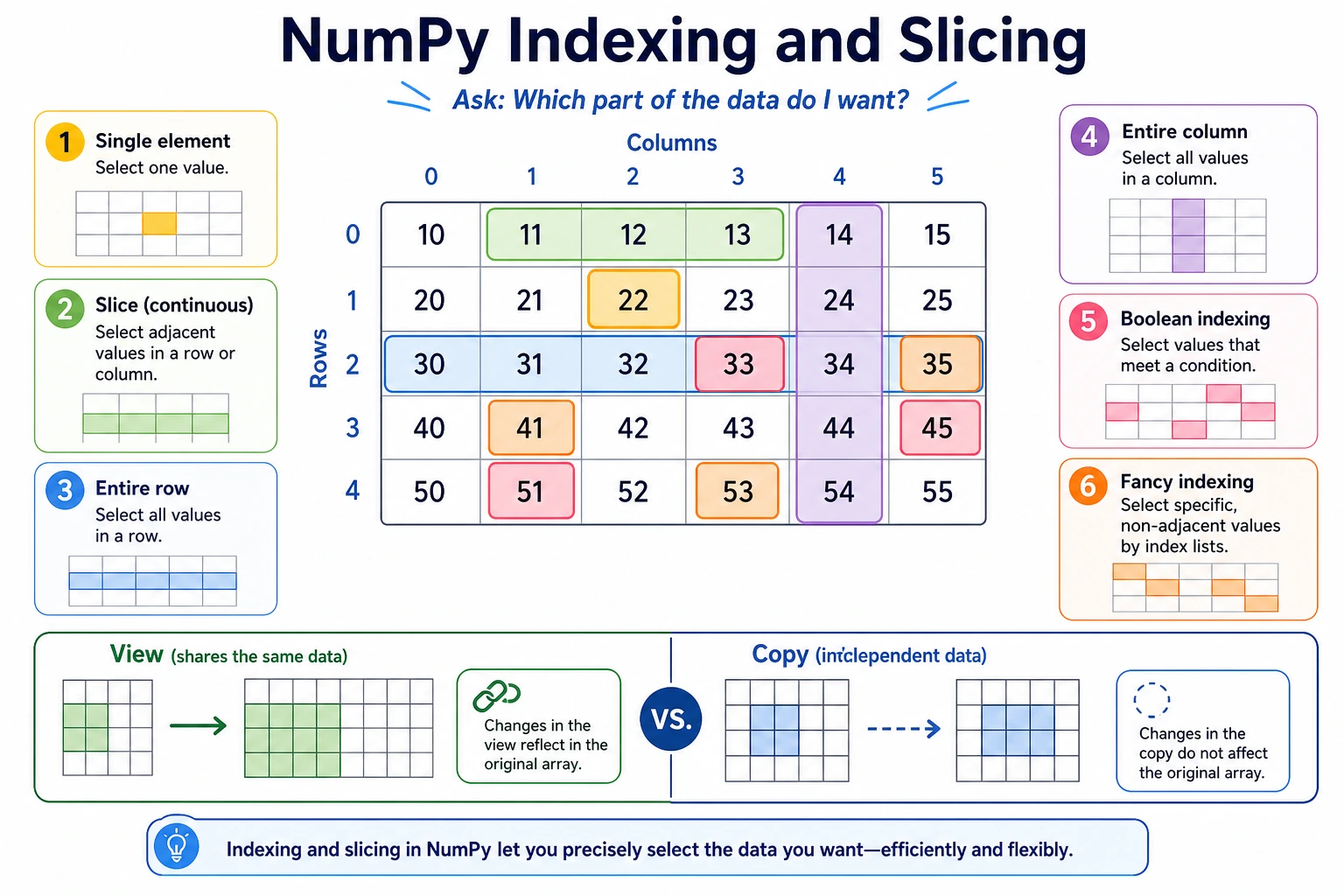
Section titled “Learning Objectives”- Master basic indexing and slicing for 1D and multi-dimensional arrays
- Learn how to use boolean indexing for conditional filtering
- Understand Fancy Indexing
- Understand the difference between View and Copy
Indexing and Slicing 1D Arrays
Section titled “Indexing and Slicing 1D Arrays”Indexing in 1D arrays is basically the same as in Python lists:
import numpy as np
arr = np.array([10, 20, 30, 40, 50, 60, 70, 80])
# ===== Basic indexing =====print(arr[0])     # 10   first elementprint(arr[3])     # 40   fourth elementprint(arr[-1])    # 80   last elementprint(arr[-2])    # 70   second-to-last element
# ===== Slicing [start:stop:step] =====print(arr[2:5])    # [30 40 50]    indices 2 to 4print(arr[:3])     # [10 20 30]    first 3 elementsprint(arr[5:])     # [60 70 80]    from index 5 to the endprint(arr[::2])    # [10 30 50 70] take every other elementprint(arr[::-1])   # [80 70 60 50 40 30 20 10] reverse
Indexing and Slicing 2D Arrays
Section titled “Indexing and Slicing 2D Arrays”2D arrays are accessed using [row, column]:
matrix = np.array([ [1, 2, 3, 4], [5, 6, 7, 8], [9, 10, 11, 12], [13, 14, 15, 16]])Access a Single Element
Section titled “Access a Single Element”print(matrix[0, 0]) # 1 row 0, column 0print(matrix[1, 2]) # 7 row 1, column 2print(matrix[-1, -1]) # 16 last row, last columnAccess an Entire Row/Column
Section titled “Access an Entire Row/Column”print(matrix[0]) # [1 2 3 4] row 0 (entire row)print(matrix[0, :]) # [1 2 3 4] same as above, more explicit
print(matrix[:, 0]) # [ 1 5 9 13] column 0 (entire column)print(matrix[:, -1]) # [ 4 8 12 16] last columnRow and Column Slicing
Section titled “Row and Column Slicing”# Get the first 2 rows and first 3 columnssub = matrix[:2, :3]print(sub)# [[1 2 3]# [5 6 7]]
# Get rows 1~2 and columns 2~3sub2 = matrix[1:3, 2:4]print(sub2)# [[ 7 8]# [11 12]]
# Take every other row (rows 0 and 2)sub3 = matrix[::2]print(sub3)# [[ 1 2 3 4]# [ 9 10 11 12]]Visual Guide to 2D Indexing
Section titled “Visual Guide to 2D Indexing”| Expression | What it selects | Result |
|---|---|---|
matrix[1, 2] | row 1, column 2 | 7 |
matrix[:2, :3] | first 2 rows and first 3 columns | [[1,2,3], [5,6,7]] |
matrix[:, 1] | all rows, column 1 | [2, 6, 10, 14] |
Boolean Indexing: Conditional Filtering
Section titled “Boolean Indexing: Conditional Filtering”This is one of NumPy’s most powerful features — use conditional expressions to filter data directly!
Basic Idea
Section titled “Basic Idea”arr = np.array([15, 23, 8, 42, 31, 5, 19, 27])
# Step 1: a condition expression generates a boolean arraymask = arr > 20print(mask) # [False True False True True False False True]
# Step 2: use the boolean array as an index to select elements where the value is Trueresult = arr[mask]print(result) # [23 42 31 27]
# Usually combined into one lineprint(arr[arr > 20]) # [23 42 31 27]Common Filtering Examples
Section titled “Common Filtering Examples”scores = np.array([85, 92, 78, 65, 95, 43, 88, 72, 55, 90])
# Passing scores (>= 60)print(scores[scores >= 60]) # [85 92 78 65 95 88 72 90]
# Excellent scores (>= 90)print(scores[scores >= 90]) # [92 95 90]
# Failing scores (< 60)print(scores[scores < 60]) # [43 55]
# Scores between 60 and 80 (combine multiple conditions with &, and add parentheses around each condition)print(scores[(scores >= 60) & (scores <= 80)]) # [78 65 72]
# Scores below 60 or above 90 (combine multiple conditions with |)print(scores[(scores < 60) | (scores > 90)]) # [92 95 43 55]
# Negation (~)print(scores[~(scores >= 60)]) # [43 55] equivalent to scores[scores < 60]Boolean Indexing with 2D Arrays
Section titled “Boolean Indexing with 2D Arrays”matrix = np.array([ [85, 92, 78], [65, 95, 43], [88, 72, 90]])
# Find all scores greater than 80print(matrix[matrix > 80]) # [85 92 95 88 90]# Note: the result becomes a 1D array!
# Change failing scores to 60 (conditional assignment)matrix[matrix < 60] = 60print(matrix)# [[85 92 78]# [65 95 60] ← 43 was changed to 60# [88 72 90]]Fancy Indexing
Section titled “Fancy Indexing”Fancy indexing lets you use an integer array as the index to retrieve multiple elements at specific positions at once:
Fancy Indexing in 1D
Section titled “Fancy Indexing in 1D”arr = np.array([10, 20, 30, 40, 50, 60, 70])
# Get elements at indices 1, 3, 5print(arr[[1, 3, 5]]) # [20 40 60]
# Repeated selection is allowedprint(arr[[0, 0, 2, 2]]) # [10 10 30 30]
# Any order is allowedprint(arr[[6, 4, 2, 0]]) # [70 50 30 10]Fancy Indexing in 2D
Section titled “Fancy Indexing in 2D”matrix = np.array([ [1, 2, 3, 4], [5, 6, 7, 8], [9, 10, 11, 12]])
# Get row 0 and row 2print(matrix[[0, 2]])# [[ 1 2 3 4]# [ 9 10 11 12]]
# Get specific positions: the three elements (0,1), (1,2), (2,3)rows = [0, 1, 2]cols = [1, 2, 3]print(matrix[rows, cols]) # [ 2 7 12]View vs Copy
Section titled “View vs Copy”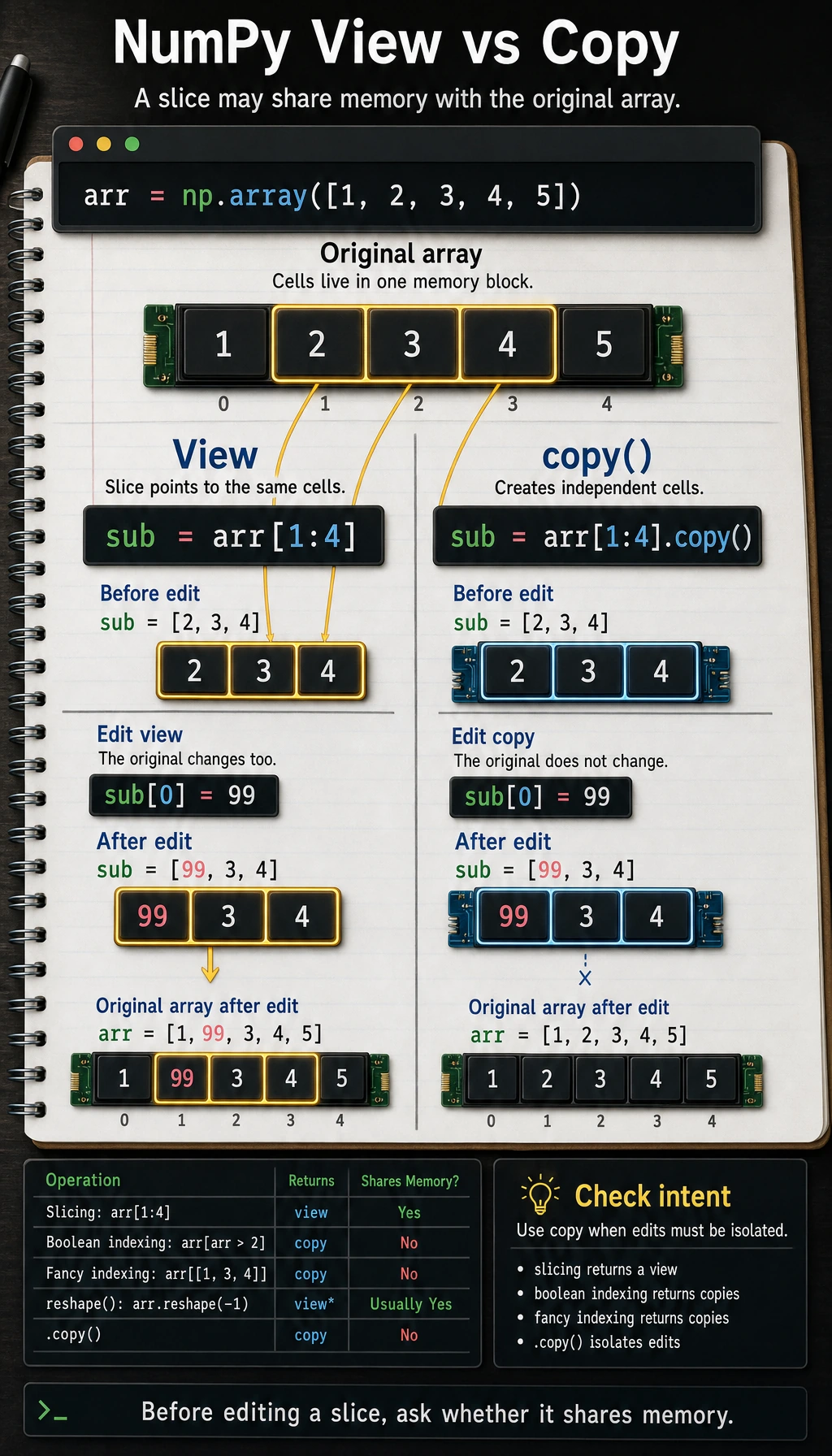
This is a common beginner trap — NumPy slicing returns a view, not a copy!
View: Changes Affect the Original Array
Section titled “View: Changes Affect the Original Array”arr = np.array([1, 2, 3, 4, 5])
# Slicing returns a viewsub = arr[1:4]print(sub) # [2 3 4]
# Changing sub also changes arr!sub[0] = 99print(sub) # [99 3 4]print(arr) # [ 1 99 3 4 5] ← the original array changed too!Copy: Independent from the Original
Section titled “Copy: Independent from the Original”arr = np.array([1, 2, 3, 4, 5])
# Use copy() to create an independent copysub = arr[1:4].copy()print(sub) # [2 3 4]
# Changing sub does not affect arrsub[0] = 99print(sub) # [99 3 4]print(arr) # [1 2 3 4 5] ← the original array is unchangedWhen Is It a View? When Is It a Copy?
Section titled “When Is It a View? When Is It a Copy?”| Operation | Return Type | Example |
|---|---|---|
| Slicing | View | arr[2:5] |
| Boolean indexing | Copy | arr[arr > 3] |
| Fancy indexing | Copy | arr[[1, 3, 5]] |
.copy() | Copy | arr[2:5].copy() |
.reshape() | View (usually) | arr.reshape(2, 3) |
Hands-on Example: Analyzing Data with Indexing
Section titled “Hands-on Example: Analyzing Data with Indexing”Back to the Titanic scenario, let’s use NumPy indexing to analyze the data:
import numpy as np
# Simulated data for 10 passengersages = np.array([22, 38, 26, 35, 35, np.nan, 54, 2, 27, 14])fares = np.array([7.25, 71.28, 7.92, 53.10, 8.05, 8.46, 51.86, 21.08, 11.13, 30.07])survived = np.array([0, 1, 1, 1, 0, 0, 0, 0, 1, 1])
# Find the average fare of survivorssurvivor_fares = fares[survived == 1]print(f"Average fare of survivors: ${np.mean(survivor_fares):.2f}")
# Find fares for passengers older than 30 (exclude NaN first)valid_mask = ~np.isnan(ages)  # exclude NaNage_mask = ages > 30combined_mask = valid_mask & age_maskprint(f"Fares for passengers over 30: {fares[combined_mask]}")
# Find the indices of the 3 passengers with the highest farestop3_indices = np.argsort(fares)[-3:][::-1]  # sort, take the last 3, then reverseprint(f"Top 3 fare indices: {top3_indices}")print(f"Corresponding fares: {fares[top3_indices]}")
Evidence to Keep
Section titled “Evidence to Keep”Keep this page’s proof of learning as a small evidence card:
- Array State
- shape, dtype, axis, and sample values before the operation
- Operation
- indexing, slicing, broadcasting, reshape, linear algebra, or random/stat function
- Output
- resulting array shape, values, or statistic
- Failure Check
- axis confusion, view/copy trap, broadcast mismatch, or wrong shape
- Expected Output
- printed shapes and values that make the array operation inspectable
Summary
Section titled “Summary”| Indexing Method | Syntax | Return Type | Use Case |
|---|---|---|---|
| Basic indexing | arr[i], arr[i, j] | Element value | Get a single element |
| Slicing | arr[start:stop:step] | View | Get a continuous region |
| Boolean indexing | arr[arr > 5] | Copy | Conditional filtering |
| Fancy indexing | arr[[1, 3, 5]] | Copy | Get non-contiguous positions |
Practice
Section titled “Practice”Exercise 1: Basic Slicing
Section titled “Exercise 1: Basic Slicing”arr = np.arange(1, 21) # [1, 2, 3, ..., 20]
# 1. Get the first 5 elements# 2. Get all elements at odd positions (indices 1, 3, 5, ...)# 3. Get the last 3 elements# 4. Reverse the arrayExercise 2: 2D Slicing
Section titled “Exercise 2: 2D Slicing”matrix = np.arange(1, 26).reshape(5, 5)print(matrix)# [[ 1 2 3 4 5]# [ 6 7 8 9 10]# [11 12 13 14 15]# [16 17 18 19 20]# [21 22 23 24 25]]
# 1. Get the middle 3×3 submatrix# 2. Get all elements in the second column# 3. Get the diagonal elements [1, 7, 13, 19, 25] (hint: use fancy indexing)Exercise 3: Boolean Indexing in Practice
Section titled “Exercise 3: Boolean Indexing in Practice”# Math scores for 20 students in a classmath_scores = np.array([ 78, 92, 65, 88, 45, 95, 72, 81, 56, 90, 83, 67, 94, 73, 85, 60, 98, 77, 69, 87])
# 1. Find all failing scores (< 60)# 2. Find all scores between 80 and 90 (inclusive)# 3. Compute the average score of passing students# 4. Change all failing scores to 60# 5. Compute the updated average scoreReference implementation and walkthrough
- Typical slice answers are
arr[:5]for the first five values,arr[1::2]for even positions in one-based wording,arr[-3:]for the last three values, andarr[::-1]for reverse order. - For a 5 by 5 matrix,
matrix[1:4, 1:4]selects the center 3 by 3 block,matrix[:, 1]selects the second column, andmatrix[np.arange(5), np.arange(5)]selects the main diagonal. - For score filtering, keep the original data unchanged, then create a copied array before replacing failing scores with
60. This avoids hiding the raw evidence.