
9.6.5 CrewAI
Learning Objectives
Section titled “Learning Objectives”- Understand CrewAI’s most important core abstractions
- Understand why it is especially suitable for team-style multi-Agent scenarios
- Read a minimal crew workflow
- Understand its strengths and limitations
What Is CrewAI’s Most Fundamental Abstraction?
Section titled “What Is CrewAI’s Most Fundamental Abstraction?”Start by Defining Roles, Not a State Diagram
Section titled “Start by Defining Roles, Not a State Diagram”CrewAI’s way of thinking is very similar to real-world team management:
- Who is responsible for research
- Who is responsible for writing
- Who is responsible for review
In other words, it does not first ask:
- How are the nodes connected?
Instead, it first asks:
- Who is on this team?
A Very Intuitive Analogy
Section titled “A Very Intuitive Analogy”CrewAI is more like:
“Build the team first, then assign tasks.”
This is very different from LangGraph’s approach of “define the state and edges first.”
The Three Most Important Concepts
Section titled “The Three Most Important Concepts”A member. It usually has:
- a role
- a goal
- a capability tendency
A specific piece of work. It usually has:
- task content
- an owner
- expected output
A small team collaborating around a common goal.
Remember this one-sentence summary:
Agent is the person, Task is the work, Crew is the team.
A Minimal Crew Example
Section titled “A Minimal Crew Example”crew = [ {"role": "researcher", "goal": "retrieve refund policy"}, {"role": "writer", "goal": "organize it into a summary"}, {"role": "reviewer", "goal": "check whether any conditions are missing"}]
tasks = [ {"owner": "researcher", "task": "find the refund policy"}, {"owner": "writer", "task": "write the summary"}, {"owner": "reviewer", "task": "check the summary"}]
print(crew)print(tasks)Expected output:
[{'role': 'researcher', 'goal': 'retrieve refund policy'}, {'role': 'writer', 'goal': 'organize it into a summary'}, {'role': 'reviewer', 'goal': 'check whether any conditions are missing'}][{'owner': 'researcher', 'task': 'find the refund policy'}, {'owner': 'writer', 'task': 'write the summary'}, {'owner': 'reviewer', 'task': 'check the summary'}]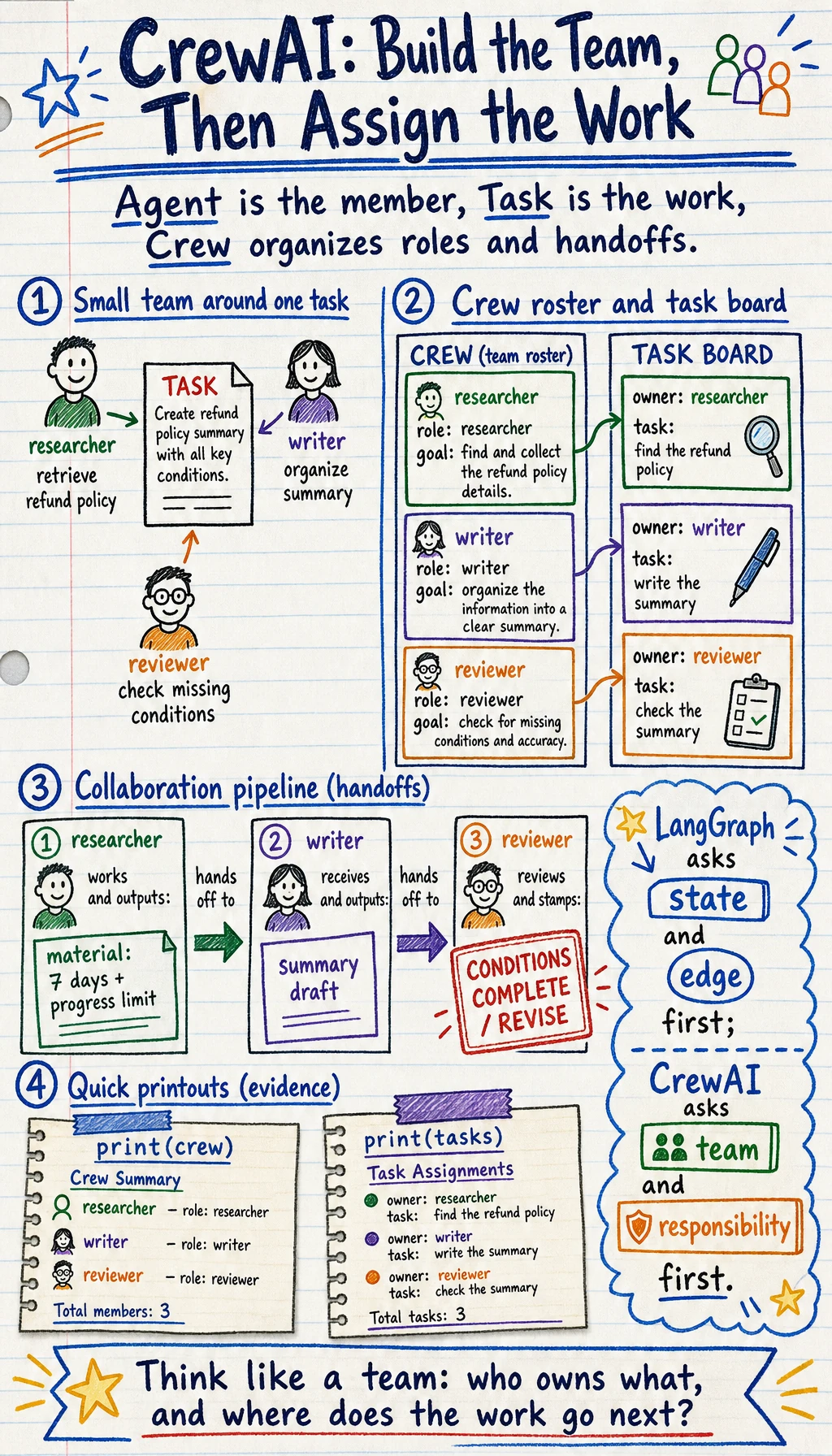
What Does This Example Really Express?
Section titled “What Does This Example Really Express?”It expresses this:
A multi-Agent system can be organized first by “roles and tasks,” rather than by a low-level state flow.
That is exactly why CrewAI is so easy to get started with.
Why Is This Abstraction Especially Suitable for Content Collaboration Tasks?
Section titled “Why Is This Abstraction Especially Suitable for Content Collaboration Tasks?”Many tasks naturally look like a small team getting work done:
- collect materials first
- then write a draft
- then review it
For example:
- research reports
- policy summaries
- content creation
- code documentation
CrewAI’s abstraction fits these tasks very well, so it often gives people the feeling that:
“This feels more like real collaboration than a low-level graph workflow.”
A More Complete Small Crew Workflow
Section titled “A More Complete Small Crew Workflow”def researcher_agent(topic): return f"Material: The key conditions for {topic} include a 7-day limit and learning progress restrictions."
def writer_agent(material): return f"Draft: {material}"
def reviewer_agent(draft): if "learning progress restrictions" in draft: return {"approved": True, "comment": "The key information is fairly complete"} return {"approved": False, "comment": "Missing learning progress information"}
topic = "refund policy"material = researcher_agent(topic)draft = writer_agent(material)review = reviewer_agent(draft)
print("material:", material)print("draft :", draft)print("review :", review)Expected output:
material: Material: The key conditions for refund policy include a 7-day limit and learning progress restrictions.draft : Draft: Material: The key conditions for refund policy include a 7-day limit and learning progress restrictions.review : {'approved': True, 'comment': 'The key information is fairly complete'}This example shows:
- clear role division
- clear inputs and outputs
- a very natural collaboration chain
Where Does CrewAI Shine?
Section titled “Where Does CrewAI Shine?”Easy to Understand
Section titled “Easy to Understand”Compared with complex state graphs, “team roles” match many people’s intuition better.
Easy to Present
Section titled “Easy to Present”It is very easy to explain in demos, architecture discussions, and collaboration examples.
Well Suited for Tasks with Clear Role Division
Section titled “Well Suited for Tasks with Clear Role Division”Especially suitable for:
- research
- writing
- review
- summarization
These are scenarios where “who does what” is very clear.
CrewAI’s Limitations Are Also Important to Understand
Section titled “CrewAI’s Limitations Are Also Important to Understand”It Does Not Automatically Solve Complex State Flows
Section titled “It Does Not Automatically Solve Complex State Flows”If your system has:
- many branches
- many loops
- complex intermediate states
Then relying only on “role abstraction” may not be enough.
Role Abstraction Can Sometimes Hide Underlying Engineering Complexity
Section titled “Role Abstraction Can Sometimes Hide Underlying Engineering Complexity”It may look like:
- researcher
- writer
- reviewer
Very clear, but in a real production system you still need to handle:
- timeouts
- retries
- logs
- trace
- permissions
So it is more like a “way of expressing” and “way of organizing” systems, rather than a universal solution.
When Is CrewAI a Better Choice?
Section titled “When Is CrewAI a Better Choice?”If your task feels very much like:
- team collaboration
- role division
- a content production pipeline
then CrewAI often feels very natural.
For example:
- “one person gathers materials, one writes, one reviews”
For this kind of task, a CrewAI mindset usually works very smoothly.
But if the task feels more like:
- a complex state graph
- fine-grained control loops
then a graph-based framework may be more stable.
Common Pitfalls for Beginners
Section titled “Common Pitfalls for Beginners”Too Many Roles, but No Clear Responsibilities
Section titled “Too Many Roles, but No Clear Responsibilities”It looks like a team, but in reality it is just many vague roles thrown together.
Thinking Role Abstraction Means the System Is Automatically Stable
Section titled “Thinking Role Abstraction Means the System Is Automatically Stable”Roles are only an organizational form. They will not automatically fill in engineering capabilities for you.
Forcing Multi-Agent Just to “Look Like a Team”
Section titled “Forcing Multi-Agent Just to “Look Like a Team””If the task itself does not need division of labor, multi-Agent can become a burden instead.
Evidence to Keep
Section titled “Evidence to Keep”Keep this page’s proof of learning as a small evidence card:
- Problem Shape
- workflow graph, retrieval app, role team, or experiment
- Framework Choice
- what abstraction it adds and what control it hides
- Trace
- state, node, tool call, message, or run id
- Failure Check
- framework magic hides state, retries, or permissions
- Decision
- choose framework only after the single-agent loop is clear
Summary
Section titled “Summary”The most important thing in this section is not memorizing a class name from some framework, but understanding:
CrewAI’s core value is that it expresses multi-Agent problems first as a collaboration structure of “roles + tasks + team.”
This is especially attractive for content-oriented tasks with clear roles, but it is not the best abstraction for every system.
Exercises
Section titled “Exercises”- Design a 3-role crew for one of your own tasks.
- Think about why “more roles” does not mean better system quality.
- Explain in your own words: What is the difference between CrewAI and LangGraph in terms of abstraction entry point?
- If your task has many loops and conditional branches, would you still choose CrewAI first? Why?
Solution approach and explanation
- A useful three-role crew might be researcher, writer, and reviewer. Each role should have a narrow responsibility, a clear output, and a handoff point to the next role.
- More roles can reduce quality when responsibilities overlap, messages become noisy, or nobody owns the final decision. Add a role only when it removes a real bottleneck.
- CrewAI starts from role collaboration: who does the work and how tasks move between roles. LangGraph starts from explicit state and transitions: what node runs next and under what condition.
- For many loops and conditional branches, CrewAI may be less ideal as the first choice. A graph or workflow-oriented design usually makes control flow, retry limits, and failure handling easier to inspect.