
3.2.1 NumPy Overview
Learning Objectives
Section titled “Learning Objectives”- Understand what NumPy is and its place in the Python ecosystem
- Understand the difference between ndarray and Python list
- Install NumPy and run your first piece of code
- Intuitively feel NumPy’s performance advantages
What Is NumPy?
Section titled “What Is NumPy?”NumPy (Numerical Python) is the core library in Python for scientific computing. If Python is a car, then NumPy is its engine — almost every data science and AI-related library is built on top of NumPy.
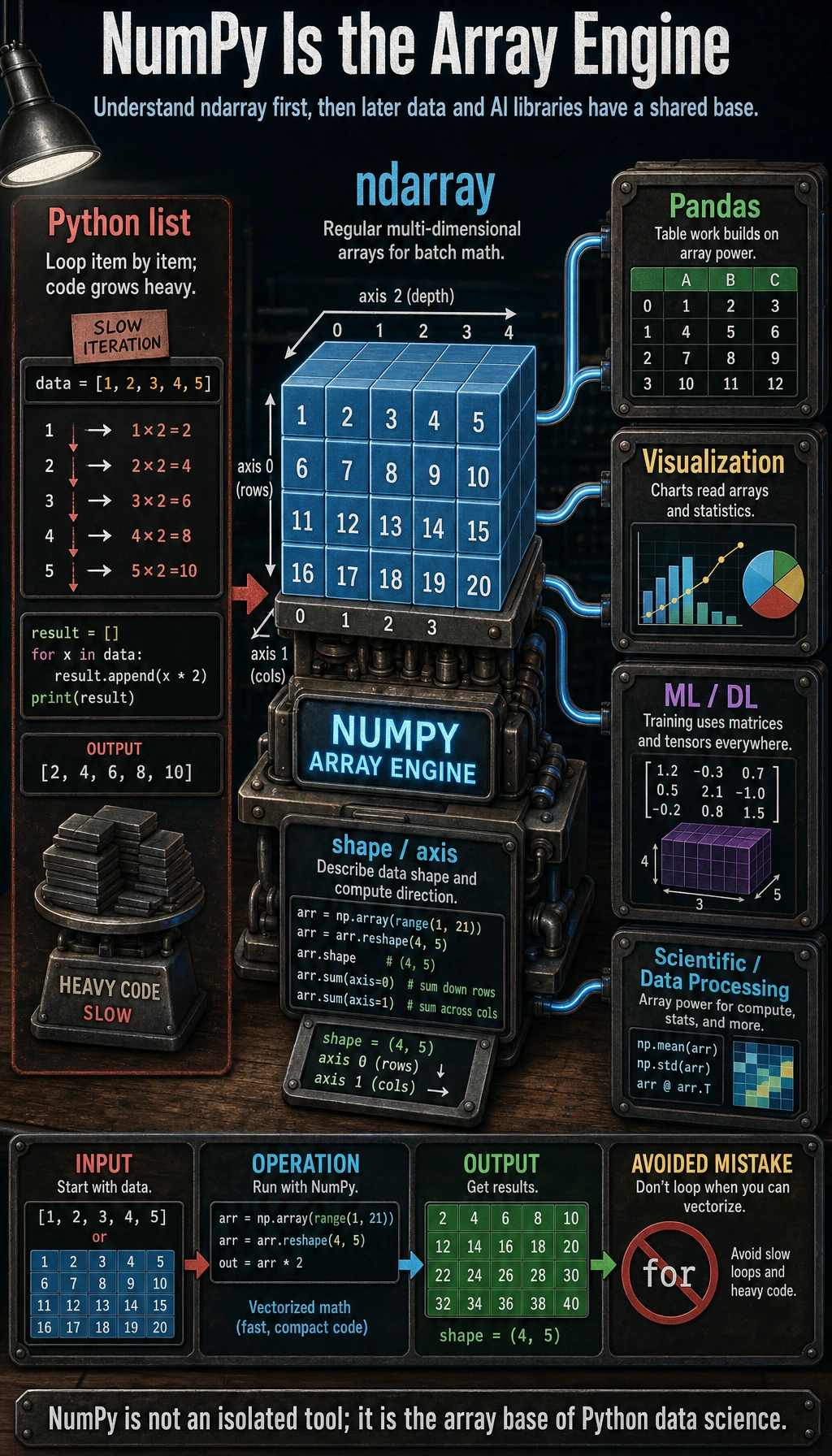
In simple terms: if you want to learn data analysis and AI, NumPy is the first stop you can’t avoid.
Why Do We Need NumPy?
Section titled “Why Do We Need NumPy?”In the warm-up exercises of Chapter 1, we processed data using pure Python and ran into many pain points. So what problems can NumPy solve for us?
The Limitations of Python Lists
Section titled “The Limitations of Python Lists”Think back: if we want to multiply a set of numbers by 2:
# Pure Python: need to write a loopnumbers = [1, 2, 3, 4, 5]result = []for n in numbers:    result.append(n * 2)print(result)  # [2, 4, 6, 8, 10]
# Or use a list comprehensionresult = [n * 2 for n in numbers]
If we want to calculate the sum of two datasets at corresponding positions:
a = [1, 2, 3, 4, 5]b = [10, 20, 30, 40, 50]result = [a[i] + b[i] for i in range(len(a))]print(result) # [11, 22, 33, 44, 55]These operations are very common, but writing a loop every time is both troublesome and slow.
NumPy’s Solution
Section titled “NumPy’s Solution”import numpy as np
# NumPy: operate directly on the whole array, no loop needed!numbers = np.array([1, 2, 3, 4, 5])result = numbers * 2print(result) # [ 2 4 6 8 10]
# Add two datasetsa = np.array([1, 2, 3, 4, 5])b = np.array([10, 20, 30, 40, 50])result = a + bprint(result) # [11 22 33 44 55]No loop, done in one line! This is NumPy’s core ability — vectorized computation.
Installing NumPy
Section titled “Installing NumPy”If you use Miniconda / Anaconda, NumPy is usually already installed. If not:
# Install with pippython -m pip install --upgrade numpy
# Or install with condaconda install numpy
Verify the installation:
import numpy as npprint(np.__version__) # e.g. 1.26.4print("NumPy installed successfully!")ndarray vs Python list
Section titled “ndarray vs Python list”The core of NumPy is the ndarray (N-dimensional array). How is it different from a Python list?
Visual Comparison
Section titled “Visual Comparison”import numpy as np
# Python listpy_list = [1, 2, 3, 4, 5]print(type(py_list)) # <class 'list'>print(py_list) # [1, 2, 3, 4, 5]
# NumPy ndarraynp_array = np.array([1, 2, 3, 4, 5])print(type(np_array)) # <class 'numpy.ndarray'>print(np_array) # [1 2 3 4 5] ← Notice: no commas!Key Differences
Section titled “Key Differences”| Feature | Python list | NumPy ndarray |
|---|---|---|
| Data type | Can mix types (integers, strings, objects together) | All elements must be the same type |
| Computation style | Needs loops to process item by item | Supports vectorized computation, operating on the whole array |
| Memory layout | Elements stored separately | Elements stored contiguously, more compactly |
| Speed | Slow (Python interpreter processes each item) | Fast (optimized in C under the hood) |
| Functionality | General-purpose container | Designed for numerical computing, with many built-in math functions |
Why Is “Same Type” So Important?
Section titled “Why Is “Same Type” So Important?”# Python list can mix typesmixed = [1, "hello", 3.14, True] # ✅ No problem
# NumPy arrays require a single typearr = np.array([1, 2, 3]) # all integers → int64arr2 = np.array([1, 2.5, 3]) # contains a float → automatically becomes float64print(arr.dtype) # int64print(arr2.dtype) # float64Because all elements have the same type, NumPy can use low-level C code for efficient batch computation instead of checking types one by one like Python lists do.
Performance Comparison: Seeing Is Believing
Section titled “Performance Comparison: Seeing Is Believing”Rather than just talking about it, let’s actually measure how fast NumPy is:
import numpy as npimport time
# Prepare 1 million numberssize = 1_000_000py_list = list(range(size))np_array = np.arange(size)
# Python list: multiply each number by 2 using a loopstart = time.time()result_py = [x * 2 for x in py_list]time_py = time.time() - startprint(f"Python list: {time_py:.4f} seconds")
# NumPy: direct vectorized computationstart = time.time()result_np = np_array * 2time_np = time.time() - startprint(f"NumPy array: {time_np:.4f} seconds")
# Speed comparisonprint(f"\nNumPy is about {time_py / time_np:.0f} times faster!")
Typical output:
Python list: 0.0580 secondsNumPy array: 0.0008 seconds
NumPy is about 72 times faster!Quick Hands-On: What Can NumPy Do?
Section titled “Quick Hands-On: What Can NumPy Do?”Before going deeper, let’s quickly try some common NumPy operations:
Creating Arrays
Section titled “Creating Arrays”import numpy as np
# Create from a lista = np.array([1, 2, 3, 4, 5])
# Create an array of all zeroszeros = np.zeros(5)print(zeros) # [0. 0. 0. 0. 0.]
# Create an array of all onesones = np.ones(3)print(ones) # [1. 1. 1.]
# Create an arithmetic sequenceseq = np.arange(0, 10, 2) # from 0 to 10, step size 2print(seq) # [0 2 4 6 8]
# Create an evenly spaced sequencelin = np.linspace(0, 1, 5) # from 0 to 1, evenly take 5 pointsprint(lin) # [0. 0.25 0.5 0.75 1. ]Math Operations
Section titled “Math Operations”a = np.array([1, 2, 3, 4, 5])
print(a + 10) # [11 12 13 14 15] add 10 to each elementprint(a ** 2) # [ 1 4 9 16 25] square each elementprint(np.sqrt(a)) # [1. 1.41 1.73 2. 2.24] take the square root of each elementStatistical Computation
Section titled “Statistical Computation”scores = np.array([85, 92, 78, 95, 88, 72, 90, 85])
print(f"Average score: {np.mean(scores):.1f}") # 85.6print(f"Highest score: {np.max(scores)}") # 95print(f"Lowest score: {np.min(scores)}") # 72print(f"Standard deviation: {np.std(scores):.1f}") # 7.3print(f"Median: {np.median(scores):.1f}") # 86.5Multidimensional Arrays
Section titled “Multidimensional Arrays”# Create a 3×3 2D array (matrix)matrix = np.array([ [1, 2, 3], [4, 5, 6], [7, 8, 9]])print(matrix)# [[1 2 3]# [4 5 6]# [7 8 9]]
print(f"Shape: {matrix.shape}") # (3, 3)print(f"Dimensions: {matrix.ndim}") # 2print(f"Total elements: {matrix.size}") # 9NumPy in AI
Section titled “NumPy in AI”You may ask: what does NumPy have to do with AI? In fact, the connection is very close:
| AI scenario | NumPy’s role |
|---|---|
| Image processing | An image is a three-dimensional array (height × width × color channels) |
| Data preprocessing | Normalization, standardization, and missing-value filling all use NumPy |
| Feature computation | Compute statistics such as mean, variance, and correlation |
| Neural networks | PyTorch Tensor and NumPy ndarray can be converted seamlessly |
| Word vectors | Word embeddings in NLP are a set of NumPy vectors |
| Matrix operations | The core of machine learning is matrix multiplication and gradient computation |
For example, an RGB color image in a computer is a NumPy array:
import numpy as np
# Simulate a 4×4 color image (a real image might be 1920×1080×3)rng = np.random.default_rng(seed=42)image = rng.integers(0, 256, size=(4, 4, 3), dtype=np.uint8)print(f"Image shape: {image.shape}")  # (4, 4, 3)  → 4 rows × 4 columns × 3 color channels (RGB)print(f"Total pixel values: {image.size}")   # 48 numbers
Evidence to Keep
Section titled “Evidence to Keep”Keep this page’s proof of learning as a small evidence card:
- Array State
- shape, dtype, axis, and sample values before the operation
- Operation
- indexing, slicing, broadcasting, reshape, linear algebra, or random/stat function
- Output
- resulting array shape, values, or statistic
- Failure Check
- axis confusion, view/copy trap, broadcast mismatch, or wrong shape
- Expected Output
- printed shapes and values that make the array operation inspectable
Summary
Section titled “Summary”| Key point | Explanation |
|---|---|
| What NumPy is | The core library for scientific computing in Python, relied on by almost all AI/database work |
| Core data structure | ndarray (N-dimensional array), where all elements have the same type |
| Why it’s fast | C implementation under the hood + contiguous memory + vectorized computation |
| vs Python list | Faster by dozens to hundreds of times, and much more convenient for computation |
| Import convention | import numpy as np |
Hands-On Exercises
Section titled “Hands-On Exercises”Exercise 1: Install and Verify
Section titled “Exercise 1: Install and Verify”Make sure NumPy is installed in your environment and print its version.
Exercise 2: Performance Comparison
Section titled “Exercise 2: Performance Comparison”Run the performance comparison code yourself. Try changing the data size to 5 million and 10 million to see how the speed difference changes.
Exercise 3: First Try
Section titled “Exercise 3: First Try”Create a NumPy array containing all integers from 1 to 100, then:
- Compute the sum of all numbers
- Compute the average
- Find the maximum and minimum values
- Compute the sum of the squares of all numbers
import numpy as np
arr = np.arange(1, 101)  # 1 to 100
total = arr.sum()average = arr.mean()max_val = arr.max()min_val = arr.min()square_sum = (arr ** 2).sum()
print("total =", total)print("average =", average)print("max =", max_val)print("min =", min_val)print("square_sum =", square_sum)
Reference implementation and walkthrough
- For
np.arange(1, 101), the expected summary is sum5050, mean50.5, minimum1, maximum100, and sum of squares338350. - The vectorized version should produce the same numbers as the loop version, but it becomes noticeably faster as the array grows to thousands or millions of values.
- If your timing result looks random on tiny arrays, that is normal. Increase the data size and repeat the measurement before making a performance claim.