
9.5.3 MCP Architecture and Core Concepts
Learning Objectives
Section titled “Learning Objectives”- Understand the core role split in an MCP system
- Read a complete tool discovery and invocation flow
- Understand where transport fits in the architecture
- Build an understanding of the “protocol flow” rather than a “single interface”
First, Get a Clear View of the Whole Architecture
Section titled “First, Get a Clear View of the Whole Architecture”flowchart LR A["Client"] --> B["Transport"] B --> C["MCP Server"] C --> D["Tools / Resources / Prompts"]
C --> E["Local tool logic"] C --> F["External services"] C --> G["File system / Database"]
style A fill:#e3f2fd,stroke:#1565c0,color:#333 style B fill:#fff3e0,stroke:#e65100,color:#333 style C fill:#f3e5f5,stroke:#6a1b9a,color:#333 style D fill:#e8f5e9,stroke:#2e7d32,color:#333 style E fill:#fffde7,stroke:#f9a825,color:#333 style F fill:#fffde7,stroke:#f9a825,color:#333 style G fill:#fffde7,stroke:#f9a825,color:#333What is most worth remembering in this diagram is not the node names, but this:
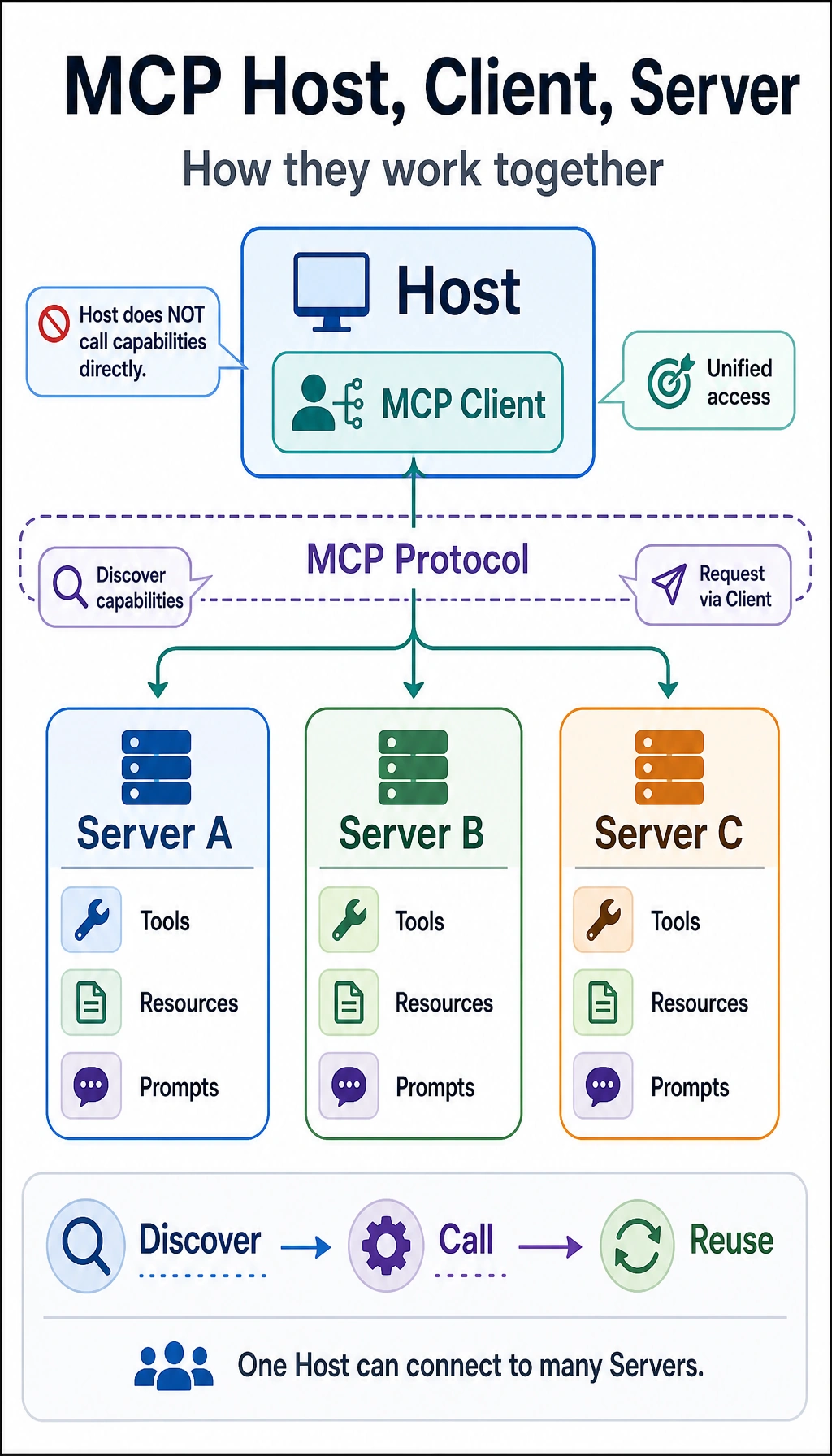
The Client does not directly operate the underlying world; it gets capabilities through the MCP Server as a unified entry point.
What Exactly Does the Client Do?
Section titled “What Exactly Does the Client Do?”The Client’s responsibilities usually include:
- Establishing a connection
- Discovering which capabilities the server exposes
- Deciding whether to call something based on the current task
- Sending requests and receiving results
You can think of the client as the “user.”
In a real system, it might be:
- An IDE plugin
- A chat assistant
- A desktop Agent
- A workflow engine
Its core value is not that it “does everything itself,” but that it:
Knows when to ask the server for which capability.
What Exactly Does the Server Do?
Section titled “What Exactly Does the Server Do?”The Server’s responsibilities usually include:
- Describing and exposing capabilities
- Receiving client requests
- Calling local or external tools
- Returning structured results
In other words, the server is more like the “capability provider.”
It is essentially saying to the outside world:
- What tools I have
- How each tool should be called
- What kinds of context objects I support
So the server is the core carrier of the protocol in practice.
Why Can’t We Ignore Transport?
Section titled “Why Can’t We Ignore Transport?”Many beginners focus only on:
- the client
- the server
But what actually enables communication between them is transport.
What problem does it solve?
Section titled “What problem does it solve?”Simply put, it determines:
What channel these protocol messages use to move back and forth.
For example:
- Local inter-process communication
- Standard input/output
- Network connections
Why is transport important?
Section titled “Why is transport important?”Because it affects:
- Latency
- Reliability
- Deployment form
- Debugging approach
So transport is not a minor detail you choose casually; it is part of the architecture.
The Three Most Common Types of Capabilities in MCP
Section titled “The Three Most Common Types of Capabilities in MCP”Although people often say “tools,” if we look more completely, the commonly exposed content can be understood as three types:
Capabilities that can be called and executed.
For example:
- Search
- Read files
- Check the weather
Resources
Section titled “Resources”These are more like “readable information sources.”
For example:
- Document content
- Configuration data
- Database table snapshots
Prompts
Section titled “Prompts”These are more like “reusable prompt templates.”
These three things are not exactly the same, but they all belong to the category of “exposed capabilities.”
What Does a Complete Message Flow Look Like?
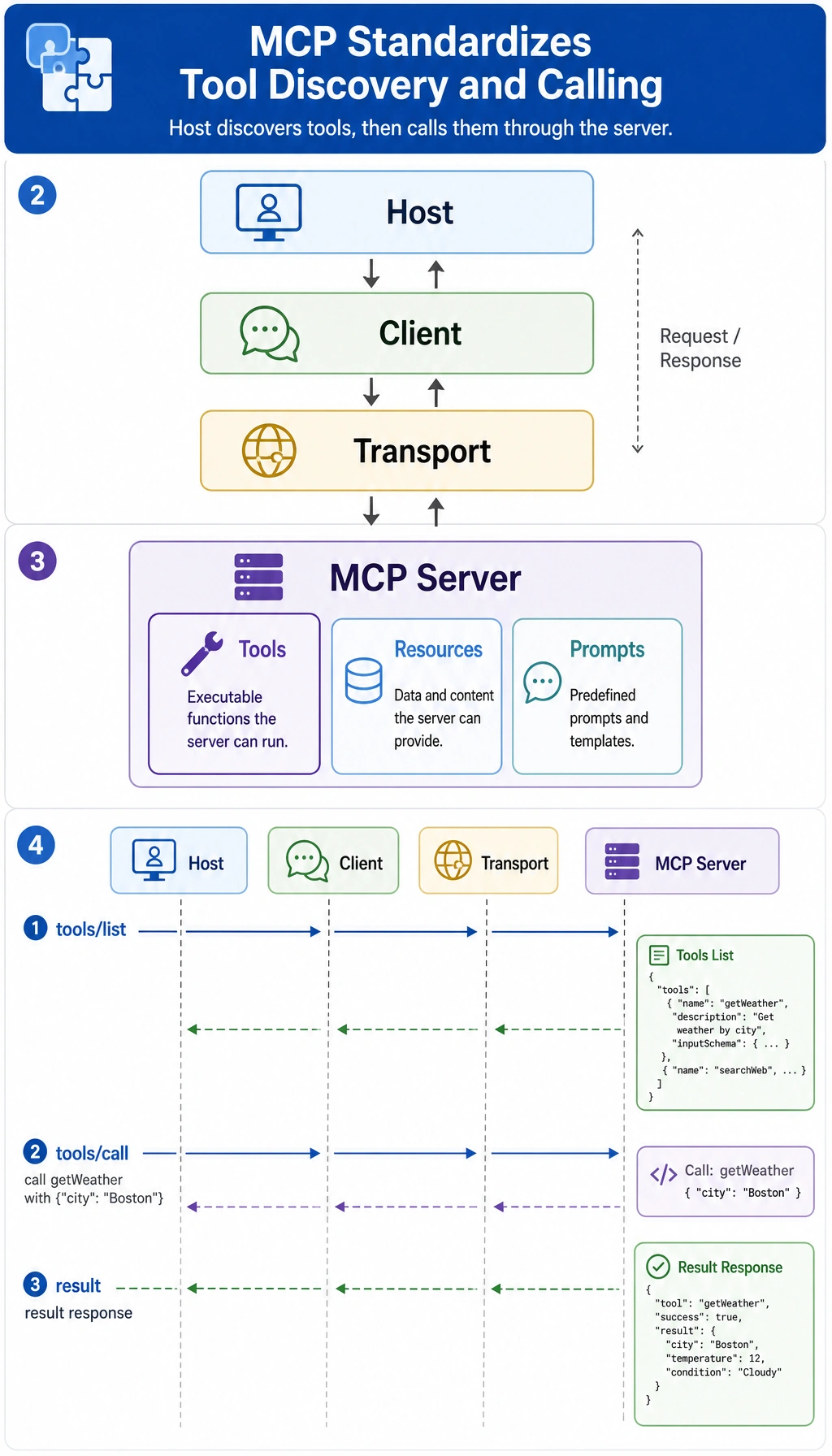
Section titled “What Does a Complete Message Flow Look Like?”First, Discover the Tools
Section titled “First, Discover the Tools”list_request = { "jsonrpc": "2.0", "id": 1, "method": "tools/list", "params": {}}
list_response = { "jsonrpc": "2.0", "id": 1, "result": { "tools": [ {"name": "search_docs", "description": "Search course documents"}, {"name": "get_weather", "description": "Query the weather"} ] }}
print(list_request)print(list_response)Expected output:
{'jsonrpc': '2.0', 'id': 1, 'method': 'tools/list', 'params': {}}{'jsonrpc': '2.0', 'id': 1, 'result': {'tools': [{'name': 'search_docs', 'description': 'Search course documents'}, {'name': 'get_weather', 'description': 'Query the weather'}]}}Then, Call the Tool
Section titled “Then, Call the Tool”call_request = { "jsonrpc": "2.0", "id": 2, "method": "tools/call", "params": { "name": "search_docs", "arguments": {"query": "refund policy"} }}
call_response = { "jsonrpc": "2.0", "id": 2, "result": { "content": [{"type": "text", "text": "A purchase can be refunded within 7 days if learning progress is below 20%."}] }}
print(call_request)print(call_response)Expected output:
{'jsonrpc': '2.0', 'id': 2, 'method': 'tools/call', 'params': {'name': 'search_docs', 'arguments': {'query': 'refund policy'}}}{'jsonrpc': '2.0', 'id': 2, 'result': {'content': [{'type': 'text', 'text': 'A purchase can be refunded within 7 days if learning progress is below 20%.'}]}}What Do These Two Steps Really Show?
Section titled “What Do These Two Steps Really Show?”They show that MCP is not just “calling a function.” Instead, it has:
- Capability discovery
- Capability invocation
This way, the client does not need to hard-code all tool details.
Why Is MCP Called a “Decoupling Layer”?
Section titled “Why Is MCP Called a “Decoupling Layer”?”Without MCP
Section titled “Without MCP”The client usually has to know directly:
- How tools are named
- How parameters are written
- What the return result looks like
This creates tight coupling between the client and the tool provider.
With MCP
Section titled “With MCP”The client relies more on:
- A unified protocol
- A unified discovery method
- A unified invocation method
This gives the system a clearer layering:
- The upper layer handles task orchestration
- The lower layer provides capabilities
So you can think of MCP as:
An adaptation layer and a decoupling layer in the tool ecosystem.
A Minimal Architecture Simulation
Section titled “A Minimal Architecture Simulation”Below is a very simple MCP interaction simulated in pure Python.
class MockMCPServer:    def __init__(self):        self.tools = {            "search_docs": lambda query: f"Search result: {query}"        }
    def list_tools(self):        return [{"name": name} for name in self.tools]
    def call_tool(self, name, arguments):        if name not in self.tools:            return {"error": "unknown_tool"}        return {"result": self.tools[name](**arguments)}
class MockMCPClient:    def __init__(self, server):        self.server = server
    def discover(self):        return self.server.list_tools()
    def call(self, name, arguments):        return self.server.call_tool(name, arguments)
server = MockMCPServer()client = MockMCPClient(server)
print(client.discover())print(client.call("search_docs", {"query": "refund policy"}))
Expected output:
[{'name': 'search_docs'}]{'result': 'Search result: refund policy'}This example is small, but very valuable for learning
Section titled “This example is small, but very valuable for learning”Because it already shows the three-layer division of labor:
- The client handles requests
- The server exposes capabilities
- The tool performs the actual work
As long as you understand this three-part division clearly, it will be much easier to study more realistic MCP systems later.
The Most Common Architectural Misunderstandings
Section titled “The Most Common Architectural Misunderstandings”Treating the server as the tool itself
Section titled “Treating the server as the tool itself”The server is not the tool. It is:
The protocol-facing gateway for tools.
Thinking transport is optional
Section titled “Thinking transport is optional”Transport directly affects deployment and stability.
Assuming MCP automatically solves permissions and policy issues
Section titled “Assuming MCP automatically solves permissions and policy issues”It does not. It solves “unified access,” not “automatic governance.”
Evidence to Keep
Section titled “Evidence to Keep”Keep this page’s proof of learning as a small evidence card:
- Capability
- resource, prompt, or tool exposed by server
- Contract
- schema, transport, permissions, and error shape
- Call Trace
- discovery, invocation, response, and failure handling
- Failure Check
- incompatible schema, missing auth, unsafe tool, or server error
- Integration Action
- validate server contract before adding autonomy
Summary
Section titled “Summary”The most important thing in this section is not memorizing the words client/server, but understanding this:
The core of MCP architecture is to let capability providers and capability consumers relate to each other through a unified message flow and a unified boundary.
Once this flow logic is clear, you’ll feel much more grounded when later learning server development, client integration, and ecosystem practices.
Exercises
Section titled “Exercises”- Explain in your own words: why must the responsibilities of the client and server be separated?
- Think about this: if transport changes, why is it best for the upper-layer calling logic to stay as unchanged as possible?
- Add a
get_weathertool toMockMCPServer. - Explain in your own words: why is MCP called a “decoupling layer,” rather than the “tool itself”?
Reference implementation and walkthrough
- Client and server responsibilities should be separated because the client owns orchestration, user context, and policy, while the server owns capability implementation and the contract. Mixing them makes every new tool or transport change ripple through the whole system.
- Transport should be replaceable because the meaning of a tool call should not depend on whether it travels through stdio, HTTP, or another channel. Good architecture keeps the call contract stable while swapping the delivery mechanism.
- A good
get_weatheraddition includes a clear name, description, requiredcityparameter, validation for empty or non-string cities, and a predictable error shape when the input is invalid. - MCP is a decoupling layer because it defines how capabilities are described and invoked across boundaries. It is not the tool itself; the weather lookup, file read, or database query still lives behind the server implementation.