
2.1.6 Data Structures
Section Overview
Section titled “Section Overview”In this section, you will learn how to organize a group of data. Lists, tuples, dictionaries, and sets will appear throughout later topics such as web scraping, data analysis, machine learning sample processing, and parsing API responses. The key is to know what each structure is suitable for storing, and when to use which one.
Learning Objectives
Section titled “Learning Objectives”- Master creating lists and common list operations
- Understand the features and use cases of tuples
- Master key-value operations in dictionaries
- Learn about deduplication and set operations with sets
- Choose the right data structure based on the scenario
Why Do We Need Data Structures?
Section titled “Why Do We Need Data Structures?”So far, the variables you have learned can only store one value at a time. But in real-world scenarios, you often need to handle a collection of data:
- 100 API latency measurements
- All the parameters of a model
- A user’s personal information (name, age, email, …)
Data structures are containers used to organize and store multiple pieces of data.
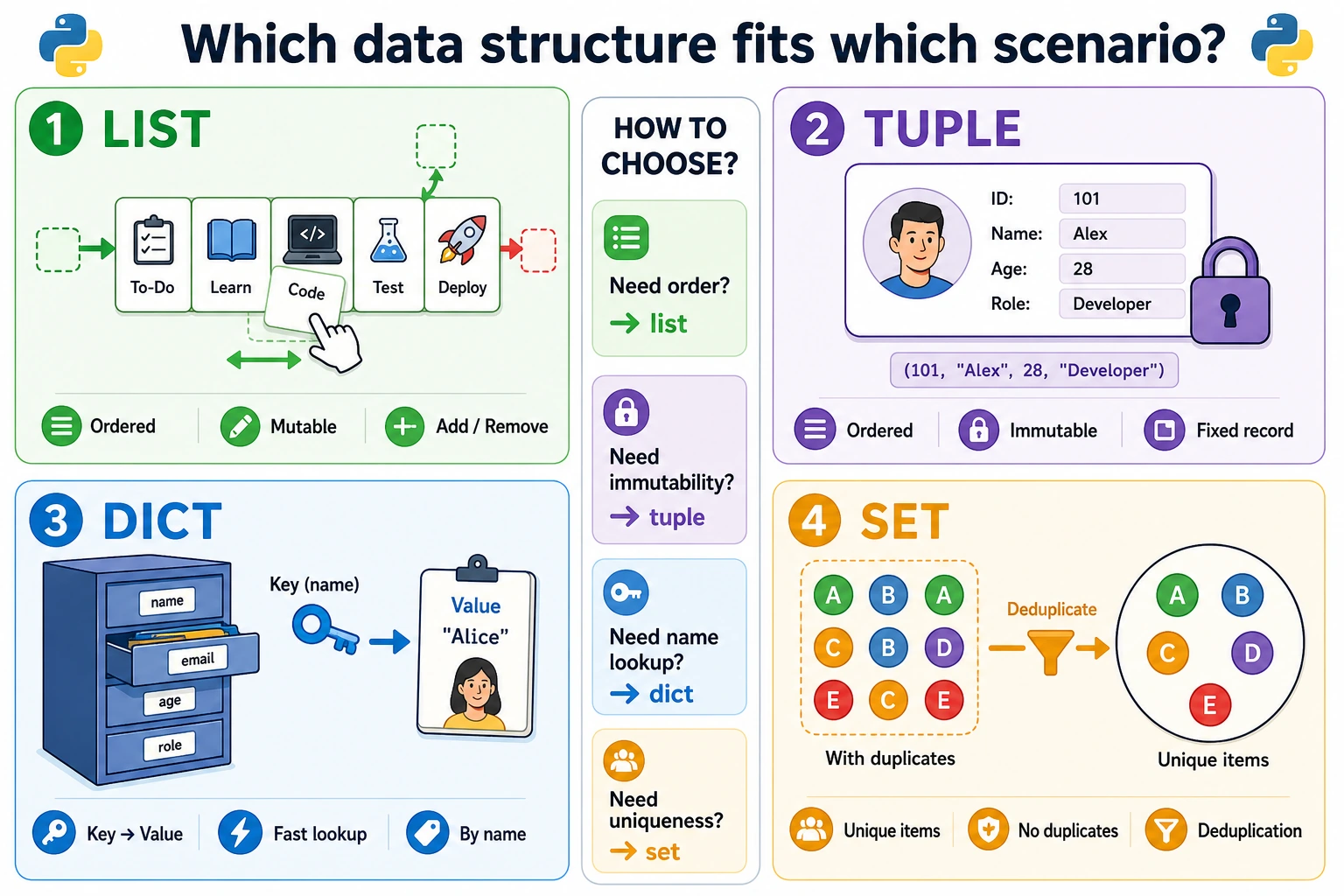
Python has 4 built-in data structures. A quick way to choose is:
| If you need… | Use this |
|---|---|
| Ordered data that changes often | List [] |
| Ordered data that should not change | Tuple () |
| Look up values by name or ID | Dictionary {key: value} |
| Remove duplicates or compare groups | Set {item} |
Remember the main properties:
- List: ordered, mutable, allows duplicates.
- Tuple: ordered, immutable, allows duplicates.
- Dictionary: ordered by insertion, mutable, keys cannot be duplicated.
- Set: unordered, mutable, duplicates are removed automatically.
List — The Most Common Data Structure
Section titled “List — The Most Common Data Structure”A list is like a stretchable cabinet: you can put anything in it, and you can add, remove, or modify items at any time.
Creating Lists
Section titled “Creating Lists”# Create listslatencies_ms = [120, 95, 240, 180, 310]features = ["Login API", "RAG demo", "Chart view"]mixed = [1, "hello", 3.14, True] # Mixed types are allowed (but not recommended)empty = [] # Empty list
print(type(latencies_ms)) # <class 'list'>print(len(latencies_ms)) # 5Accessing Elements (Indexing)
Section titled “Accessing Elements (Indexing)”service_queue = ["Login API", "Search API", "Worker", "Dashboard", "Docs site"]# 0 1 2 3 4# -5 -4 -3 -2 -1
print(service_queue[0]) # Login API (the first service)print(service_queue[2]) # Worker (the third service)print(service_queue[-1]) # Docs site (the last service)print(service_queue[-2]) # Dashboard (the second to last service)Slicing
Section titled “Slicing”numbers = [0, 1, 2, 3, 4, 5, 6, 7, 8, 9]
print(numbers[2:5]) # [2, 3, 4] (indices 2 to 4)print(numbers[:3]) # [0, 1, 2] (first 3 items)print(numbers[7:]) # [7, 8, 9] (from index 7 to the end)print(numbers[::2]) # [0, 2, 4, 6, 8] (take every other item)print(numbers[::-1]) # [9, 8, 7, 6, 5, 4, 3, 2, 1, 0] (reverse)Modifying Elements
Section titled “Modifying Elements”latencies_ms = [120, 95, 240, 180, 310]
# Modify a single elementlatencies_ms[2] = 210print(latencies_ms) # [120, 95, 210, 180, 310]
# Modify multiple elements (via slicing)latencies_ms[1:3] = [100, 180]print(latencies_ms) # [120, 100, 180, 180, 310]Adding Elements
Section titled “Adding Elements”tasks = ["Build login form", "Write API tests"]
# Add to the endtasks.append("Add error states")print(tasks) # ['Build login form', 'Write API tests', 'Add error states']
# Insert at a specific positiontasks.insert(1, "Review auth flow")print(tasks) # ['Build login form', 'Review auth flow', 'Write API tests', 'Add error states']
# Add multiple elementstasks.extend(["Update README", "Record demo"])print(tasks) # ['Build login form', 'Review auth flow', 'Write API tests', 'Add error states', 'Update README', 'Record demo']Removing Elements
Section titled “Removing Elements”tasks = ["Build login form", "Write API tests", "Add error states", "Review auth flow", "Record demo"]
# Remove by value (removes the first matching item)tasks.remove("Add error states")print(tasks) # ['Build login form', 'Write API tests', 'Review auth flow', 'Record demo']
# Remove by indexdeleted = tasks.pop(1) # Remove the element at index 1 and return itprint(deleted) # Write API testsprint(tasks) # ['Build login form', 'Review auth flow', 'Record demo']
# Remove the last onelast = tasks.pop()print(last) # Record demo
# Remove by index (no return value needed)del tasks[0]print(tasks) # ['Review auth flow']Common List Operations
Section titled “Common List Operations”numbers = [3, 1, 4, 1, 5, 9, 2, 6, 5]
# Sortnumbers.sort()print(numbers) # [1, 1, 2, 3, 4, 5, 5, 6, 9]
# Sort in descending ordernumbers.sort(reverse=True)print(numbers) # [9, 6, 5, 5, 4, 3, 2, 1, 1]
# Sort without modifying the original listoriginal = [3, 1, 4, 1, 5]sorted_list = sorted(original)print(original) # [3, 1, 4, 1, 5] (original list unchanged)print(sorted_list) # [1, 1, 3, 4, 5]
# Reversenumbers = [1, 2, 3, 4, 5]numbers.reverse()print(numbers) # [5, 4, 3, 2, 1]
# Searchprint(numbers.index(3)) # 2 (index of element 3)print(numbers.count(5)) # 1 (number of times element 5 appears)print(3 in numbers) # True
# Statisticslatencies_ms = [120, 95, 240, 180, 310]print(len(latencies_ms)) # 5print(sum(latencies_ms)) # 945print(max(latencies_ms)) # 310print(min(latencies_ms)) # 95print(sum(latencies_ms) / len(latencies_ms)) # 189.0 (average latency)List Comprehensions (Very Pythonic!)
Section titled “List Comprehensions (Very Pythonic!)”List comprehensions are a concise way to create new lists:
# Traditional waysquares = []for i in range(1, 6):    squares.append(i ** 2)print(squares)  # [1, 4, 9, 16, 25]
# List comprehension (done in one line!)squares = [i ** 2 for i in range(1, 6)]print(squares)  # [1, 4, 9, 16, 25]
# List comprehension with a conditioneven_squares = [i ** 2 for i in range(1, 11) if i % 2 == 0]print(even_squares)  # [4, 16, 36, 64, 100]
# Real-world use: normalize feature slugsraw_slugs = [" Login API ", "RAG DEMO", " Chart View "]clean_slugs = [slug.strip().lower().replace(" ", "-") for slug in raw_slugs]print(clean_slugs) # ['login-api', 'rag-demo', 'chart-view']Tuple — An Immutable List
Section titled “Tuple — An Immutable List”Tuples are almost the same as lists, except for one difference: tuples cannot be modified after they are created.
Creating Tuples
Section titled “Creating Tuples”# Create with parenthesespoint = (3, 4)colors = ("red", "green", "blue")single = (42,) # When there is only one element, you must add a comma!empty = ()
# In fact, the parentheses can be omittedcoordinates = 3, 4 # This is also a tupleprint(type(coordinates)) # <class 'tuple'>Tuple Operations
Section titled “Tuple Operations”colors = ("red", "green", "blue", "yellow", "purple")
# Access (same as lists)print(colors[0]) # redprint(colors[-1]) # purpleprint(colors[1:3]) # ('green', 'blue')
# Iteratefor color in colors: print(color)
# Searchprint(len(colors)) # 5print("red" in colors) # Trueprint(colors.count("red")) # 1print(colors.index("blue")) # 2
# But you cannot modify it!# colors[0] = "black" # Error! TypeError: 'tuple' object does not support item assignmentTuple Unpacking
Section titled “Tuple Unpacking”# Assign tuple values to multiple variablespoint = (10, 20)x, y = pointprint(f"x={x}, y={y}") # x=10, y=20
# When a function returns multiple values, it actually returns a tupledef get_task_and_hours(): return "Login API", 8
task, hours = get_task_and_hours()print(f"{task}, {hours} hours") # Login API, 8 hours
# Use * to collect extra valuesfirst, *rest = [1, 2, 3, 4, 5]print(first) # 1print(rest) # [2, 3, 4, 5]When Should You Use a Tuple?
Section titled “When Should You Use a Tuple?”- When the data should not be modified (for example, coordinates, RGB color values)
- As dictionary keys (lists cannot be dictionary keys, but tuples can)
- When a function returns multiple values
Dictionary — Key-Value Storage
Section titled “Dictionary — Key-Value Storage”A dictionary is one of the most important data structures in Python. It uses a key to look up a value, just like a real dictionary uses a word to find its definition.
Creating Dictionaries
Section titled “Creating Dictionaries”# Create with curly bracestask = { "name": "Login API", "owner": "Mina", "status": "in_progress", "hours": [2, 3, 3]}
# Empty dictionaryempty = {}
# Create with dict()config = dict(learning_rate=0.001, epochs=100, batch_size=32)print(config) # {'learning_rate': 0.001, 'epochs': 100, 'batch_size': 32}
print(type(task)) # <class 'dict'>Accessing Values
Section titled “Accessing Values”task = {"name": "Login API", "owner": "Mina", "status": "in_progress"}
# Method 1: Access with []print(task["name"]) # Login API# print(task["deadline"]) # Error! KeyError: 'deadline'
# Method 2: Access with .get() (safer)print(task.get("owner")) # Minaprint(task.get("deadline")) # None (returns None if it does not exist, no error)print(task.get("deadline", "not scheduled")) # not scheduled (returns default value if it does not exist)Adding and Modifying
Section titled “Adding and Modifying”task = {"name": "Login API", "status": "todo"}
# Add new key-value pairstask["owner"] = "Mina"task["repo"] = "portfolio-api"
# Modify an existing valuetask["status"] = "in_progress"
print(task)# {'name': 'Login API', 'status': 'in_progress', 'owner': 'Mina', 'repo': 'portfolio-api'}
# Update in bulktask.update({"status": "done", "hours": 8})print(task)Deleting
Section titled “Deleting”task = {"name": "Login API", "status": "done", "owner": "Mina"}
# Delete a specific keydel task["owner"]print(task) # {'name': 'Login API', 'status': 'done'}
# pop: delete and return the valuestatus = task.pop("status")print(status) # doneprint(task) # {'name': 'Login API'}Iterating Through a Dictionary
Section titled “Iterating Through a Dictionary”task_hours = {"Login API": 8, "RAG demo": 12, "Chart view": 5}
# Iterate over keysfor task in task_hours: print(task)
# Iterate over valuesfor hours in task_hours.values(): print(hours)
# Iterate over key-value pairs (most common)for task, hours in task_hours.items(): print(f"{task}: {hours} hours")
# Output:# Login API: 8 hours# RAG demo: 12 hours# Chart view: 5 hoursDictionary Comprehensions
Section titled “Dictionary Comprehensions”# Create a mapping from numbers to squaressquares = {x: x**2 for x in range(1, 6)}print(squares) # {1: 1, 2: 4, 3: 9, 4: 16, 5: 25}
# Filter a dictionarytask_hours = {"Login API": 8, "Bug fix": 3, "RAG demo": 12, "Docs": 2}large_tasks = {name: hours for name, hours in task_hours.items() if hours >= 8}print(large_tasks) # {'Login API': 8, 'RAG demo': 12}Real Example: Counting Character Frequency
Section titled “Real Example: Counting Character Frequency”text = "hello world"char_count = {}
for char in text: if char in char_count: char_count[char] += 1 else: char_count[char] = 1
print(char_count)# {'h': 1, 'e': 1, 'l': 3, 'o': 2, ' ': 1, 'w': 1, 'r': 1, 'd': 1}Set — The Deduplication Tool
Section titled “Set — The Deduplication Tool”A set is an unordered collection of unique elements.
Creating Sets
Section titled “Creating Sets”# Create with curly bracestask_tags = {"api", "ui", "testing", "api"} # duplicates are removed automaticallyprint(task_tags) # {'testing', 'ui', 'api'} (order may differ)
# Create from a list (deduplicates!)modules = ["api", "api", "ui", "worker", "ui", "db"]unique_modules = set(modules)print(unique_modules) # {'api', 'db', 'ui', 'worker'} (order may differ)
# Note: an empty set must be created with set(), not {}empty_set = set() # empty setempty_dict = {} # this is an empty dictionary!
print(type(task_tags)) # <class 'set'>Set Operations
Section titled “Set Operations”a = {1, 2, 3, 4, 5}b = {4, 5, 6, 7, 8}
# Intersection (items in both)print(a & b) # {4, 5}print(a.intersection(b))
# Union (combined, duplicates removed)print(a | b) # {1, 2, 3, 4, 5, 6, 7, 8}print(a.union(b))
# Difference (items in a but not in b)print(a - b) # {1, 2, 3}print(a.difference(b))
# Symmetric difference (items unique to each set)print(a ^ b) # {1, 2, 3, 6, 7, 8}Real-World Use
Section titled “Real-World Use”# Scenario: find tasks that touch both frontend and backend workfrontend_tasks = {"Login UI", "Chart view", "Settings page", "Theme switcher"}backend_tasks = {"Login API", "Chart view", "Audit log", "Settings page"}
both = frontend_tasks & backend_tasksprint(f"Tasks touching both sides: {sorted(both)}") # ['Chart view', 'Settings page']
only_frontend = frontend_tasks - backend_tasksprint(f"Frontend-only tasks: {sorted(only_frontend)}") # ['Login UI', 'Theme switcher']
all_tasks = frontend_tasks | backend_tasksprint(f"All related tasks: {sorted(all_tasks)}")Data Structure Selection Guide
Section titled “Data Structure Selection Guide”| Requirement | Recommended | Reason |
|---|---|---|
| Ordered collection that needs add/remove/modify | List | The most versatile container |
| Data should not be modified | Tuple | Immutable, safer |
| Find a value by key | Dictionary | O(1) lookup speed |
| Deduplication | Set | Automatically removes duplicates |
| Count occurrences | Dictionary | Keys are elements, values are counts |
| Check whether an element exists | Set/Dictionary | Much faster than a list |
Hands-On Practice
Section titled “Hands-On Practice”Exercise 1: API Latency Statistics
Section titled “Exercise 1: API Latency Statistics”latencies_ms = [120, 95, 240, 180, 310, 150, 88, 205, 260, 170]
# 1. Calculate the highest latency, lowest latency, and average latency# 2. Find all latencies above 200 (use a list comprehension)# 3. Sort the latencies from high to lowExercise 2: Service Owner Directory
Section titled “Exercise 2: Service Owner Directory”Use a dictionary to implement a simple service owner directory:
owners = {}
# 1. Add 3 services (service name -> owner email)# 2. Look up a service owner's email# 3. Modify a service owner's email# 4. Delete one service# 5. Print all service owners
Exercise 3: Event Word Frequency Count
Section titled “Exercise 3: Event Word Frequency Count”text = "api error api timeout worker error api"
# Count how many times each event word appears# Hint: first use split() to turn it into a list, then count with a dictionaryExercise 4: Remove Duplicates from a List (Keep Order)
Section titled “Exercise 4: Remove Duplicates from a List (Keep Order)”numbers = [3, 1, 4, 1, 5, 9, 2, 6, 5, 3, 5]
# Remove duplicate elements while keeping the original order# Expected output: [3, 1, 4, 5, 9, 2, 6]# Hint: use a set to record elements that have already appearedReference implementation and walkthrough
- The latency statistics are max
310, min88, and average181.8. Latencies above200can be[240, 310, 205, 260], and descending order starts with[310, 260, 240, 205, ...]. - The owner directory should add, update, and delete by key, for example
owners["Login API"] = "[email protected]". - Event word frequency should count
api: 3,error: 2,timeout: 1, andworker: 1for the sample text. - Ordered deduplication should produce
[3, 1, 4, 5, 9, 2, 6]. Use aseenset plus a result list. - Choose a list for order, dictionary for lookup, set for membership or deduplication, and tuple for fixed records.
Evidence to Keep
Section titled “Evidence to Keep”Keep this page’s proof of learning as a small evidence card:
- Concept
- variable, type, operator, input/output, branch, loop, structure, function, or module
- Code
- smallest runnable Python snippet for the concept
- Output
- printed value, type, branch result, loop trace, or returned value
- Failure Check
- type mismatch, indentation, off-by-one, mutable data, or import path issue
- Expected Output
- code plus printed result that proves the concept works
Summary
Section titled “Summary”| Data Structure | Creation | Features | Common Use |
|---|---|---|---|
| List | [1, 2, 3] | Ordered, mutable, allows duplicates | Store a group of similar data |
| Tuple | (1, 2, 3) | Ordered, immutable | Coordinates, return multiple values |
| Dictionary | {"a": 1} | Key-value pairs, keys cannot be duplicated | Configuration, mapping relationships |
| Set | {1, 2, 3} | Unordered, unique | Deduplication, set operations |