
9.1.5 Agent System Architecture
Learning Objectives
Section titled “Learning Objectives”After completing this section, you will be able to:
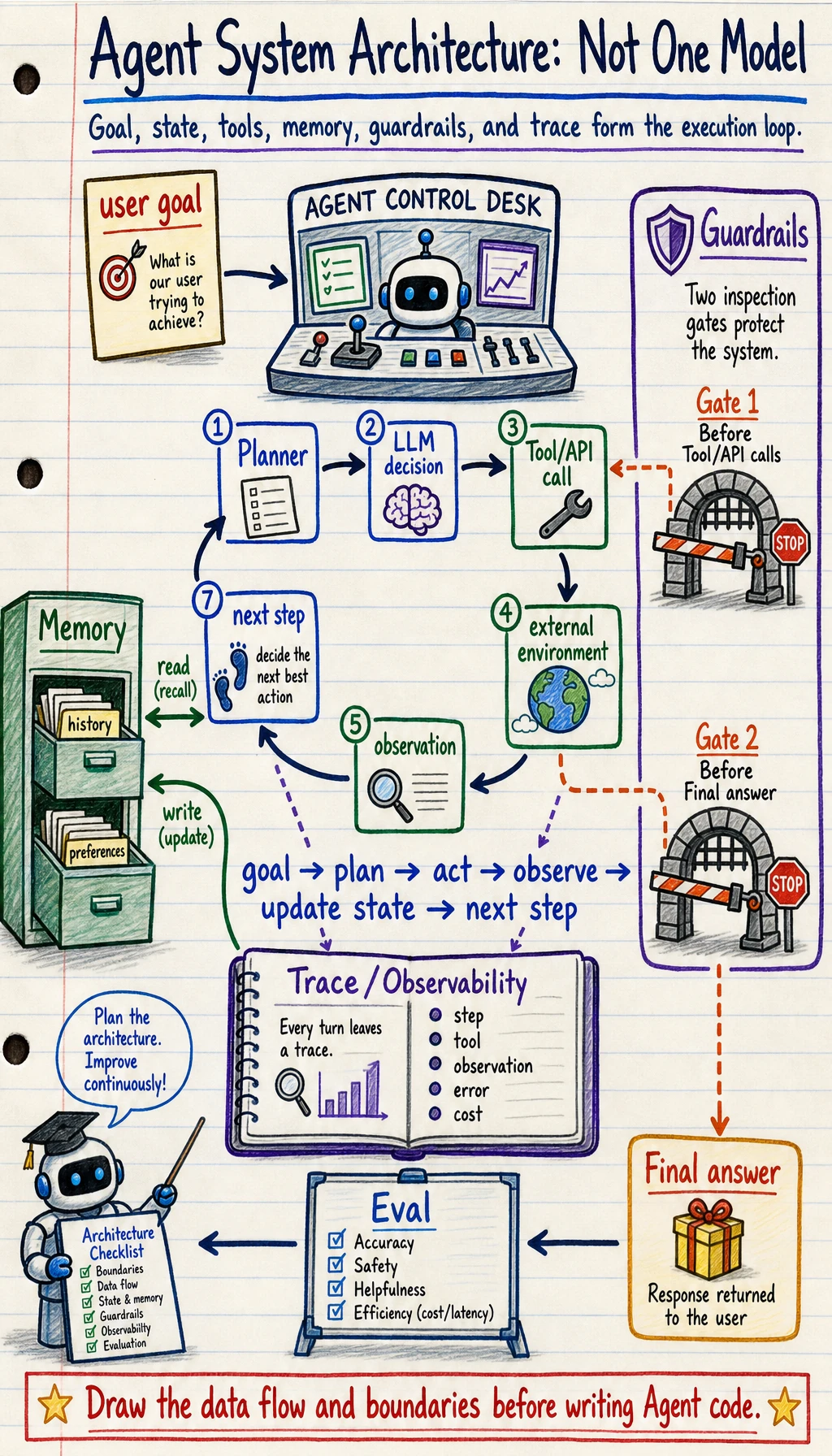
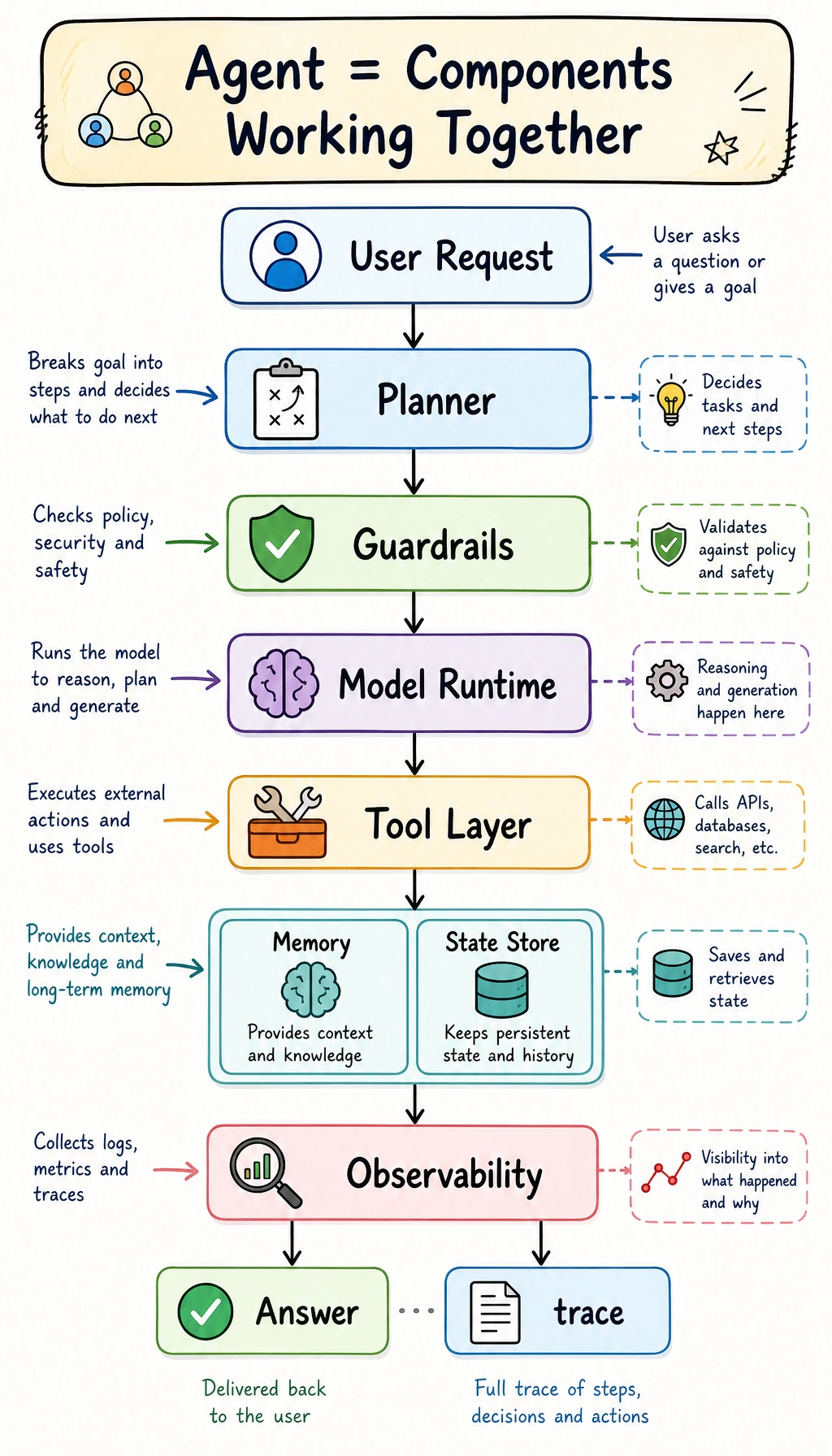
- Explain the core components commonly found in an Agent system
- Understand the basic execution loop of a single-Agent architecture
- Run a mini architecture example with state and tool registration
- Know why real systems cannot do without observability and guardrails
An Agent Is Not Just “a Model”
Section titled “An Agent Is Not Just “a Model””The most basic misconception: thinking an Agent is just an LLM + Prompt
Section titled “The most basic misconception: thinking an Agent is just an LLM + Prompt”A truly usable Agent system usually also needs at least:
- a tool layer
- state management
- an execution loop
- error handling
- safety constraints
The model is important, but it is more like one part of the brain, not the whole system.
You can think of an Agent as a small operating system
Section titled “You can think of an Agent as a small operating system”It contains:
- a decision center
- a toolbox
- a notebook
- execution logs
- safety rules
That is also why once an Agent enters the engineering stage, it is no longer just about “writing prompts.”
Common Core Components
Section titled “Common Core Components”Planner / Decision Maker
Section titled “Planner / Decision Maker”Responsible for deciding:
- how to break down the current task
- what to do next
- whether to call a tool
In simple systems, this part may be handled directly by the LLM. In scenarios that require stronger control, it may also be handled by a combination of rules + LLM.
Tool Layer / Tools Layer
Section titled “Tool Layer / Tools Layer”This is the key to letting an Agent take action.
Tools may include:
- search
- database queries
- API calls
- file read/write
- calculators
Without tools, many Agents can only “talk” and cannot actually “do.”
State, Memory, and Context
Section titled “State, Memory, and Context”State: where the current task is now
Section titled “State: where the current task is now”State usually records:
- user goal
- completed steps
- intermediate results
- number of retry attempts after failures
This is not the same as “long-term memory.” It is more like the workspace for the current task.
Memory: what is kept across turns
Section titled “Memory: what is kept across turns”Memory is more about:
- user preferences
- historical projects
- long-term context
Many basic Agents do not necessarily need complex memory at the beginning, but almost all of them need state.
A Standard Execution Loop
Section titled “A Standard Execution Loop”The minimal loop: perceive, decide, act, observe
Section titled “The minimal loop: perceive, decide, act, observe”flowchart LR A["Input goal"] --> B["Decide next step"] B --> C["Call tool / generate action"] C --> D["Get result and update state"] D --> B D --> E["Output after the end condition is met"]
style A fill:#e3f2fd,stroke:#1565c0,color:#333 style B fill:#fff3e0,stroke:#e65100,color:#333 style C fill:#f3e5f5,stroke:#6a1b9a,color:#333 style D fill:#fffde7,stroke:#f9a825,color:#333 style E fill:#e8f5e9,stroke:#2e7d32,color:#333Why is this loop so important?
Section titled “Why is this loop so important?”Because the essence of an Agent is not “answer once,” but:
Continuously adjust actions based on intermediate results.
This is one of the fundamental differences between an Agent and a normal chatbot.
A Mini Runnable Architecture Example
Section titled “A Mini Runnable Architecture Example”In the example below, we explicitly write out:
- a tool registry
- state
- decision logic
- an execution loop
import astimport operator
OPS = {    ast.Add: operator.add,    ast.Sub: operator.sub,    ast.Mult: operator.mul,    ast.Div: operator.truediv,}

def safe_calculate(expression):    def visit(node):        if isinstance(node, ast.Expression):            return visit(node.body)        if isinstance(node, ast.Constant) and isinstance(node.value, (int, float)):            return node.value        if isinstance(node, ast.BinOp) and type(node.op) in OPS:            return OPS[type(node.op)](visit(node.left), visit(node.right))        if isinstance(node, ast.UnaryOp) and isinstance(node.op, ast.USub):            return -visit(node.operand)        raise ValueError("unsupported_expression")
    return visit(ast.parse(expression, mode="eval"))

def tool_weather(city):    data = {"Beijing": "Sunny, 22°C", "Shanghai": "Cloudy, 25°C"}    return data.get(city, "No weather information available for this city")
def tool_calc(expression):    return str(safe_calculate(expression))
TOOLS = {    "weather": tool_weather,    "calc": tool_calc}
def decide_next_action(state):    query = state["query"]    if state["done"]:        return None
    if "weather" in query and not state["steps"]:        city = "Beijing" if "Beijing" in query else "Shanghai"        return {"tool": "weather", "args": city}
    if "calculate" in query and not state["steps"]:        expression = query.replace("calculate", "").strip()        return {"tool": "calc", "args": expression}
    return {"tool": None, "args": None}
def run_agent(query):    state = {        "query": query,        "steps": [],        "observations": [],        "done": False    }
    while not state["done"]:        action = decide_next_action(state)        if action is None or action["tool"] is None:            state["done"] = True            break
        tool_name = action["tool"]        args = action["args"]        result = TOOLS[tool_name](args)
        state["steps"].append(action)        state["observations"].append(result)        state["done"] = True
    if state["observations"]:        return state, state["observations"][-1]    return state, "No executable action"
state, answer = run_agent("calculate 23 * 8")print("State:", state)print("Final answer:", answer)
Expected output:
State: {'query': 'calculate 23 * 8', 'steps': [{'tool': 'calc', 'args': '23 * 8'}], 'observations': ['184'], 'done': True}Final answer: 184This example is small, but it already contains the core feel of an Agent architecture.
Guardrails: Why Are Safety Rails Essential?
Section titled “Guardrails: Why Are Safety Rails Essential?”Because Agents take actions
Section titled “Because Agents take actions”And action means risk.
For example:
- calling the wrong tool
- repeating execution
- unauthorized access
- accidentally deleting data
So common guardrails in real systems include:
- tool whitelists
- parameter validation
- maximum step limits
- human approval checkpoints
The simplest guardrail example
Section titled “The simplest guardrail example”import astimport operator
OPS = { ast.Add: operator.add, ast.Sub: operator.sub, ast.Mult: operator.mul, ast.Div: operator.truediv,}
def safe_calculate(expression): def visit(node): if isinstance(node, ast.Expression): return visit(node.body) if isinstance(node, ast.Constant) and isinstance(node.value, (int, float)): return node.value if isinstance(node, ast.BinOp) and type(node.op) in OPS: return OPS[type(node.op)](visit(node.left), visit(node.right)) if isinstance(node, ast.UnaryOp) and isinstance(node.op, ast.USub): return -visit(node.operand) raise ValueError("unsupported_expression")
return visit(ast.parse(expression, mode="eval"))
def safe_eval(expression): allowed_chars = set("0123456789+-*/(). ") if not set(expression) <= allowed_chars: return "The expression contains disallowed characters" return str(safe_calculate(expression))
print(safe_eval("3 * (4 + 5)"))print(safe_eval("__import__('os').system('rm -rf /')"))Expected output:
27The expression contains disallowed charactersThe core idea of guardrails is not to make the system completely error-free, but to narrow the scope of possible mistakes.
Observability: Why Do We Need to See What the Agent Is Doing?
Section titled “Observability: Why Do We Need to See What the Agent Is Doing?”Because multi-step systems are hard to debug when they are opaque
Section titled “Because multi-step systems are hard to debug when they are opaque”At minimum, you want to see:
- what decision was made at each step
- which tool was called
- what the tool returned
- why the process ended
The minimum observability information usually includes
Section titled “The minimum observability information usually includes”- input
- action
- observation
- final output
- time cost
Many Agent projects get stuck in the end not because the model is too weak, but because the system itself cannot clearly see where it went wrong.
Single Agent and Multi-Agent
Section titled “Single Agent and Multi-Agent”A single Agent is usually what you should learn first
Section titled “A single Agent is usually what you should learn first”Most systems should first make a single Agent solid:
- easier to debug
- easier to converge
- clearer architecture
Multi-Agent is not the default upgrade path
Section titled “Multi-Agent is not the default upgrade path”Only when a task is truly suitable for division of labor is Multi-Agent worth considering.
For example:
- Planning Agent
- Execution Agent
- Review Agent
If the task is not complex, Multi-Agent may instead increase coordination costs.
Common Beginner Mistakes
Section titled “Common Beginner Mistakes”Starting with Multi-Agent before understanding Single Agent
Section titled “Starting with Multi-Agent before understanding Single Agent”This usually makes debugging much harder.
Mixing up state and memory
Section titled “Mixing up state and memory”State is more about the current task, while memory is more about accumulation across tasks.
Having no logging or replay mechanism
Section titled “Having no logging or replay mechanism”Once the system fails, you can only guess.
Evidence to Keep
Section titled “Evidence to Keep”Keep this page’s proof of learning as a small evidence card:
- Agent Boundary
- how this differs from chatbot or fixed workflow
- Goal State Action
- goal, current state, next action, observation
- Architecture Parts
- planner, tools, memory, guardrails, evaluator
- Failure Check
- over-autonomy, vague goal, missing state, or no trace
- Next Action
- build the smallest traceable single-agent loop
Summary
Section titled “Summary”The most important takeaway from this section is:
The key to an Agent architecture is not just “whether it can call tools,” but whether it can organize decision-making, execution, state, guardrails, and observability into a stable closed loop.
That is why real Agent engineering is both a model problem and a system design problem.
Exercises
Section titled “Exercises”- Add a
docs_searchtool to the mini Agent. - Add a “maximum step count” limit to
run_agent(). - Think about it: if tools often time out, what mechanisms should be added at the architecture level?
Reference implementation and walkthrough
docs_searchshould define query input, permission and filter rules, result format, and no-evidence behavior.- The maximum step limit should stop infinite loops and return a trace explaining where execution stopped.
- Add timeouts, retries with backoff, circuit breakers, fallback paths, queue limits, and observability for tool latency and error rates.