
8.4.2 Asynchronous Programming and Concurrent Calls
Learning objectives
Section titled “Learning objectives”- Understand why LLM applications are naturally suitable for asynchronous concurrency
- Distinguish between synchronous calls and asynchronous calls
- Learn the basic usage of
async/await/gather - Understand why concurrency limits and timeout control are important
- Read an asynchronous call example that is closer to a real-world scenario
Beginner terminology bridge
Section titled “Beginner terminology bridge”Before reading the code, it helps to clarify a few words that appear often in engineering discussions:
| Term | What it means in this section | Why it matters |
|---|---|---|
I/O | Input / Output, such as network requests, database queries, file reads, and API calls | These steps often spend most of their time waiting rather than computing |
coroutine | A task that can pause at await and resume later | It lets Python switch to other waiting tasks instead of blocking the whole flow |
scheduler | The part of the event loop that decides which coroutine should continue next | It is the “traffic controller” that makes async concurrency possible |
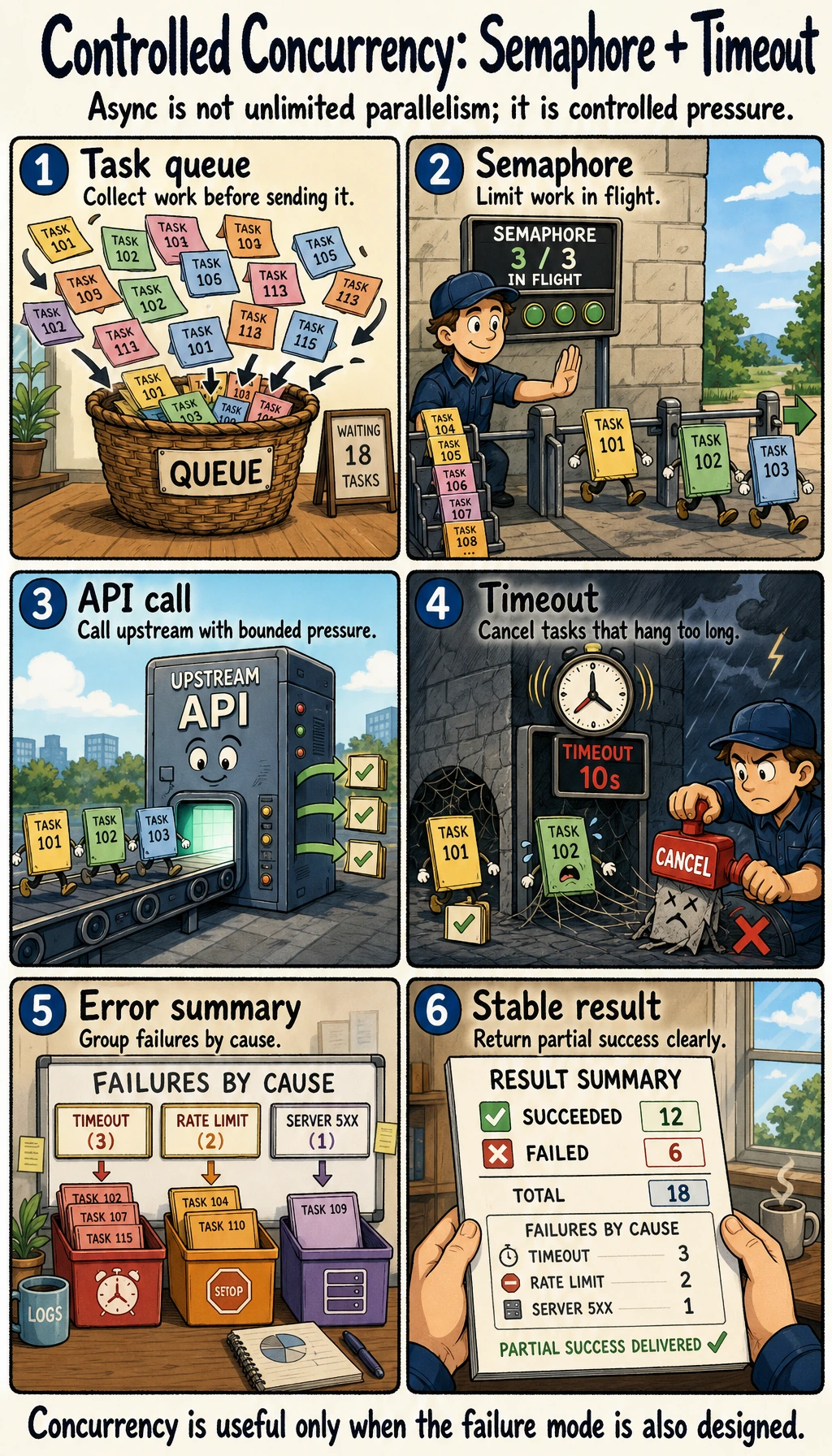
Semaphore | A concurrency gate that limits how many tasks can run at the same time | It prevents your app from overwhelming APIs, databases, or model services |
timeout | A maximum waiting time for an operation | It prevents one stuck upstream call from dragging down the whole request |
The beginner mental model is: async code does not make one slow external service faster; it helps the application avoid wasting time while waiting for that service.
First, build a map
Section titled “First, build a map”It is easier to understand asynchronous programming by focusing on “where we are waiting, whether we can run concurrently, and where we need rate limiting”:
flowchart LR A["Multiple external calls"] --> B["Accumulated waiting time"] B --> C["Concurrent calls"] C --> D["Concurrency limits and timeout control"]So what this section really wants to solve is:
- Why performance problems in LLM engineering are often not about compute, but about waiting
- Why asynchronous programming is not magic speed-up, but a smarter use of waiting time
Why is LLM engineering especially prone to “waiting”?
Section titled “Why is LLM engineering especially prone to “waiting”?”A very real-world scenario
Section titled “A very real-world scenario”You build a question-answering assistant, and one request may need to:
- Query the knowledge base
- Call the model
- Call a tool again
If each step is waited on sequentially before starting the next one, overall latency can easily grow.
Key point: many steps are not “slow computation” but “slow waiting”
Section titled “Key point: many steps are not “slow computation” but “slow waiting””For example:
- Network requests
- Database queries
- Third-party APIs
During these stages, the CPU is often not actually fully occupied. That means:
While waiting for one task, you can move on to other tasks.
This is exactly where asynchronous programming is most valuable.
A beginner-friendly analogy
Section titled “A beginner-friendly analogy”You can think of asynchronous programming as:
- Boiling water while chopping vegetables
If you just stand by the pot and wait while the water is heating, a lot of time is wasted. Asynchrony is saying:
- During the waiting period, keep advancing other tasks
This analogy is great for beginners because it helps you first grasp that:
- Asynchrony does not make a single request “stronger”
- It makes overall waiting “smarter”
What is the difference between synchronous and asynchronous?
Section titled “What is the difference between synchronous and asynchronous?”Synchronous: finish one task before starting the next
Section titled “Synchronous: finish one task before starting the next”import time
def task(name, delay): time.sleep(delay) return f"{name} done"
start = time.time()print(task("A", 1))print(task("B", 1))print("elapsed =", round(time.time() - start, 2))This code will take about 2 seconds.
Example output:
A doneB doneelapsed = 2.0Asynchronous: send it off and do not wait idly
Section titled “Asynchronous: send it off and do not wait idly”import asyncioimport time
async def task(name, delay): await asyncio.sleep(delay) return f"{name} done"
async def main(): start = time.time() results = await asyncio.gather( task("A", 1), task("B", 1) ) print(results) print("elapsed =", round(time.time() - start, 2))
asyncio.run(main())This version usually takes about 1 second.
Example output:
['A done', 'B done']elapsed = 1.0What is the real difference?
Section titled “What is the real difference?”It is not that “asynchrony is mysterious,” but that:
During waiting, the scheduler does not just sit there; it keeps advancing other coroutines.
What exactly do async and await express?
Section titled “What exactly do async and await express?”async def
Section titled “async def”It means:
This is a coroutine function.
It will not finish immediately like a normal function; it can be scheduled for execution.
It means:
We need to wait here for an asynchronous result to come back.
But while waiting, the scheduler can process other coroutines.
A very easy-to-understand analogy
Section titled “A very easy-to-understand analogy”Synchronous is like:
- Standing by the pot and foolishly waiting for the water to boil while cooking
Asynchronous is like:
- While the water is boiling, you go chop vegetables first
Why is gather so commonly used?
Section titled “Why is gather so commonly used?”Because many LLM scenarios are naturally “concurrently query multiple sources”
Section titled “Because many LLM scenarios are naturally “concurrently query multiple sources””For example:
- Query 3 retrievers at the same time
- Request multiple model candidates at the same time
- Query several data sources at the same time
At that point, asyncio.gather() feels very natural.
A more LLM-like example
Section titled “A more LLM-like example”import asyncio
async def retrieve_docs(): await asyncio.sleep(0.3) return ["refund policy", "certificate instructions"]
async def call_model(): await asyncio.sleep(0.5) return "initial model response"
async def fetch_user_profile(): await asyncio.sleep(0.2) return {"user_level": "beginner"}
async def main(): docs, model_reply, profile = await asyncio.gather( retrieve_docs(), call_model(), fetch_user_profile() ) print(docs) print(model_reply) print(profile)
asyncio.run(main())Expected output:
['refund policy', 'certificate instructions']initial model response{'user_level': 'beginner'}This is already very similar to “query several layers of information in parallel” in a real application.
Why can’t we run infinitely many tasks concurrently?
Section titled “Why can’t we run infinitely many tasks concurrently?”Because external systems cannot handle unlimited load
Section titled “Because external systems cannot handle unlimited load”If you launch 1000 requests at once, you may run into:
- API rate limiting
- Database overload
- File descriptor exhaustion
- Upstream service timeouts
So asynchronous programming is not “the more concurrency, the better,” but rather:
Find a balance between throughput and stability.
Use Semaphore to limit concurrency
Section titled “Use Semaphore to limit concurrency”import asyncio
semaphore = asyncio.Semaphore(3)
async def limited_task(i): async with semaphore: await asyncio.sleep(0.2) return f"task_{i}"
async def main(): results = await asyncio.gather(*(limited_task(i) for i in range(10))) print(results)
asyncio.run(main())Expected output:
['task_0', 'task_1', 'task_2', 'task_3', 'task_4', 'task_5', 'task_6', 'task_7', 'task_8', 'task_9']This example means:
- Although 10 tasks are started in total
- At any given moment, only 3 are allowed to run at the same time
A beginner-friendly judgment table
Section titled “A beginner-friendly judgment table”| Phenomenon | What to try first |
|---|---|
| Many requests, but mostly stuck on I/O | Consider concurrency first |
| External service starts returning rate-limit errors | Add a Semaphore first |
| Some requests keep hanging | Add a timeout first |
| A single task itself is computationally heavy | Asynchrony may not be the first solution |
This table is useful for beginners because it turns “when should I use async, and when should I rate-limit?” into specific decisions.
Why is timeout control especially important?
Section titled “Why is timeout control especially important?”Because some requests can “hang”
Section titled “Because some requests can “hang””In real systems, if an upstream service is extremely slow and you do not have timeout control, the whole request may hang forever.
A minimal timeout example
Section titled “A minimal timeout example”import asyncio
async def slow_task(): await asyncio.sleep(2) return "done"
async def main(): try: result = await asyncio.wait_for(slow_task(), timeout=0.5) print(result) except asyncio.TimeoutError: print("task timeout")
asyncio.run(main())Expected output:
task timeoutThis is extremely important in engineering, because “waiting forever” is usually worse than “failing clearly.”
Typical places where asynchronous programming is used in LLM engineering
Section titled “Typical places where asynchronous programming is used in LLM engineering”Concurrent retrieval
Section titled “Concurrent retrieval”Query at the same time:
- FAQ
- Vector database
- Database
Multi-model concurrency
Section titled “Multi-model concurrency”For example:
- Main model + fallback model
- Generate multiple candidate answers concurrently
Tool concurrency
Section titled “Tool concurrency”For example, when an Agent needs to simultaneously:
- Check the weather
- Check user status
- Check order records
Logging and monitoring pipelines
Section titled “Logging and monitoring pipelines”Some logs and reporting are also suitable for asynchronous handling, so they do not block the main request.
The safest default order for introducing async into a project
Section titled “The safest default order for introducing async into a project”A safer sequence is usually:
- Find which steps are mainly waiting on I/O
- Make those steps concurrent first
- Add Semaphore to control concurrency
- Finally add timeout and exception handling
This is more stable than converting the entire project to async all at once.
If your goal is a “SOP document assistant driven by a knowledge base,” which steps are most worth running concurrently?
Section titled “If your goal is a “SOP document assistant driven by a knowledge base,” which steps are most worth running concurrently?”In this kind of project, the easiest steps to parallelize are usually not the “final SOP draft generation” step, but the external waiting actions before generation.
The steps that are more worth prioritizing for concurrency are usually:
- Querying internal SOP and policy documents
- Fetching handled case examples
- Reading support role or approval configuration
- Prefetching Word template sections
You can first understand it as:
The most valuable place for concurrency is often the “context gathering” stage.
A small example that looks more like a real system
Section titled “A small example that looks more like a real system”import asyncio
async def search_kb(query): await asyncio.sleep(0.3) return f"knowledge base result: {query}"
async def get_user_status(user_id): await asyncio.sleep(0.2) return {"user_id": user_id, "progress": 0.15}
async def call_llm(prompt): await asyncio.sleep(0.4) return f"LLM response: {prompt}"
async def handle_request(query, user_id): kb_result, user_status = await asyncio.gather( search_kb(query), get_user_status(user_id) )
prompt = f"Please answer based on the following information: {kb_result}, user status: {user_status}" answer = await call_llm(prompt) return answer
print(asyncio.run(handle_request("What is the refund policy?", 1)))Expected output:
LLM response: Please answer based on the following information: knowledge base result: What is the refund policy?, user status: {'user_id': 1, 'progress': 0.15}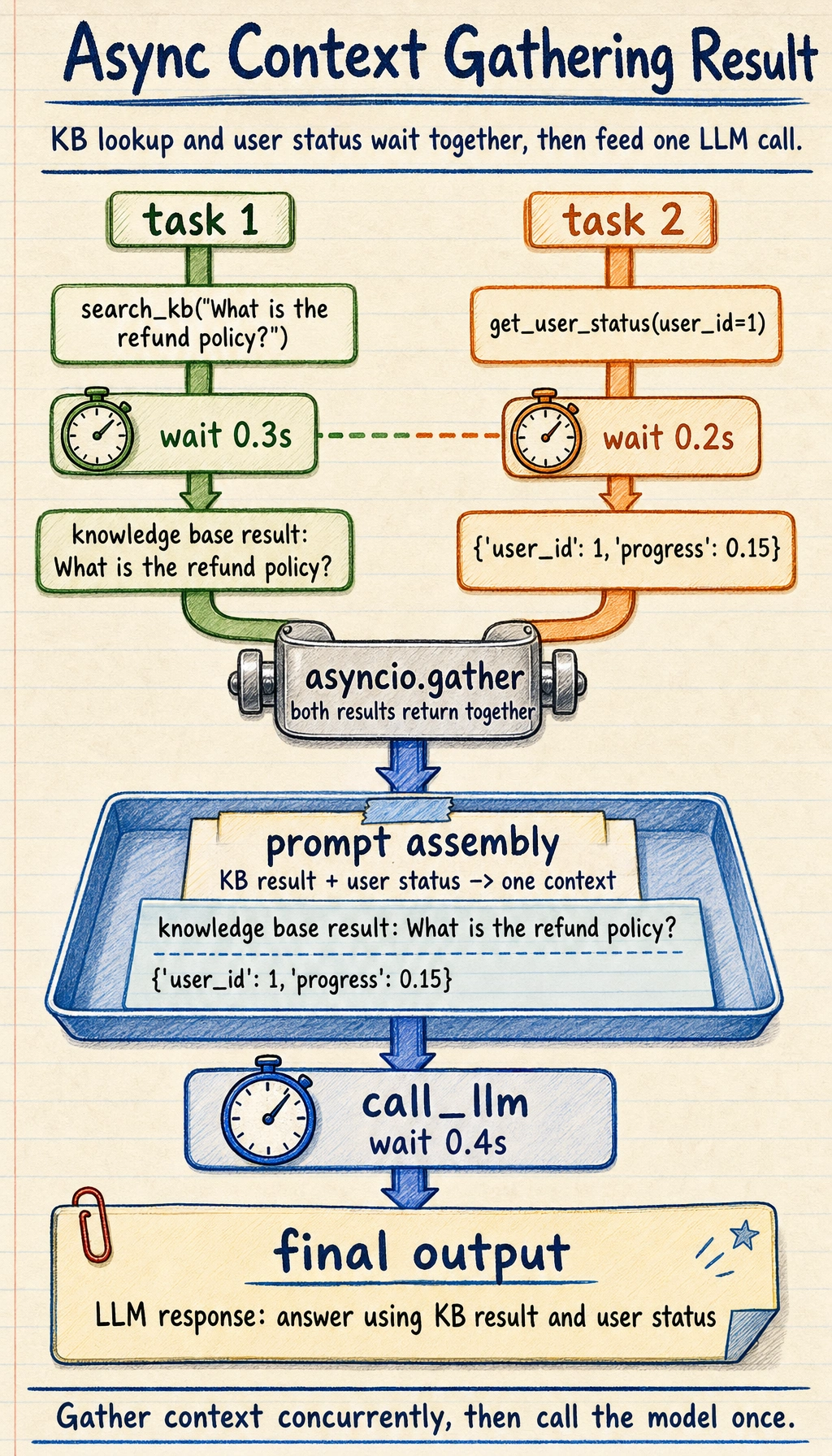
This example already looks very much like a real backend:
- The first half gathers context concurrently
- The second half sends everything to the model together
Common mistakes beginners make
Section titled “Common mistakes beginners make”Thinking of async as “faster synchronous code”
Section titled “Thinking of async as “faster synchronous code””Asynchrony is not a speed-up magic trick; it is more like a smarter way of waiting.
Starting with unlimited concurrency
Section titled “Starting with unlimited concurrency”This can easily overload your system.
Not handling timeouts and exceptions
Section titled “Not handling timeouts and exceptions”Once a task gets stuck, the entire request pipeline may be dragged down.
If you turn this into a project or system design, what is most worth showing?
Section titled “If you turn this into a project or system design, what is most worth showing?”What is usually most worth showing is not:
- “I used asyncio”
But rather:
- Which steps were made concurrent
- Why concurrency was useful here
- How rate limiting and timeout were designed
- How the overall latency was reduced
This makes it easier for others to see that:
- You understand the engineering value of asynchronous concurrency
- You are not just able to write the syntax
Evidence to Keep
Section titled “Evidence to Keep”Keep this page’s proof of learning as a small evidence card:
- Service Contract
- endpoint, input schema, output schema, error schema
- Run Signal
- latency, throughput, logs, health check, or container status
- Observability
- request id, trace id, structured log, or metric
- Failure Check
- timeout, retry storm, missing log, deployment mismatch
- Ops Action
- backoff, queue, alert, rollout, or rollback
Summary
Section titled “Summary”The most important thing in this section is not memorizing async / await syntax, but understanding that:
The core of asynchronous programming is to make use of waiting time, so the system is more efficient and more stable in I/O-bound scenarios.
This is almost unavoidable foundational knowledge in LLM engineering.
Exercises
Section titled “Exercises”- Increase the number of tasks in the concurrency example in this section from 10 to 30, and adjust the size of
Semaphore. - Add one more concurrent tool call in
handle_request(). - Think about why asynchronous programming is especially suitable for LLM applications with “many external dependencies.”
- Explain in your own words: why is asynchronous programming not “making a single task faster,” but “making overall waiting smarter”?
Reference implementation and walkthrough
- Increasing tasks to 30 should reveal queueing.
Semaphorecontrols max in-flight work and prevents overwhelming external dependencies. - The additional concurrent call should be awaited with error and timeout handling so one slow dependency does not block everything silently.
- LLM apps wait on model APIs, retrievers, databases, tools, storage, and monitoring. Async improves resource use during that waiting time.
- It does not make one remote call faster; it lets other useful work proceed while that call waits.