
3.5.5 Database Design
Learning Objectives
Section titled “Learning Objectives”- Understand why good database design matters
- Master the core ideas behind database normalization
- Learn how to design table structures and relationships
- Understand the role of indexes and when to use them
First, Build a Map
Section titled “First, Build a Map”Database design is easier to understand as “split tables first, then connect tables, then add indexes”:
flowchart LR A["First split tables by entity"] --> B["Use primary keys and foreign keys to connect relationships"] B --> C["Then see whether queries need indexes"]So what this section really aims to solve is:
- Why tables should not be lumped together casually
- Why design problems eventually become data quality and query efficiency problems
Why Is Design Important?
Section titled “Why Is Design Important?”A bad database design can lead to:
| Problem | Result |
|---|---|
| Data redundancy | The same information is stored N times, wasting space and requiring N changes for one update |
| Update anomalies | You update one copy but forget another, causing inconsistent data |
| Insert anomalies | You want to add one piece of information, but you are forced to invent related data that does not exist |
| Delete anomalies | Deleting one record accidentally removes other useful information |
A Better Analogy for Beginners
Section titled “A Better Analogy for Beginners”You can think of database design like this:
- Design the warehouse shelves first, then start putting things on them
If the shelves are messy from the start:
- The same kind of item gets placed everywhere
- One item appears in many copies
- It becomes hard to find things later
Maintenance costs will keep rising.
Database Normalization
Section titled “Database Normalization”Normalization is a set of database design rules that helps you avoid the problems above. You only need to remember the core ideas of the first three normal forms.
First Normal Form (1NF): Columns Must Be Atomic
Section titled “First Normal Form (1NF): Columns Must Be Atomic”Rule: Each field should store only one value, not a list or multiple comma-separated values.
Violates 1NF
| name | phones |
|---|---|
| Zhang San | 138xxxx, 139xxxx, 186xxxx |
Problem: one field stores several phone numbers.
Follows 1NF
| name | phone |
|---|---|
| Zhang San | 138xxxx |
| Zhang San | 139xxxx |
| Zhang San | 186xxxx |
Second Normal Form (2NF): Remove Partial Dependency
Section titled “Second Normal Form (2NF): Remove Partial Dependency”Rule: On the basis of 1NF, non-key fields must depend on the whole primary key, not just part of it.
Violates 2NF
- Composite primary key:
order_id + product_id. - Example row:
O1001,P01,Alex Chen,Wireless Mouse,2. - Problem:
customer_namedepends only onorder_id, whileproduct_namedepends only onproduct_id.
Follows 2NF
| Table | Stores |
|---|---|
customers | customer_id, customer_name |
orders | order_id, customer_id |
products | product_id, product_name |
order_items | order_id, product_id, quantity |
Third Normal Form (3NF): Remove Transitive Dependency
Section titled “Third Normal Form (3NF): Remove Transitive Dependency”Rule: On the basis of 2NF, non-key fields must not depend on another non-key field.
Violates 3NF
- Employee row:
employee_id=E01,name=Lee,dept_id=D01. - Department facts stored on the employee row:
dept_name=Sales,dept_manager=Wang.
Problem: dept_name and dept_manager depend on dept_id, not directly on employee_id.
Follows 3NF
| Table | Stores |
|---|---|
employees | employee_id, name, dept_id |
departments | dept_id, dept_name, dept_manager |
Normalization Summary
Section titled “Normalization Summary”flowchart TD A["Raw data (one big table)"] --> B["1NF: columns must be atomic"] B --> C["2NF: remove partial dependency"] C --> D["3NF: remove transitive dependency"]
B1["Problem: one field stores multiple values"] -.-> B C1["Problem: non-key fields depend on only part of a composite key"] -.-> C D1["Problem: non-key fields depend on other non-key fields"] -.-> D
style A fill:#ffebee,stroke:#c62828,color:#333 style D fill:#e8f5e9,stroke:#2e7d32,color:#333A Quick Normalization Cheat Sheet for Beginners
Section titled “A Quick Normalization Cheat Sheet for Beginners”| Normal Form | First intuition |
|---|---|
| 1NF | Do not put multiple values in one cell |
| 2NF | Non-key fields should not depend on only part of a composite primary key |
| 3NF | Non-key fields should not depend on other non-key fields |
This table is especially helpful for beginners because it turns abstract normalization ideas into a few practical sentences.
Practice: Designing an E-commerce Database
Section titled “Practice: Designing an E-commerce Database”Requirement Analysis
Section titled “Requirement Analysis”A simple e-commerce system needs to manage:
- user information
- product information
- product categories
- orders and order details
ER Diagram (Entity-Relationship Diagram)
Section titled “ER Diagram (Entity-Relationship Diagram)”erDiagram users { int id PK text name text email text phone date created_at }
categories { int id PK text name text description }
products { int id PK text name real price int stock int category_id FK }
orders { int id PK int user_id FK real total_amount text status datetime created_at }
order_items { int id PK int order_id FK int product_id FK int quantity real unit_price }
users ||--o{ orders : "place orders" categories ||--o{ products : "contain" orders ||--|{ order_items : "contain" products ||--o{ order_items : "are purchased in"Key Design Decisions
Section titled “Key Design Decisions”Why split an order into two tables: orders + order_items?
Bad design 1: one wide table
- Shape:
order_id,user_id,product1,qty1,product2,qty2, … - Problem: the number of columns changes as the cart grows, so it violates 1NF.
Bad design 2: repeated order information
- Row 1: order
1, userZhang San, total8998, productiPhone, quantity1. - Row 2: order
1, userZhang San, total8998, productAirPods, quantity1. - Problem:
order_id,user, andtotalrepeat on every item row, which creates 2NF-style update problems.
Better design: split the responsibility
| Table | Main fields |
|---|---|
orders | order_id, user_id, total_amount, status |
order_items | item_id, order_id, product_id, quantity, unit_price |
Implementing with SQLite
Section titled “Implementing with SQLite”import sqlite3
conn = sqlite3.connect(":memory:")cursor = conn.cursor()
# Create tablescursor.executescript(""" CREATE TABLE categories ( id INTEGER PRIMARY KEY AUTOINCREMENT, name TEXT NOT NULL UNIQUE );
CREATE TABLE products ( id INTEGER PRIMARY KEY AUTOINCREMENT, name TEXT NOT NULL, price REAL NOT NULL CHECK(price > 0), stock INTEGER DEFAULT 0, category_id INTEGER, FOREIGN KEY (category_id) REFERENCES categories(id) );
CREATE TABLE users ( id INTEGER PRIMARY KEY AUTOINCREMENT, name TEXT NOT NULL, email TEXT UNIQUE, created_at TEXT DEFAULT CURRENT_TIMESTAMP );
CREATE TABLE orders ( id INTEGER PRIMARY KEY AUTOINCREMENT, user_id INTEGER NOT NULL, total_amount REAL DEFAULT 0, status TEXT DEFAULT 'pending', created_at TEXT DEFAULT CURRENT_TIMESTAMP, FOREIGN KEY (user_id) REFERENCES users(id) );
CREATE TABLE order_items ( id INTEGER PRIMARY KEY AUTOINCREMENT, order_id INTEGER NOT NULL, product_id INTEGER NOT NULL, quantity INTEGER NOT NULL CHECK(quantity > 0), unit_price REAL NOT NULL, FOREIGN KEY (order_id) REFERENCES orders(id), FOREIGN KEY (product_id) REFERENCES products(id) );""")
# Insert sample datacursor.executescript(""" INSERT INTO categories (name) VALUES ('Phone'), ('Accessories'), ('Computer');
INSERT INTO products (name, price, stock, category_id) VALUES ('iPhone 16', 7999, 100, 1), ('AirPods Pro', 1899, 200, 2), ('MacBook Pro', 14999, 50, 3), ('Phone Case', 39, 500, 2);
INSERT INTO users (name, email) VALUES ('Zhang San', '[email protected]'), ('Li Si', '[email protected]');
INSERT INTO orders (user_id, total_amount, status) VALUES (1, 9898, 'completed'), (2, 14999, 'shipped');
INSERT INTO order_items (order_id, product_id, quantity, unit_price) VALUES (1, 1, 1, 7999), (1, 2, 1, 1899), (2, 3, 1, 14999);""")
conn.commit()Practical Query Examples
Section titled “Practical Query Examples”import pandas as pd
# Query each user's order detailsdf = pd.read_sql_query(""" SELECT u.name AS user, o.id AS order_id, p.name AS product, oi.quantity AS quantity, oi.unit_price AS unit_price, oi.quantity * oi.unit_price AS subtotal, o.status AS status FROM order_items oi JOIN orders o ON oi.order_id = o.id JOIN users u ON o.user_id = u.id JOIN products p ON oi.product_id = p.id""", conn)print(df)
# Query sales amount for each categorydf_category = pd.read_sql_query(""" SELECT c.name AS category, COUNT(oi.id) AS sales_count, SUM(oi.quantity * oi.unit_price) AS total_sales FROM categories c LEFT JOIN products p ON c.id = p.category_id LEFT JOIN order_items oi ON p.id = oi.product_id GROUP BY c.id, c.name ORDER BY total_sales DESC""", conn)print(df_category)What Is an Index?
Section titled “What Is an Index?”An index is like a book’s table of contents — without it, you have to flip through the whole book to find a word; with it, you can jump straight to the right page.
| Scenario | Without index | With index |
|---|---|---|
| Query one row from 1 million rows | Scan all 1 million rows | Locate directly, in milliseconds |
| Search principle | Compare row by row (full table scan) | B-Tree search (logarithmic) |
Creating and Using Indexes
Section titled “Creating and Using Indexes”-- Create an index on the email column (speeds up queries by email)CREATE INDEX idx_users_email ON users(email);
-- Create an index on the order_date columnCREATE INDEX idx_orders_date ON orders(created_at);
-- Composite index (multiple columns)CREATE INDEX idx_items_order_product ON order_items(order_id, product_id);
-- View table indexes-- SQLite: PRAGMA index_list('users');-- MySQL: SHOW INDEX FROM users;When Should You Add an Index?
Section titled “When Should You Add an Index?”| Add an index | No need to add an index |
|---|---|
| Columns commonly used in WHERE conditions | Columns rarely used for queries |
| Columns used in JOIN conditions | Small tables (a few hundred rows) |
| Columns used in ORDER BY | Frequently updated columns (indexes must also be updated) |
| Columns that must be unique | Columns with a very high duplication rate (such as gender) |
A Beginner-Friendly Index Decision Table
Section titled “A Beginner-Friendly Index Decision Table”| Scenario | What to think about first |
|---|---|
| A column is often used in WHERE filtering | Consider an index |
| A column is often used in JOINs | Consider an index |
| The table is very small | Do not rush to add an index |
| A column changes very frequently | Be more cautious with indexes |
This table is helpful for beginners because it turns “when should I create an index?” into a few concrete decisions.
Database Design Checklist
Section titled “Database Design Checklist”Use this checklist every time you design a database:
- Every table has a primary key.
- Field names are clear and consistently styled;
snake_caseis a good default. - Data types match the data, such as
INTEGERfor counts andREALfor simple money examples. - Required fields are marked
NOT NULL. - Unique fields are marked
UNIQUE, such asemail. - Relationships between tables are represented with foreign keys.
- The design satisfies 3NF, or denormalization is intentional and documented.
- Frequently queried columns have indexes.
- Reasonable defaults are set, such as
status DEFAULT 'active'. - A
created_attimestamp records creation time where useful.
Evidence to Keep
Section titled “Evidence to Keep”Keep this page’s proof of learning as a small evidence card:
- Schema
- table names, keys, relationships, and sample rows
- Query
- SQL or Python database code used
- Output
- result rows, row count, or saved extract
- Failure Check
- wrong join key, unsafe query, missing transaction, or schema mismatch
- Expected Output
- query plus result table and one data-quality note
What You Should Take Away from This Section
Section titled “What You Should Take Away from This Section”- The most important part of database design is not “how pretty the tables look,” but whether they are easy to maintain and free from conflicts later
- Normalization helps reduce redundancy and anomalies; it is not just theory to memorize
- More indexes are not always better; indexes should serve real query scenarios
Summary
Section titled “Summary” root(("Database Design")) Normalization 1NF Columns must be atomic 2NF Remove partial dependency 3NF Remove transitive dependency Denormalization Appropriate redundancy Table Design Primary key Required for every table Foreign key Connects other tables Constraints Ensure data quality Naming Clear and consistent Indexes Speed up queries WHERE columns JOIN columns Do not over-index Practice ER diagram first Split tables instead of using one giant wide table Make trade-offs intentionally| Principle | Explanation |
|---|---|
| Draw the ER diagram first | Understand entities and relationships before creating tables |
| Follow normalization | Reduce redundancy and anomalies |
| Denormalize appropriately | Trade some redundancy for performance |
| Use indexes wisely | Speed up critical queries |
| Design first, code later | Changing the database structure is much harder than changing code |
Hands-on Exercises
Section titled “Hands-on Exercises”Exercise 1: Identify Normalization Problems
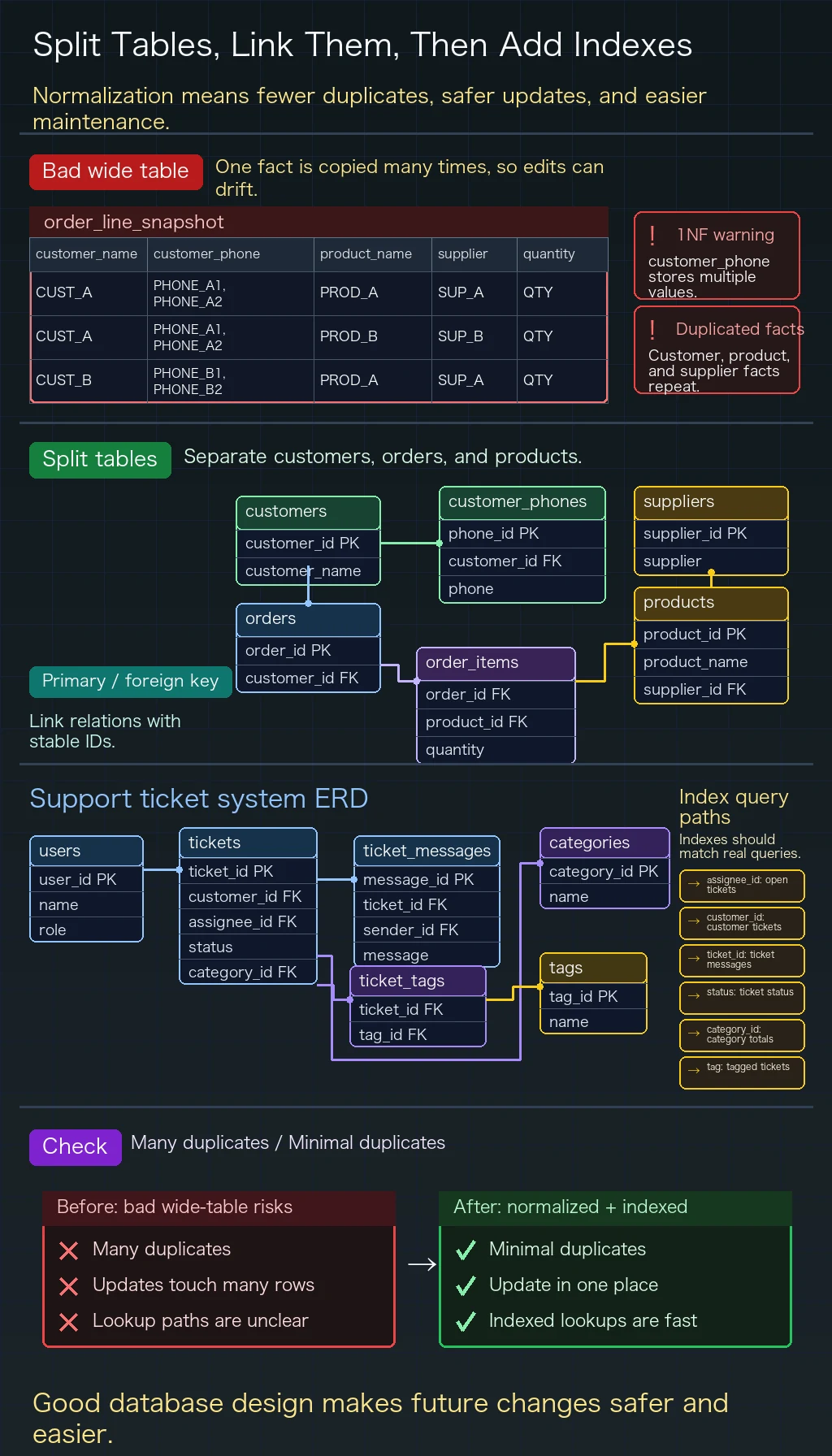
Section titled “Exercise 1: Identify Normalization Problems”What is wrong with the following table design? Which normal form is violated? How would you fix it?
Table: order_line_snapshot
- Row 1: order
O1001, customerAlex Chen, phones555-0101, 555-0199, productP01 Wireless Mouse, supplierGearCo, quantity2. - Row 2: order
O1001, customerAlex Chen, phones555-0101, 555-0199, productP02 Keyboard, supplierKeyLabs, quantity1. - Row 3: order
O1002, customerMia Wong, phone555-0188, productP01 Wireless Mouse, supplierGearCo, quantity1.
Exercise 2: Design a Customer Support Ticket System
Section titled “Exercise 2: Design a Customer Support Ticket System”Design a database for a simple customer support system that needs to support:
- customer and support agent accounts
- creating support tickets (title, description, status, priority)
- ticket messages from customers and agents
- ticket categories and tags (one ticket can have multiple tags)
Requirements:
- Draw an ER diagram (you can use paper or Mermaid)
- Write the CREATE TABLE statements
- Consider which indexes should be added
Exercise 3: Implement and Query
Section titled “Exercise 3: Implement and Query”# Implement the design from Exercise 2 using SQLite# Insert sample data# Complete the following queries:# 1. Query all open tickets assigned to a specific agent# 2. Query all messages for a specific ticket (including sender names)# 3. Query the number of tickets under each status or category# 4. Query all tickets with the "refund" tagReference implementation and walkthrough
- For the normalization exercise, separate customers, customer phone numbers, orders, products, suppliers, and order items. A comma-separated phone field violates 1NF, while customer and product facts repeated inside order lines create partial dependencies and update errors.
- For a support-ticket schema, typical tables are users, tickets, ticket_messages, categories, tags, and a
ticket_tagsjoin table. Foreign keys should describe customer ownership, agent assignment, and ticket-message relationships clearly. - Add indexes where lookups and joins happen often, such as
assignee_id,customer_id,ticket_id,status,category_id, and tag names. Do not add indexes blindly; each one should support a query you expect to run.