
8.1.5 Retrieval Strategies
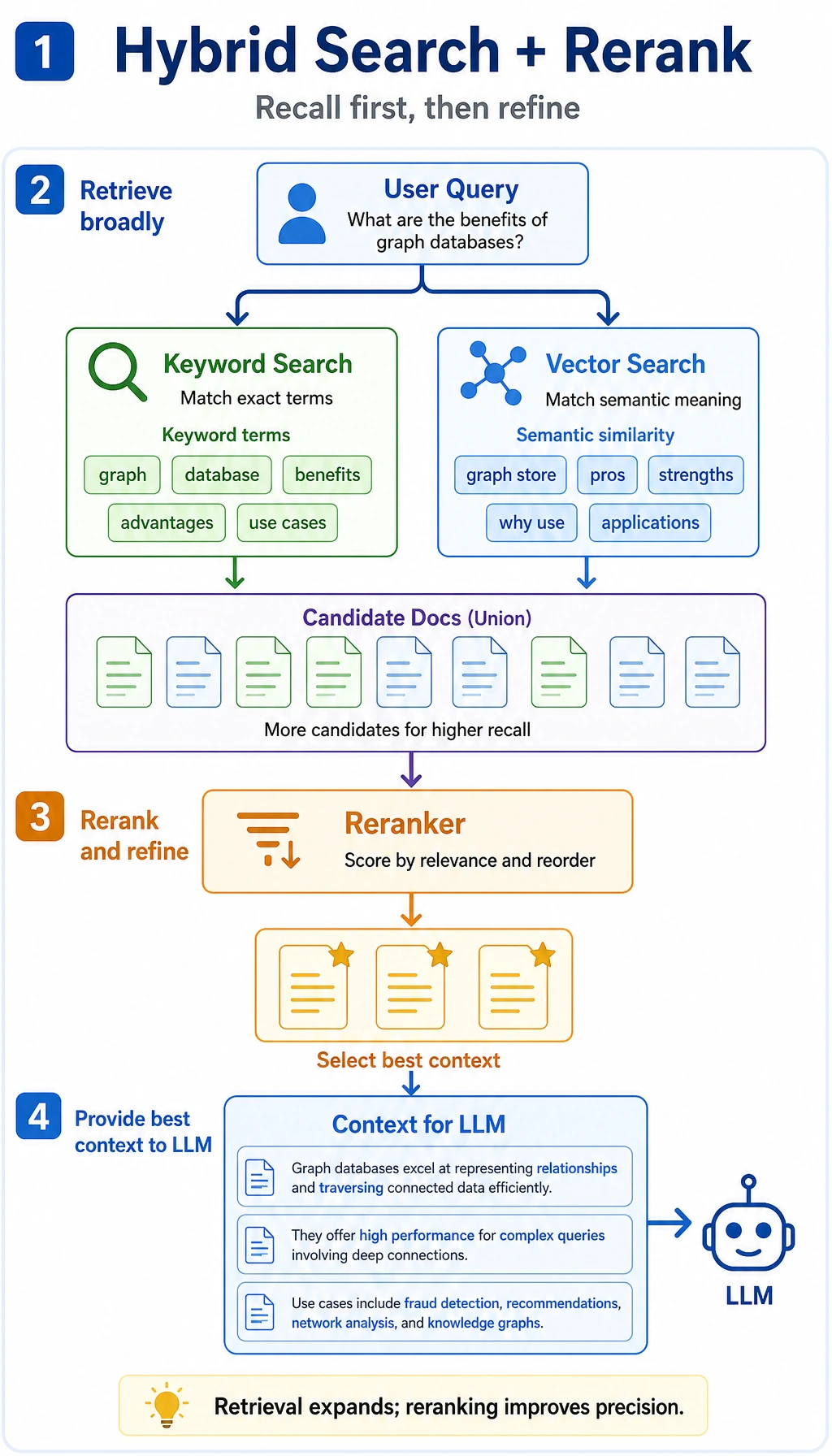
Learning Objectives
Section titled “Learning Objectives”By the end of this section, you will be able to:
- Understand why retrieval strategy directly determines RAG quality
- Distinguish between keyword retrieval, vector retrieval, and hybrid retrieval
- Understand common enhancement methods such as rerank and query rewrite
- Experience the idea of hybrid retrieval with a runnable example
Retrieval Is Not “Only One top-k”
Section titled “Retrieval Is Not “Only One top-k””Keyword Retrieval: Good for Finding Exact Terms
Section titled “Keyword Retrieval: Good for Finding Exact Terms”Keyword retrieval is more like “looking something up in a catalog.”
It is good at:
- Exact terminology
- Product names
- Error codes
- Legal article numbers
For example, when a user asks:
“What does error code 403 mean?”
In this scenario, keyword retrieval is often very strong.
Vector Retrieval: Good for Finding Semantically Similar Content
Section titled “Vector Retrieval: Good for Finding Semantically Similar Content”Vector retrieval is more like “finding similar meaning.”
It is good at:
- Synonyms
- Paraphrased questions
- Casual user questions
For example:
“How do I drop a course?”
and:
“A refund can be requested within 7 days after purchasing the course”
Although the words are different, vector retrieval has a chance to connect them.
Why Do Many Projects Eventually Move Toward Hybrid Retrieval?
Section titled “Why Do Many Projects Eventually Move Toward Hybrid Retrieval?”Because Keywords and Semantics Each Have Blind Spots
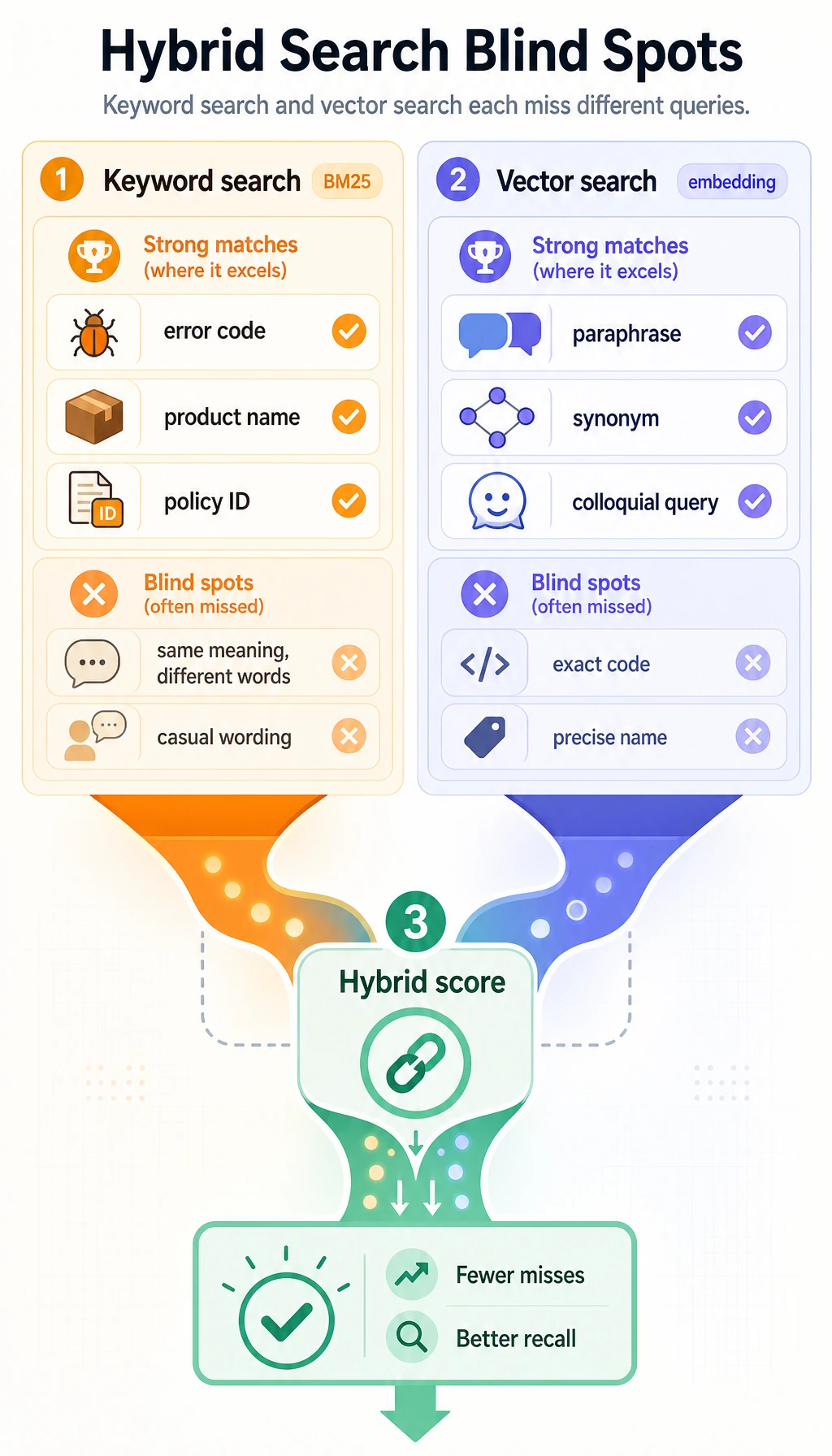
Section titled “Because Keywords and Semantics Each Have Blind Spots”If you only use keyword retrieval:
- You may miss content that is semantically close but phrased differently
If you only use vector retrieval:
- You may sometimes ignore very important domain-specific terms
So many systems do this:
Keyword score + vector score = hybrid score
This Is Like Looking at Both the Literal Words and the Meaning
Section titled “This Is Like Looking at Both the Literal Words and the Meaning”Humans do the same thing when searching for materials:
- First, check whether there are clear keywords
- Then, judge whether it is talking about the same thing
Hybrid retrieval combines these two judgments.
BM25 is a classic keyword-ranking method. Many hybrid search systems combine a BM25-style score with vector similarity, then let reranking polish the final order.
A Minimal Runnable Hybrid Retrieval Example
Section titled “A Minimal Runnable Hybrid Retrieval Example”In the example below:
keyword_scoresimulates keyword matchingvector_scoresimulates semantic similarity- Finally, the two are combined with weights
import mathimport refrom collections import Counterimport numpy as np
docs = [    {        "id": "d1",        "text": "A refund can be requested within 7 days after purchasing the course",        "vector": np.array([0.95, 0.10, 0.05])    },    {        "id": "d2",        "text": "You can earn a certificate after completing all projects and passing the test",        "vector": np.array([0.10, 0.95, 0.10])    },    {        "id": "d3",        "text": "It is recommended to learn Python first, then machine learning and deep learning",        "vector": np.array([0.20, 0.30, 0.95])    }]
query = "How do I apply for a course refund?"query_vector = np.array([0.90, 0.10, 0.10])
def tokenize(text):    words = re.findall(r"[a-zA-Z0-9_]+", text.lower())    cjk_chars = re.findall(r"[\u4e00-\u9fff\u3040-\u30ff]", text)    cjk_bigrams = ["".join(cjk_chars[i:i + 2]) for i in range(len(cjk_chars) - 1)]    return words + cjk_bigrams
def keyword_score(query, text):    q = Counter(tokenize(query))    t = Counter(tokenize(text))    return sum(min(q[k], t[k]) for k in q)
def cosine_similarity(a, b):    return float(np.dot(a, b) / (np.linalg.norm(a) * np.linalg.norm(b)))
results = []for doc in docs:    kw = keyword_score(query, doc["text"])    vec = cosine_similarity(query_vector, doc["vector"])    hybrid = 0.4 * kw + 0.6 * vec    results.append((hybrid, kw, vec, doc["id"], doc["text"]))
for hybrid, kw, vec, doc_id, text in sorted(results, reverse=True):    print(doc_id, "hybrid=", round(hybrid, 4), "kw=", kw, "vec=", round(vec, 4), "->", text)
Expected output:
d1 hybrid= 1.799 kw= 3 vec= 0.9983 -> A refund can be requested within 7 days after purchasing the coursed2 hybrid= 0.5337 kw= 1 vec= 0.2228 -> You can earn a certificate after completing all projects and passing the testd3 hybrid= 0.1977 kw= 0 vec= 0.3295 -> It is recommended to learn Python first, then machine learning and deep learningAlthough simplified, this example is already very close to the core idea of a real system.
Rerank: First Recall Roughly, Then Sort Precisely
Section titled “Rerank: First Recall Roughly, Then Sort Precisely”Why Do We Need Rerank?
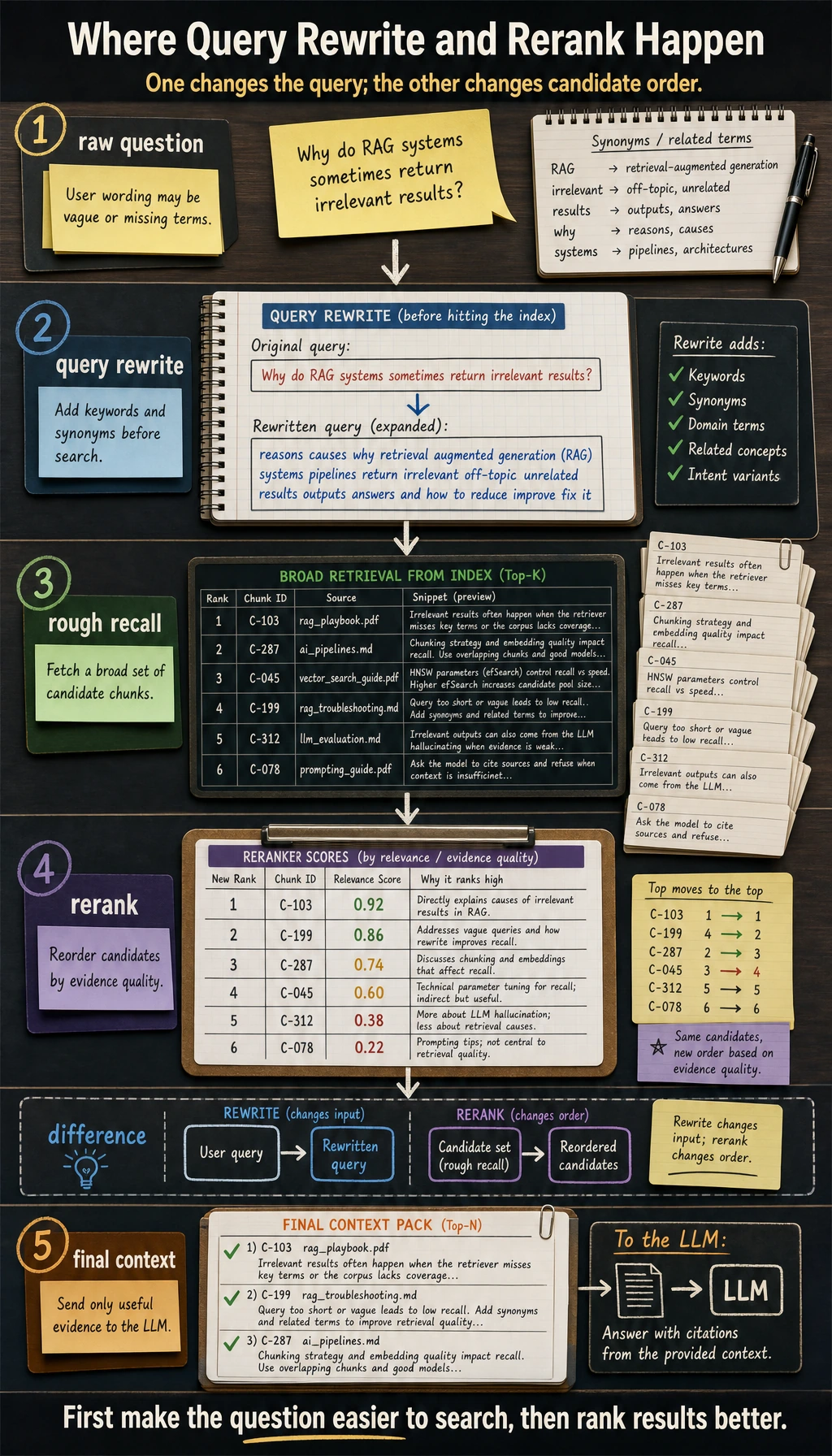
Section titled “Why Do We Need Rerank?”Many systems do not try to “rank correctly on the first try.” Instead, they do this:
- Use a cheaper method to recall a set of candidates
- Use a stronger but more expensive method to rerank them
This is called rerank.
An Intuitive Analogy
Section titled “An Intuitive Analogy”It is like screening resumes when hiring:
- The first round filters resumes by keywords
- The second round carefully checks whether the candidate is really a good fit
RAG works the same way.
Query Rewrite: User Questions Are Often Not Good Retrieval Queries
Section titled “Query Rewrite: User Questions Are Often Not Good Retrieval Queries”User Questions Are Not Always Good Search Terms
Section titled “User Questions Are Not Always Good Search Terms”A user might say:
“Can I still refund in my case?”
But the knowledge base says:
“Refunds are available if the purchase was made within 7 days and learning progress is below 20%”
At this point, the system often rewrites the question into something more suitable for retrieval.
A Toy Query Rewrite Example
Section titled “A Toy Query Rewrite Example”def rewrite_query(query): rewrite_rules = { "drop a course": "refund policy course cancellation", "cancel the course": "refund policy course cancellation", "refund in my case": "refund eligibility purchase date learning progress", "earn a certificate": "certificate requirements course completion test", "graduation certificate": "certificate requirements course completion test", } lowered = query.lower() for phrase, retrieval_query in rewrite_rules.items(): if phrase in lowered: return retrieval_query return query
queries = [ "How do I drop a course?", "I want to earn a certificate", "Can I still refund in my case?",]
for q in queries: print(q, "->", rewrite_query(q))Expected output:
How do I drop a course? -> refund policy course cancellationI want to earn a certificate -> certificate requirements course completion testCan I still refund in my case? -> refund eligibility purchase date learning progressNotice that the rewritten query does not have to be a beautiful natural sentence. Its job is to become a better retrieval phrase.
In real systems, query rewrite may be done by an LLM.
What Other Common Retrieval Enhancement Strategies Are There?
Section titled “What Other Common Retrieval Enhancement Strategies Are There?”Multi-query
Section titled “Multi-query”Rewrite one question into multiple equivalent questions, retrieve separately, and merge the results.
Metadata Filter
Section titled “Metadata Filter”First narrow the scope by business conditions, then do semantic retrieval.
Parent-child Retrieval
Section titled “Parent-child Retrieval”First retrieve small chunks, then go back to a larger section or the original passage.
Self-query Retrieval
Section titled “Self-query Retrieval”Let the model automatically decide which filtering conditions and retrieval fields are needed.
How Should You Choose a Retrieval Strategy?
Section titled “How Should You Choose a Retrieval Strategy?”If You Have Many Proper Nouns
Section titled “If You Have Many Proper Nouns”You should pay more attention to:
- Keyword retrieval
- Hybrid retrieval
- Metadata filtering
If Users Speak Very Casually
Section titled “If Users Speak Very Casually”You should pay more attention to:
- Vector retrieval
- Query rewrite
- Rerank
If Your Knowledge Base Is Highly Structured
Section titled “If Your Knowledge Base Is Highly Structured”You can consider:
- Routing first
- Targeted retrieval next
- Reranking last
If Your Goal Is a “Knowledge-Base-Driven SOP Document Assistant,” How Should You Think About Retrieval Strategy?
Section titled “If Your Goal Is a “Knowledge-Base-Driven SOP Document Assistant,” How Should You Think About Retrieval Strategy?”In this kind of project, retrieval is not just about “finding relevant content,” but more like making two layers of choices:
- First decide whether to search internal materials or supplement with external materials
- Then decide whether to search for policies, handled cases, or checklist items
So it is a good idea to express retrieval conditions like this first:
| Condition | What It Helps You Control |
|---|---|
topic | Current topic |
content_type | Policy / Case / Checklist |
source_origin | Internal materials / External materials |
team | Support team or target audience |
You can remember this line first:
Retrieval in an SOP document project is not just “find related content,” but “find the right evidence for the right section.”
A minimal filtering example can be written like this first:
items = [    {"topic": "refund escalation", "content_type": "policy", "source_origin": "internal", "text": "Duplicate billing refunds must be escalated with transaction evidence."},    {"topic": "refund escalation", "content_type": "case", "source_origin": "internal", "text": "Support verified two successful charges after a failed checkout and escalated the case to billing."},    {"topic": "refund escalation", "content_type": "note", "source_origin": "external", "text": "External note: payment providers may show temporary authorization holds."},]
hits = [    x for x in items    if x["topic"] == "refund escalation" and x["content_type"] in {"policy", "case"}]
for hit in hits:    print(hit)
Expected output:
{'topic': 'refund escalation', 'content_type': 'policy', 'source_origin': 'internal', 'text': 'Duplicate billing refunds must be escalated with transaction evidence.'}{'topic': 'refund escalation', 'content_type': 'case', 'source_origin': 'internal', 'text': 'Support verified two successful charges after a failed checkout and escalated the case to billing.'}This example is especially suitable for beginners, because it lets you see first that:
- metadata filter often works before “using a bigger model”
Common Beginner Mistakes
Section titled “Common Beginner Mistakes”Testing Only Vector Retrieval, Not Keyword Retrieval
Section titled “Testing Only Vector Retrieval, Not Keyword Retrieval”In many enterprise scenarios, keyword retrieval is not weak at all, and may even be the foundation.
Making the Retrieval Strategy Too Complex at the Start
Section titled “Making the Retrieval Strategy Too Complex at the Start”It is recommended to start with:
- A baseline
- A clear evaluation set
- Changing only one strategy at a time
Looking Only at Recall, Not at the Final Answer
Section titled “Looking Only at Recall, Not at the Final Answer”A high retrieval score does not mean the final answer will definitely be better. Because the generation stage also affects performance.
Retrieval Strategy Tuning Table
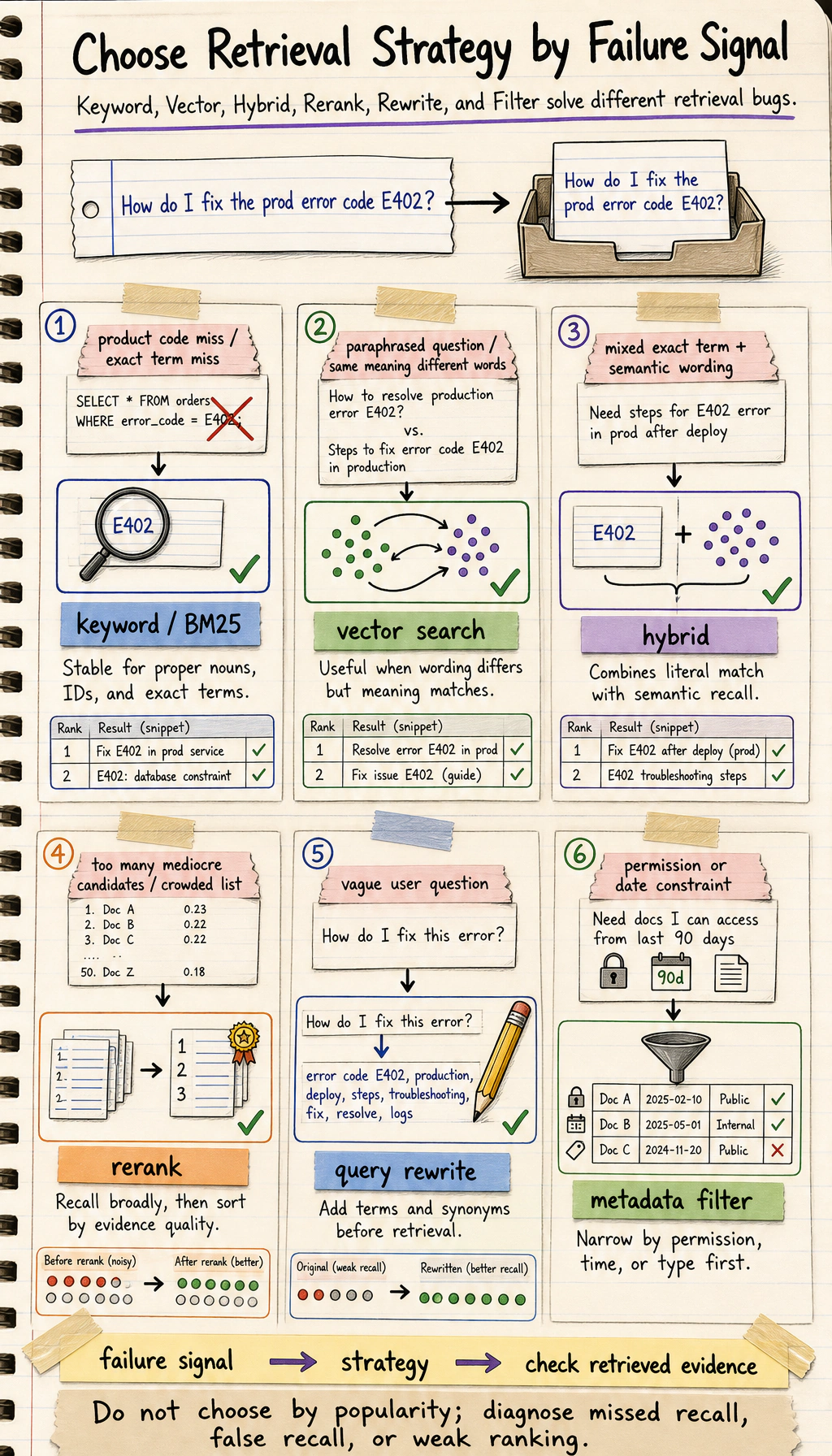
Section titled “Retrieval Strategy Tuning Table”When tuning retrieval, do not just say “the result is not good.” Map the phenomenon to adjustable levers.
| Phenomenon | Priority Adjustment | Why |
|---|---|---|
| Exact terms and error codes cannot be found | Add keyword retrieval or hybrid retrieval | Vector retrieval may weaken exact terms |
| Casual user questions cannot be found | Query rewrite, multi-query, vector retrieval | User expressions and document expressions do not match |
| Relevant content is ranked too low in top-k | Rerank | Rough recall can find it, but the ranking is not accurate enough |
| The retrieved result has the right topic but the wrong version | Metadata filter | You need to narrow the scope by version, date, or source |
| The answer needs to combine multiple passages | Parent-child retrieval or better chunking | Small chunks match, but the context is not enough |
This table is best used together with an evaluation set. Change only one strategy each time, then record Hit@k, MRR, citation quality, and changes in failure cases.
A Retrieval Experiment Log Template
Section titled “A Retrieval Experiment Log Template”baseline: keyword search,top-k=3, no rerank. Exact terms can be found, but synonymous questions are missed. This is suitable for error codes and terminology.exp-1: vector search,top-k=3, no rerank. Synonymous questions work better, but proper nouns are sometimes inaccurate. Keep the keyword channel.exp-2: hybrid retrieval,top-k=5, with rerank. Overall quality is best, but latency increases. Use it as the standard version if latency is acceptable.
The key to retrieval optimization is not finding the perfect strategy at once, but making sure every change has records, metrics, and failure cases.
Evidence to Keep
Section titled “Evidence to Keep”Keep this page’s proof of learning as a small evidence card:
- Query
- one user question or test case
- Retrieved Chunks
- chunk ids, scores, and source titles
- Answer
- final response with citation or source note
- Failure Check
- missing evidence, wrong chunk, stale doc, or unsupported claim
- Next Action
- chunking, embedding, reranking, prompt, or eval change
Summary
Section titled “Summary”The most important takeaway from this lesson is:
In RAG, “finding materials” is not a mechanical step, but a system component that can be continuously designed and optimized.
In many cases, upgrading the retrieval strategy brings more direct gains than switching to a larger model.
Exercises
Section titled “Exercises”- Modify the weights in the hybrid retrieval example and compare how the ranking changes when keyword weight is higher versus when vector weight is higher.
- Add another sentence containing the phrase “drop a course” to the documents, and observe the advantage of keyword retrieval.
- Design a richer
rewrite_query()rule table on your own.
Reference implementation and walkthrough
- Higher keyword weight should favor exact term matches; higher vector weight should favor semantic similarity. The better setting depends on whether your users ask with exact product terms or with vague natural language.
- Keyword retrieval is strong when exact phrases, identifiers, course names, policy terms, or error codes matter. It can catch terms that embeddings may smooth over.
- A useful rewrite table should normalize synonyms, expand abbreviations, map user wording to domain terms, and avoid changing the user’s intent. Rewrites should be logged because a bad rewrite can silently ruin retrieval.