
5.6.6 Hands-on Workshop: Build a Reproducible ML Evidence Pack
Learning Objectives
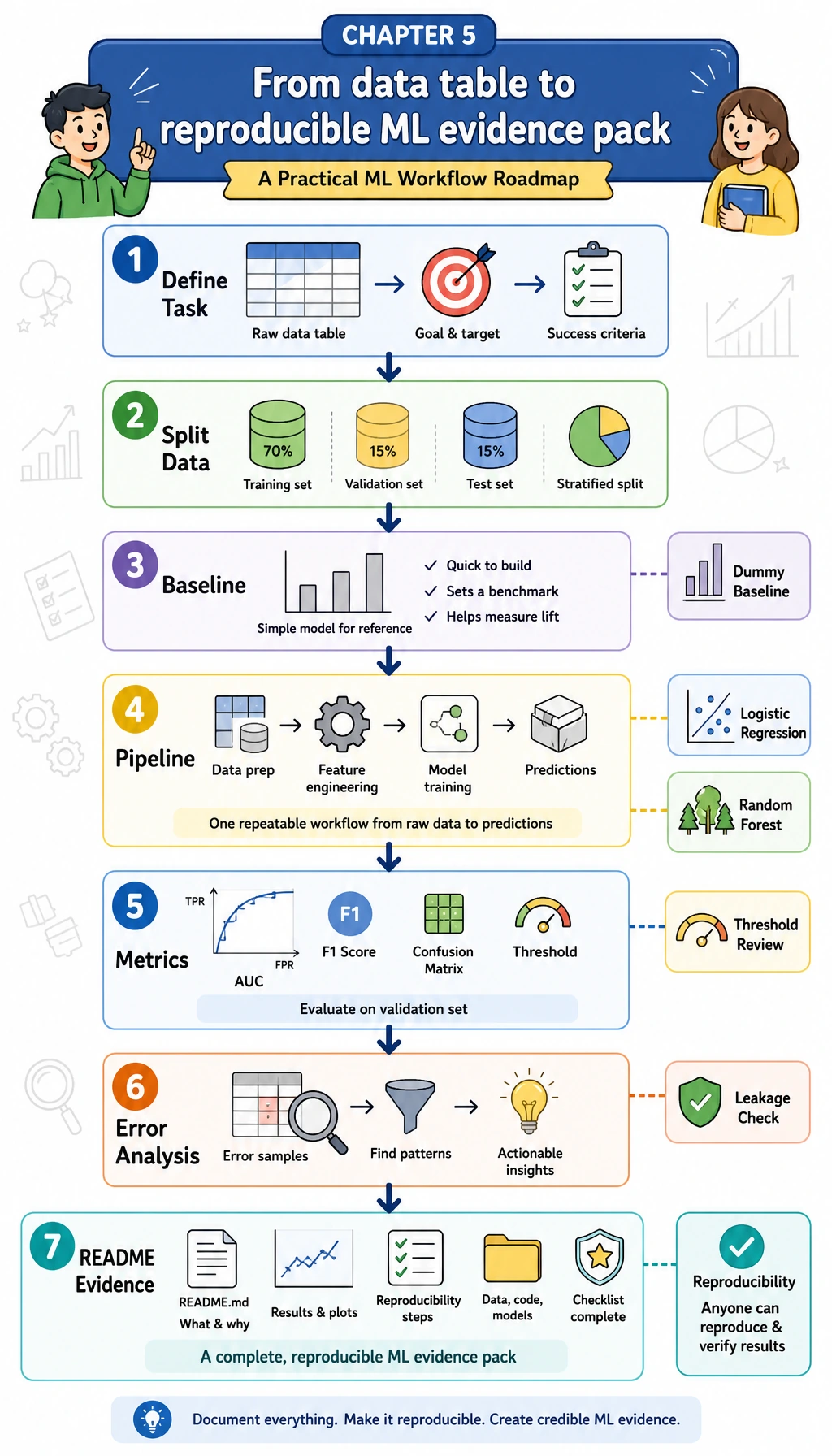
Section titled “Learning Objectives”- Turn a tabular business question into a supervised learning task
- Build a
DummyClassifierbaseline before trying stronger models - Use
ColumnTransformerandPipelineso preprocessing stays inside the training workflow - Compare models with cross-validation and a held-out test set
- Review threshold trade-offs instead of treating
0.5as magic - Save metrics, error samples, leakage checks, and an experiment log as project evidence
What You Will Build
Section titled “What You Will Build”This workshop creates a small local project called ml_workshop_run/.
The task is:
Predict whether a learner is likely to delay the next study task.
The dataset is synthetic and generated locally, so you do not need to download anything. It contains numeric features such as practice hours and quiz score, plus categorical features such as learning track and study mode. The target column is delayed, where 1 means the learner is at higher delay risk.
| Chapter 5 idea | What you will do in the project |
|---|---|
| Task definition | Convert “delay risk” into binary classification |
| Baseline | Train a DummyClassifier first |
| Feature preprocessing | Impute missing values, scale numeric columns, and one-hot encode categories |
| Pipeline | Keep preprocessing and model training together |
| Evaluation | Compare F1, recall, precision, AUC, and confusion matrix |
| Threshold | Review different probability cutoffs |
| Error analysis | Save mispredicted samples |
| Portfolio evidence | Save README, metrics, error samples, and leakage notes |
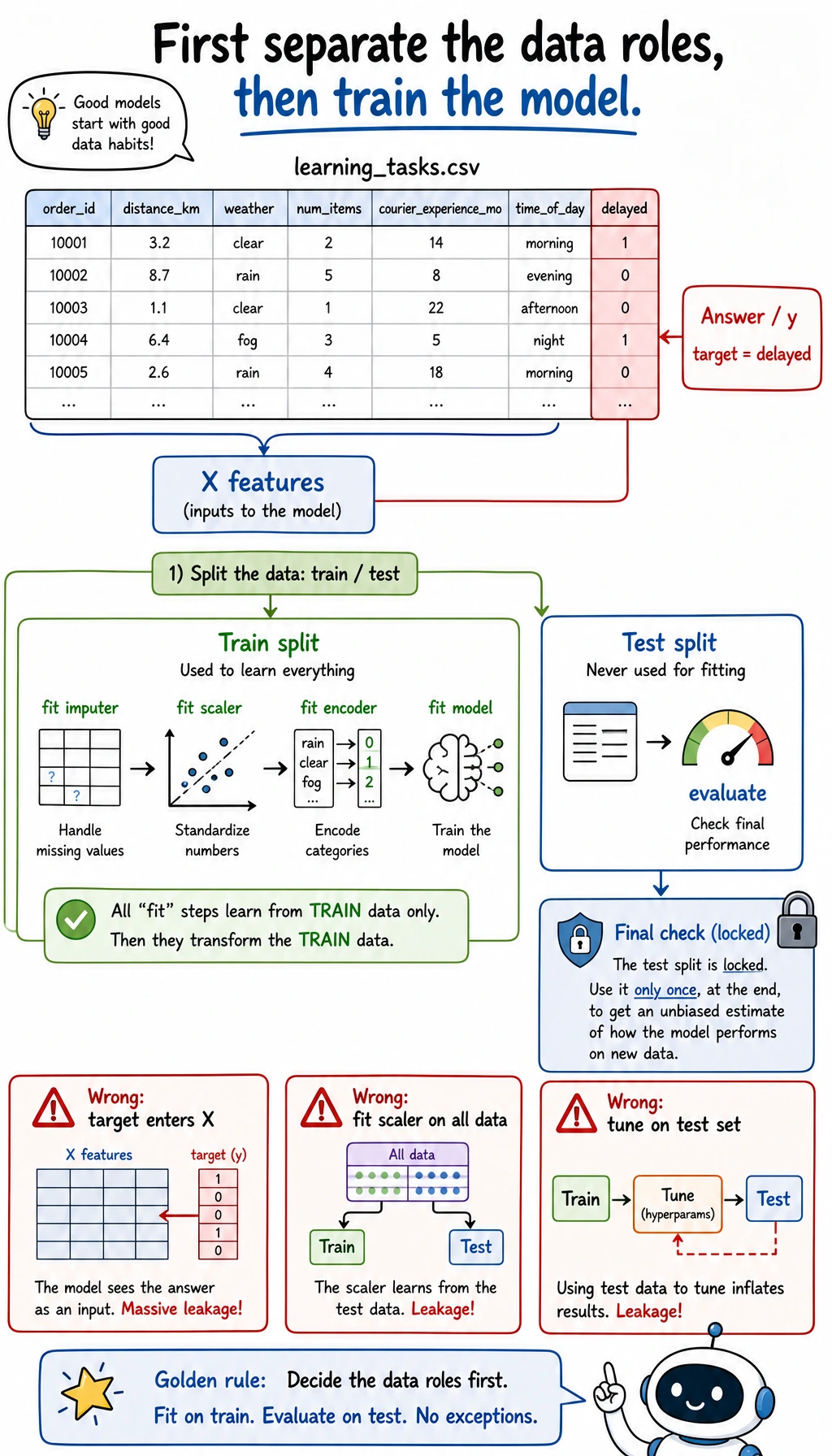
Read the diagram before you run the script. The target column delayed is the answer the model is trying to learn. It must stay out of X. The training split is where preprocessing and model parameters are learned; the test split is held back for the final check. If you mix these roles, the score may look good while the project is already broken.
Evidence Flow: From Data to Report
Section titled “Evidence Flow: From Data to Report”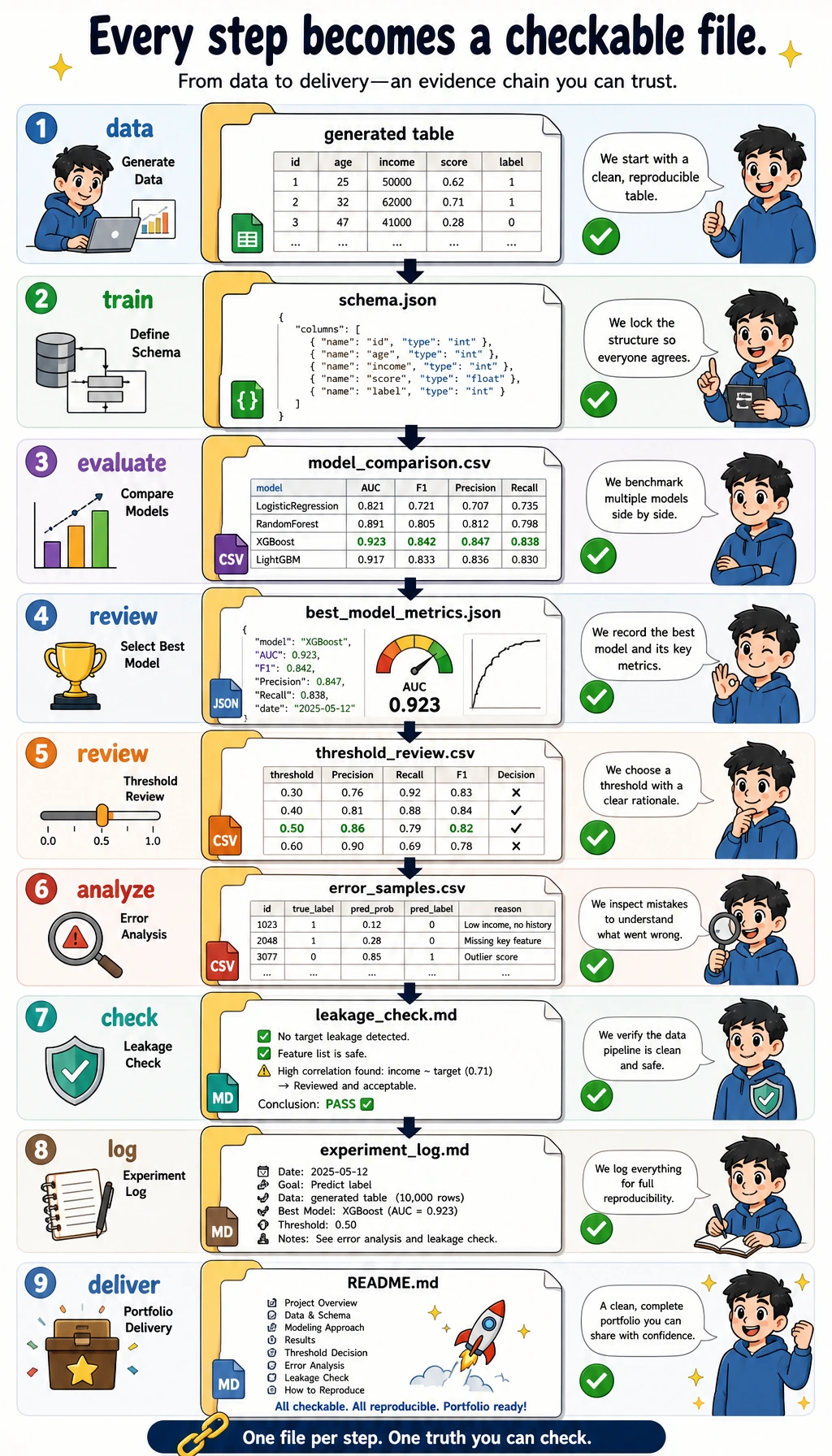
A beginner mistake is stopping at:
model.fit(...)print(score)That is not enough for a real machine learning project. You need to leave a trail:
- What data did you use?
- What was the baseline?
- Which model beat the baseline?
- Which metric matters most?
- Where did the model fail?
- How can someone rerun the project?
The script below generates this evidence pack:
| Area | Files |
|---|---|
| Data | data/learning_tasks.csv, data/schema.json |
| Model outputs | outputs/model_comparison.csv, best_model_metrics.json, classification_report.txt |
| Review outputs | outputs/threshold_review.csv, error_samples.csv |
| Reports | reports/leakage_check.md, experiment_log.md |
| Rerun guide | README.md |
Terms to Decode Before Running
Section titled “Terms to Decode Before Running”- Baseline: the simplest first model. It tells you what score you must beat.
- F1: a balance between precision and recall, useful when the positive class matters and classes are not perfectly balanced.
- Recall: among truly delayed learners, how many did the model catch?
- Precision: among learners flagged as delayed, how many were truly delayed?
- AUC: how well the model ranks positive cases ahead of negative cases across thresholds.
- Pipeline: a scikit-learn object that runs preprocessing and modeling as one safe workflow.
- Data leakage: when the model accidentally sees information it would not have at prediction time.
Prepare the Environment
Section titled “Prepare the Environment”If you are inside this course repository, install the Chapter 1-5 runtime:
python -m pip install -r requirements-course-core.txtIf you are working in a separate folder, install the required packages directly:
python -m pip install numpy pandas scikit-learnThis workshop uses stable scikit-learn APIs such as Pipeline, ColumnTransformer, OneHotEncoder, DummyClassifier, LogisticRegression, and RandomForestClassifier. It was verified locally with Python 3.13, NumPy 2.4, pandas 3.0, and scikit-learn 1.8.
Run the Complete Workshop
Section titled “Run the Complete Workshop”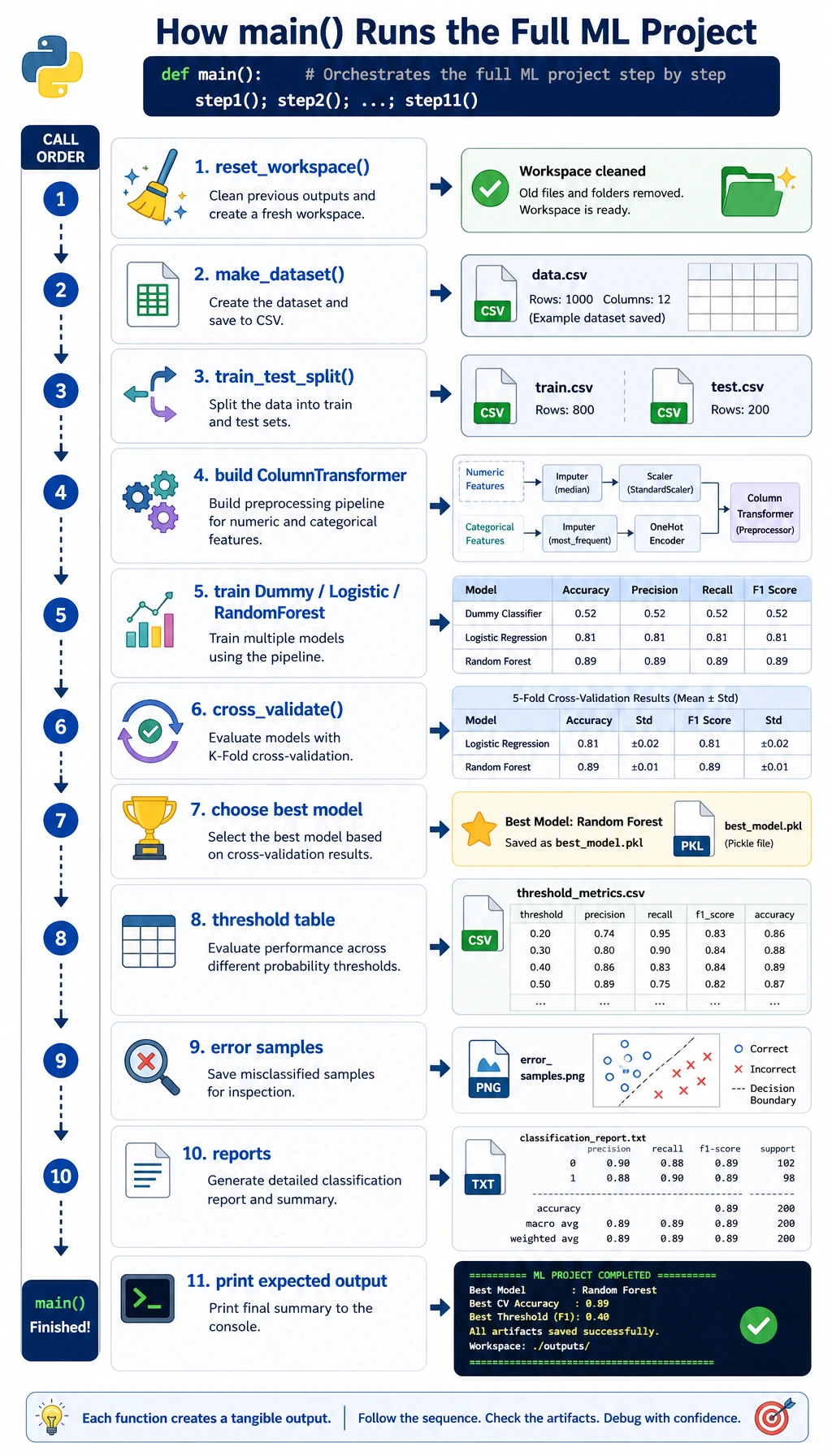
This is the order you will follow: create a clean folder, copy one script, run it once, then inspect the generated evidence. Do not edit the model first. The first run is your reference point.
Create a Clean Folder
Section titled “Create a Clean Folder”mkdir ch05-ml-workshopcd ch05-ml-workshopCreate ml_workshop.py
Section titled “Create ml_workshop.py”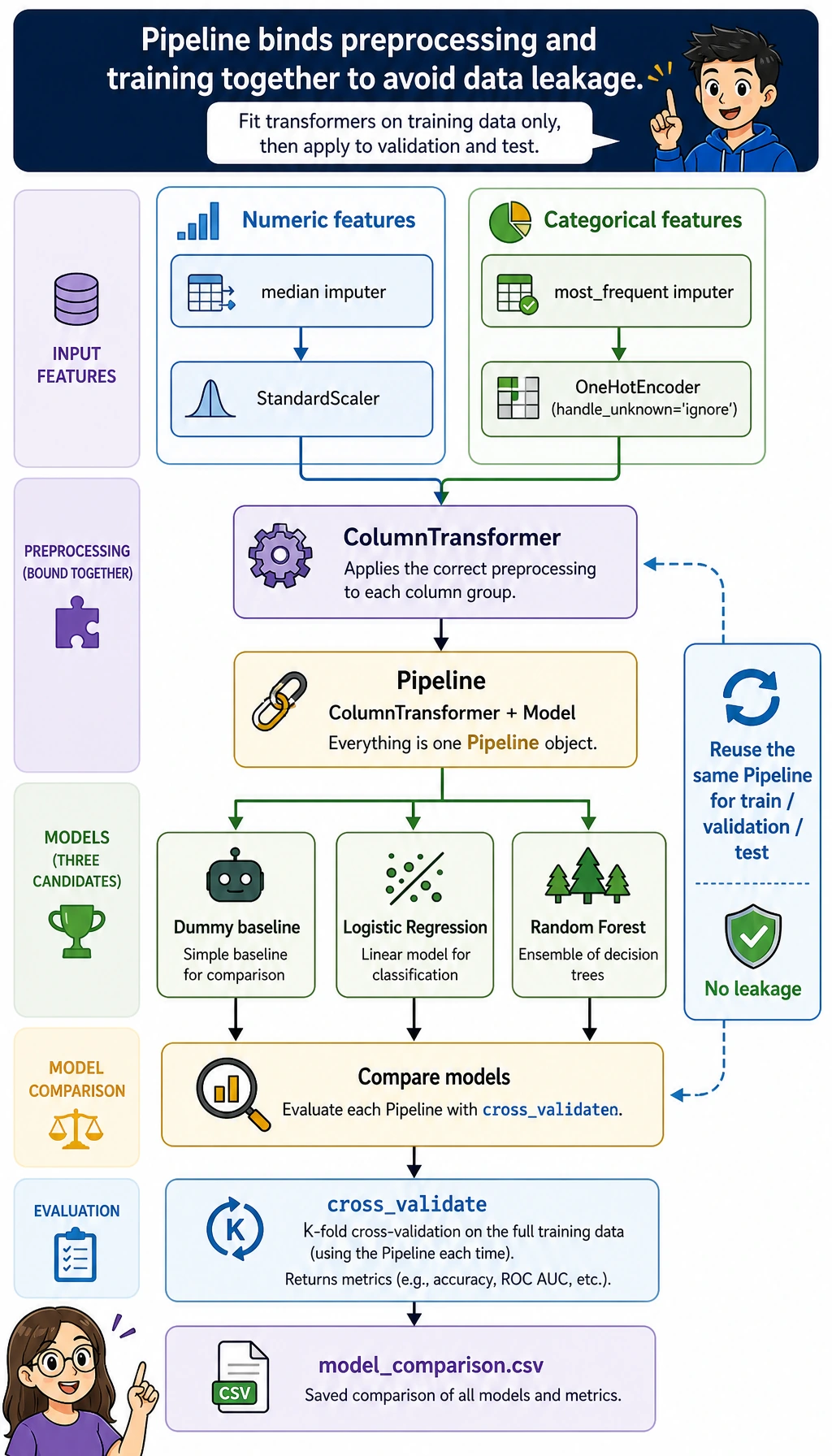
Copy the code below into ml_workshop.py.
from __future__ import annotations
import jsonimport shutilfrom pathlib import Path
import numpy as npimport pandas as pdfrom sklearn.compose import ColumnTransformerfrom sklearn.dummy import DummyClassifierfrom sklearn.ensemble import RandomForestClassifierfrom sklearn.impute import SimpleImputerfrom sklearn.linear_model import LogisticRegressionfrom sklearn.metrics import (    accuracy_score,    classification_report,    confusion_matrix,    f1_score,    precision_score,    recall_score,    roc_auc_score,)from sklearn.model_selection import StratifiedKFold, cross_validate, train_test_splitfrom sklearn.pipeline import Pipelinefrom sklearn.preprocessing import OneHotEncoder, StandardScaler
RUN_DIR = Path("ml_workshop_run")DATA_DIR = RUN_DIR / "data"OUTPUT_DIR = RUN_DIR / "outputs"REPORT_DIR = RUN_DIR / "reports"
NUMERIC_FEATURES = [    "hours_practiced",    "quiz_score",    "forum_questions",    "previous_stage_days",]CATEGORICAL_FEATURES = ["track", "study_mode"]TARGET = "delayed"

def reset_workspace() -> None:    if RUN_DIR.exists():        shutil.rmtree(RUN_DIR)    for folder in (DATA_DIR, OUTPUT_DIR, REPORT_DIR):        folder.mkdir(parents=True, exist_ok=True)

def write_json(path: Path, payload) -> None:    path.write_text(json.dumps(payload, indent=2, ensure_ascii=False), encoding="utf-8")

def make_learning_dataset(seed: int = 42) -> pd.DataFrame:    rng = np.random.default_rng(seed)    rows = 240    hours = rng.normal(7.5, 2.2, rows).clip(1, 14)    quiz = rng.normal(72, 13, rows).clip(25, 100)    questions = rng.poisson(2.5, rows)    previous_days = rng.normal(9, 3.5, rows).clip(2, 24)    track = rng.choice(["data", "app", "model"], rows, p=[0.38, 0.34, 0.28])    study_mode = rng.choice(["solo", "group", "mentor"], rows, p=[0.45, 0.35, 0.20])
    track_risk = np.select([track == "model", track == "app", track == "data"], [0.55, 0.20, 0.05])    mode_bonus = np.select([study_mode == "mentor", study_mode == "group", study_mode == "solo"], [-0.45, -0.18, 0.15])    raw_score = (        1.3        - 0.22 * hours        - 0.035 * quiz        + 0.16 * questions        + 0.14 * previous_days        + track_risk        + mode_bonus        + rng.normal(0, 0.55, rows)    )    probability = 1 / (1 + np.exp(-raw_score))    delayed = (probability >= 0.38).astype(int)
    df = pd.DataFrame(        {            "hours_practiced": hours.round(1),            "quiz_score": quiz.round(1),            "forum_questions": questions,            "previous_stage_days": previous_days.round(1),            "track": track,            "study_mode": study_mode,            TARGET: delayed,        }    )
    missing_hours = rng.choice(df.index, size=10, replace=False)    missing_track = rng.choice(df.index, size=8, replace=False)    df.loc[missing_hours, "hours_practiced"] = np.nan    df.loc[missing_track, "track"] = np.nan    return df

def build_preprocessor() -> ColumnTransformer:    numeric_pipe = Pipeline(        steps=[            ("imputer", SimpleImputer(strategy="median")),            ("scaler", StandardScaler()),        ]    )    categorical_pipe = Pipeline(        steps=[            ("imputer", SimpleImputer(strategy="most_frequent")),            ("onehot", OneHotEncoder(handle_unknown="ignore", sparse_output=False)),        ]    )    return ColumnTransformer(        transformers=[            ("num", numeric_pipe, NUMERIC_FEATURES),            ("cat", categorical_pipe, CATEGORICAL_FEATURES),        ]    )

def make_models() -> dict[str, Pipeline]:    return {        "Dummy baseline": Pipeline(            steps=[                ("preprocess", build_preprocessor()),                ("model", DummyClassifier(strategy="most_frequent")),            ]        ),        "Logistic Regression": Pipeline(            steps=[                ("preprocess", build_preprocessor()),                ("model", LogisticRegression(max_iter=1000, class_weight="balanced")),            ]        ),        "Random Forest": Pipeline(            steps=[                ("preprocess", build_preprocessor()),                ("model", RandomForestClassifier(n_estimators=160, max_depth=5, random_state=42, class_weight="balanced")),            ]        ),    }

def evaluate_models(models, X_train, y_train, X_test, y_test) -> pd.DataFrame:    cv = StratifiedKFold(n_splits=5, shuffle=True, random_state=42)    rows = []    for name, model in models.items():        cv_scores = cross_validate(            model,            X_train,            y_train,            cv=cv,            scoring={"f1": "f1", "roc_auc": "roc_auc", "recall": "recall"},            n_jobs=None,        )        model.fit(X_train, y_train)        predictions = model.predict(X_test)        probabilities = model.predict_proba(X_test)[:, 1]        rows.append(            {                "model": name,                "cv_f1_mean": round(float(cv_scores["test_f1"].mean()), 3),                "cv_auc_mean": round(float(cv_scores["test_roc_auc"].mean()), 3),                "test_accuracy": round(accuracy_score(y_test, predictions), 3),                "test_precision": round(precision_score(y_test, predictions, zero_division=0), 3),                "test_recall": round(recall_score(y_test, predictions, zero_division=0), 3),                "test_f1": round(f1_score(y_test, predictions, zero_division=0), 3),                "test_auc": round(roc_auc_score(y_test, probabilities), 3),            }        )    return pd.DataFrame(rows).sort_values(["test_f1", "test_auc"], ascending=False)

def threshold_table(model: Pipeline, X_test: pd.DataFrame, y_test: pd.Series) -> pd.DataFrame:    probabilities = model.predict_proba(X_test)[:, 1]    rows = []    for threshold in [0.30, 0.40, 0.50, 0.60, 0.70]:        pred = (probabilities >= threshold).astype(int)        rows.append(            {                "threshold": threshold,                "precision": round(precision_score(y_test, pred, zero_division=0), 3),                "recall": round(recall_score(y_test, pred, zero_division=0), 3),                "f1": round(f1_score(y_test, pred, zero_division=0), 3),                "flagged_students": int(pred.sum()),            }        )    return pd.DataFrame(rows)

def save_error_samples(model: Pipeline, X_test: pd.DataFrame, y_test: pd.Series) -> pd.DataFrame:    probabilities = model.predict_proba(X_test)[:, 1]    predictions = (probabilities >= 0.5).astype(int)    errors = X_test.copy()    errors["actual_delayed"] = y_test.to_numpy()    errors["predicted_delayed"] = predictions    errors["delay_probability"] = probabilities.round(3)    errors = errors[errors["actual_delayed"] != errors["predicted_delayed"]]    return errors.sort_values("delay_probability", ascending=False).head(8)

def write_markdown_report(path: Path, title: str, lines: list[str]) -> None:    path.write_text("# " + title + "\n\n" + "\n".join(lines) + "\n", encoding="utf-8")

def main() -> None:    reset_workspace()    df = make_learning_dataset()    df.to_csv(DATA_DIR / "learning_tasks.csv", index=False)    write_json(        DATA_DIR / "schema.json",        {            "target": TARGET,            "numeric_features": NUMERIC_FEATURES,            "categorical_features": CATEGORICAL_FEATURES,            "meaning": "Predict whether a learner is likely to delay the next task.",        },    )
    X = df[NUMERIC_FEATURES + CATEGORICAL_FEATURES]    y = df[TARGET]    X_train, X_test, y_train, y_test = train_test_split(        X,        y,        test_size=0.25,        random_state=42,        stratify=y,    )
    models = make_models()    metrics = evaluate_models(models, X_train, y_train, X_test, y_test)    metrics.to_csv(OUTPUT_DIR / "model_comparison.csv", index=False)
    best_name = str(metrics.iloc[0]["model"])    best_model = models[best_name]    best_model.fit(X_train, y_train)
    best_predictions = best_model.predict(X_test)    best_probabilities = best_model.predict_proba(X_test)[:, 1]    write_json(        OUTPUT_DIR / "best_model_metrics.json",        {            "best_model": best_name,            "accuracy": round(accuracy_score(y_test, best_predictions), 3),            "precision": round(precision_score(y_test, best_predictions, zero_division=0), 3),            "recall": round(recall_score(y_test, best_predictions, zero_division=0), 3),            "f1": round(f1_score(y_test, best_predictions, zero_division=0), 3),            "auc": round(roc_auc_score(y_test, best_probabilities), 3),            "confusion_matrix": confusion_matrix(y_test, best_predictions).tolist(),        },    )
    threshold_results = threshold_table(best_model, X_test, y_test)    threshold_results.to_csv(OUTPUT_DIR / "threshold_review.csv", index=False)
    errors = save_error_samples(best_model, X_test, y_test)    errors.to_csv(OUTPUT_DIR / "error_samples.csv", index=False)
    report_text = classification_report(y_test, best_predictions, zero_division=0)    (OUTPUT_DIR / "classification_report.txt").write_text(report_text, encoding="utf-8")
    write_markdown_report(        REPORT_DIR / "leakage_check.md",        "Leakage Check",        [            "- Split the data before fitting imputers, scalers, encoders, or models.",            "- Keep the target column out of the feature list.",            "- Put preprocessing inside ColumnTransformer and Pipeline.",            "- Use cross-validation on the training split, then check the test split once.",        ],    )    write_markdown_report(        REPORT_DIR / "experiment_log.md",        "Experiment Log",        [            "| version | change | main result | next step |",            "|---|---|---|---|",            f"| v0 | Dummy baseline | f1={metrics[metrics['model'] == 'Dummy baseline'].iloc[0]['test_f1']} | Need a real model |",            f"| v1 | {best_name} with Pipeline | f1={metrics.iloc[0]['test_f1']} | Review threshold and errors |",        ],    )
    readme_lines = [        "# Machine Learning Workshop Evidence Pack",        "",        "Run command:",        "",        "```bash",        "python ml_workshop.py",        "```",        "",        "Generated files:",        "- data/learning_tasks.csv",        "- outputs/model_comparison.csv",        "- outputs/best_model_metrics.json",        "- outputs/threshold_review.csv",        "- outputs/error_samples.csv",        "- reports/leakage_check.md",        "- reports/experiment_log.md",    ]    (RUN_DIR / "README.md").write_text("\n".join(readme_lines) + "\n", encoding="utf-8")
    positive_rate = float(y.mean())    dummy_f1 = float(metrics[metrics["model"] == "Dummy baseline"].iloc[0]["test_f1"])    best_f1 = float(metrics.iloc[0]["test_f1"])    print("STEP 1: data prepared")    print(f"rows: {len(df)}")    print(f"features: {len(NUMERIC_FEATURES) + len(CATEGORICAL_FEATURES)}")    print(f"positive_rate: {positive_rate:.3f}")    print("STEP 2: baseline and model comparison")    print(f"dummy_f1: {dummy_f1:.3f}")    print(f"best_model: {best_name}")    print(f"best_f1: {best_f1:.3f}")    print("STEP 3: evidence files")    print(RUN_DIR / "README.md")    print(OUTPUT_DIR / "model_comparison.csv")    print(OUTPUT_DIR / "error_samples.csv")    print(REPORT_DIR / "leakage_check.md")

if __name__ == "__main__":    main()
Run It
Section titled “Run It”python ml_workshop.pyExpected output:
STEP 1: data preparedrows: 240features: 6positive_rate: 0.287STEP 2: baseline and model comparisondummy_f1: 0.000best_model: Logistic Regressionbest_f1: 0.821STEP 3: evidence filesml_workshop_run/README.mdml_workshop_run/outputs/model_comparison.csvml_workshop_run/outputs/error_samples.csvml_workshop_run/reports/leakage_check.md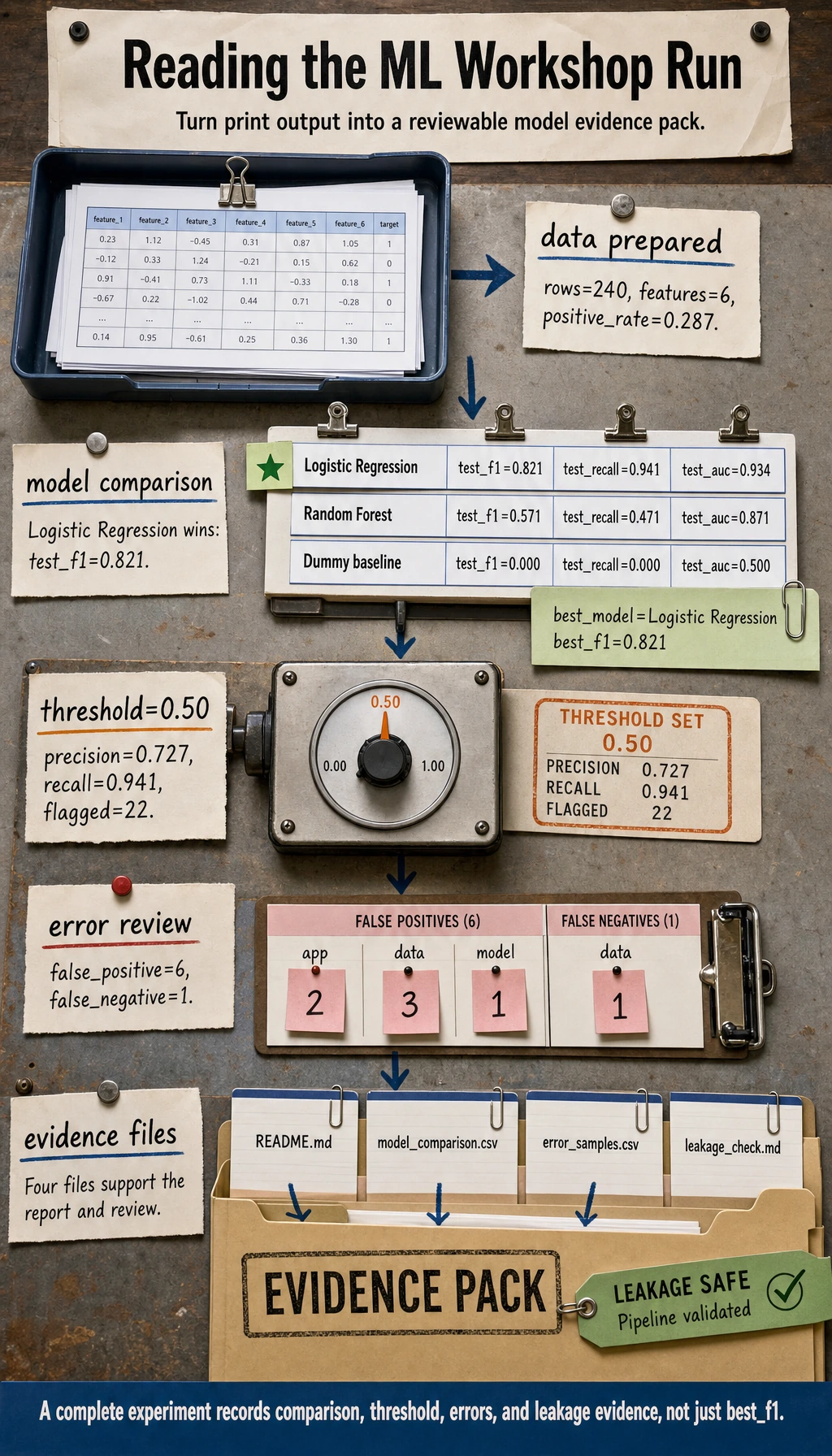
Verify the Generated Evidence
Section titled “Verify the Generated Evidence”Before interpreting any score, confirm that the evidence files were actually created.
find ml_workshop_run -maxdepth 2 -type f | sortExpected output:
ml_workshop_run/README.mdml_workshop_run/data/learning_tasks.csvml_workshop_run/data/schema.jsonml_workshop_run/outputs/best_model_metrics.jsonml_workshop_run/outputs/classification_report.txtml_workshop_run/outputs/error_samples.csvml_workshop_run/outputs/model_comparison.csvml_workshop_run/outputs/threshold_review.csvml_workshop_run/reports/experiment_log.mdml_workshop_run/reports/leakage_check.mdRead the Output Step by Step
Section titled “Read the Output Step by Step”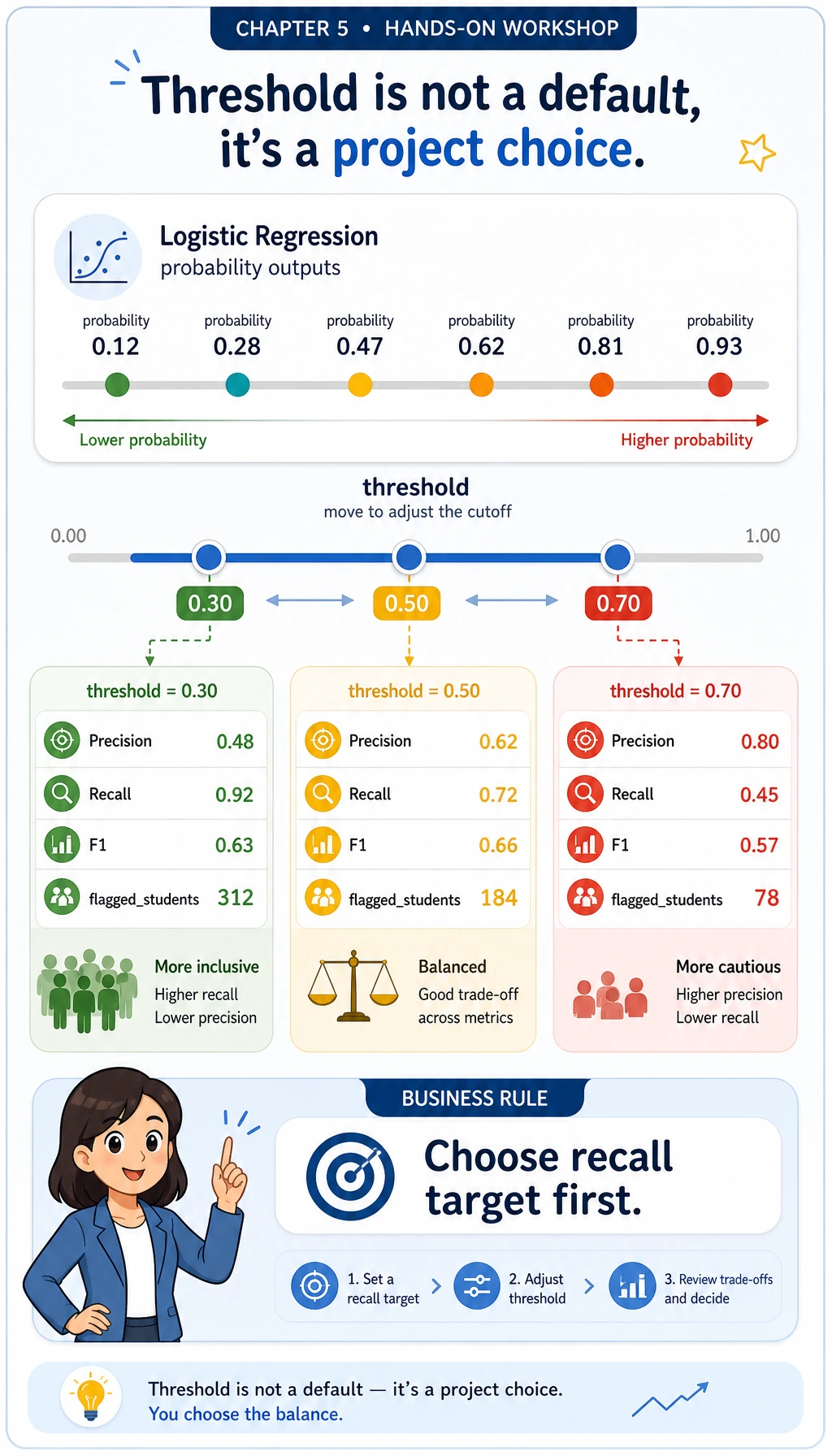
Start with the baseline
Section titled “Start with the baseline”Open ml_workshop_run/outputs/model_comparison.csv.
The Dummy baseline usually gets f1 = 0. This is not a failure. It is the floor. If a real model cannot beat this floor, your data, feature design, metric, or task definition is not ready.
Use this quick reader so you are not guessing from the raw CSV:
python - <<'PY'import pandas as pd
comparison = pd.read_csv("ml_workshop_run/outputs/model_comparison.csv")print(comparison[["model", "test_f1", "test_recall", "test_auc"]].to_string(index=False))PY
Expected output:
model test_f1 test_recall test_aucLogistic Regression 0.821 0.941 0.934 Random Forest 0.571 0.471 0.871 Dummy baseline 0.000 0.000 0.500Check the real model
Section titled “Check the real model”The expected best model is Logistic Regression. That is a good beginner result because it is:
- easy to explain
- fast to train
- strong enough for a first tabular baseline
- compatible with scaled numeric features and one-hot categorical features
Do not jump straight to the Random Forest just because it sounds stronger. In Chapter 5, the first habit is: simple baseline first, stronger model later.
Review the threshold
Section titled “Review the threshold”Open ml_workshop_run/outputs/threshold_review.csv.
For a delay-risk model, recall may matter more than precision: if the goal is to help learners early, missing high-risk learners may be more expensive than sending a few extra reminders. A threshold is therefore a project decision, not just a model default.
Run this small decision helper. It chooses the best row whose recall is at least 0.90, then prints the trade-off in plain text.
python - <<'PY'import pandas as pd
thresholds = pd.read_csv("ml_workshop_run/outputs/threshold_review.csv")choice = thresholds[thresholds["recall"] >= 0.90].sort_values(    ["f1", "precision"],    ascending=False,).iloc[0]
print(f"chosen_threshold={choice.threshold:.2f}")print(    f"precision={choice.precision:.3f} "    f"recall={choice.recall:.3f} "    f"f1={choice.f1:.3f} "    f"flagged={int(choice.flagged_students)}")PY
Expected output:
chosen_threshold=0.50precision=0.727 recall=0.941 f1=0.821 flagged=22If your business goal changes, change the rule. For example, recall >= 0.80 may be enough for a low-cost reminder system, while a medical or safety workflow may require a much stricter recall target and human review.
Inspect the errors
Section titled “Inspect the errors”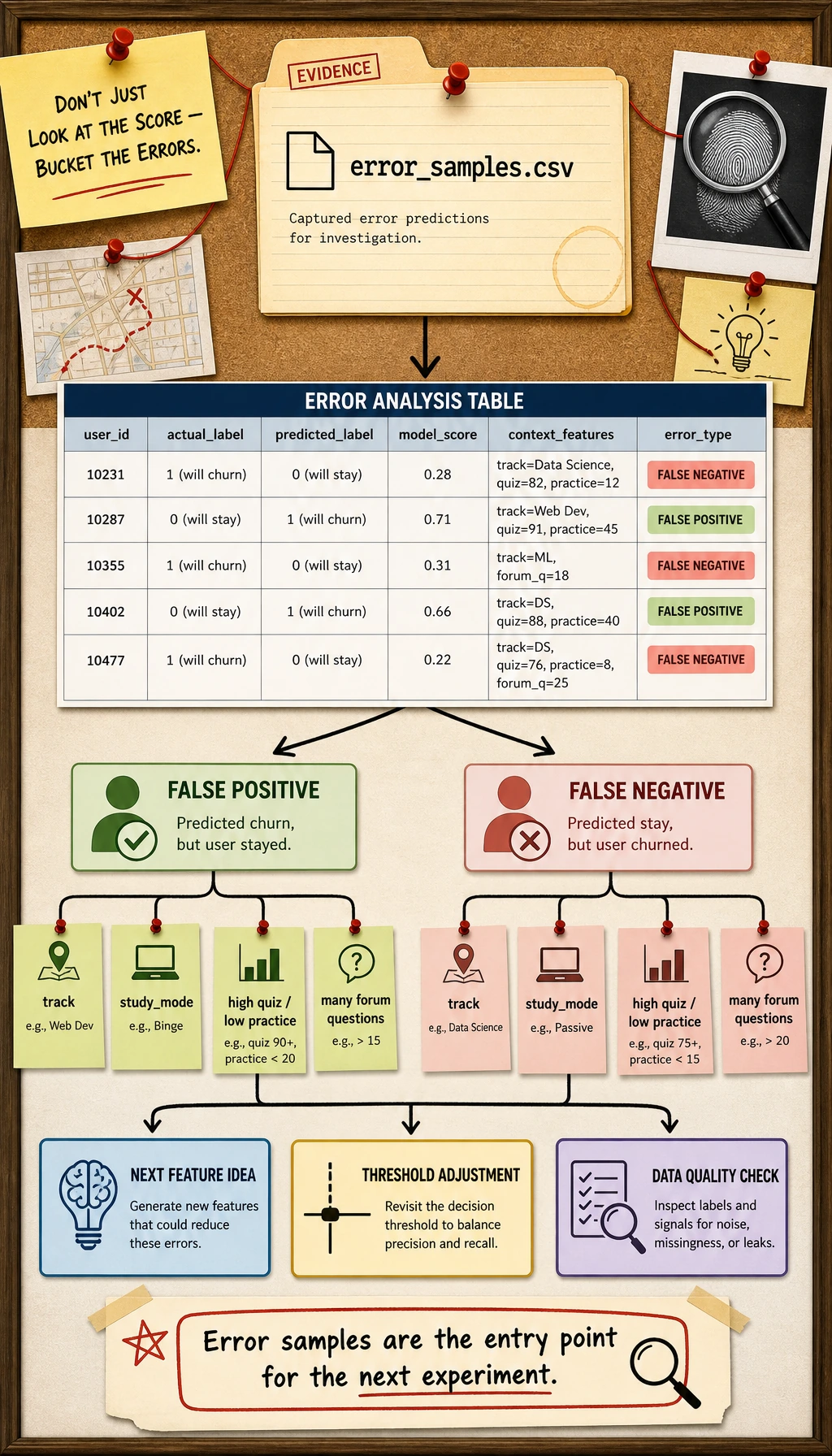
Open ml_workshop_run/outputs/error_samples.csv.
Ask:
- Are the false negatives learners with high quiz scores but low practice time?
- Are the false positives learners from one track or study mode?
- Do the features describe the real reason for delay, or are important signals missing?
Error analysis turns the project from “a score” into “an investigation.”
Use a second quick reader to bucket the wrong predictions:
python - <<'PY'import pandas as pd
errors = pd.read_csv("ml_workshop_run/outputs/error_samples.csv")errors["error_type"] = errors.apply(    lambda row: "false_negative" if row.actual_delayed == 1 else "false_positive",    axis=1,)
print(errors["error_type"].value_counts().to_string())print("--- by track ---")print(errors.groupby(["error_type", "track"]).size().to_string())PY
Expected output:
error_typefalse_positive 6false_negative 1--- by track ---error_type trackfalse_negative data 1false_positive app 2 data 3 model 1Read this as a to-do list, not as blame. False positives may mean the model is too cautious. False negatives are usually more urgent when the product goal is early help.
Read the leakage check
Section titled “Read the leakage check”Open ml_workshop_run/reports/leakage_check.md.
The most important line is:
Split first, then fit preprocessing only inside the training workflow.
That is why this example uses ColumnTransformer inside Pipeline.
Evidence to Keep
Section titled “Evidence to Keep”Keep this page’s proof of learning as a small evidence card:
- Project Goal
- prediction, segmentation, Kaggle, or end-to-end ML portfolio target
- Pipeline
- data split, preprocessing, model, evaluation, and report artifacts
- Result
- metric table, chart, predictions, failure samples, and README note
- Failure Check
- non-reproducible run, leakage, overfitting, weak baseline, or missing deployment boundary
- Expected Output
- ML project folder with pipeline, metrics, and failure review
Common Errors and Debugging Loop
Section titled “Common Errors and Debugging Loop”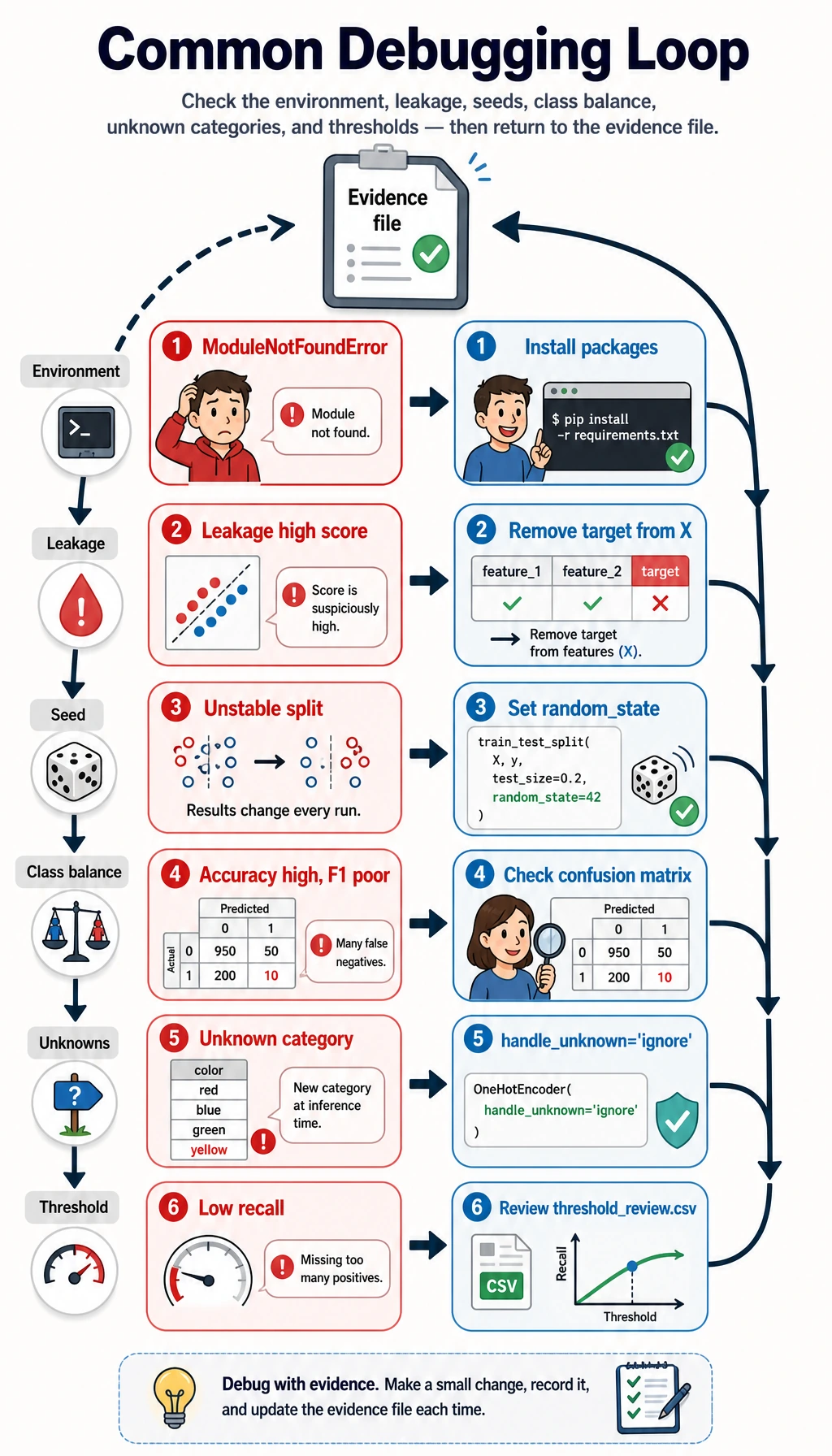
| Symptom | Likely cause | What to do |
|---|---|---|
ModuleNotFoundError: No module named 'sklearn' | The course runtime is not installed | Run python -m pip install -r requirements-course-core.txt or install numpy pandas scikit-learn |
| Score looks impossibly high | Target leakage or wrong split | Check the feature list and make sure delayed is not in X |
| Test F1 changes every run | Random seed or split is not fixed | Keep random_state=42 while learning |
| Accuracy is high but F1 is poor | Class imbalance | Compare precision, recall, F1, and confusion matrix |
| Pipeline fails on categorical values | New category appears in test data | Use OneHotEncoder(handle_unknown="ignore") |
| Model catches too few positive cases | Threshold is too high | Review threshold_review.csv and lower the threshold if recall matters more |
Turn This Into a Portfolio Project
Section titled “Turn This Into a Portfolio Project”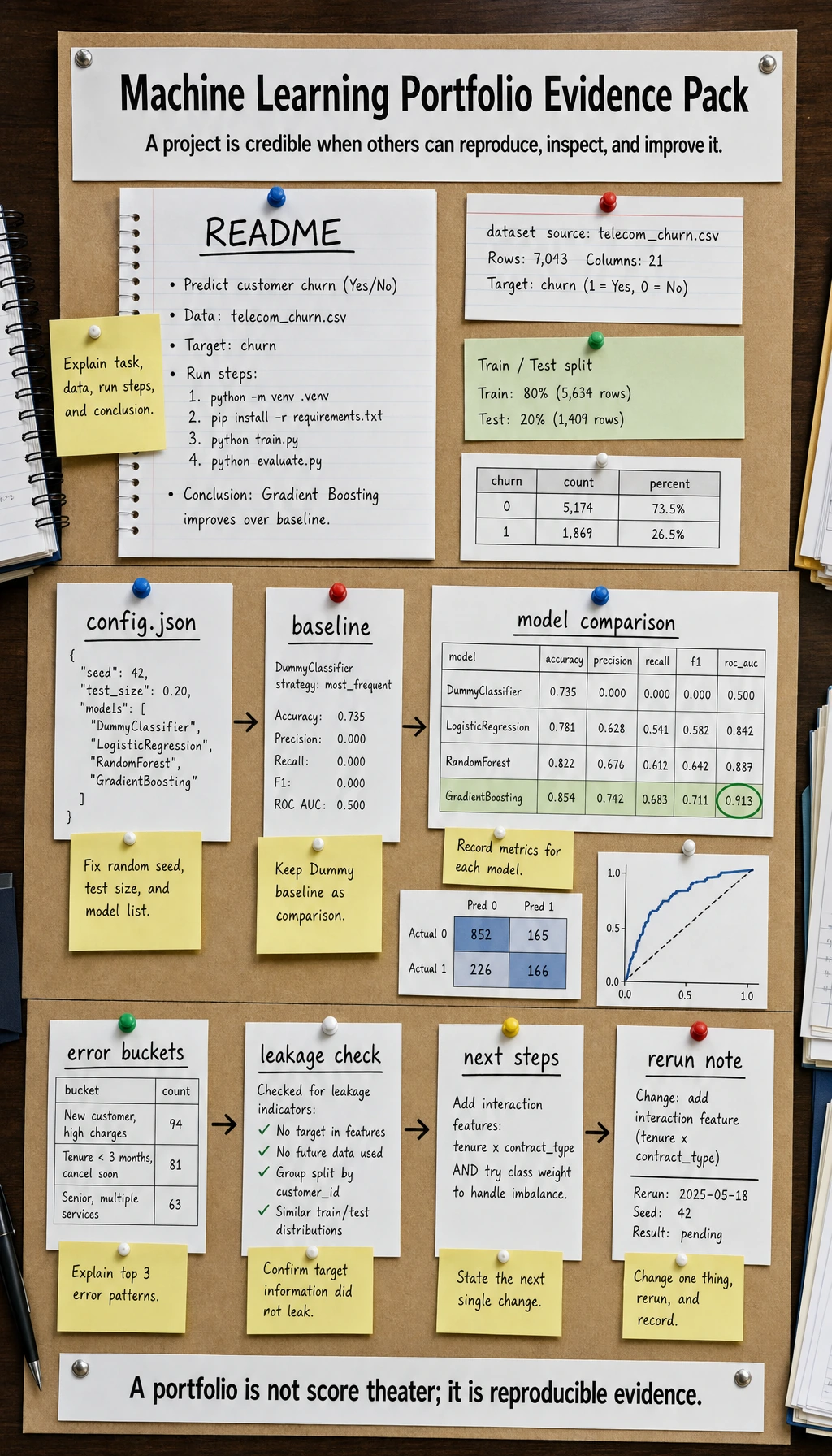
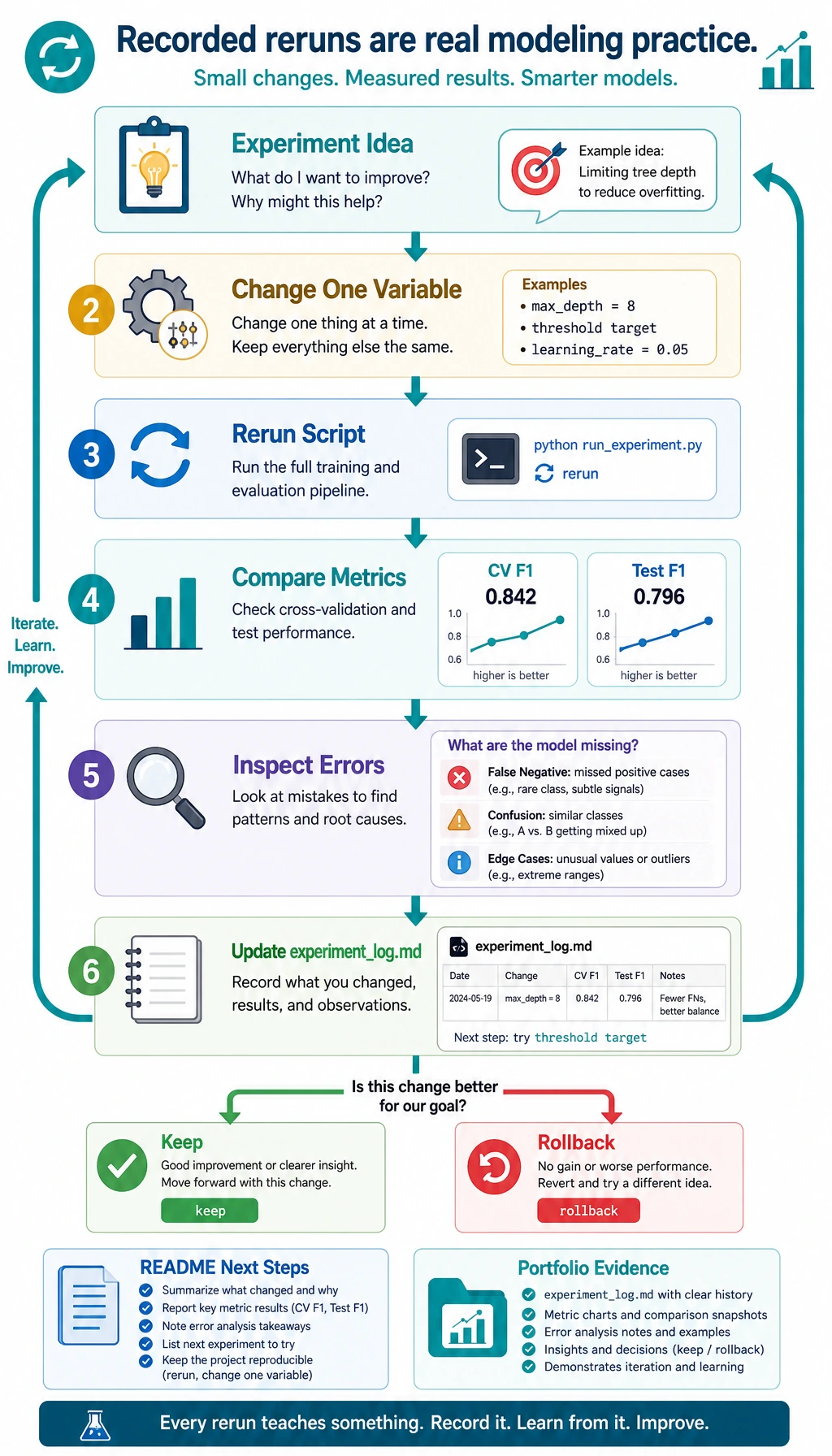
Upgrade the workshop in small steps:
- Replace the synthetic dataset with a CSV from your own project.
- Add a
config.jsonfile for random seed, test size, and model list. - Add one more model, but keep the Dummy baseline.
- Add a confusion matrix plot or threshold curve.
- Write one paragraph explaining the top 3 error patterns.
- Add a “what I would improve next” section to
README.md.
Do one tiny iteration before you leave this page. Append an experiment note, then rerun the script after you change exactly one thing, such as max_depth=8 for the random forest.
python - <<'PY'from pathlib import Path
log_path = Path("ml_workshop_run/reports/experiment_log.md")log = log_path.read_text(encoding="utf-8")log += "\n| v2 | Try RandomForest max_depth=8 | Compare CV F1 and test F1 after rerun | Keep only if both stay stable |\n"log_path.write_text(log, encoding="utf-8")print(log_path.read_text(encoding="utf-8"))PY
Expected output includes this new row:
| v2 | Try RandomForest max_depth=8 | Compare CV F1 and test F1 after rerun | Keep only if both stay stable |This is the habit you want from Chapter 5: change one variable, rerun, compare evidence, then decide. Random experimentation is not yet modeling practice; recorded experimentation is.
Portfolio Checklist
Section titled “Portfolio Checklist”Before calling your Chapter 5 project done, make sure you have:
- A run command that works from a clean folder
- A baseline metric
- A real model metric
- A model comparison table
- A leakage check
- A threshold or metric explanation
- Error samples
- A README with next steps
Project reference and review notes
- A clean run command means someone can create the output folder again without relying on hidden notebook state.
- The baseline metric and real model metric should sit in the same comparison table, using the same split and metric.
- The leakage check should explicitly confirm that target-derived fields are excluded and preprocessing is fitted inside the training workflow.
- The metric or threshold explanation should connect to the task goal, especially when false negatives and false positives have different costs.
- Error samples should lead to a next experiment, such as a feature change, label review, segment-specific analysis, or threshold adjustment.
- The README is portfolio-ready when it explains what was tried, what improved, what failed, and what you would do next.
Summary
Section titled “Summary”This workshop is the Chapter 5 loop in one file: data, baseline, Pipeline, model comparison, threshold review, error analysis, leakage check, and README evidence. If you can rerun it and explain each output file, you are no longer only learning machine learning APIs. You are practicing a real modeling workflow.