
9.5.2 MCP Protocol Overview
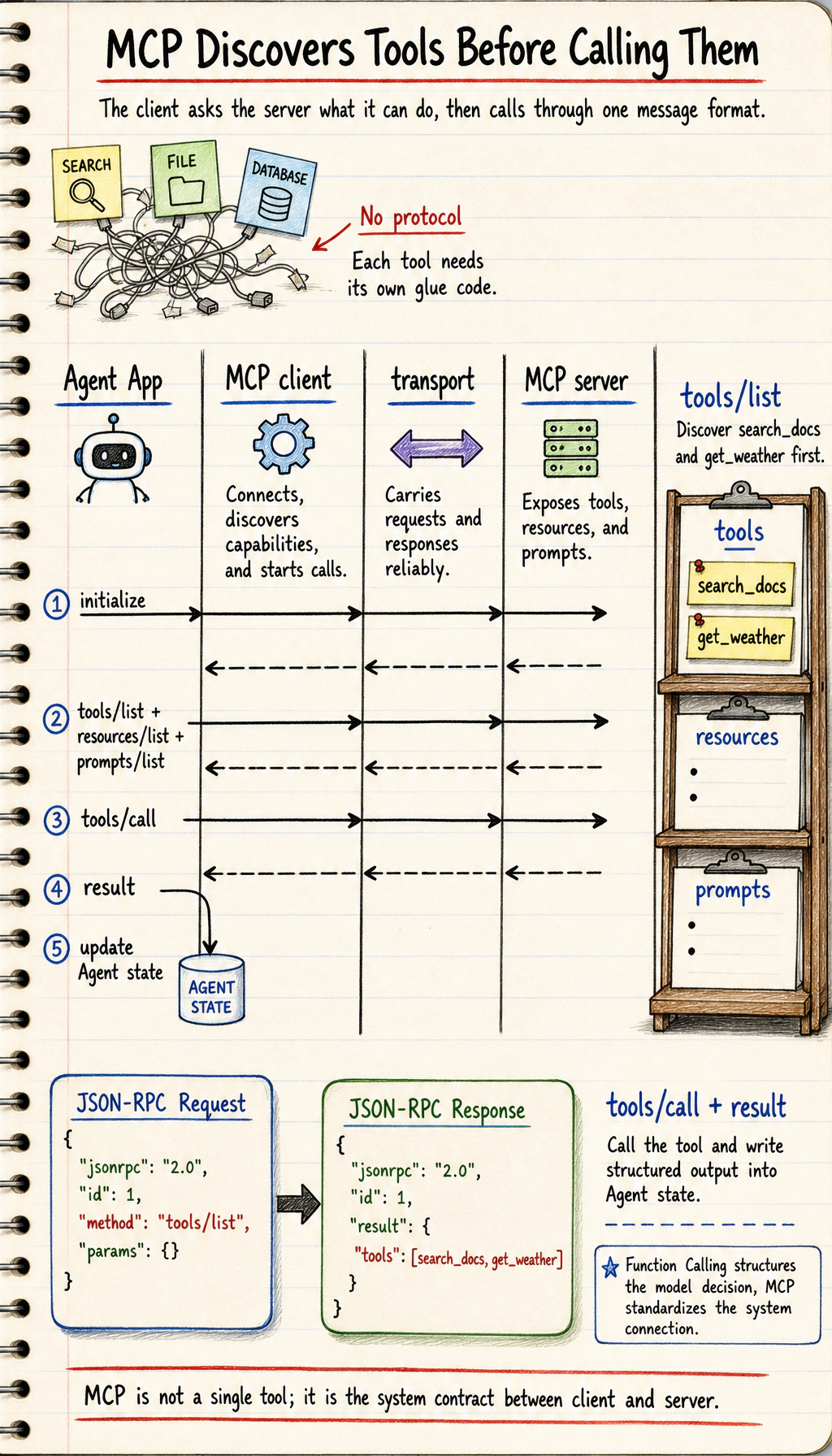
Learning Objectives
Section titled “Learning Objectives”- Understand why writing tool integration code on its own can quickly become messy
- Understand the core problem MCP is trying to solve
- Distinguish the roles of client, server, tool, and transport
- Read a minimal MCP-style message example
- Build the right intuition for MCP use cases and boundaries
Why do we need MCP?
Section titled “Why do we need MCP?”First, what happens when there is “no protocol”?
Section titled “First, what happens when there is “no protocol”?”If you connect 3 tools to an Agent system:
- Search
- File system
- Database
The most likely situation is:
- Each tool has a different interface format
- Each tool uses a different way to describe parameters
- Error handling is implemented separately for each one
- If you switch clients, you have to rewrite the adaptation layer
At first, this may still feel manageable, but as tools increase, the system quickly becomes:
Every time you add a tool, you also add a pile of glue code.
What is the purpose of a protocol?
Section titled “What is the purpose of a protocol?”The purpose of a protocol is not to “make the name sound more advanced,” but to:
Allow different systems to exchange information according to a shared set of rules.
You can compare it to:
- USB for peripherals
- HTTP for web requests
- SQL for database queries
What MCP wants to do is:
Become the “universal port” for tool integration.
What problem is MCP answering?
Section titled “What problem is MCP answering?”You can boil it down to three questions:
- How does the client know which tools are available on the server?
- How does the client call those tools in a unified format?
- How are tool call results and context returned?
In other words, MCP is not about one specific tool. It is about:
How the client and the tool server communicate reliably.
The most important MCP roles
Section titled “The most important MCP roles”Client
Section titled “Client”The client is the initiator. It is usually responsible for:
- Discovering tools
- Selecting tools
- Starting calls
- Receiving results
In real systems, the client is often:
- An Agent framework
- A chat client
- An IDE plugin
Server
Section titled “Server”The server is the capability provider. It is usually responsible for:
- Exposing tools
- Receiving call requests
- Executing tool logic
- Returning results
A tool is a concrete capability exposed by the server, such as:
search_docsread_filerun_sql
Transport
Section titled “Transport”The transport layer determines how the client and server send messages back and forth. For example:
- Standard input/output
- Local process communication
- Network connections
Remember this sentence first:
The client decides whether to use a tool, and the server provides the tool.
First, look at a minimal MCP-style message
Section titled “First, look at a minimal MCP-style message”MCP-style interaction usually has a very clear structure. Here, we will use a simplified JSON-RPC-style message to build intuition.
request = {    "jsonrpc": "2.0",    "id": 1,    "method": "tools/list",    "params": {}}
response = {    "jsonrpc": "2.0",    "id": 1,    "result": {        "tools": [            {"name": "search_docs", "description": "Search course documents"},            {"name": "get_weather", "description": "Query weather"}        ]    }}
print(request)print(response)
Expected output:
{'jsonrpc': '2.0', 'id': 1, 'method': 'tools/list', 'params': {}}{'jsonrpc': '2.0', 'id': 1, 'result': {'tools': [{'name': 'search_docs', 'description': 'Search course documents'}, {'name': 'get_weather', 'description': 'Query weather'}]}}The most important thing in this example is not the field names, but the structure
Section titled “The most important thing in this example is not the field names, but the structure”It teaches you that:
- Requests and responses come in pairs
- Each message has a clear method name
- The result field is not arbitrary text, but structured data
This is the stability that a protocol brings.
Why is “tool discovery” such a big deal?
Section titled “Why is “tool discovery” such a big deal?”Without a protocol, the client usually has to hard-code in advance:
- Tool names
- Parameter formats
- Return formats
This leads to:
- Strong coupling between client and server
- Code changes every time the tool set changes
One important value of MCP is:
Discover first, then call.
In other words, the client does not need to hard-code all tool details ahead of time. It can ask through the protocol:
- What tools do you have?
- How is each tool described?
This makes the tool ecosystem more flexible.
What is the relationship between MCP and Function Calling?
Section titled “What is the relationship between MCP and Function Calling?”These two concepts are easy to mix up.
Function Calling is more like a “structured calling ability at the model layer”
Section titled “Function Calling is more like a “structured calling ability at the model layer””It focuses on:
- Whether the model can produce a structured calling intent
For example:
{ "name": "search_docs", "arguments": {"query": "refund policy"}}MCP is more like a “tool integration protocol at the system layer”
Section titled “MCP is more like a “tool integration protocol at the system layer””It focuses on:
- How the client and server discover tools
- How tools are described
- How tools are called
- How results are returned
So more accurately:
Function Calling solves “how the model emits a structured call,” while MCP solves “how the system standardizes tool integration.”
They can be used together, but they are not the same thing.
What scenarios is MCP good for?
Section titled “What scenarios is MCP good for?”Especially suitable for
Section titled “Especially suitable for”- Lots of tool types
- Lots of client types
- A need for unified tool integration
- A need to expand the tool ecosystem later
For example:
- IDE assistants
- Desktop Agents
- Internal enterprise tool platforms
Cases where you may not need MCP right away
Section titled “Cases where you may not need MCP right away”If you only have:
- A small script
- Two or three built-in tools
- No need for multiple client integrations
Then a local tool-calling layer may already be enough.
So do not think of MCP as something you “must” use. Instead, understand it as:
When the tool ecosystem and integration complexity grow, protocol-based design becomes increasingly valuable.
A more down-to-earth analogy: MCP is like a “tool power strip”
Section titled “A more down-to-earth analogy: MCP is like a “tool power strip””You can think of it this way:
- A tool is like an appliance
- The client is the person using these appliances
- MCP is like a universal power strip and interface standard
Without a universal power strip:
- Every appliance has a different connector
- Every time you plug one in, you have to adapt again
With a universal power strip:
- New appliances are easier to connect
- The user does not need to relearn a new set of rules each time
That is the engineering value of a protocol.
Evidence to Keep
Section titled “Evidence to Keep”Keep this page’s proof of learning as a small evidence card:
- Capability
- resource, prompt, or tool exposed by server
- Contract
- schema, transport, permissions, and error shape
- Call Trace
- discovery, invocation, response, and failure handling
- Failure Check
- incompatible schema, missing auth, unsafe tool, or server error
- Integration Action
- validate server contract before adding autonomy
Common beginner mistakes
Section titled “Common beginner mistakes”Thinking MCP is a specific tool library
Section titled “Thinking MCP is a specific tool library”It is not. It is first and foremost a protocol and an interaction convention.
Thinking that once you have MCP, tools will automatically work
Section titled “Thinking that once you have MCP, tools will automatically work”They will not. The protocol solves the integration layer. You still need to handle calling strategy, permissions, and evaluation yourself.
Mixing up MCP and Function Calling as if they were the same thing
Section titled “Mixing up MCP and Function Calling as if they were the same thing”They are related, but they are at different levels.
Summary
Section titled “Summary”The most important thing in this section is not to memorize the word “protocol,” but to understand:
The core value of MCP is to make discovery, description, calling, and result exchange between the client and the tool server into a more unified system contract.
Once you build this intuition, later when you learn architecture, servers, clients, and ecosystems, you will not just feel like you are looking at a pile of interface names.
Exercises
Section titled “Exercises”- Explain in your own words the roles of client, server, tool, and transport.
- Think about why “tool discovery” itself is worth being standardized by a protocol.
- If your system only has 2 fixed tools, why might you not need MCP yet?
- Explain in your own words the difference between MCP and Function Calling.
Solution approach and explanation
- A reasonable answer is: the client is the caller that owns the user goal and chooses when to use capabilities; the server exposes capabilities with a contract; a tool is one executable capability; transport is the channel that carries discovery, calls, and responses.
- Tool discovery is worth standardizing because the client needs to know what exists, what parameters are valid, what errors look like, and what permission boundaries apply before it can safely plan a call.
- With only two fixed tools, hand-written integration may be simpler, easier to debug, and cheaper to maintain. MCP starts to pay off when tools change, multiply, come from different teams, or need reusable discovery and contracts.
- Function Calling is usually the model-facing mechanism for selecting a structured function call. MCP is a broader client-server protocol for discovering and invoking external capabilities. In practice they can work together, but they sit at different layers.