
5.1.3 Scikit-learn Follow-Along: Fit, Transform, Pipeline
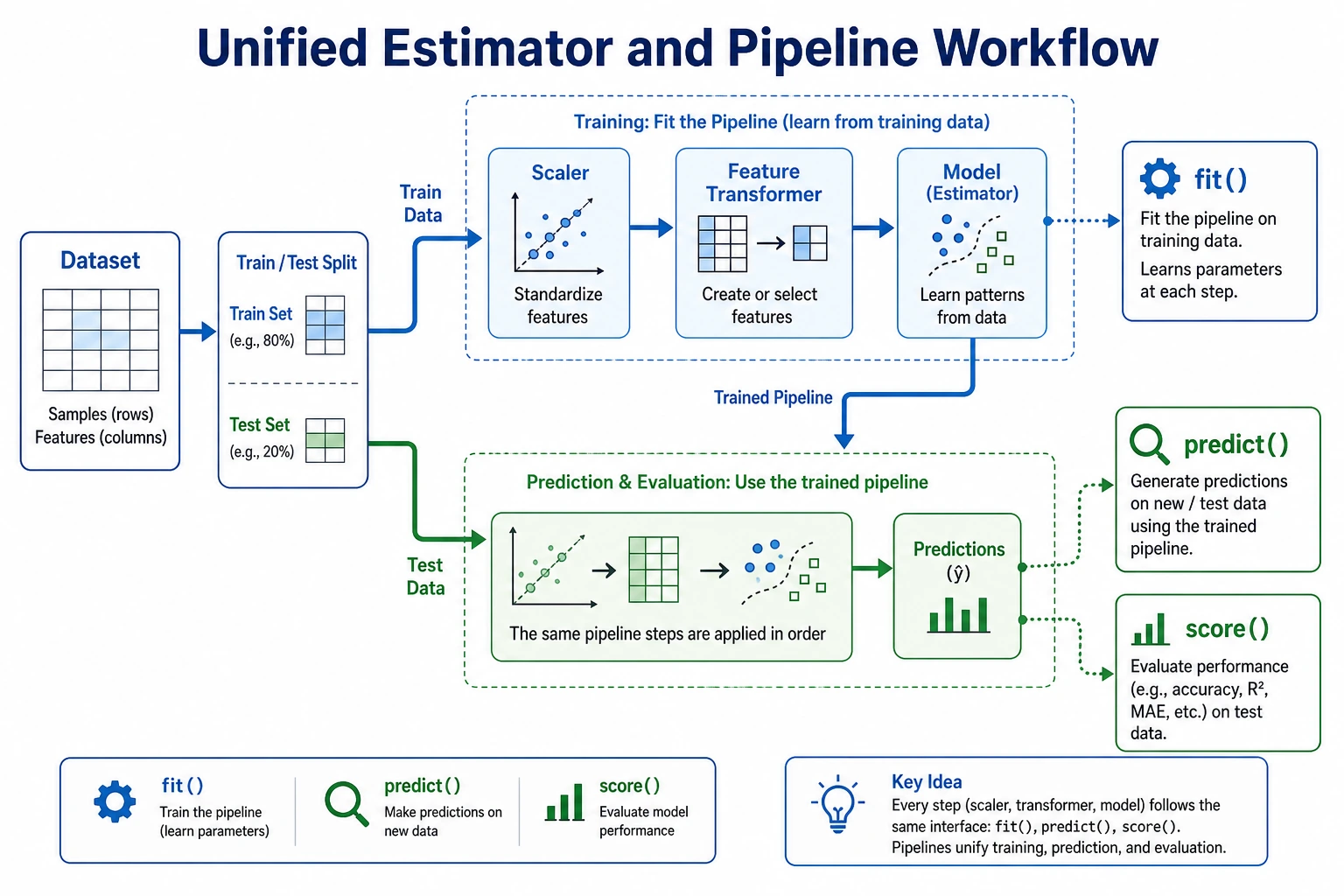
Scikit-learn is the standard Python library for classic machine learning. This page is intentionally short: first see the workflow, then run one complete script.
Look at the Workflow First
Section titled “Look at the Workflow First”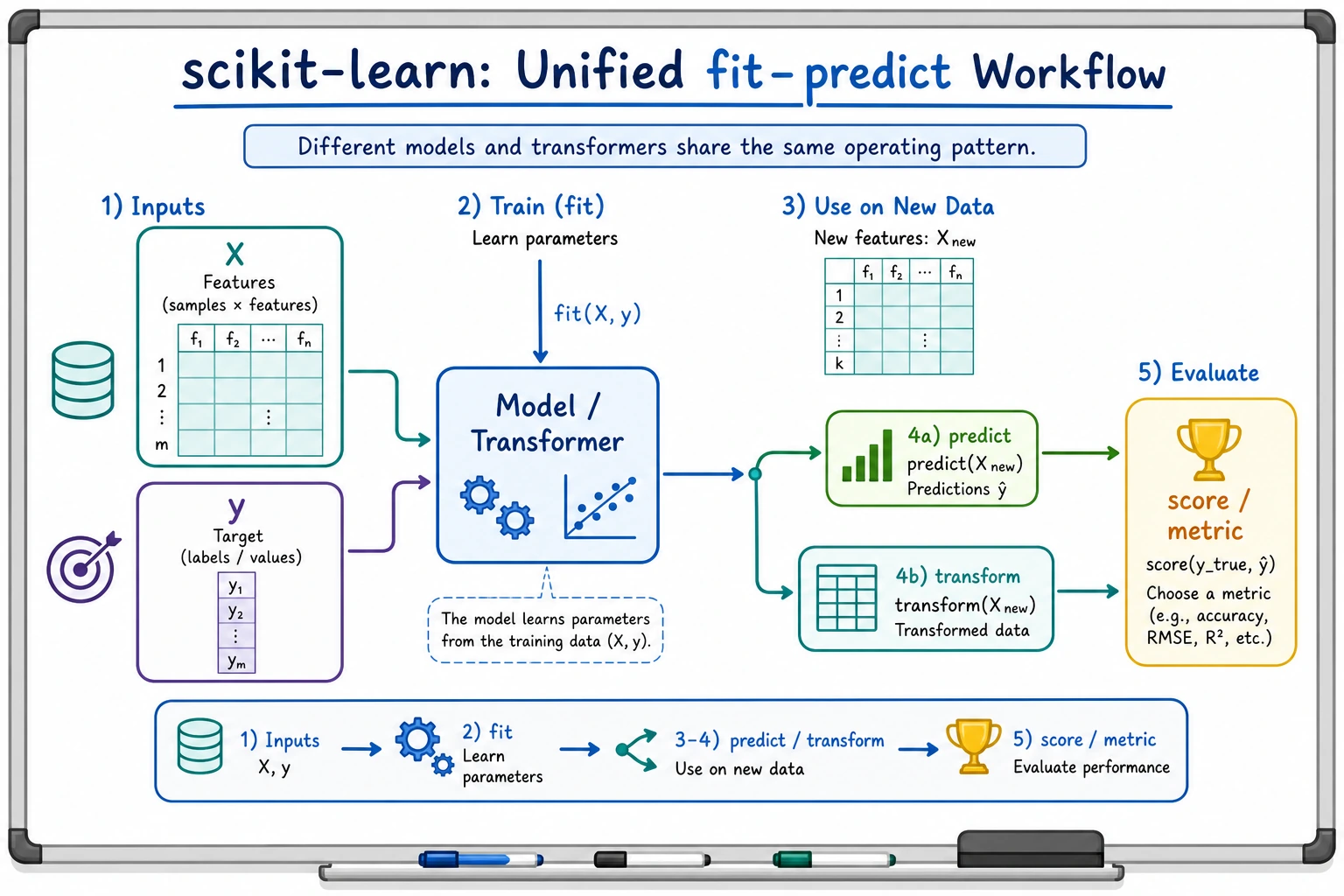
Most sklearn work follows the same loop:
The four verbs to remember:
| Verb | Meaning | Common object |
|---|---|---|
fit | learn parameters from training data | estimator or transformer |
transform | apply learned preprocessing | transformer |
predict | produce labels or numbers | estimator |
score | return a quick metric | estimator or pipeline |
Three Roles
Section titled “Three Roles”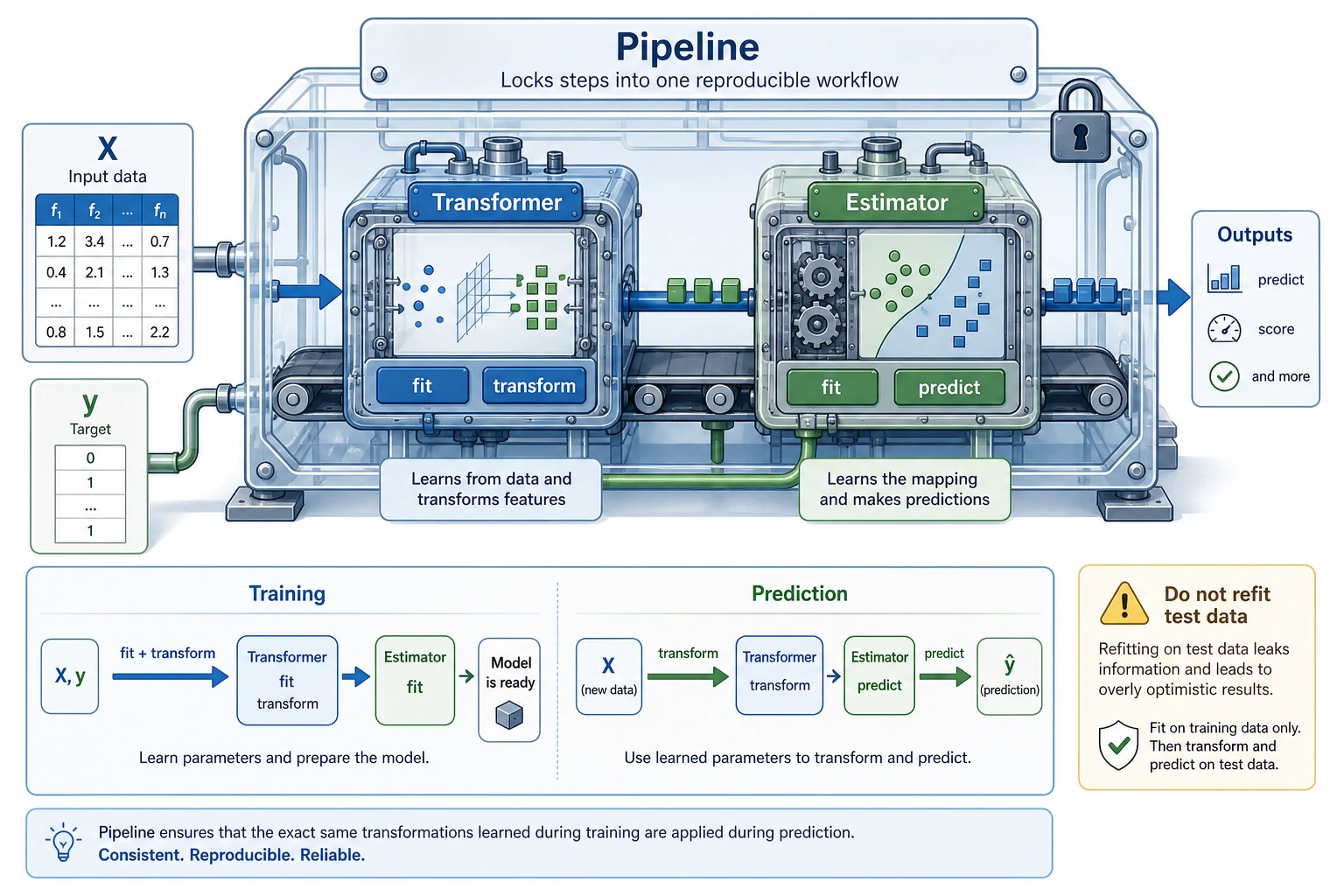
| Role | Job | Example |
|---|---|---|
| Estimator | learn and predict | LogisticRegression, DecisionTreeClassifier |
| Transformer | change data shape, scale, or representation | StandardScaler, OneHotEncoder, PCA |
| Pipeline | connect preprocessing and model into one reusable workflow | scaler -> classifier |
The beginner rule: fit preprocessing only on the training set. A Pipeline helps you follow that rule automatically.
Install and Check
Section titled “Install and Check”python -m pip install --upgrade scikit-learn joblibpython - <<'PY'import sklearnprint(sklearn.__version__)PYExpected output is a version number such as:
1.8.0scikit-learn is the package name you install. sklearn is the module name you import.
Run the Complete Workflow
Section titled “Run the Complete Workflow”Create ch05_sklearn_workflow.py.
from pathlib import Path
from joblib import dump, loadfrom sklearn.datasets import load_irisfrom sklearn.linear_model import LogisticRegressionfrom sklearn.metrics import accuracy_score, classification_reportfrom sklearn.model_selection import train_test_splitfrom sklearn.neighbors import KNeighborsClassifierfrom sklearn.pipeline import Pipelinefrom sklearn.preprocessing import StandardScalerfrom sklearn.tree import DecisionTreeClassifier
iris = load_iris()X_train, X_test, y_train, y_test = train_test_split(    iris.data,    iris.target,    test_size=0.25,    random_state=42,    stratify=iris.target,)
models = {    "logistic": Pipeline([        ("scale", StandardScaler()),        ("model", LogisticRegression(max_iter=1000, random_state=42)),    ]),    "tree": Pipeline([        ("model", DecisionTreeClassifier(max_depth=3, random_state=42)),    ]),    "knn": Pipeline([        ("scale", StandardScaler()),        ("model", KNeighborsClassifier(n_neighbors=5)),    ]),}
scores = {}for name, pipe in models.items():    pipe.fit(X_train, y_train)    pred = pipe.predict(X_test)    scores[name] = accuracy_score(y_test, pred)    print(f"{name:<8} accuracy={scores[name]:.3f}")
best_name = max(scores, key=scores.get)best_model = models[best_name]print(f"best={best_name}")print("first_prediction=", iris.target_names[best_model.predict(X_test[:1])][0])print("report_for_best:")print(classification_report(    y_test,    best_model.predict(X_test),    target_names=iris.target_names,    zero_division=0,))
output_path = Path("iris_pipeline.joblib")dump(best_model, output_path)reloaded = load(output_path)print("reloaded_prediction=", iris.target_names[reloaded.predict(X_test[:1])][0])
Run it:
python ch05_sklearn_workflow.pyExpected output:
logistic accuracy=0.921tree     accuracy=0.895knn      accuracy=0.921best=logisticfirst_prediction= setosareport_for_best:              precision    recall  f1-score   support
      setosa       1.00      1.00      1.00        12  versicolor       0.86      0.92      0.89        13   virginica       0.92      0.85      0.88        13
    accuracy                           0.92        38   macro avg       0.92      0.92      0.92        38weighted avg       0.92      0.92      0.92        38
reloaded_prediction= setosa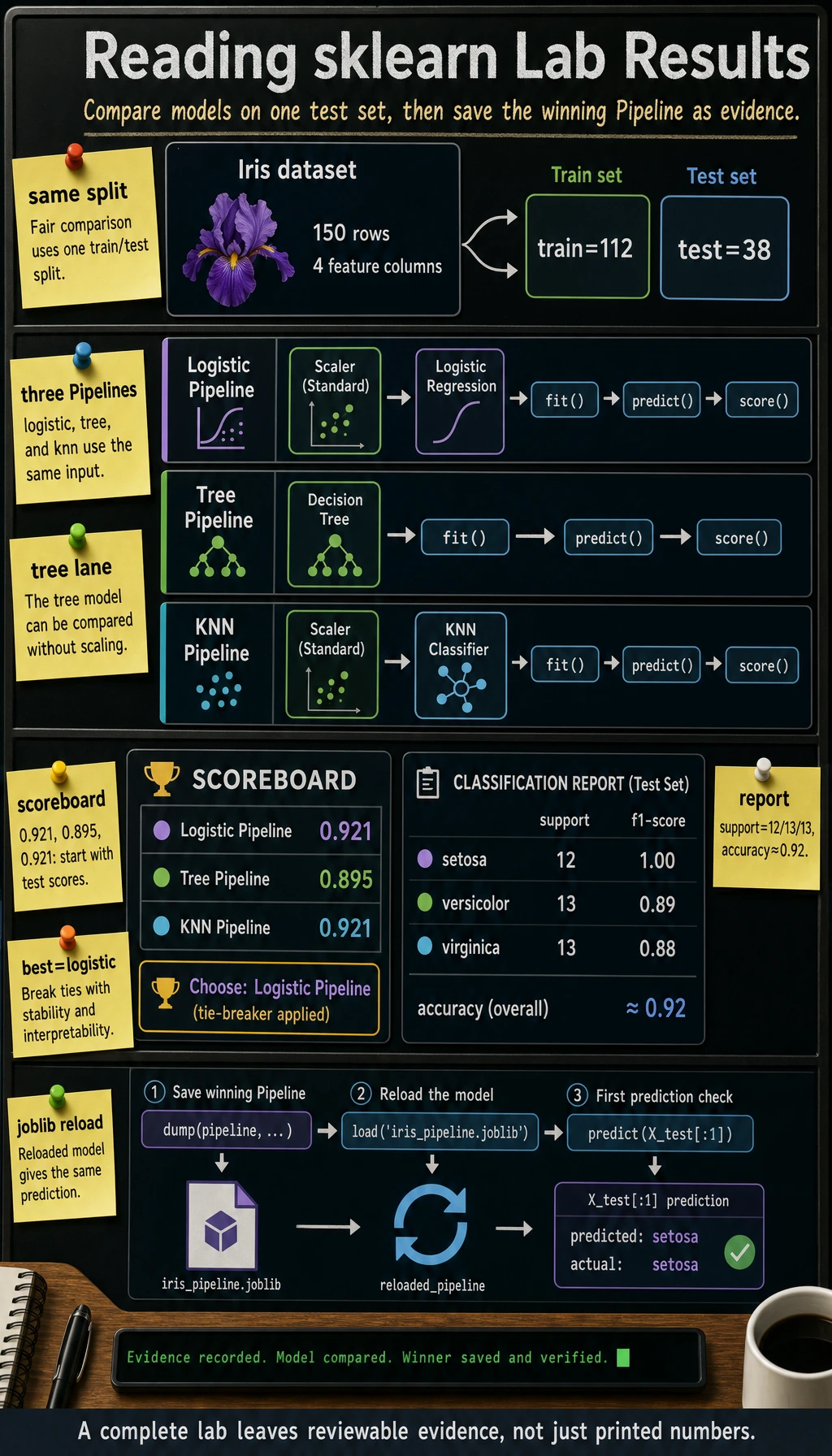
Different sklearn versions may break ties differently when two models have the same score. That is fine. The important evidence is: every model fits, predicts, scores, and the saved pipeline can predict after reload.
Why Pipeline Prevents a Common Mistake
Section titled “Why Pipeline Prevents a Common Mistake”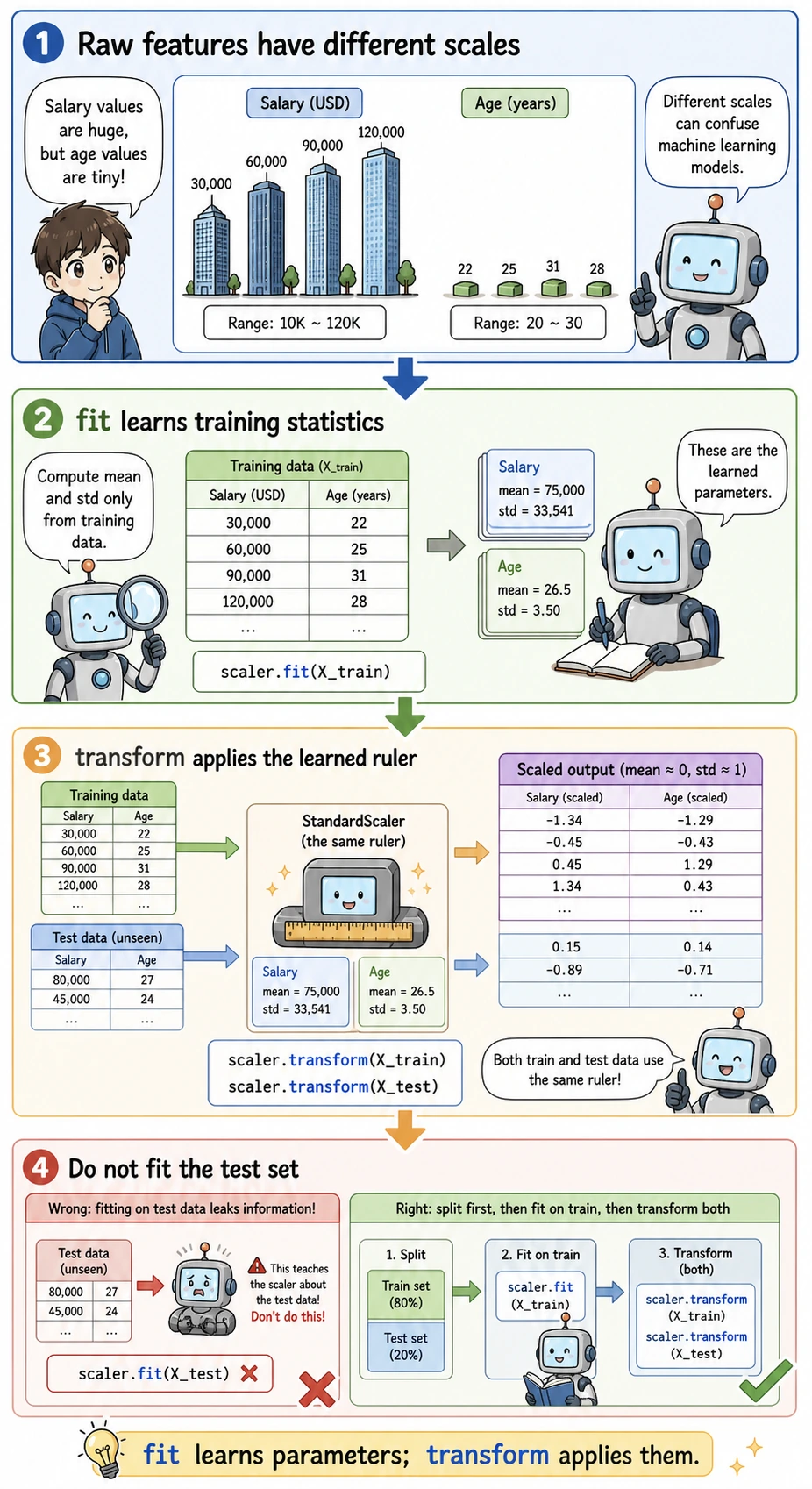
Wrong workflow:
Why wrong: the test set already influenced preprocessing, so the score is too optimistic.
Correct workflow:
Using Pipeline([("scale", StandardScaler()), ("model", ...)]) keeps that order for both training and prediction.
Evidence to Keep
Section titled “Evidence to Keep”Keep this page’s proof of learning as a small evidence card:
- Ml Problem
- supervised, unsupervised, evaluation, or feature-engineering task
- Baseline
- simplest sklearn/modeling loop and fixed train/test split
- Output
- prediction, metric, chart, or model decision note
- Failure Check
- data leakage, unclear target, weak baseline, or metric mismatch
- Expected Output
- minimal ML loop with metric and one failure observation
Common Failures
Section titled “Common Failures”| Symptom | First check | Usual fix |
|---|---|---|
ModuleNotFoundError: sklearn | active Python environment | install with python -m pip install scikit-learn |
| score changes every run | missing random_state | set random_state=42 for split and models that support it |
| great test score, poor real result | data leakage | use Pipeline, split before fitting preprocessing |
| cannot save or load model | missing joblib or wrong path | install joblib, print Path.cwd() |
| model comparison feels unfair | different preprocessing paths | put each model inside a comparable Pipeline |
Practice
Section titled “Practice”- Change
test_sizefrom0.25to0.2and record the score change. - Change
KNeighborsClassifier(n_neighbors=5)ton_neighbors=3. - Add one more model, such as
SVC, using the same Pipeline pattern. - Save the terminal output and
iris_pipeline.joblibas your evidence.
Operation guide and checkpoints
- A smaller test split leaves more training examples but fewer evaluation examples, so the score may move slightly and become a little less stable.
n_neighbors=3makes KNN more local and flexible. It can improve if the boundary is sharp, or worsen if it reacts to noise.- The extra model should use the same split and preprocessing path, for example
Pipeline([("scaler", StandardScaler()), ("model", SVC())]), so the comparison is fair. - Good evidence includes the command output, model settings, score, and saved
.joblibfile. The point is to prove that the full fit/evaluate/save loop ran.
Pass Check
Section titled “Pass Check”You are ready for the next lesson when you can explain:
- what
fit,transform,predict, andscoredo; - why preprocessing must learn from training data only;
- why
Pipelineis safer than manual preprocessing; - how to compare two models with the same train/test split;
- how to save and reload the final model.