
9.3.3 Tool Description and Discovery
Learning objectives
Section titled “Learning objectives”- Understand why tool metadata directly affects call quality
- Learn how to design a clearer tool description structure
- Understand how tool discovery maps “user needs” to “candidate tools”
- See a runnable example of a minimal tool registration and discovery system
Why can’t tools exist based on function names alone?
Section titled “Why can’t tools exist based on function names alone?”Clear enough for programmers, not necessarily for models
Section titled “Clear enough for programmers, not necessarily for models”For example, these two function names:
search_docssearch_policy
A human engineer may quickly see the difference, but the model does not know:
- Which one is better for checking refund rules
- Which one is better for checking knowledge base articles
- Whether their parameters are the same
Without descriptions, the model only sees two names that look similar.
Tool description is essentially about reducing ambiguity
Section titled “Tool description is essentially about reducing ambiguity”A good tool description should answer at least:
- What is this tool for?
- In what scenarios should it be used?
- What parameters are required?
- What structure does it return?
- What are the permissions and risk level?
The clearer this information is, the easier it is for the model to make a stable choice.
An analogy: an API catalog is more important than endpoint names
Section titled “An analogy: an API catalog is more important than endpoint names”A tool registry is a bit like an API catalog.
- Function names are like endpoint names
- Descriptions are like contract notes
With only names and no explanations, both users and models can easily find the wrong thing.
What should a tool description include at minimum?
Section titled “What should a tool description include at minimum?”The name should reflect the purpose, not just implementation details
Section titled “The name should reflect the purpose, not just implementation details”For example:
query_42is badsearch_refund_policyis better
Because when the model chooses tools, it depends more on semantics than on implementation details.
The description should clearly say “when to use it”
Section titled “The description should clearly say “when to use it””Don’t just write:
- Query policy
A better version is:
- Query after-sales policy rules such as refunds, invoices, and address changes; not suitable for checking real-time order status
This directly reduces incorrect calls.
Parameter descriptions should answer “how to fill them in”
Section titled “Parameter descriptions should answer “how to fill them in””For example:
- What is the parameter name?
- What is the type?
- What is an example value?
- Is it required?
The return structure should also be defined
Section titled “The return structure should also be defined”If the tool’s return structure is completely arbitrary, it becomes hard for the model and the scheduler to handle it reliably later.
So it is better to clearly define:
- Fields on success
- Fields on failure
- Error codes or error types
A tool description card that is very useful for beginners to remember first
Section titled “A tool description card that is very useful for beginners to remember first”| Field | What it should answer at minimum |
|---|---|
| name | What is the tool called? Ideally semantically clear |
| description | When should it be used, and when should it not be used? |
| required_args | How should the parameters be filled in? |
| returns | What will be obtained after success? |
| risk_level | How risky is it, and does it need stricter control? |
This table is very suitable for beginners because it turns “tool description” from an abstract concept into a checklist that can be reviewed.
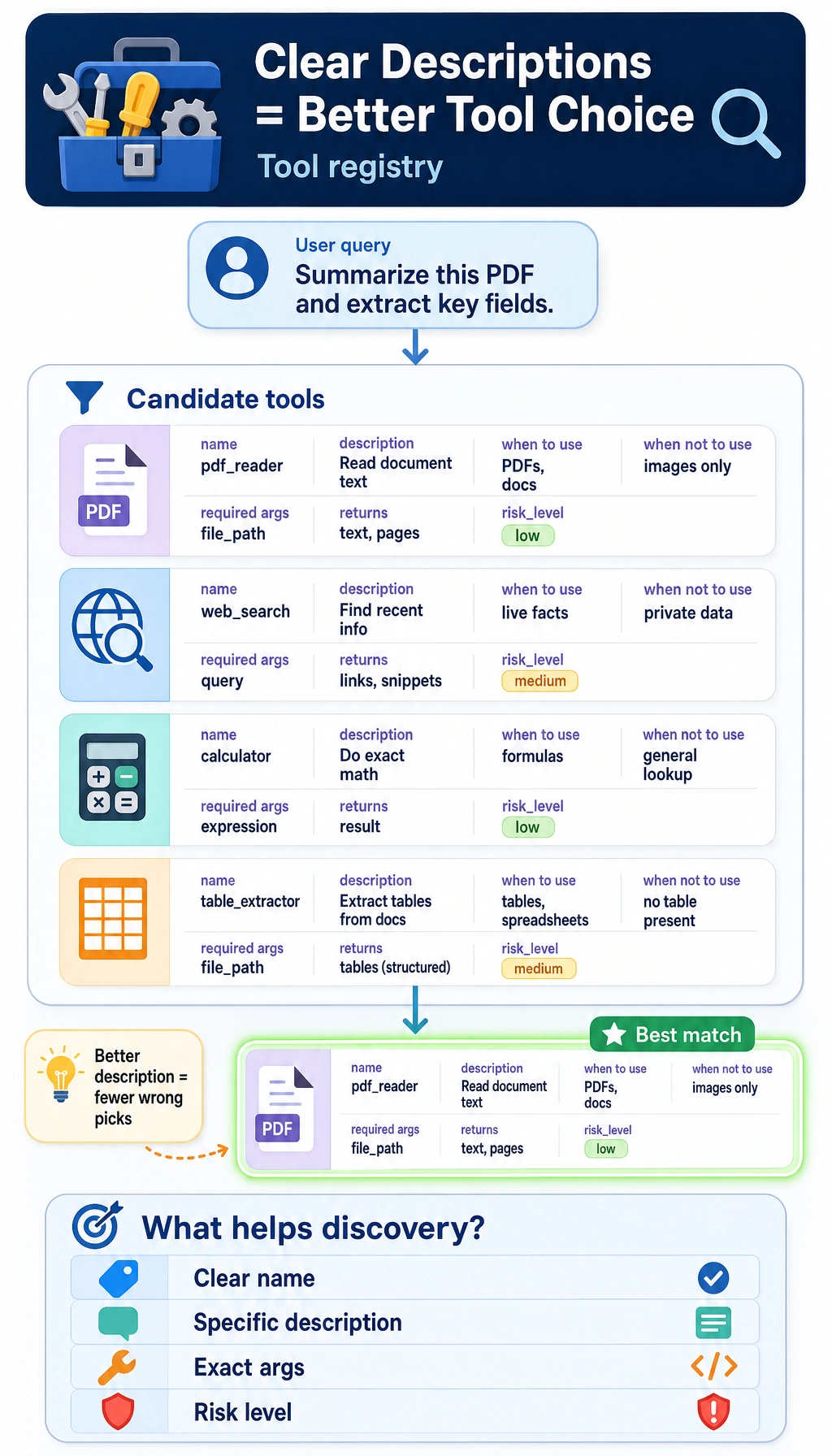
First run a more realistic tool registry example
Section titled “First run a more realistic tool registry example”The code below does three things:
- Registers tool metadata
- Performs minimal discovery based on query and tags
- Returns a list of candidate tools
It is more educational than just printing a tool array, because it already shows:
- How “tool description” participates in decision-making
TOOL_REGISTRY = [    {        "name": "search_refund_policy",        "description": "Query after-sales policy rules such as refunds, invoices, and address changes",        "tags": ["policy", "refund", "invoice", "after_sales"],        "required_args": ["keyword"],        "returns": ["policy_text"],        "risk_level": "low",    },    {        "name": "get_order_status",        "description": "Query the current order status, such as not shipped, shipped, or delivered",        "tags": ["order", "status", "shipping", "after_sales"],        "required_args": ["order_id"],        "returns": ["order_status"],        "risk_level": "medium",    },    {        "name": "calculator",        "description": "Perform deterministic numerical calculations, such as addition, subtraction, multiplication, division, and fee totals",        "tags": ["math", "fee", "total", "calculation"],        "required_args": ["expression"],        "returns": ["result"],        "risk_level": "low",    },]

def discover_tools(query, registry, top_k=2):    words = query.lower().replace("?", "").replace("?", "").split()    scored = []
    for tool in registry:        text = " ".join([tool["name"], tool["description"], " ".join(tool["tags"])]).lower()        score = sum(word in text for word in words)        scored.append((tool["name"], score))
    scored.sort(key=lambda item: item[1], reverse=True)    return scored[:top_k]

queries = [    "What is the refund policy",    "Has the order been shipped now",    "fee calculation 299 plus 80 minus 5",]
for query in queries:    print(query, "->", discover_tools(query, TOOL_REGISTRY))
Expected output:
What is the refund policy -> [('search_refund_policy', 2), ('get_order_status', 1)]Has the order been shipped now -> [('get_order_status', 3), ('search_refund_policy', 0)]fee calculation 299 plus 80 minus 5 -> [('calculator', 2), ('search_refund_policy', 0)]What is this code really teaching?
Section titled “What is this code really teaching?”It teaches two especially important things:
- Tools are not “bare functions,” but objects with metadata
- Tool discovery is essentially matching between “needs” and “tool descriptions”
Why are tags useful?
Section titled “Why are tags useful?”Because users do not always use exactly the same words as the tool name. For example:
- The user says “Has it shipped?”
- The tool name might be
get_order_status
Without tags, the discovery stage may easily miss candidate tools.
Why does this only return candidates instead of executing directly?
Section titled “Why does this only return candidates instead of executing directly?”Because “discovery” is only the first step. It solves:
- Which tools are worth including in the candidate set
Usually, the system still needs to continue with:
- Parameter filling
- Tool selection
- Execution and validation
Another minimal “candidate tool filtering table” example
Section titled “Another minimal “candidate tool filtering table” example”query = "What is the refund policy"candidates = discover_tools(query, TOOL_REGISTRY)
for item in candidates: print({"query": query, "candidate_tool": item[0], "score": item[1]})Expected output:
{'query': 'What is the refund policy', 'candidate_tool': 'search_refund_policy', 'score': 2}{'query': 'What is the refund policy', 'candidate_tool': 'get_order_status', 'score': 1}This example is very suitable for beginners, because it helps you see first that:
- What the tool discovery stage really produces is not an answer
- It is a set of candidate actions
In real systems, discovery usually involves more than one method
Section titled “In real systems, discovery usually involves more than one method”Keyword / tag matching
Section titled “Keyword / tag matching”This is the most intuitive layer, and its advantages are:
- Simple
- Explainable
Its drawback is:
- Weak semantic generalization
Vector-retrieval-based tool discovery
Section titled “Vector-retrieval-based tool discovery”When there are many tools, a common approach becomes:
- Convert tool descriptions into embeddings
- Match user intent with vectors
This is more suitable for:
- A large number of tools
- Longer tool descriptions
Explicit routing rules
Section titled “Explicit routing rules”In some high-risk systems, tool discovery is not left entirely to the model, and rules are added first:
- Order-related requests should check order tools first
- Deletion operations must go through human confirmation
This shows that tool discovery is not just a recall problem, but also a policy problem.
The safest default order when building a tool system for the first time
Section titled “The safest default order when building a tool system for the first time”A more stable sequence is usually:
- First write tool descriptions clearly
- First do the simplest candidate retrieval
- First check whether the candidate set is reasonable
- Then add parameter filling and execution
This is more stable than focusing from the start on whether the model can “automatically choose correctly.”
Why is the return structure also part of “tool description”?
Section titled “Why is the return structure also part of “tool description”?”Because discovery is not only about “finding a tool,” but also about whether it can connect to later steps
Section titled “Because discovery is not only about “finding a tool,” but also about whether it can connect to later steps”For example:
search_refund_policyreturnspolicy_textget_order_statusreturnsorder_status
If the downstream system needs to merge them into the same reply, the clearer the returned fields are, the more stable the whole flow will be.
A simple unified return convention
Section titled “A simple unified return convention”def normalize_tool_result(ok, data=None, error=None): return { "ok": ok, "data": data or {}, "error": error, }
print(normalize_tool_result(True, data={"policy_text": "Refunds available within 7 days"}))print(normalize_tool_result(False, error="missing_order_id"))Expected output:
{'ok': True, 'data': {'policy_text': 'Refunds available within 7 days'}, 'error': None}{'ok': False, 'data': {}, 'error': 'missing_order_id'}The benefits of a unified return structure are:
- Easier for the scheduler to handle
- Easier to analyze in logs
- Easier for the Agent to read observations
Evidence to Keep
Section titled “Evidence to Keep”Keep this page’s proof of learning as a small evidence card:
- Tool Contract
- name, description, input schema, output schema
- Permission
- what the tool is allowed to read or change
- Call Trace
- arguments, result, error, retry or fallback
- Failure Check
- wrong tool, bad arguments, unsafe action, or missing observation
- Safety Action
- validate, confirm, sandbox, rate-limit, or rollback
Common pitfalls in tool descriptions
Section titled “Common pitfalls in tool descriptions”Mistake 1: A clear function signature is enough
Section titled “Mistake 1: A clear function signature is enough”That may be enough for programmers, but it is usually not enough for models.
Mistake 2: The shorter the tool description, the better
Section titled “Mistake 2: The shorter the tool description, the better”Too short will cause ambiguity. What really matters in a tool description is:
- Precision
- Distinguishability
Not just brevity.
Mistake 3: Discovery only needs to retrieve one tool
Section titled “Mistake 3: Discovery only needs to retrieve one tool”If the candidate set is poor, the later selection and execution will also be poor.
So tool discovery is an important front-end layer of system quality.
If you turn this into notes or a project, what is most worth showing?
Section titled “If you turn this into notes or a project, what is most worth showing?”What is most worth showing is usually not:
- A pile of tool function definitions
But instead:
- Tool description cards
- User question -> candidate tool list
- Why a certain tool is ranked first
- How the tool return structure is unified
That way, others will more easily see that:
- What you understand is the discovery layer of the tool system
- Not just connecting functions into a model
Summary
Section titled “Summary”The most important thing in this section is not remembering how many field names there are, but building a clear judgment:
An Agent can choose tools stably not because the model “magically understands all functions,” but because the tools are described as objects that can be discovered, distinguished, and validated.
Once this main thread is established, when you later learn:
- Tool routing
- Tool safety
- Multi-tool collaboration
you will understand why “first describe the tools clearly” is the first step.
Exercises
Section titled “Exercises”- Add a
search_faqtool to the registry example and see whether it will be confused withsearch_refund_policy. - Why are tags often more suitable than tool names for the first retrieval layer?
- Think about it: what else would you add to the description of a high-risk tool besides purpose and parameters?
- If there are more and more tools, would you first strengthen “tool descriptions” or the “tool executor”? Why?
Reference implementation and walkthrough
search_faqshould have tags and examples that separate general help questions from refund-policy lookup, otherwise it will compete withsearch_refund_policy.- Tags are useful in the first retrieval layer because they group intent, domain, risk, and data source more flexibly than a single tool name.
- For high-risk tools, include permissions, side effects, confirmation rules, rollback limits, audit logs, and examples of when not to call the tool.
- When tools grow, strengthen descriptions and retrieval first so the Agent chooses the right tool. The executor still needs safety checks, but it cannot rescue consistently bad routing.