
2.1.5 Flow Control
Where This Section Fits
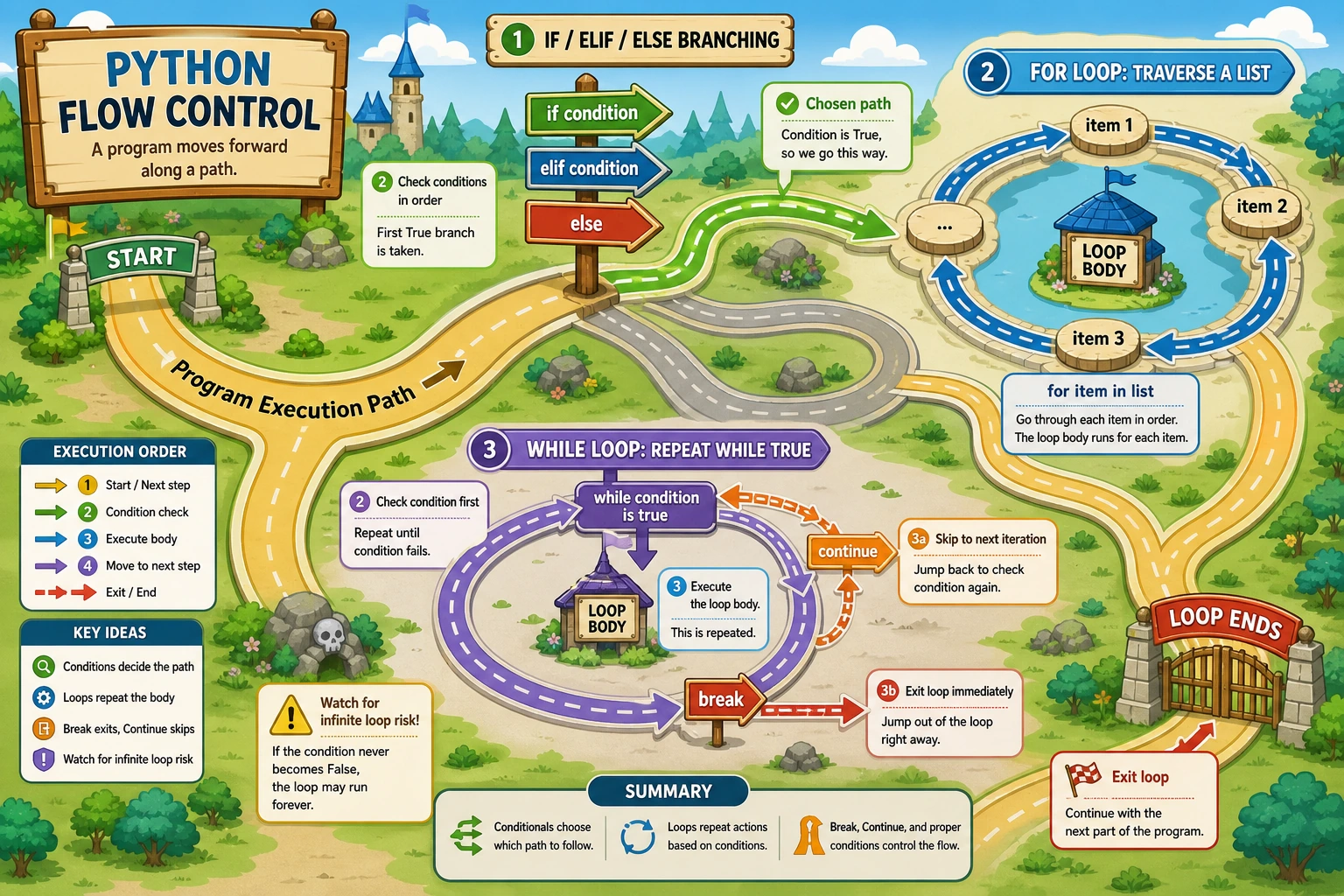
Section titled “Where This Section Fits”In this section, you will learn how to make a program “make decisions” and “repeat actions.” Conditional logic and loops are the backbone of all automation scripts, data processing pipelines, and model training code. Once you understand them, your code will no longer just execute from top to bottom.
Learning Objectives
Section titled “Learning Objectives”- Master
if/elif/elseconditional logic - Master
forloops andwhileloops - Learn to use
breakandcontinueto control loops - Be able to write programs with nested logic
What Is Flow Control?
Section titled “What Is Flow Control?”So far, the code you have written has all been executed line by line from top to bottom. But real programs need to make decisions and repeat actions — that is flow control.
Imagine the decision process when you leave home in the morning:
If it is raining: take an umbrellaOtherwise if the sun is very strong: wear a hatOtherwise: just leaveThis is conditional logic.
Now imagine memorizing vocabulary words:
Repeat 100 times: look at a new word remember itThis is a loop.
Conditional Logic: if / elif / else
Section titled “Conditional Logic: if / elif / else”Basic if
Section titled “Basic if”failed_tests = 3
if failed_tests > 0: print("Stop the release and inspect the failing tests.")Syntax rules:
ifis followed by a condition expression- The condition must end with a colon
:(many beginners forget this) - The code that runs when the condition is true must be indented by 4 spaces
if…else
Section titled “if…else”all_checks_passed = False
if all_checks_passed: print("Build is ready to deploy") print("Write the release note")else: print("Keep the build in review") print("Fix the failing checks first")if…elif…else
Section titled “if…elif…else”elif is short for “else if” and is used to check multiple conditions:
latency_ms = 185
if latency_ms < 100:    status = "Fast"elif latency_ms < 200:    status = "Healthy"elif latency_ms < 500:    status = "Slow"else:    status = "Critical"
print(f"API latency: {latency_ms} ms, status: {status}")# Output: API latency: 185 ms, status: HealthyShortened conditional logic
Section titled “Shortened conditional logic”# Ternary expression (one line for a simple if-else)latency_ms = 185status = "Within budget" if latency_ms <= 200 else "Needs review"print(status) # Within budget
# Equivalent to:if latency_ms <= 200: status = "Within budget"else: status = "Needs review"Nested if
Section titled “Nested if”You can put conditions inside other conditions:
has_approval = Trueall_tests_passed = False
if has_approval:    if all_tests_passed:        print("Deploy the build")    else:        print("Wait for the test suite to pass")else:    print("Ask for release approval first")
However, too many levels of nesting make code hard to read, so it is usually not recommended to go beyond 3 levels.
for Loops
Section titled “for Loops”A for loop is used to iterate over each element in a sequence (lists, strings, ranges, etc.).
Iterate over a list
Section titled “Iterate over a list”services = ["Login API", "Search API", "Worker", "Dashboard"]
for service in services: print(f"Checking {service}")
# Output:# Checking Login API# Checking Search API# Checking Worker# Checking DashboardThe idea is: for service in services means “for each service in services, execute the code below.”
Iterate over a string
Section titled “Iterate over a string”word = "Python"
for char in word: print(char, end=" ")
# Output: P y t h o nThe range() function
Section titled “The range() function”range() generates a sequence of numbers and is the most common partner for for loops:
# range(5) generates 0, 1, 2, 3, 4for i in range(5):    print(i, end=" ")# Output: 0 1 2 3 4
# range(start, stop) goes from start to stop-1for i in range(1, 6):    print(i, end=" ")# Output: 1 2 3 4 5
# range(start, stop, step) with a step sizefor i in range(0, 10, 2):    print(i, end=" ")# Output: 0 2 4 6 8
# Count downfor i in range(5, 0, -1):    print(i, end=" ")# Output: 5 4 3 2 1
Real example: total review time
Section titled “Real example: total review time”total_minutes = 0for day in range(1, 6): total_minutes += 30print(f"Review minutes for 5 days: {total_minutes}") # 150enumerate(): get both index and value
Section titled “enumerate(): get both index and value”tasks = ["Design login form", "Build API endpoint", "Write smoke test"]
# Traditional wayfor i in range(len(tasks)): print(f"Task {i+1}: {tasks[i]}")
# More Pythonic way: use enumeratefor i, task in enumerate(tasks): print(f"Task {i+1}: {task}")
# Specify the starting numberfor i, task in enumerate(tasks, start=1): print(f"Task {i}: {task}")while Loops
Section titled “while Loops”A while loop keeps running as long as the condition is true, and stops when the condition becomes false.
Basic usage
Section titled “Basic usage”count = 0
while count < 5: print(f"Current count: {count}") count += 1 # Don't forget to update the condition!
print("Loop ended")
# Output:# Current count: 0# Current count: 1# Current count: 2# Current count: 3# Current count: 4# Loop endedTypical use cases for while
Section titled “Typical use cases for while”while is suitable when the number of iterations is unknown:
# Scenario: wait for a background job to finishjob_status = "queued"poll_count = 0
while job_status != "finished":    poll_count += 1    print(f"Poll {poll_count}: {job_status}")
    if poll_count == 1:        job_status = "running"    elif poll_count == 2:        job_status = "finished"
print(f"Job finished after {poll_count} polls")
Which should you choose: for or while?
Section titled “Which should you choose: for or while?”| Scenario | Recommended | Reason |
|---|---|---|
| Iterate over a list/string | for | Naturally suited |
| Loop a fixed number of times | for + range() | Clear and concise |
| Unknown number of iterations | while | Flexible control |
| Wait until a condition is met | while | Intuitive |
Rule of thumb: use for whenever possible; it is safer (it won’t become an infinite loop).
break and continue
Section titled “break and continue”break: stop the loop immediately
Section titled “break: stop the loop immediately”# Stop as soon as the first slow request is foundlatencies_ms = [120, 145, 310, 180, 260]
for latency_ms in latencies_ms: if latency_ms > 250: print(f"First slow request: {latency_ms} ms") break print(f"{latency_ms} ms is within range, keep checking...")
# Output:# 120 ms is within range, keep checking...# 145 ms is within range, keep checking...# First slow request: 310 mscontinue: skip the current iteration and move to the next one
Section titled “continue: skip the current iteration and move to the next one”# Print only slow requests, skip healthy oneslatencies_ms = [95, 210, 180, 260, 130]
for latency_ms in latencies_ms: if latency_ms <= 200: continue # Skip healthy requests print(latency_ms, end=" ")
# Output: 210 260The difference between break and continue
Section titled “The difference between break and continue”# break: leave the loop immediatelyfor i in range(10): if i == 5: break # The loop stops completely at 5 print(i, end=" ")# Output: 0 1 2 3 4
# continue: skip the current item and go to the next onefor i in range(10): if i == 5: continue # Skip 5 and continue with 6, 7, 8, 9 print(i, end=" ")# Output: 0 1 2 3 4 6 7 8 9else in Loops
Section titled “else in Loops”Python loops have a unique else clause — it runs when the loop ends normally (that is, not stopped by break):
# Check whether a required review is missingcompleted_checks = ["unit-test", "lint", "api-test"]required_check = "security-review"
for check in completed_checks:    if check == required_check:        print(f"{required_check} is complete")        breakelse:    # The loop was not terminated by break, so the required check was not found    print(f"{required_check} is missing")
# Output: security-review is missing
Nested Loops
Section titled “Nested Loops”You can put a loop inside another loop:
# Print a module/check matrixmodules = ["API", "UI", "DB"]checks = ["lint", "test"]
for module in modules:    for check in checks:        print(f"{module}:{check}", end="\t")    print()   # New line after each module
Output:
API:lint API:testUI:lint UI:testDB:lint DB:testComprehensive Examples
Section titled “Comprehensive Examples”Example 1: Simulate an AI model training process
Section titled “Example 1: Simulate an AI model training process”import random
print("=== Starting model training ===")print(f"{'Epoch':<10}{'Loss':<15}{'Accuracy':<15}{'Status'}")print("-" * 50)
loss = 2.5accuracy = 0.10
for epoch in range(1, 21): # Simulate training: loss gradually decreases, accuracy gradually increases loss *= random.uniform(0.85, 0.95) accuracy = min(accuracy + random.uniform(0.03, 0.06), 1.0)
# Determine training status if accuracy >= 0.95: status = "✅ Achieved" elif accuracy >= 0.80: status = "📈 Good" else: status = "🔄 Training"
print(f"{epoch:<10}{loss:<15.4f}{accuracy:<15.2%}{status}")
# Stop early if accuracy reaches 98% if accuracy >= 0.98: print(f"\nEarly stopping! Target accuracy reached at epoch {epoch}") breakelse: print(f"\nTraining complete! Final accuracy: {accuracy:.2%}")Example 2: Password strength checker
Section titled “Example 2: Password strength checker”password = input("Please enter a password: ")
has_upper = False # Contains an uppercase letterhas_lower = False # Contains a lowercase letterhas_digit = False # Contains a digithas_special = False # Contains a special character
for char in password: if char.isupper(): has_upper = True elif char.islower(): has_lower = True elif char.isdigit(): has_digit = True else: has_special = True
# Calculate strength scorescore = 0if len(password) >= 8: score += 1if has_upper: score += 1if has_lower: score += 1if has_digit: score += 1if has_special: score += 1
# Output resultprint(f"\nPassword strength: {'★' * score}{'☆' * (5 - score)} ({score}/5)")
if score <= 2: print("Weak password! Consider strengthening it")elif score <= 4: print("Medium strength")else: print("Strong password!")Hands-on Practice
Section titled “Hands-on Practice”Exercise 1: Release Check Labels
Section titled “Exercise 1: Release Check Labels”Practice branch order with a small release-check labeler:
Print sample numbers from 1 to 50, but:
- If a number is divisible by 15, print “FullCheck”
- If a number is divisible by 3, print “Lint”
- If a number is divisible by 5, print “Test”
- Otherwise, print the number itself
for i in range(1, 51): if i % 15 == 0: print("FullCheck") elif i % 3 == 0: print("Lint") elif i % 5 == 0: print("Test") else: print(i)Hint: First check whether the number is divisible by 15, then check 3 and 5 separately.
Exercise 2: Latency Alert Loop (Limited Samples)
Section titled “Exercise 2: Latency Alert Loop (Limited Samples)”Check at most 7 latency samples and stop as soon as one exceeds the threshold.
latencies_ms = [120, 180, 260, 140, 310, 190, 170]threshold_ms = 250max_samples = 7
for sample_no, latency_ms in enumerate(latencies_ms[:max_samples], start=1):    print(f"Sample {sample_no}: {latency_ms} ms")
    if latency_ms <= threshold_ms:        print("Healthy")        continue
print("Alert: latency exceeded the threshold") breakelse: print("All checked samples stayed within the threshold.")Exercise 3: Print a Deployment Progress Bar
Section titled “Exercise 3: Print a Deployment Progress Bar”Use loops to print the following progress shape:
###############Then try printing a countdown progress bar:
###############Exercise 4: Find Failed Checks
Section titled “Exercise 4: Find Failed Checks”Print every check name whose status is not "passed".
checks = [    ("lint", "passed"),    ("unit-test", "failed"),    ("api-test", "passed"),    ("security-review", "failed"),]
for check_name, status in checks:    if status == "passed":        continue    print(f"{check_name}: {status}")
Reference implementation and walkthrough
- Release check labels should test divisibility by
15first. Otherwise15may printLintorTesttoo early. - For the latency list, test the healthy path, alert path, and all-clear path by moving or removing the slow value.
- Progress bars can be printed with
for n in range(1, 6): print("#" * n)and a reversed range for the countdown. - Failed-check filtering should use
continuefor"passed"and only print failed or otherwise non-passing statuses. - Watch off-by-one errors:
range(1, 51)includes50;range(1, 50)does not.
Evidence to Keep
Section titled “Evidence to Keep”Keep this page’s proof of learning as a small evidence card:
- Concept
- variable, type, operator, input/output, branch, loop, structure, function, or module
- Code
- smallest runnable Python snippet for the concept
- Output
- printed value, type, branch result, loop trace, or returned value
- Failure Check
- type mismatch, indentation, off-by-one, mutable data, or import path issue
- Expected Output
- code plus printed result that proves the concept works
Summary
Section titled “Summary”| Syntax | Purpose | Key Point |
|---|---|---|
if/elif/else | Conditional logic | Conditions are checked from top to bottom; don’t forget the colon and indentation |
for...in | Iterate over a sequence | Used with range(), lists, and strings |
while | Conditional loop | Update the condition to avoid infinite loops |
break | Stop the loop | Exit the entire loop immediately |
continue | Skip this iteration | Skip the current iteration and move to the next one |
range() | Generate a sequence of numbers | range(start, stop, step) |