
12.3.2 Video Generation Technology
Learning Objectives
Section titled “Learning Objectives”- Understand why video generation is one level more difficult than image generation
- Understand the core problems of temporal consistency and motion modeling
- Build a first-pass map of mainstream video generation approaches
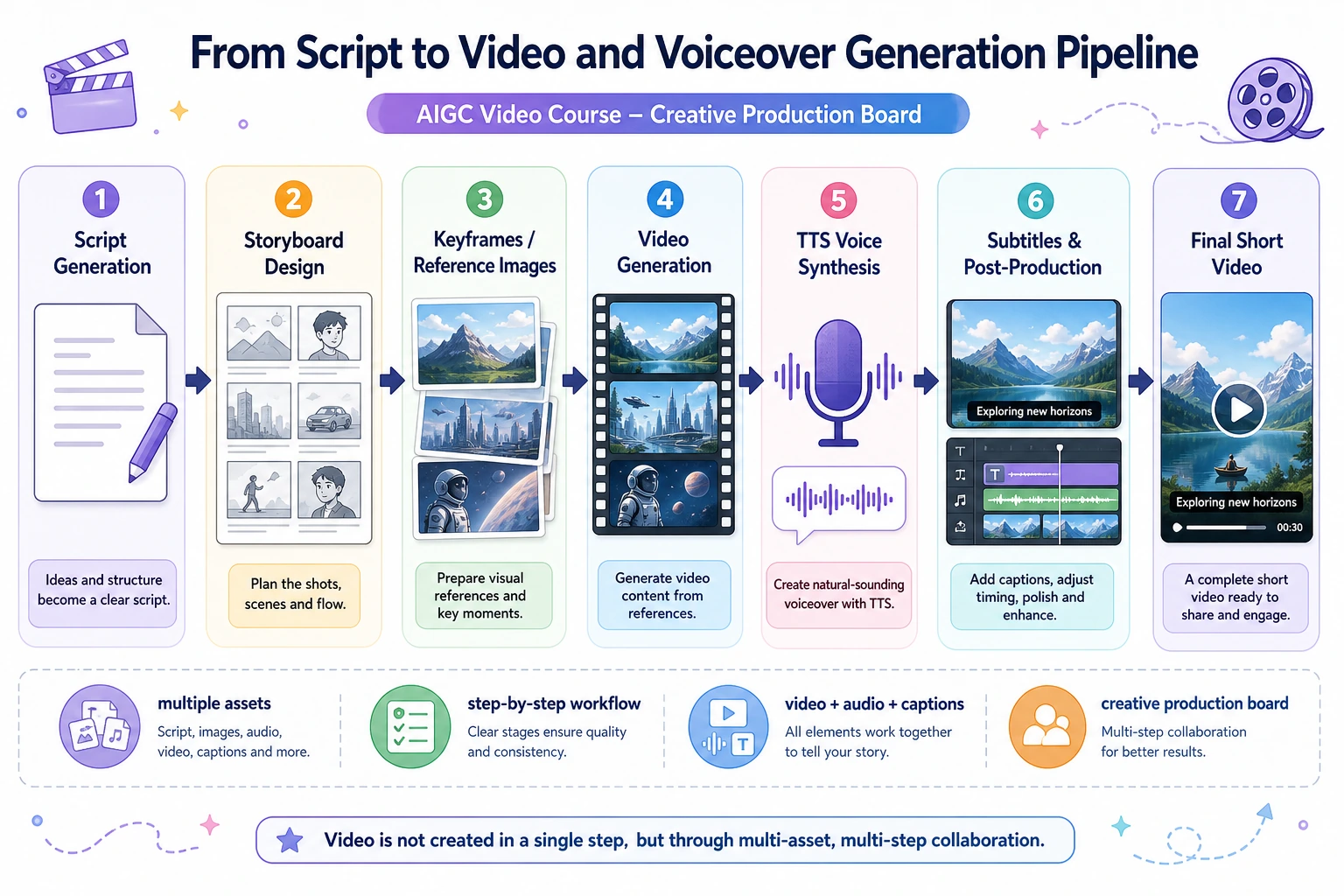
- Understand why video generation often looks more like a “multi-module system” than a single model
First, Build a Map
Section titled “First, Build a Map”It is more helpful to understand video generation from three angles: “single-frame quality + temporal consistency + workflow organization”:
flowchart LR A["Looks real in a single frame"] --> B["Adjacent frames stay consistent"] B --> C["Motion and camera movement are reasonable"] C --> D["Then combine with audio / control / post-processing"]So what this section really wants to explain is:
- Why video generation is not just “generate more images”
- Why it is naturally more like a temporally continuous system
Why Is Video Generation Harder?
Section titled “Why Is Video Generation Harder?”Image generation only requires a reasonable single frame
Section titled “Image generation only requires a reasonable single frame”The core requirement of text-to-image is:
- This image should look real
Video generation also requires continuity over time
Section titled “Video generation also requires continuity over time”In addition to single-frame quality, video must also ensure:
- The same person does not suddenly change their face
- The background does not flicker from frame to frame
- Motion is smooth
- Camera movement is coherent
In other words, the most important new problem in video generation is:
Temporal consistency.
A better analogy for beginners
Section titled “A better analogy for beginners”You can think of video generation as:
- Filming a short scene, not taking a single photo
For a photo, only that one frame has to look good. For a video, you also need:
- The actor not to suddenly change faces
- The lighting not to jump around
- The motion not to look stuttery
This analogy is very helpful for beginners because it helps you focus first on:
- The hardest part of video is not “does a single frame look real?”
- It is “does the whole sequence look real when played together?”
Start by Understanding Video from the Simplest View
Section titled “Start by Understanding Video from the Simplest View”What is video, essentially?
Section titled “What is video, essentially?”From the roughest perspective:
Video = a sequence of image frames arranged in time.
A minimal illustration
Section titled “A minimal illustration”frames = ["frame_1", "frame_2", "frame_3", "frame_4"]
for i, frame in enumerate(frames, start=1): print(f"t={i}: {frame}")Expected output:
t=1: frame_1t=2: frame_2t=3: frame_3t=4: frame_4Read t as the time order. A video model must keep both the content of each frame and the order between frames under control.
Of course, that is not the whole story, but it is the starting point that every video generation model must deal with:
- You need to understand spatial structure
- You also need to understand temporal order
Why Does “Good Frames” Not Mean “Good Video”?
Section titled “Why Does “Good Frames” Not Mean “Good Video”?”A very typical failure example
Section titled “A very typical failure example”Suppose there is a cat running from left to right in a video. If each frame looks fine on its own, but:
- Frame 1 shows an orange cat
- Frame 2 shows a gray cat
- Frame 3 suddenly has a much larger body
Then users will still feel that it is very fake.
So the key extra constraints in video generation are
Section titled “So the key extra constraints in video generation are”- Inter-frame consistency
- Motion continuity
- Identity preservation
That is also why a video task cannot be understood simply as:
“Just generate more images.”
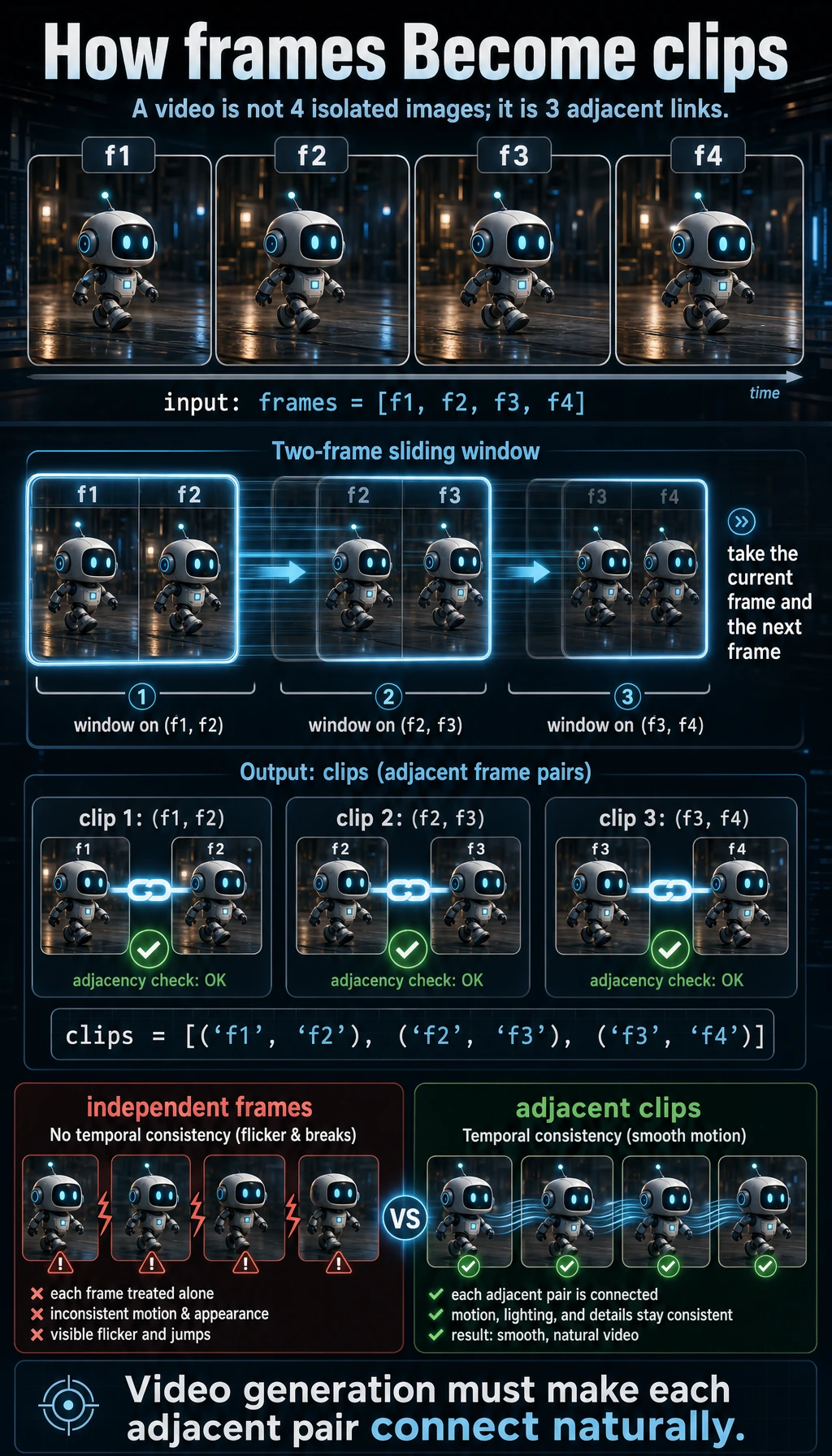
A Minimal “Frames to Clip” Example
Section titled “A Minimal “Frames to Clip” Example”frames = ["f1", "f2", "f3", "f4"]clips = [(frames[i], frames[i + 1]) for i in range(len(frames) - 1)]
print("frames:", frames)print("clips :", clips)Expected output:
frames: ['f1', 'f2', 'f3', 'f4']clips : [('f1', 'f2'), ('f2', 'f3'), ('f3', 'f4')]The clips list makes the hidden requirement visible: the model must make each adjacent pair feel connected, not only make each frame look good alone.
What is this example teaching?
Section titled “What is this example teaching?”It is teaching you that:
- Video is not a collection of independent samples
- Adjacent frames are naturally related
- Many models treat these local temporal relationships as the basis for modeling
How Can We Roughly Understand Mainstream Video Generation Approaches?
Section titled “How Can We Roughly Understand Mainstream Video Generation Approaches?”Frame-by-frame generation
Section titled “Frame-by-frame generation”Idea:
- Generate frames one by one
- Then try to make them connect smoothly
Pros:
- Easy to understand
Cons:
- Inconsistency is very easy to appear
Extending image models into the time dimension
Section titled “Extending image models into the time dimension”Idea:
- Reuse image generation capability first
- Then add temporal modeling
This is a very natural route, because image generation itself is already quite mature.
Video diffusion approaches
Section titled “Video diffusion approaches”Idea:
- Instead of diffusing only single frames, perform diffusion and denoising on the representation of the whole video sequence
This is also an increasingly important direction.
A comparison table that beginners can remember first
Section titled “A comparison table that beginners can remember first”| Approach | First impression |
|---|---|
| Frame-by-frame generation | Easy to understand, but consistency can be poor |
| Extending image models into time | A very natural engineering evolution path |
| Video diffusion | More complete consideration of the whole video sequence |
This table is very useful for beginners because it compresses “there are many approaches” into three easier-to-grasp ideas.
Why Are Many Video Generation Approaches Related to Image Models?
Section titled “Why Are Many Video Generation Approaches Related to Image Models?”Because image generation has already solved many fundamental problems:
- Text-conditioned control
- Single-frame visual quality
- Detail expression
So a natural idea is:
First establish strong single-frame quality, then gradually add the dimension of “time.”
That is why many video generation systems look like:
- Image diffusion models + temporal modeling
This is not a coincidence, but a very natural evolutionary logic.
The Most Common Evaluation Dimensions for Video Generation
Section titled “The Most Common Evaluation Dimensions for Video Generation”Single-frame quality
Section titled “Single-frame quality”Whether each frame itself looks real.
Temporal consistency
Section titled “Temporal consistency”Whether adjacent frames are smooth and stable.
Motion plausibility
Section titled “Motion plausibility”Whether the motion trajectory feels natural.
Condition control
Section titled “Condition control”Whether the user’s text or reference conditions are maintained throughout the entire video.
So evaluating video generation is often more complex than evaluating image generation, because it is at least a dual task of “spatial quality + temporal quality.”
A beginner-friendly evaluation table
Section titled “A beginner-friendly evaluation table”| Dimension | What you should look at first |
|---|---|
| Single-frame quality | Whether one image looks real |
| Temporal consistency | Whether there are sudden jumps between frames |
| Motion plausibility | Whether the motion trajectory feels natural |
| Condition control | Whether the text or reference conditions persist throughout |
This table is helpful for beginners because it breaks “video quality” into several more observable problems.
Why Is Video Generation Harder in Engineering?
Section titled “Why Is Video Generation Harder in Engineering?”Larger compute cost
Section titled “Larger compute cost”Because it is no longer just:
- Height x width x channels
but:
- Number of frames x height x width x channels
Failures are easier to notice
Section titled “Failures are easier to notice”A small flaw in an image may still be acceptable to users. But if a video jumps inconsistently from frame to frame, users will immediately feel that it is fake.
Higher interaction cost
Section titled “Higher interaction cost”Video generation is usually slower, more expensive, and more dependent on engineering optimization.
An Important Product Perspective
Section titled “An Important Product Perspective”In practice, many video generation products do not rely entirely on one single large model. Instead, they are more like a combination of:
- Keyframe generation
- Interpolation
- Audio synthesis
- Pose control
- Post-processing
In other words:
Many video generation products are essentially “multi-module workflow systems.”
This is very important, because it shows that:
- Not every problem needs to be handed over to one huge end-to-end model
If you turn this into a project or system design, what is most worth showing?
Section titled “If you turn this into a project or system design, what is most worth showing?”What is usually most worth showing is not:
- “I generated a video”
but rather:
- How single-frame quality and temporal consistency are evaluated separately
- What modules the system uses
- Where the system is most likely to fail
- Why it looks more like a multi-module workflow than a single model button
In this way, others can more easily see that:
- You understand the system-level challenges of video generation
- You are not just exporting a result
Evidence to Keep
Section titled “Evidence to Keep”Keep this page’s proof of learning as a small evidence card:
- Storyboard
- scene list, duration, camera/voice/subtitle/timing notes
- Asset List
- images, audio, voice, captions, clips, and source/license fields
- Sync Check
- speech-text timing, lip sync, shot continuity, or frame consistency
- Failure Check
- flicker, identity drift, audio mismatch, unsafe likeness, or export issue
- Expected Output
- storyboard or timeline artifact with review notes
Summary
Section titled “Summary”The most important thing in this section is not to remember the name of a particular approach, but to build a stable intuition:
Video generation = generating each frame + maintaining reasonable continuity between frames.
That is the fundamental reason it is harder than image generation and also more challenging from an engineering perspective.
Exercises
Section titled “Exercises”- Explain in your own words: why does video generation have one more core layer of difficulty than image generation?
- Think about this: if every frame in a video looks good on its own, but the sequence feels jumpy when played together, which layer has gone wrong?
- Why do we say that many video generation systems are essentially “multi-module workflows”?
- If you were building a short-video generation product, would you prioritize single-frame quality or temporal consistency first? Why?
Solution approach and explanation
- Video adds time. The system must keep identity, motion, camera, lighting, and scene state consistent across frames, not merely make one good image.
- If each frame looks good but playback feels jumpy, the temporal consistency layer is failing. Motion, object persistence, or camera trajectory is not coherent across the sequence.
- Many systems become multi-module workflows because prompt understanding, keyframe generation, motion control, interpolation, upscaling, audio, editing, and review each solve different problems.
- For most short-video products, temporal consistency should be prioritized early. A slightly less beautiful but stable clip is usually more usable than a high-quality frame sequence that flickers or changes identity.