
12.2.3 Stable Diffusion Architecture
Learning Objectives
Section titled “Learning Objectives”- Understand the overall module responsibilities in Stable Diffusion
- Understand why it diffuses in latent space instead of pixel space
- Understand what the text encoder, U-Net, and VAE each do
- Understand how cross-attention connects text to image generation
- Build a system-level map of the Stable Diffusion workflow
Why isn’t the original diffusion idea practical enough?
Section titled “Why isn’t the original diffusion idea practical enough?”The most intuitive problem: pixel space is too large
Section titled “The most intuitive problem: pixel space is too large”If you diffuse directly in the original image pixel space:
- as resolution grows, the tensor becomes very large
- both inference and training become expensive
For example:
512 x 512 x 3
is already a very large representation space.
The key shift in Stable Diffusion
Section titled “The key shift in Stable Diffusion”Its most important step is:
Do not diffuse directly on the original image. First compress the image into latent space, and then diffuse there.
This idea is later called:
- latent diffusion
It greatly improves engineering feasibility.
Let’s first look at the overall structure
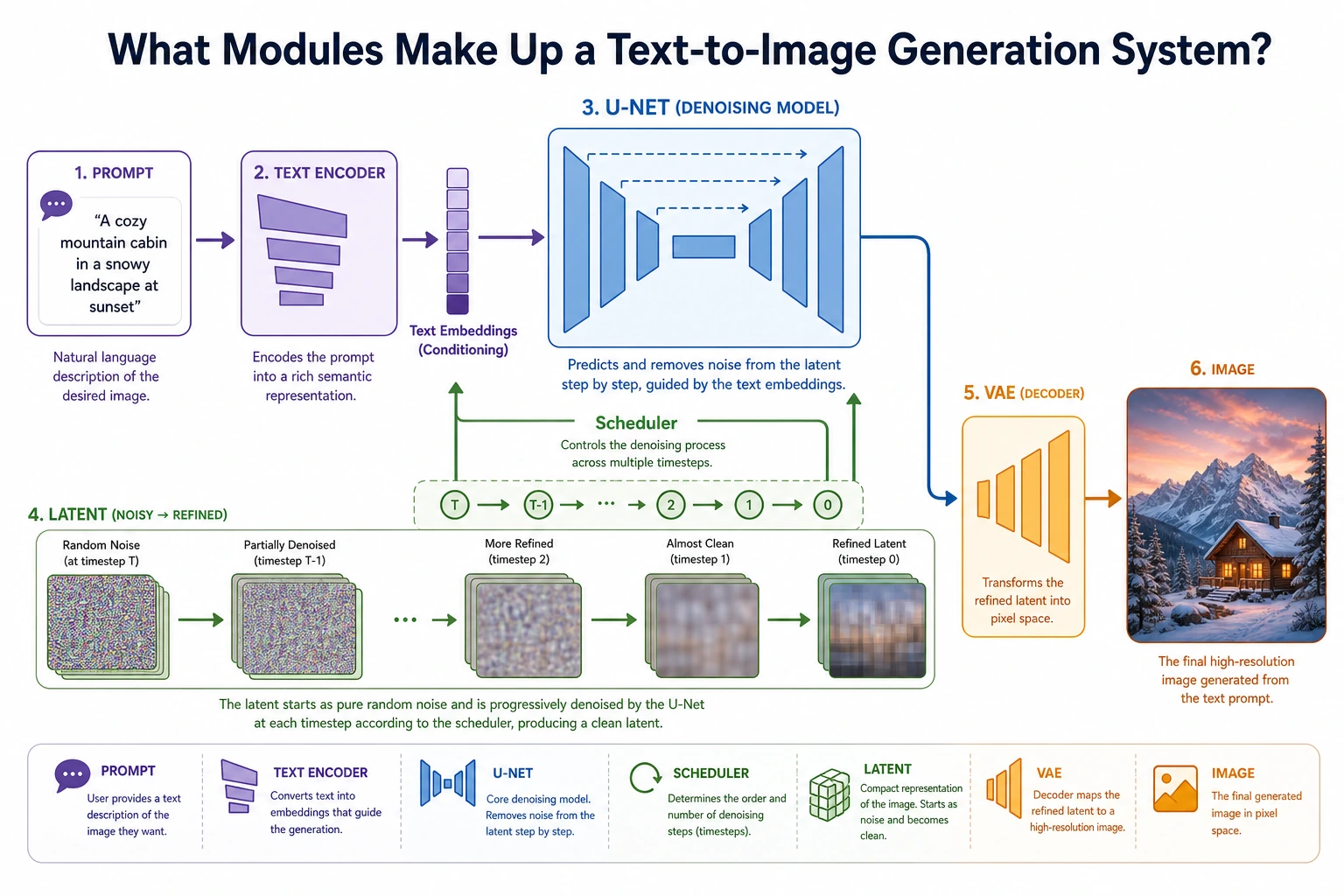
Section titled “Let’s first look at the overall structure”flowchart LR A["Text Prompt"] --> B["Text Encoder"] C["Image"] --> D["VAE Encoder"] D --> E["Latent Space"] B --> F["U-Net + Cross-Attention"] E --> F F --> G["Denoised Latent"] G --> H["VAE Decoder"] H --> I["Output Image"]
style A fill:#e3f2fd,stroke:#1565c0,color:#333 style B fill:#fff3e0,stroke:#e65100,color:#333 style C fill:#e3f2fd,stroke:#1565c0,color:#333 style D fill:#f3e5f5,stroke:#6a1b9a,color:#333 style E fill:#fffde7,stroke:#f9a825,color:#333 style F fill:#e8f5e9,stroke:#2e7d32,color:#333 style G fill:#fffde7,stroke:#f9a825,color:#333 style H fill:#f3e5f5,stroke:#6a1b9a,color:#333 style I fill:#ffebee,stroke:#c62828,color:#333A simple way to remember it is to split it into three main parts:
- Text encoder: turns the prompt into a conditioning representation
- U-Net: performs denoising in latent space
- VAE: converts between image space and latent space
What exactly is the role of the VAE here?
Section titled “What exactly is the role of the VAE here?”It acts more like a compressor than the main generator
Section titled “It acts more like a compressor than the main generator”In Stable Diffusion, the VAE mainly does this:
- Encoder: compresses the image into a latent
- Decoder: decodes the latent back into an image
In other words, it mainly serves as a bridge between:
image space and latent space.
Why is this step so important?
Section titled “Why is this step so important?”Because if diffusion is done directly in image space, the cost is too high. The VAE provides a much smaller and more abstract intermediate space.
You can think of it like this:
Instead of carving directly on a huge high-resolution canvas, first compress it into a much smaller “semantic sketch board.”
A minimal intuition example for “compression / expansion”
Section titled “A minimal intuition example for “compression / expansion””import numpy as np
image = np.random.randn(8, 8).astype(np.float32)
# Use average pooling to simulate compressionlatent = image.reshape(4, 2, 4, 2).mean(axis=(1, 3))
# Use repeat to simulate decodingreconstructed = np.repeat(np.repeat(latent, 2, axis=0), 2, axis=1)
print("image shape :", image.shape)print("latent shape :", latent.shape)print("reconstructed shape:", reconstructed.shape)Expected output:
image shape : (8, 8)latent shape : (4, 4)reconstructed shape: (8, 8)The important observation is the middle line: the latent is smaller. Stable Diffusion spends most denoising work in this compressed space, then decodes the final latent back to image space.
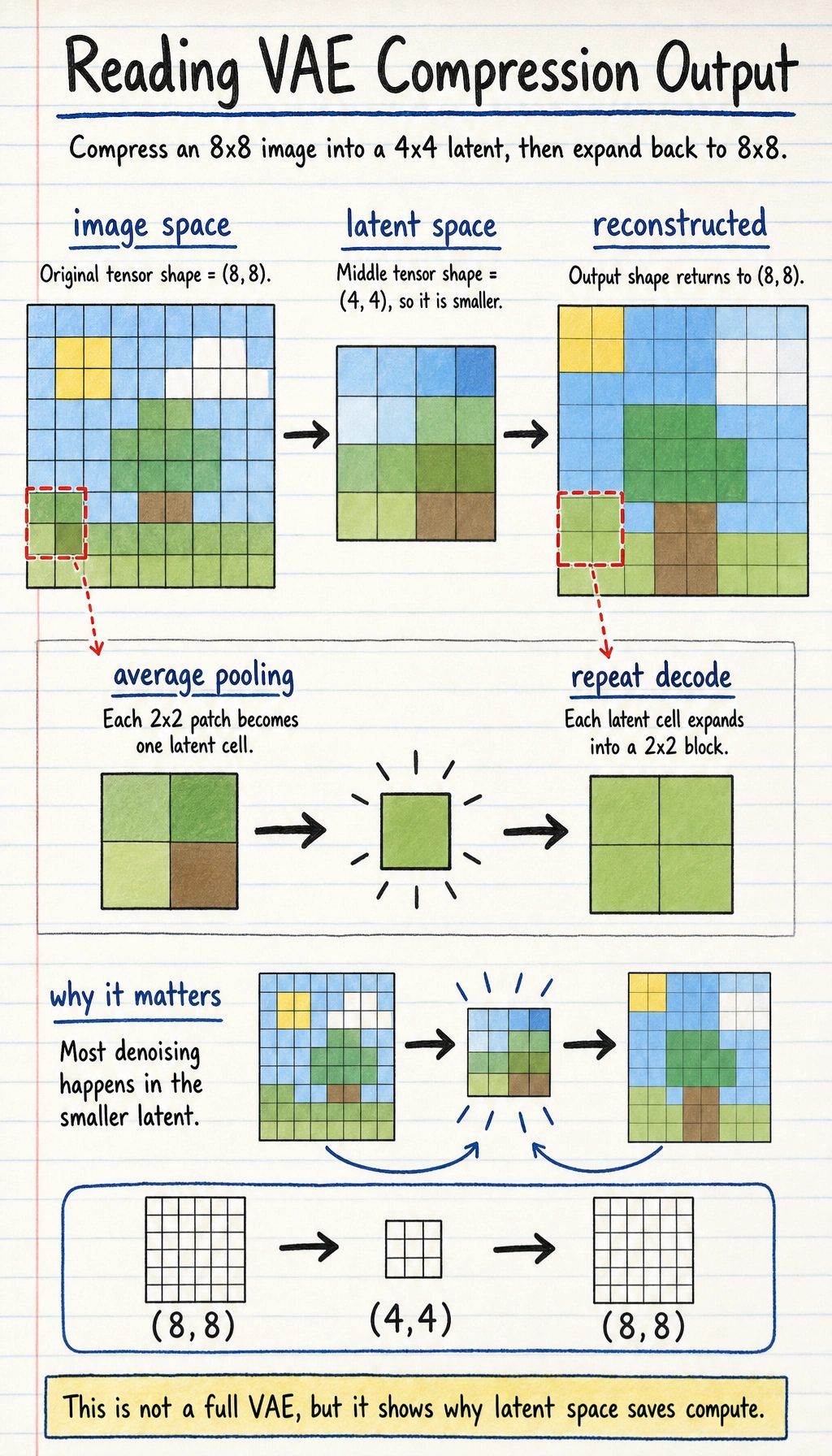
Of course, this example is not a VAE, but it is enough to help you grasp the core intuition:
- latent is smaller than the original image
- latent is a more compressed representation
Why is the text encoder indispensable?
Section titled “Why is the text encoder indispensable?”The prompt cannot be understood directly by the U-Net
Section titled “The prompt cannot be understood directly by the U-Net”The U-Net processes numeric tensors, and it cannot directly understand natural language such as:
- “an orange cat sitting by the window”
So we need a text encoder first
Section titled “So we need a text encoder first”The text encoder turns the prompt into:
- a set of semantic vectors
You can think of it as:
Translating language conditions into numeric conditions that the image generation pipeline can consume.
A simple illustration
Section titled “A simple illustration”text_condition = { "prompt": "an orange cat sitting by the window", "embedding_shape": (77, 768)}
print(text_condition)Expected output:
{'prompt': 'an orange cat sitting by the window', 'embedding_shape': (77, 768)}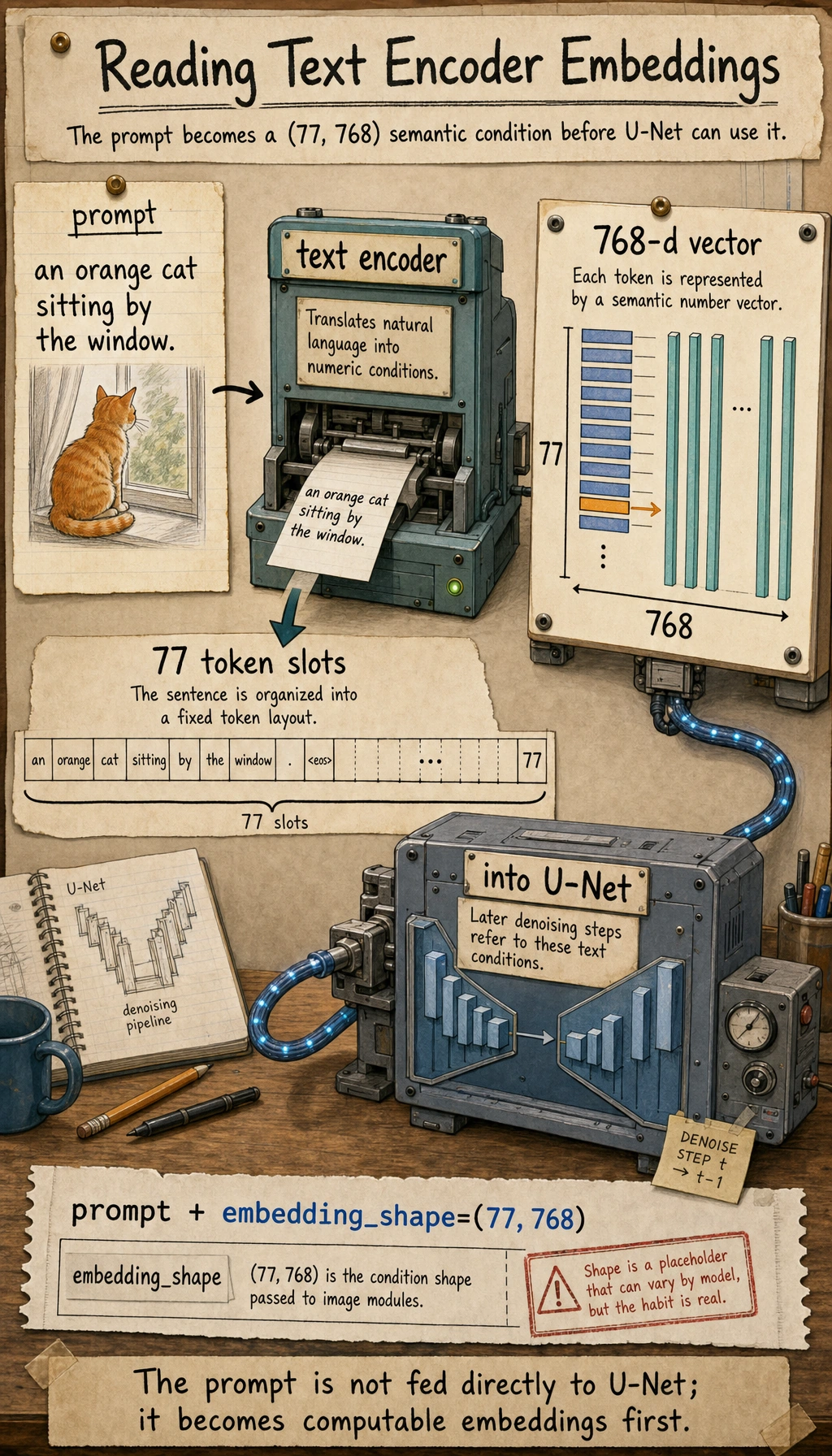
The shape is only a placeholder, but the habit is real: before image modules can use text, the prompt must become numeric vectors.
The most important thing here is not the exact dimensions, but understanding that:
- the prompt is first converted into vectors
- the visual backbone later uses these vectors
Why did U-Net become the backbone of diffusion?
Section titled “Why did U-Net become the backbone of diffusion?”U-Net is naturally good at multi-scale information processing
Section titled “U-Net is naturally good at multi-scale information processing”Typical U-Net characteristics include:
- encoder path: gradually compresses and extracts abstract features
- decoder path: gradually restores spatial details
- skip connections: help preserve details instead of losing them completely
Why is this a good fit for denoising?
Section titled “Why is this a good fit for denoising?”Because denoising requires both:
- understanding global structure
- preserving local details
And U-Net is very good at exactly this kind of task.
So in Stable Diffusion, the role of U-Net is:
Predict noise in latent space and progressively remove it.
Why is cross-attention so important?
Section titled “Why is cross-attention so important?”Text and images are not naturally connected
Section titled “Text and images are not naturally connected”If you only have:
- a text encoder
- a U-Net
but no clear mechanism for the image to “look at” the text, then the prompt control effect will be weak.
The intuition behind cross-attention
Section titled “The intuition behind cross-attention”Its core idea is:
Let the image denoising process refer to the text condition while updating itself.
In other words, when the image latent is updated, it does not only look at its own state; it also looks at:
- the semantic signals provided by the prompt
A very simple illustration
Section titled “A very simple illustration”latent_feature = "current image latent features"text_feature = "orange cat + window + sunset"
fusion = f"{latent_feature} updates while referring to {text_feature}"print(fusion)Expected output:
current image latent features updates while referring to orange cat + window + sunset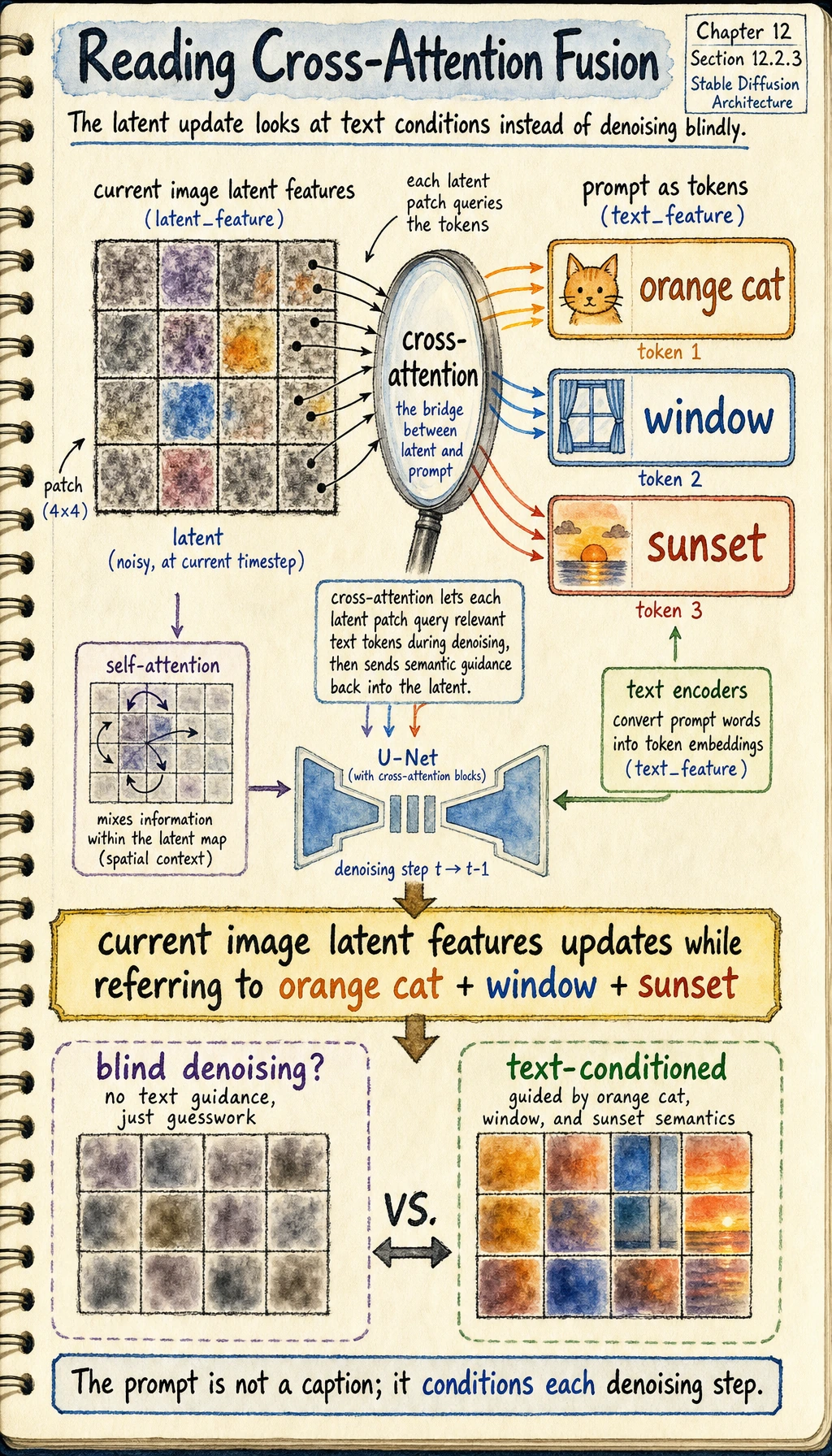
Read this sentence as the role of cross-attention: the latent is not denoised blindly; it keeps checking the text condition while it updates.
Although this is only a textual illustration, it captures the essence:
- self-attention is more like “looking at yourself”
- cross-attention is more like “the image looking at the text”
Putting the whole workflow together
Section titled “Putting the whole workflow together”You can compress the main Stable Diffusion flow into these 5 steps:
- prompt -> text encoder
- randomly initialize latent noise
- U-Net performs step-by-step denoising under text conditioning
- obtain a cleaner latent
- VAE Decoder decodes the latent into an image
workflow = [    "prompt -> text encoder",    "latent noise",    "U-Net denoise with text condition",    "clean latent",    "decode to image"]
for step in workflow:    print(step)
Expected output:
prompt -> text encoderlatent noiseU-Net denoise with text conditionclean latentdecode to image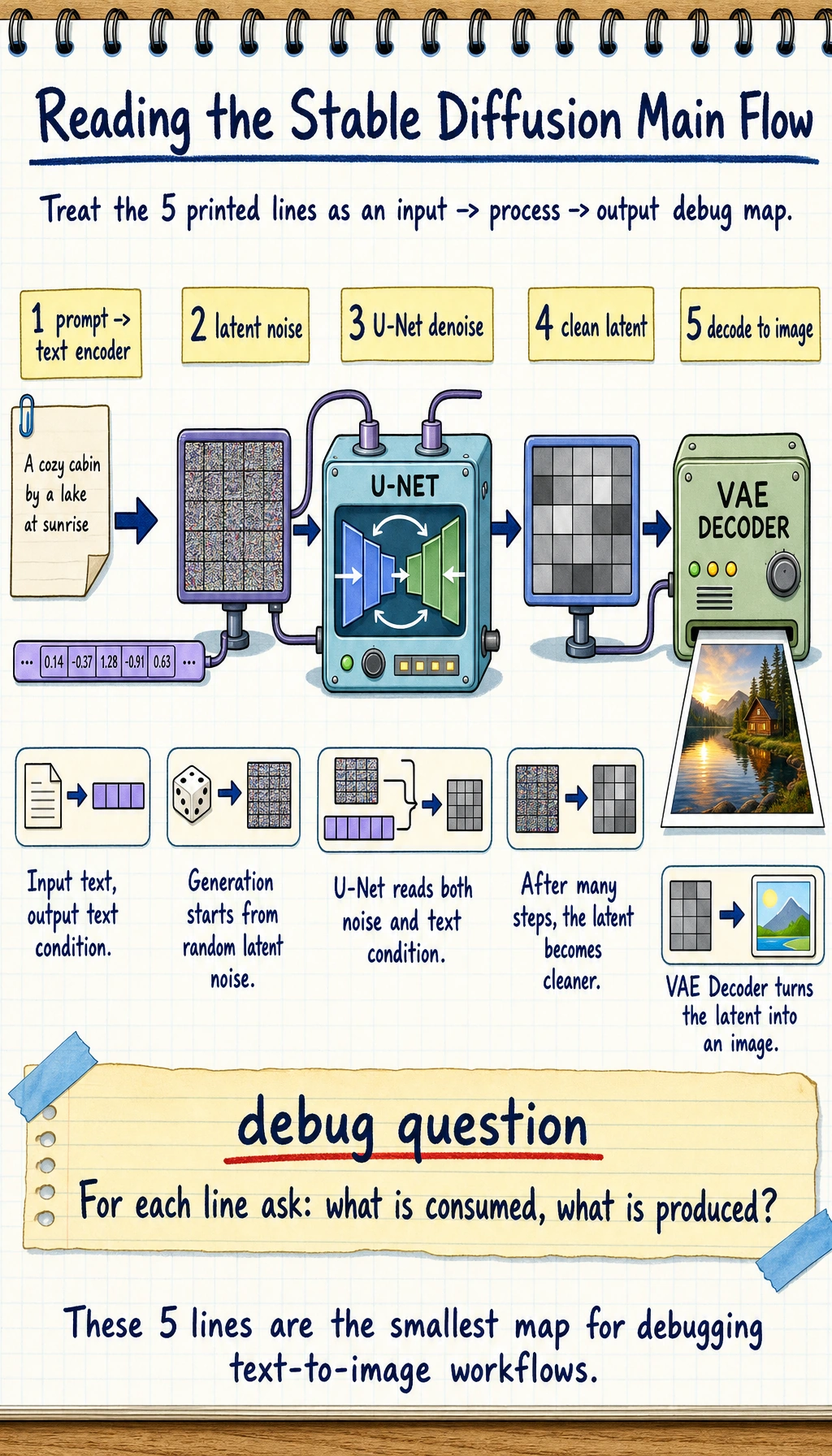
If you can explain what each line consumes and produces, you already have the practical mental model needed to debug most Stable Diffusion workflows.
This is the most important main workflow of Stable Diffusion.
Why did it become such an important architecture for text-to-image generation?
Section titled “Why did it become such an important architecture for text-to-image generation?”Because it balances quality and engineering feasibility
Section titled “Because it balances quality and engineering feasibility”Compared with direct pixel-space diffusion:
- latent diffusion is lighter
- training and inference are more practical
Because it is well suited for conditional control
Section titled “Because it is well suited for conditional control”Stable Diffusion is naturally good for:
- text-to-image generation
- image editing
- local inpainting
- style control
Because the module boundaries are clear
Section titled “Because the module boundaries are clear”This is very important:
- the text encoder handles semantics
- the U-Net handles denoising
- the VAE handles spatial conversion
Clear module responsibilities make it easier for an ecosystem to grow.
Evidence to Keep
Section titled “Evidence to Keep”Keep this page’s proof of learning as a small evidence card:
- Prompt Record
- prompt, negative requirements, reference, seed/model, and version number
- Candidate Outputs
- generated or simulated results with selection reason
- Technical Note
- diffusion step, latent, cross-attention, LoRA, or application mode
- Failure Check
- prompt drift, style mismatch, artifact, copyright, portrait, or review failure
- Expected Output
- selected image/version record plus rejected-candidate notes
Common misconceptions
Section titled “Common misconceptions”Thinking Stable Diffusion is just “one big black box”
Section titled “Thinking Stable Diffusion is just “one big black box””In fact, it is a collaboration of multiple modules:
- text encoder
- U-Net
- VAE
- conditioning injection mechanism
Not understanding the engineering value of latent diffusion
Section titled “Not understanding the engineering value of latent diffusion”This is one of the key reasons it can actually be used.
Memorizing module names without understanding their responsibilities
Section titled “Memorizing module names without understanding their responsibilities”If you do this, later learning about fine-tuning and applications will feel very vague.
Summary
Section titled “Summary”The most important thing in this section is not memorizing terminology, but grasping this main line:
The core of Stable Diffusion is conditional diffusion in latent space, where the VAE handles compression and decoding, the text encoder provides semantic conditions, the U-Net handles denoising, and cross-attention connects text to the image generation process.
Once you understand this main line, text-to-image applications, image editing, and fine-tuning will make much more sense later.
Exercises
Section titled “Exercises”- Explain in your own words: why doesn’t Stable Diffusion diffuse directly in pixel space?
- Think about it: why do the text encoder and cross-attention need to exist at the same time?
- If you replace the U-Net with a small ordinary network, why is the result usually much worse?
- Summarize in your own words: what are the responsibilities of the VAE, U-Net, and text encoder?
Reference implementation and walkthrough
- Stable Diffusion works in latent space because pixel space is large and expensive. A VAE compresses the image into a smaller representation where denoising is cheaper while still preserving the main visual structure.
- The text encoder turns words into guidance vectors; cross-attention lets the denoising network look at those vectors while deciding what to change. Without the encoder there is no semantic condition, and without cross-attention the condition is hard to inject at the right spatial moments.
- U-Net is useful because it combines local details with larger spatial context through downsampling, upsampling, and skip connections. A small ordinary network usually loses either fine detail or global structure.
- The VAE compresses and reconstructs images, the U-Net performs iterative denoising in latent space, and the text encoder converts the prompt into conditioning information that guides the denoising process.