
2.3.2 Project: Web Scraper
Project Overview
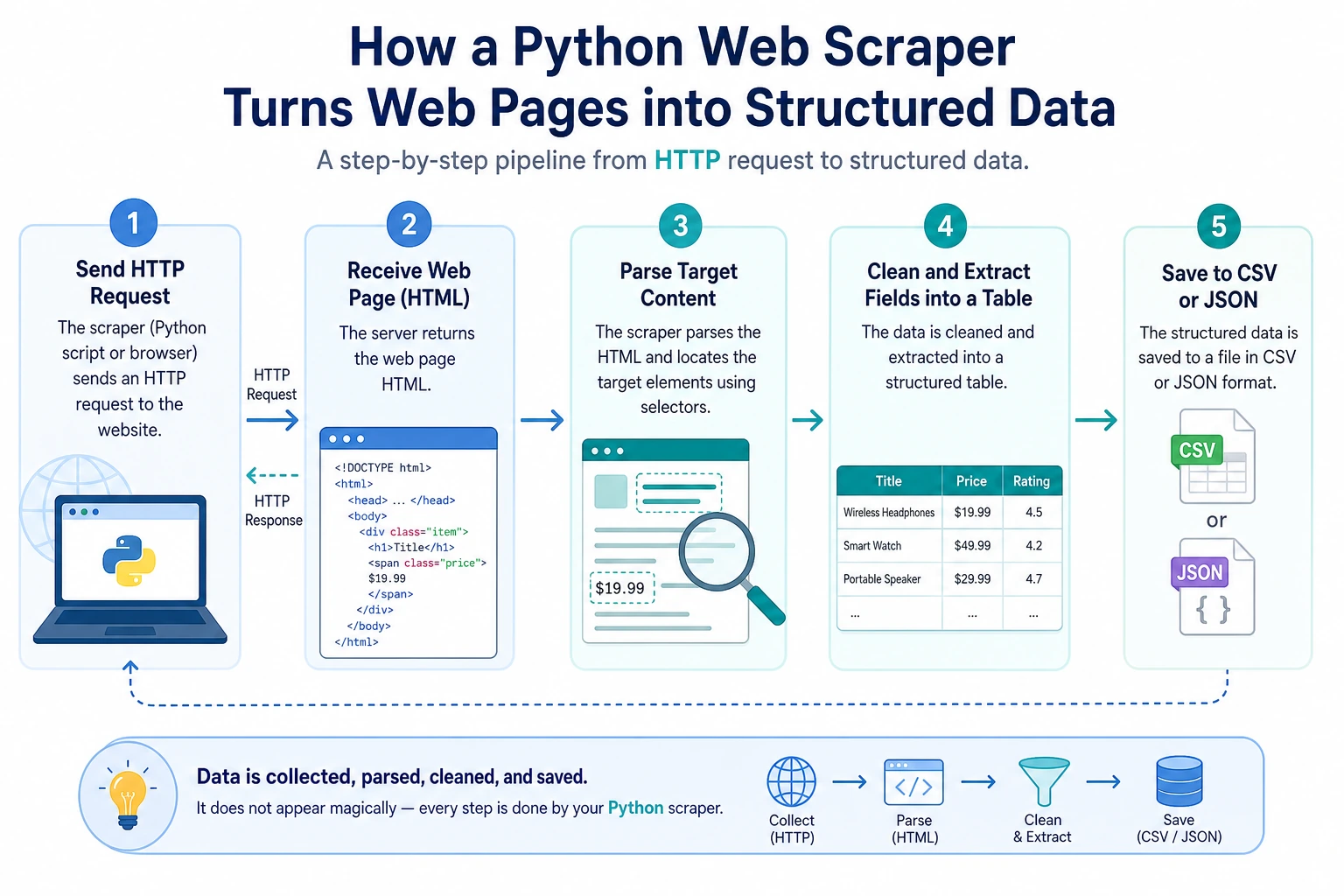
Section titled “Project Overview”This project gives you your first experience using Python to obtain data from the internet. You will connect HTTP requests, HTML parsing, data cleaning, and file saving to understand that real-world data does not appear out of thin air — it must be collected, organized, and structured.
Project Goals
Section titled “Project Goals”- Understand the basic concepts of HTTP requests and web page structure
- Learn how to use the
requestslibrary to send HTTP requests - Learn how to use
BeautifulSoupto parse HTML - Build a practical web data collection tool
Introduction
Section titled “Introduction”A Web Scraper is a program that automatically extracts data from web pages. For example:
- Collect job listings from job boards
- Scrape article titles from news websites
- Get product prices from e-commerce websites
- Collect data for AI model training
We will build a scraper that can extract web page information and save it as structured data.
Prerequisite Knowledge: HTTP and HTML
Section titled “Prerequisite Knowledge: HTTP and HTML”What is an HTTP request?
Section titled “What is an HTTP request?”When you enter a URL in your browser and press Enter, the browser sends an HTTP request to the server, and the server returns the web page content (HTTP response).
Your browser → HTTP request → ServerYour browser ← HTTP response ← Server (returns HTML)Python’s requests library can help you do the same thing as a browser — send requests and get page content.
What is HTML?
Section titled “What is HTML?”HTML (HyperText Markup Language) is the “skeleton” of a web page. A simple HTML page:
<html><head> <title>Sample Page</title></head><body> <h1>Welcome to My Website</h1> <p class="intro">This is an introductory paragraph.</p> <ul> <li>Item 1</li> <li>Item 2</li> <li>Item 3</li> </ul> <a href="https://example.com">Click here</a></body></html>The scraper’s job is to extract the data you need from these HTML tags.
Step 1: Install Dependencies
Section titled “Step 1: Install Dependencies”pip install requests beautifulsoup4| Library | Purpose |
|---|---|
requests | Send HTTP requests and get web content |
beautifulsoup4 | Parse HTML and extract data |
Step 2: Send an HTTP Request
Section titled “Step 2: Send an HTTP Request”import requests
# Send a GET requestresponse = requests.get("https://httpbin.org/get")
# Check the response statusprint(f"Status code: {response.status_code}") # 200 means successprint(f"Encoding: {response.encoding}")
# View the response contentprint(response.text[:200]) # Text content (first 200 characters)
# Meaning of response status codes# 200: Success# 404: Page not found# 403: Forbidden# 500: Server errorAdd Request Headers (Simulate a Browser)
Section titled “Add Request Headers (Simulate a Browser)”Some websites check whether requests come from a browser, so you may need to set a User-Agent:
headers = {    "User-Agent": "Mozilla/5.0 (Macintosh; Intel Mac OS X 10_15_7) "                  "AppleWebKit/537.36 (KHTML, like Gecko) "                  "Chrome/120.0.0.0 Safari/537.36"}
response = requests.get("https://example.com", headers=headers)print(response.status_code)
Handle Request Exceptions
Section titled “Handle Request Exceptions”import requests
def fetch_page(url: str) -> str | None: """Safely fetch web page content""" try: response = requests.get(url, headers=headers, timeout=10) response.raise_for_status() # Raise an exception if the status code is not 200 response.encoding = response.apparent_encoding # Auto-detect encoding return response.text except requests.ConnectionError: print(f"❌ Could not connect to {url}") except requests.Timeout: print(f"❌ Request timed out: {url}") except requests.HTTPError as e: print(f"❌ HTTP error: {e}") return NoneStep 3: Parse HTML
Section titled “Step 3: Parse HTML”from bs4 import BeautifulSoup
html = """<html><body> <h1>Python Course List</h1> <div class="course-list"> <div class="course"> <h2 class="title">Python Basics</h2> <span class="price">¥99</span> <span class="rating">4.8</span> </div> <div class="course"> <h2 class="title">Advanced Python</h2> <span class="price">¥199</span> <span class="rating">4.6</span> </div> <div class="course"> <h2 class="title">Python AI Practice</h2> <span class="price">¥399</span> <span class="rating">4.9</span> </div> </div></body></html>"""
# Create a BeautifulSoup objectsoup = BeautifulSoup(html, "html.parser")
# Find a single elementtitle = soup.find("h1")print(title.text) # Python Course List
# Find all matching elementscourses = soup.find_all("div", class_="course")for course in courses: name = course.find("h2", class_="title").text price = course.find("span", class_="price").text rating = course.find("span", class_="rating").text print(f"{name} - {price} - Rating: {rating}")
# Output:# Python Basics - ¥99 - Rating: 4.8# Advanced Python - ¥199 - Rating: 4.6# Python AI Practice - ¥399 - Rating: 4.9Common BeautifulSoup Methods
Section titled “Common BeautifulSoup Methods”# Find by tag namesoup.find("h1") # Find the first h1soup.find_all("p") # Find all p tags
# Find by classsoup.find("div", class_="content")soup.find_all("span", class_="price")
# Find by idsoup.find("div", id="main")
# CSS selectors (more powerful)soup.select("div.course h2") # All h2 under div.coursesoup.select("ul > li") # li direct children of ulsoup.select("a[href]") # All a tags with an href attribute
# Get text and attributestag = soup.find("a")print(tag.text) # Link textprint(tag.get("href")) # href attribute valueprint(tag["href"]) # Same as aboveStep 4: Full Project Demo
Section titled “Step 4: Full Project Demo”Project: Scrape a Quotes Website
Section titled “Project: Scrape a Quotes Website”We’ll use a website made specifically for scraper practice: quotes.toscrape.com:
"""Web scraper project: Scrape famous quotesTarget website: https://quotes.toscrape.com"""
import requestsfrom bs4 import BeautifulSoupimport jsonimport time

def scrape_quotes(max_pages: int = 5) -> list[dict]:    """Scrape quote data"""    all_quotes = []    base_url = "https://quotes.toscrape.com"
    for page in range(1, max_pages + 1):        url = f"{base_url}/page/{page}/"        print(f"Scraping page {page}: {url}")
        try:            response = requests.get(url, timeout=10)            response.raise_for_status()        except requests.RequestException as e:            print(f"  ❌ Request failed: {e}")            continue
        soup = BeautifulSoup(response.text, "html.parser")        quotes = soup.find_all("div", class_="quote")
        if not quotes:            print("  No more data available")            break
        for quote in quotes:            text = quote.find("span", class_="text").text            author = quote.find("small", class_="author").text            tags = [tag.text for tag in quote.find_all("a", class_="tag")]
            all_quotes.append({                "text": text,                "author": author,                "tags": tags            })
        print(f"  ✅ Scraped {len(quotes)} quotes")        time.sleep(1)  # Be polite and do not put too much pressure on the server
    return all_quotes

def save_to_json(data: list[dict], filename: str = "quotes.json") -> None:    """Save as a JSON file"""    with open(filename, "w", encoding="utf-8") as f:        json.dump(data, f, ensure_ascii=False, indent=2)    print(f"\n💾 Saved {len(data)} records to {filename}")

def save_to_csv(data: list[dict], filename: str = "quotes.csv") -> None:    """Save as a CSV file"""    import csv    with open(filename, "w", newline="", encoding="utf-8") as f:        writer = csv.DictWriter(f, fieldnames=["text", "author", "tags"])        writer.writeheader()        for item in data:            item_copy = item.copy()            item_copy["tags"] = ", ".join(item["tags"])            writer.writerow(item_copy)    print(f"💾 Saved to {filename}")

def analyze_quotes(quotes: list[dict]) -> None:    """Analyze data"""    print("\n📊 Data analysis:")    print(f"  Total quotes: {len(quotes)}")
    # Count how many quotes each author has    author_count = {}    for q in quotes:        author = q["author"]        author_count[author] = author_count.get(author, 0) + 1
    # Sort by count    sorted_authors = sorted(author_count.items(), key=lambda x: x[1], reverse=True)    print(f"  Number of authors: {len(sorted_authors)}")    print(f"\n  Top 5 authors by quote count:")    for author, count in sorted_authors[:5]:        print(f"    {author}: {count} quotes")
    # Count tags    all_tags = {}    for q in quotes:        for tag in q["tags"]:            all_tags[tag] = all_tags.get(tag, 0) + 1
    sorted_tags = sorted(all_tags.items(), key=lambda x: x[1], reverse=True)    print(f"\n  Top 10 most popular tags:")    for tag, count in sorted_tags[:10]:        print(f"    #{tag}: {count} times")

def main():    print("=== Famous Quotes Scraper ===\n")
    # Scrape data    quotes = scrape_quotes(max_pages=5)
    if not quotes:        print("No data was scraped")        return
    # Save data    save_to_json(quotes)    save_to_csv(quotes)
    # Analyze data    analyze_quotes(quotes)

if __name__ == "__main__":    main()
Things to Keep in Mind When Scraping
Section titled “Things to Keep in Mind When Scraping”Extension Challenges
Section titled “Extension Challenges”Challenge 1: Error Retry Mechanism
Section titled “Challenge 1: Error Retry Mechanism”Add automatic retry support to your scraper — if a request fails, wait a few seconds and retry automatically (up to 3 times).
Challenge 2: Automatic Pagination
Section titled “Challenge 2: Automatic Pagination”Let the scraper automatically detect the “next page” button and keep scraping until there is no next page.
Challenge 3: Data Deduplication
Section titled “Challenge 3: Data Deduplication”If the same piece of data is scraped multiple times, automatically remove duplicates.
Challenge 4: Command-Line Arguments
Section titled “Challenge 4: Command-Line Arguments”Use sys.argv or argparse to let users specify the number of pages to scrape and the output filename from the command line:
python scraper.py --pages 10 --output data.jsonProject reference and review notes
- Add retry and backoff around the request loop, and stop after three failures. Keep the retry count visible so network problems are easy to debug.
- Detect the next-page link and keep following it until there is no next page left. Track visited URLs if you want to guard against loops.
- Deduplicate by using a stable key such as quote text plus author, or a unique ID/URL if the target site provides one.
- Add
argparsearguments for page count and output path so the scraper is reusable from the command line instead of being hard-coded. - Self-check: verify that the scraper gets HTML, handles a temporary network error, exports JSON/CSV, and produces no duplicate rows.
Project Self-Check Checklist
Section titled “Project Self-Check Checklist”- Can successfully send HTTP requests and get responses
- Can parse HTML and extract target data
- Data is saved in JSON and/or CSV format
- Has proper error handling (network errors, parsing errors)
- Includes delays between requests (
time.sleep) - Code structure is clear, with well-defined functions
- Includes simple data analysis and statistics
Suggested Version Roadmap
Section titled “Suggested Version Roadmap”| Version | Goal | Delivery Focus |
|---|---|---|
| Basic | Complete the smallest working loop | Can accept input, process it, output it, and keep one set of examples |
| Standard | Turn it into a presentable project | Add configuration, logging, error handling, README, and screenshots |
| Challenge | Approach portfolio quality | Add evaluation, comparison experiments, failure sample analysis, and next-step roadmap |
It’s recommended to complete the basic version first. Don’t try to make it large and comprehensive from the start. With each version upgrade, write into the README: “What new capability was added, how was it verified, and what problems remain.”
Evidence to Keep
Section titled “Evidence to Keep”Keep this page’s proof of learning as a small evidence card:
- Project Goal
- CLI, scraper, API, AI API call, or integrated Python workshop target
- Run Command
- exact command used to start the project
- Artifact
- output file, API response, JSON record, screenshot, or README note
- Failure Check
- dependency, network, parsing, route, input validation, or API-key issue
- Expected Output
- reproducible mini project folder with run result and one failure case