
2.1.4 Input and Output
Where this section fits
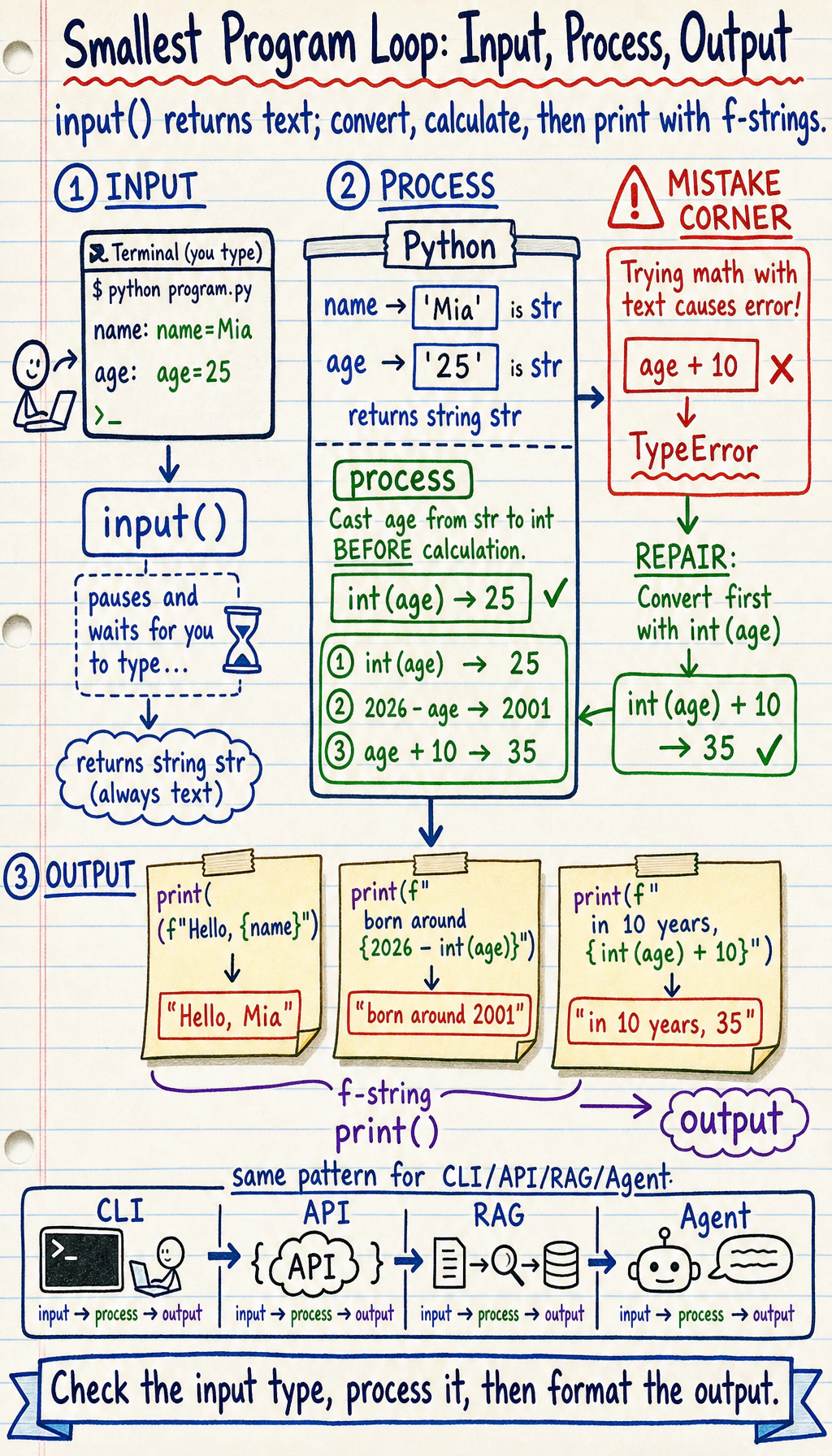
Section titled “Where this section fits”This section is where your program starts interacting with the user. You’ll learn how to use input() to receive information, print() to display results, and f-string formatting to lay the foundation for command-line tools, API debugging, and result presentation later on.
Learning objectives
Section titled “Learning objectives”- Master different uses of
print()and formatted output - Learn how to use
input()to get user input - Understand advanced f-string formatting
- Write simple interactive programs
When beginners learn Python, this is the one line to focus on first: the program gets input, does a bit of processing, and then outputs the result. CLI, API, RAG, and Agent later on all repeat this same pattern in essence.
Let’s look at a small program first
Section titled “Let’s look at a small program first”service = input("Please enter the service name: ")latency_ms = int(input("Please enter latency in ms: "))
print(f"Service: {service}")print(f"Latency in seconds: {latency_ms / 1000:.2f}")print(f"Alert threshold in 10 ms: {latency_ms + 10} ms")Example output:
| Field | Value |
|---|---|
| Service input | Login API |
| Latency input | 185 ms |
| Printed seconds | 0.18 |
| Printed threshold | 195 ms |
This is the most basic input/output pattern: input() is responsible for receiving data, and print() is responsible for displaying the result.
Detailed look at print()
Section titled “Detailed look at print()”print() is the function you will use most often, without question.
Basic usage of print()
Section titled “Basic usage of print()”# Print a stringprint("Hello, World!")
# Print numbersprint(42)print(3.14)
# Print a variablename = "Python"print(name)
# Print the result of an expressionprint(1 + 2 + 3) # 6Printing multiple values
Section titled “Printing multiple values”# Separate with commas; print will automatically join them with spacesprint("Service:", "Login API", "Latency:", 185, "ms")# Output: Service: Login API Latency: 185 ms
# Custom separatorprint("2026", "01", "15", sep="-")# Output: 2026-01-15
print("lint", "test", "deploy", sep=" | ")# Output: lint | test | deployControlling line breaks
Section titled “Controlling line breaks”# By default, every print ends with a newlineprint("Line 1")print("Line 2")# Output:# Line 1# Line 2
# Use the end parameter to change the ending characterprint("Hello", end=" ")print("World")# Output: Hello World (on the same line)
# Use end to create a simple progress displayprint("Loading", end="")print(".", end="")print(".", end="")print(".", end="")print(" Done!")# Output: Loading... Done!Printing special characters
Section titled “Printing special characters”# Newline character \nprint("Line 1\nLine 2\nLine 3")# Output:# Line 1# Line 2# Line 3
# Tab character \t (used for alignment)print("Task\tOwner\tStatus")print("Login API\tMina\tDone")print("Dashboard UI\tKai\tIn progress")# Output:# Task Owner Status# Login API Mina Done# Dashboard UI Kai In progress
# Backslash itself \\print("File path: C:\\Users\\Desktop")
# Raw string (does not process escape sequences)print(r"File path: C:\Users\Desktop") # The r prefix means a raw stringf-string formatting (key point)
Section titled “f-string formatting (key point)”f-string is the string formatting style introduced in Python 3.6, and it is also the most recommended method at present.
Basic usage of f-string
Section titled “Basic usage of f-string”service = "Login API"owner = "Mina"latency_ms = 92.567
# Add f before the string, and put variable names inside curly bracesprint(f"{service} is owned by {owner}")# Output: Login API is owned by Mina
# You can put any expression inside the curly bracesprint(f"The next retry number is {2 + 1}")print(f"The service name has {len(service)} characters")print(f"Within 100 ms target? {'Yes' if latency_ms < 100 else 'No'}")Number formatting
Section titled “Number formatting”This is one of the most powerful features of f-strings:
# Control decimal placespi = 3.141592653589793print(f"π = {pi:.2f}")     # 3.14 (keep 2 decimal places)print(f"π = {pi:.4f}")     # 3.1416 (keep 4 decimal places)
# Percentageaccuracy = 0.8734print(f"Accuracy: {accuracy:.1%}")   # 87.3%print(f"Accuracy: {accuracy:.2%}")   # 87.34%
# Thousands separatorpopulation = 1400000000print(f"Population: {population:,}")      # 1,400,000,000print(f"Population: {population:_}")      # 1_400_000_000
# Scientific notationspeed_of_light = 299792458print(f"Speed of light: {speed_of_light:.2e} m/s")  # 3.00e+08 m/s
# Pad integers with zerosfor i in range(1, 4):    print(f"Episode {i:03d}")  # Episode 001, Episode 002, Episode 003
Alignment and padding
Section titled “Alignment and padding”# Left align, right align, centername = "Python"print(f"|{name:<20}|") # |Python | left alignedprint(f"|{name:>20}|") # | Python| right alignedprint(f"|{name:^20}|") # | Python | centered
# Pad with a specific characterprint(f"|{name:*<20}|") # |Python**************|print(f"|{name:*>20}|") # |**************Python|print(f"|{name:*^20}|") # |*******Python*******|
# Practical use: print a simple tableprint(f"{'Service':<16}{'Latency':>10}")print("-" * 20)print(f"{'Login API':<16}{95:>10}")print(f"{'Search API':<16}{187:>10}")print(f"{'Worker':<16}{42:>10}")Output:
Service Latency--------------------Login API 95Search API 187Worker 42Formatting cheat sheet
Section titled “Formatting cheat sheet”| Format | Meaning | Example | Result |
|---|---|---|---|
:.2f | Keep 2 decimal places | f"{3.14159:.2f}" | 3.14 |
:.1% | Percentage (1 decimal place) | f"{0.873:.1%}" | 87.3% |
:, | Thousands separator | f"{1000000:,}" | 1,000,000 |
:.2e | Scientific notation | f"{12345:.2e}" | 1.23e+04 |
:03d | Pad with zeros to 3 digits | f"{5:03d}" | 005 |
:<10 | Left aligned, width 10 | f"{'hi':<10}" | hi________ |
:>10 | Right aligned, width 10 | f"{'hi':>10}" | ________hi |
:^10 | Centered, width 10 | f"{'hi':^10}" | ____hi____ |
Getting user input with input()
Section titled “Getting user input with input()”input() pauses the program, waits for the user to type something, and then returns the input as a string.
Basic usage of input()
Section titled “Basic usage of input()”# input() always returns a string!service = input("Please enter the service name: ")print(f"Checking {service}!")print(type(service)) # <class 'str'>Important: input() returns a string
Section titled “Important: input() returns a string”# Common pitfalllatency = input("Please enter latency in ms: ") # User enters 185print(type(latency)) # <class 'str'>, not int!
# If you do math directly, there will be a problem# print(latency + 10) # Error! You can't add a number to a string
# Correct approach: convert the type firstlatency = int(input("Please enter latency in ms: ")) # Convert to int while reading inputprint(f"Alert threshold: {latency + 10} ms")
# If you need a floating-point numbertimeout = float(input("Please enter timeout seconds: "))print(f"Timeout is {timeout} seconds")Handling invalid input
Section titled “Handling invalid input”Users may enter something other than what you expected:
# The user entered "abc" instead of a number# latency_ms = int(input("Please enter latency in ms: "))  # This will raise a ValueError!
# Safer approach (we will cover exception handling later, which is more elegant)user_input = input("Please enter a number: ")if user_input.isdigit():    number = int(user_input)    print(f"The number you entered is: {number}")else:    print("This is not a valid number!")
Comprehensive examples
Section titled “Comprehensive examples”Example 1: Simple calculator
Section titled “Example 1: Simple calculator”print("=== Simple Calculator ===")num1 = float(input("Please enter the first number: "))num2 = float(input("Please enter the second number: "))
print(f"\nResults:")print(f"{num1} + {num2} = {num1 + num2}")print(f"{num1} - {num2} = {num1 - num2}")print(f"{num1} × {num2} = {num1 * num2}")if num2 != 0: print(f"{num1} ÷ {num2} = {num1 / num2:.2f}")else: print("The divisor cannot be 0!")Example 2: AI training report generator
Section titled “Example 2: AI training report generator”# Simulated training result datamodel_name = "ResNet-50"total_epochs = 100train_accuracy = 0.9534val_accuracy = 0.9187train_loss = 0.1245val_loss = 0.2891training_hours = 2.5
# Generate a formatted reportprint("=" * 40)print(f"{'Model Training Report':^40}")print("=" * 40)print(f"Model name: {model_name}")print(f"Training epochs:{total_epochs}")print(f"Training accuracy:{train_accuracy:.2%}")print(f"Validation accuracy:{val_accuracy:.2%}")print(f"Training loss: {train_loss:.4f}")print(f"Validation loss: {val_loss:.4f}")print(f"Training time: {training_hours:.1f} hours")print("-" * 40)
# Judge model statusgap = train_accuracy - val_accuracyif gap > 0.05: print(f"⚠️ Overfitting risk: training/validation gap {gap:.2%}")else: print(f"✅ Model looks good: training/validation gap {gap:.2%}")print("=" * 40)Output summary:
| Field | Value |
|---|---|
| Model | ResNet-50 |
| Epochs | 100 |
| Accuracy | train 95.34%, validation 91.87% |
| Loss | train 0.1245, validation 0.2891 |
| Training time | 2.5 hours |
| Warning | Overfitting risk: gap 3.47% |
Hands-on practice
Section titled “Hands-on practice”Exercise 1: Project status card
Section titled “Exercise 1: Project status card”Write a program that asks for a feature name, owner, completed tasks, and total tasks, then generates a formatted project status card:
feature = input("Feature name: ")owner = input("Owner: ")completed_tasks = int(input("Completed tasks: "))total_tasks = int(input("Total tasks: "))progress = completed_tasks / total_tasks
# Generate the project status card belowprint("=" * 34)print(f"Feature:   {feature}")print(f"Owner:     {owner}")print(f"Progress:  {progress:.1%}")print(f"Remaining: {total_tasks - completed_tasks}")print("=" * 34)
Exercise 2: Project estimate table
Section titled “Exercise 2: Project estimate table”# Input task informationtask1 = "API endpoint"hours1 = 5.0rate1 = 40
task2 = "UI polish"hours2 = 3.5rate2 = 40
# Print a project estimate, with these requirements:# 1. Task names left aligned, numbers right aligned# 2. Show the cost for each task# 3. Show the total at the end# Hint: use f-string alignment featuressubtotal1 = hours1 * rate1subtotal2 = hours2 * rate2total = subtotal1 + subtotal2
print("=" * 46)print(f"{'Task':<18}{'Hours':>8}{'Rate':>6}{'Cost':>12}")print("-" * 46)print(f"{task1:<18}{hours1:>8.1f}{rate1:>6}{subtotal1:>12.2f}")print(f"{task2:<18}{hours2:>8.1f}{rate2:>6}{subtotal2:>12.2f}")print("-" * 46)print(f"{'Total':<32}{total:>14.2f}")Exercise 3: Latency unit converter
Section titled “Exercise 3: Latency unit converter”Write a program that lets the user enter latency in milliseconds, then outputs the corresponding seconds and minutes:
latency_ms = float(input("Please enter latency in ms: "))# 1000 milliseconds = 1 second# 60 seconds = 1 minuteseconds = latency_ms / 1000minutes = seconds / 60print(f"{latency_ms:.2f} ms = {seconds:.2f} seconds")print(f"{latency_ms:.2f} ms = {minutes:.2f} minutes")Reference implementation and walkthrough
input()returns strings. Convert completed/total task counts withint()and latency withfloat()before doing arithmetic.- The status card should have top and bottom separators and should reflect the values typed by the user.
- The estimate table should align columns and show costs
200.00,140.00, and total340.00for the given data. - For
latency_ms = 2500, seconds are2.50and minutes are about0.04. - If conversion fails, check for empty input, non-numeric input, full-width digits, or units typed into the number field.
Evidence to Keep
Section titled “Evidence to Keep”Keep this page’s proof of learning as a small evidence card:
- Concept
- variable, type, operator, input/output, branch, loop, structure, function, or module
- Code
- smallest runnable Python snippet for the concept
- Output
- printed value, type, branch result, loop trace, or returned value
- Failure Check
- type mismatch, indentation, off-by-one, mutable data, or import path issue
- Expected Output
- code plus printed result that proves the concept works
Summary
Section titled “Summary”| Function/Syntax | Purpose | Key point |
|---|---|---|
print() | Output information | sep changes the separator, end changes the ending |
input() | Get user input | The return value is always a string |
f"..." | Format strings | {variable:format} controls how values are displayed |
int() / float() | Type conversion | You usually need to convert after input() |