
9.5.4 MCP Server Development
Learning objectives
Section titled “Learning objectives”- Understand the minimum responsibility boundary of an MCP Server
- Learn how to define tool descriptions, parameter structures, and invocation entry points
- Understand why the focus of server development is “exposing capabilities,” not “hard-coding business logic”
- Read and understand a minimal runnable Mock MCP Server
What is an MCP Server really doing?
Section titled “What is an MCP Server really doing?”It is not “just another regular backend”
Section titled “It is not “just another regular backend””A regular backend usually exposes business APIs directly. An MCP Server is more like:
Organizing existing capabilities into a set of tools that can be discovered and called by the client.
So its core concerns are usually:
- What tools are available
- How each tool is described
- How parameters are validated
- How results are returned in a consistent way
An intuitive analogy
Section titled “An intuitive analogy”An MCP Server is a bit like a tool library manager with a front desk:
- The client asks, “What tools do you have here?”
- The server lists its capability inventory
- The client then says, “Which one should I use?”
- The server executes according to the contract and returns the result
This is very different from “just writing all the business functions loosely scattered around.”
First define a minimal tool
Section titled “First define a minimal tool”What does a tool minimally need?
Section titled “What does a tool minimally need?”At minimum, it should have:
- A name
- A description
- Parameter specifications
- Actual execution logic
A minimal tool description example
Section titled “A minimal tool description example”search_docs_tool = { "name": "search_docs", "description": "Search course documents and return relevant content", "parameters": { "query": { "type": "string", "description": "The keyword to search for" } }, "required": ["query"]}
print(search_docs_tool)Expected output:
{'name': 'search_docs', 'description': 'Search course documents and return relevant content', 'parameters': {'query': {'type': 'string', 'description': 'The keyword to search for'}}, 'required': ['query']}You can think of this structure as:
The public-facing instruction manual for the tool.
Why can’t tool descriptions be too casual?
Section titled “Why can’t tool descriptions be too casual?”A bad description
Section titled “A bad description”bad_tool = { "name": "search", "description": "Do search", "parameters": {"q": {"type": "string"}}}
print(bad_tool)Expected output:
{'name': 'search', 'description': 'Do search', 'parameters': {'q': {'type': 'string'}}}The problems are:
- The name is too vague
- The description is too empty
- The meaning of the parameter is unclear
A more reliable description
Section titled “A more reliable description”good_tool = { "name": "search_course_docs", "description": "Search course FAQ, policies, and learning path documents", "parameters": { "query": { "type": "string", "description": "The topic the user wants to query, such as refund policy or certificate" } }, "required": ["query"]}
print(good_tool)Expected output:
{'name': 'search_course_docs', 'description': 'Search course FAQ, policies, and learning path documents', 'parameters': {'query': {'type': 'string', 'description': 'The topic the user wants to query, such as refund policy or certificate'}}, 'required': ['query']}What is better here:
- The tool boundary is clearer
- The parameter semantics are clearer
- The client is more likely to use it correctly
The two minimum capabilities of a Server: list tools + call tools
Section titled “The two minimum capabilities of a Server: list tools + call tools”A minimal usable MCP Server usually needs to be able to:
- List available tools
- Accept a tool invocation
First, write a minimal Server
Section titled “First, write a minimal Server”class MockMCPServer: def __init__(self): self.tool_specs = [ { "name": "search_docs", "description": "Search course documents", "parameters": { "query": {"type": "string"} } } ]
def list_tools(self): return self.tool_specs
server = MockMCPServer()print(server.list_tools())Expected output:
[{'name': 'search_docs', 'description': 'Search course documents', 'parameters': {'query': {'type': 'string'}}}]Then add real execution logic
Section titled “Then add real execution logic”class MockMCPServer: def __init__(self): self.kb = { "refund": "You can request a refund within 7 days after purchase if your learning progress is below 20%.", "certificate": "You can receive a certificate after completing all projects and passing the tests." }
self.tool_specs = [ { "name": "search_docs", "description": "Search course documents", "parameters": { "query": {"type": "string"} } } ]
def list_tools(self): return self.tool_specs
def call_tool(self, name, arguments): if name != "search_docs": return {"error": "unknown_tool"}
query = arguments.get("query", "") for key, value in self.kb.items(): if key in query: return {"result": value} return {"result": "No relevant documents found"}
server = MockMCPServer()print(server.call_tool("search_docs", {"query": "What is the refund policy?"}))Expected output:
{'result': 'You can request a refund within 7 days after purchase if your learning progress is below 20%.'}This is already a very clear minimal server skeleton.
Why is parameter validation one of the server’s responsibilities?
Section titled “Why is parameter validation one of the server’s responsibilities?”Because the client or the model may pass incorrect parameters
Section titled “Because the client or the model may pass incorrect parameters”For example:
bad_call = {"query_text": "refund policy"}If the server executes this directly, it may crash or behave strangely.
A minimal validation version
Section titled “A minimal validation version”def validate_search_docs(arguments): if "query" not in arguments: return False, "missing_query" if not isinstance(arguments["query"], str): return False, "query_must_be_string" return True, "ok"
print(validate_search_docs({"query": "refund policy"}))print(validate_search_docs({"query_text": "refund policy"}))Expected output:
(True, 'ok')(False, 'missing_query')Why can’t we skip this step?
Section titled “Why can’t we skip this step?”Because the server is the gatekeeper of the capability boundary. If the server does not validate, the entire tool system becomes hard to keep stable.
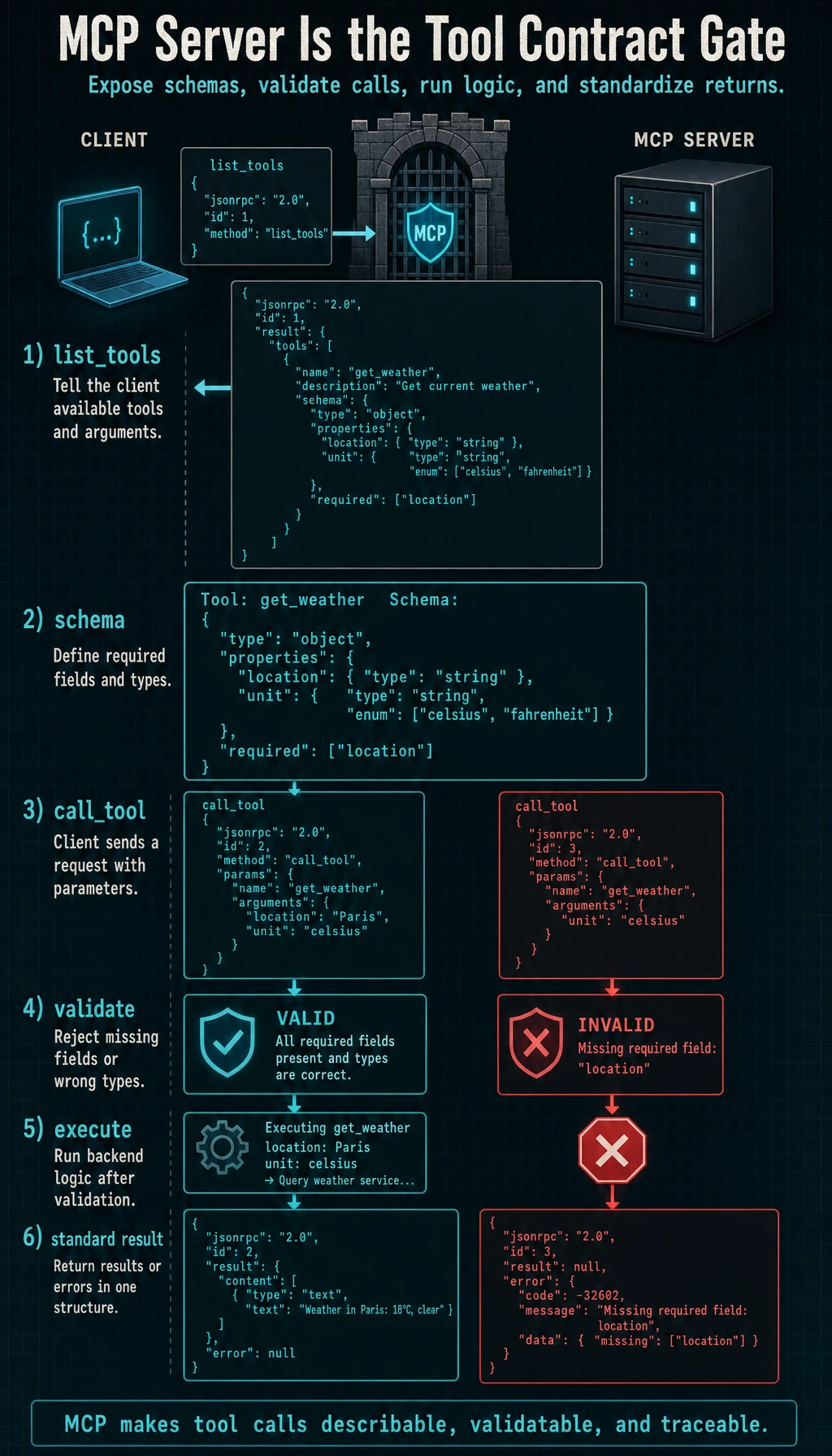
A more complete minimal Server version
Section titled “A more complete minimal Server version”class BetterMCPServer: def __init__(self): self.kb = { "refund": "You can request a refund within 7 days after purchase if your learning progress is below 20%.", "certificate": "You can receive a certificate after completing all projects and passing the tests." }
def list_tools(self): return [ { "name": "search_docs", "description": "Search course documents", "parameters": { "query": {"type": "string"} } } ]
def validate(self, name, arguments): if name != "search_docs": return False, "unknown_tool" if "query" not in arguments: return False, "missing_query" if not isinstance(arguments["query"], str): return False, "query_must_be_string" return True, "ok"
def call_tool(self, name, arguments): ok, msg = self.validate(name, arguments) if not ok: return {"error": msg}
query = arguments["query"] for key, value in self.kb.items(): if key in query: return {"result": value} return {"result": "No relevant documents found"}
server = BetterMCPServer()print(server.list_tools())print(server.call_tool("search_docs", {"query": "How do I get a certificate?"}))print(server.call_tool("search_docs", {"wrong": "How do I get a certificate?"}))Expected output:
[{'name': 'search_docs', 'description': 'Search course documents', 'parameters': {'query': {'type': 'string'}}}]{'result': 'You can receive a certificate after completing all projects and passing the tests.'}{'error': 'missing_query'}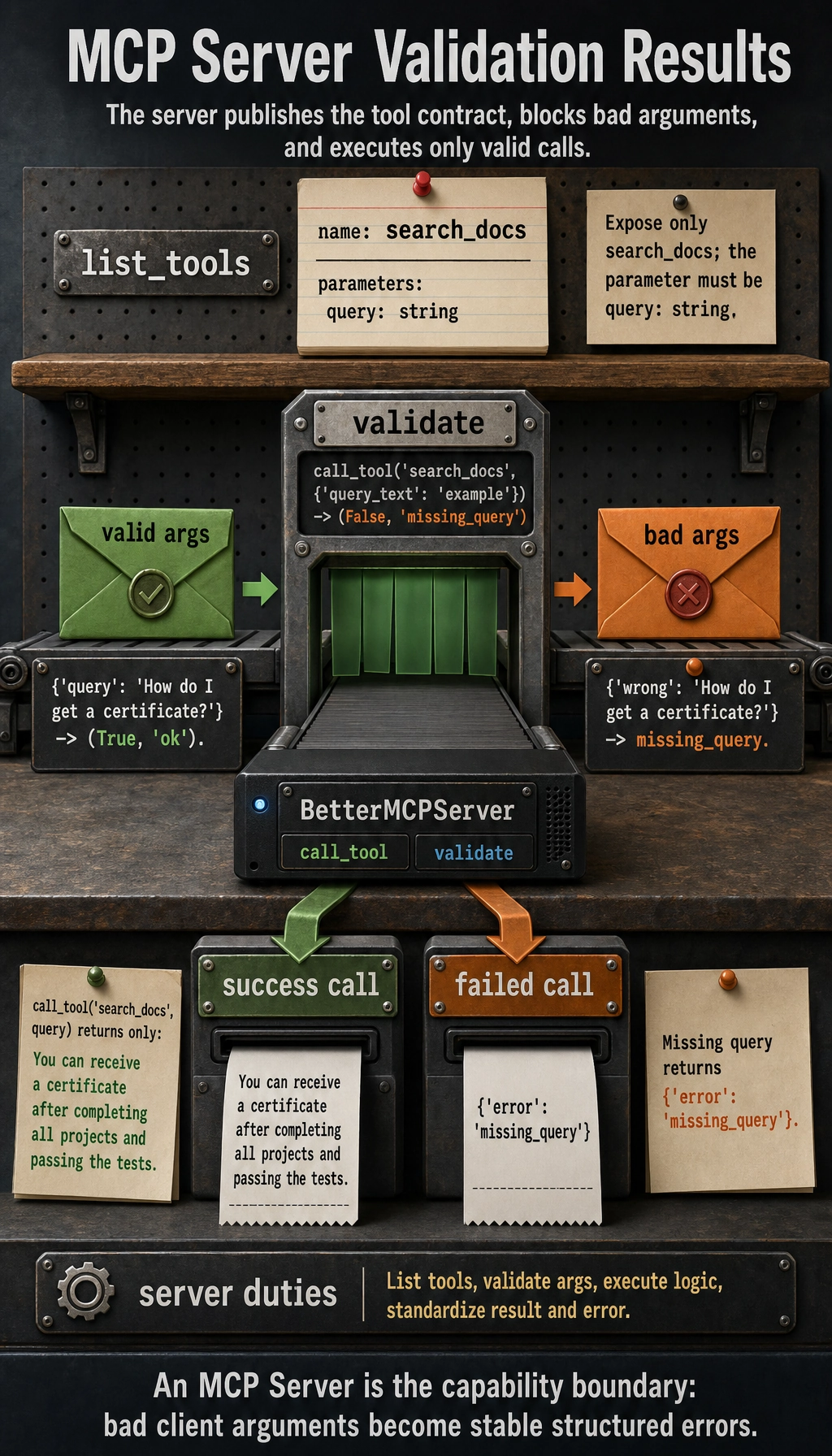
What is better about this version than the previous one?
Section titled “What is better about this version than the previous one?”It already has:
- Tool listing
- Parameter validation
- A unified invocation entry point
- Unified error returns
This is already very close to the core responsibilities of a server in real-world engineering.
Evidence to Keep
Section titled “Evidence to Keep”Keep this page’s proof of learning as a small evidence card:
- Capability
- resource, prompt, or tool exposed by server
- Contract
- schema, transport, permissions, and error shape
- Call Trace
- discovery, invocation, response, and failure handling
- Failure Check
- incompatible schema, missing auth, unsafe tool, or server error
- Integration Action
- validate server contract before adding autonomy
The most common pitfalls in MCP Server development
Section titled “The most common pitfalls in MCP Server development”Mixing business logic with protocol logic
Section titled “Mixing business logic with protocol logic”This leads to:
- Unclear tool descriptions
- Harder extension
- Harder debugging
Tool granularity that is too coarse or too fine
Section titled “Tool granularity that is too coarse or too fine”- Too coarse: one tool does everything
- Too fine: client invocation complexity explodes
Inconsistent return structures
Section titled “Inconsistent return structures”Sometimes returning text, sometimes dicts, sometimes raising exceptions directly makes future integration very difficult.
How do you know whether an MCP Server design is good enough?
Section titled “How do you know whether an MCP Server design is good enough?”You can start by asking four questions:
- Can the client clearly know what tools are available?
- Are the parameter requirements explicit?
- Are error returns consistent?
- Will the structure become messy when adding new tools?
If you can answer all four questions confidently, the server design is usually already pretty good.
Summary
Section titled “Summary”The most important thing in this section is not “writing a class,” but understanding:
The essence of an MCP Server is to expose a set of executable capabilities in a way that is clear to discover, validate, and call.
The clearer the server is, the easier it is for the client side to expand, and the easier it is to grow the whole tool ecosystem.
Exercises
Section titled “Exercises”- Add a new
get_weather(city)tool toBetterMCPServer. - Add parameter validation logic for this new tool.
- Think about it: what problems do too coarse and too fine tool granularity each cause?
- Explain in your own words: why is the core of MCP Server development not just “executing tools,” but “exposing clear boundaries”?
Reference implementation and walkthrough
- Add
get_weather(city)as a registered tool with a description and schema, then return a small structured result such as{city, condition, source}. Use placeholder data unless the page already connects to a real API. - Validate that
cityexists, is a non-empty string, and is not an unexpectedly large payload. Invalid input should return a clear error instead of silently guessing. - Too coarse a tool hides important choices and makes errors hard to localize. Too fine a tool forces the Agent to plan too many tiny calls and increases latency, routing mistakes, and context clutter.
- MCP Server development is about exposing a boundary: what the tool does, what input it accepts, what output and errors it returns, and what permissions it needs. Execution is only one part of that contract.