
2.1.2 Data Types and Variables
Where This Section Fits
Section titled “Where This Section Fits”This section helps you understand how Python represents and stores data. Variables, numbers, strings, booleans, and type conversion are the foundation for writing conditionals, processing tabular data, and calling model APIs later on. First, get familiar with these “smallest units of data.”
Learning Objectives
Section titled “Learning Objectives”- Understand what variables are and learn the rules for naming them
- Master Python’s basic data types: integers, floating-point numbers, strings, and booleans
- Learn how to convert between data types
- Understand what dynamic typing means
What Is a Variable?
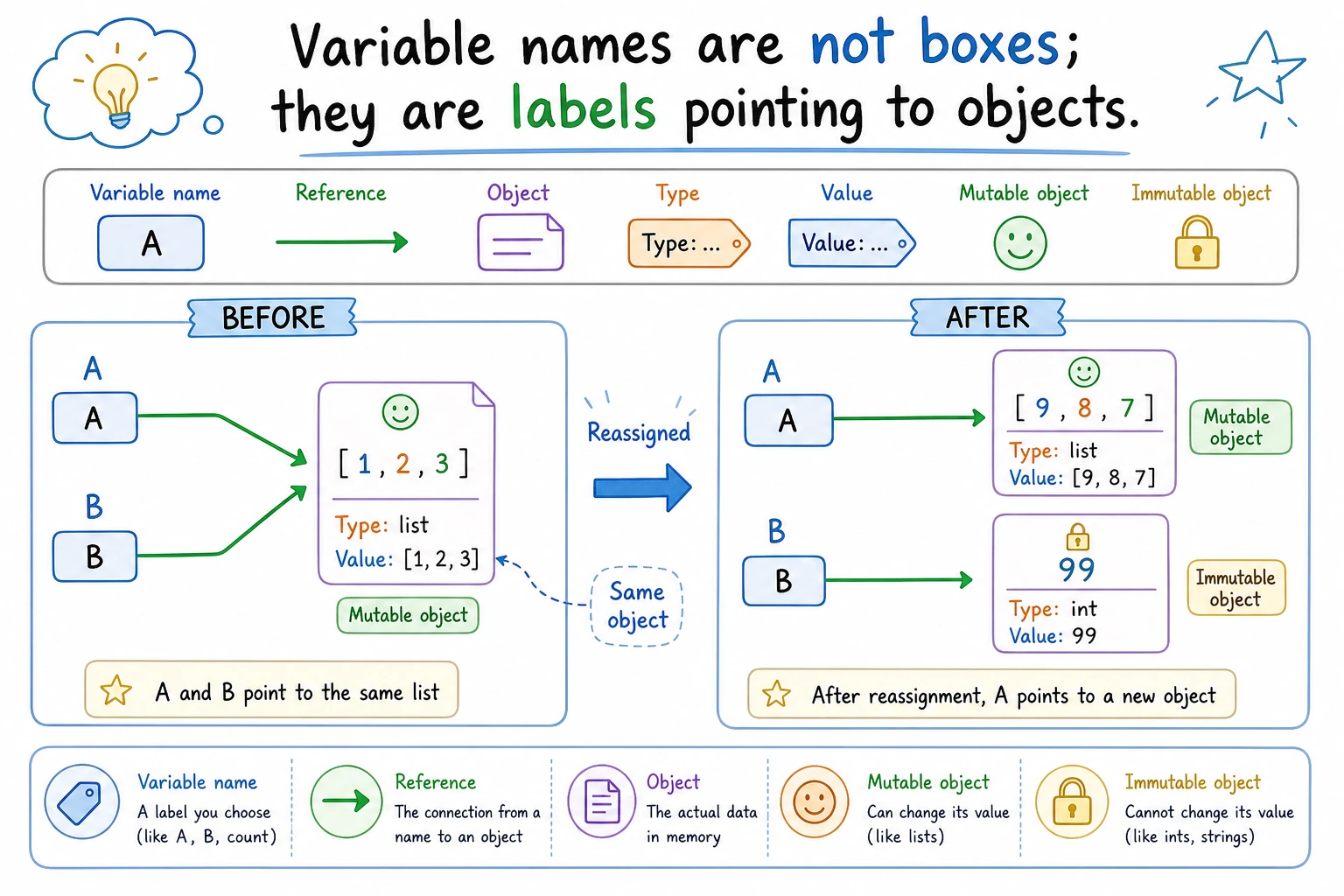
Section titled “What Is a Variable?”Think of a variable as a labeled box. You can put something inside it and use the label to find it later.
service_name = "Login API" # The box has a "service_name" labellatency_ms = 185 # The box has a "latency_ms" labeltimeout_seconds = 2.5 # The box has a "timeout_seconds" labelIn Python, = does not mean “equal to” — it means assignment. It puts the value on the right into the box on the left.
# Assignment direction: from right to leftx = 10      # Put 10 into the box named x
# You can change the contents of the boxx = 20      # Now x contains 20 (10 is gone)
# You can use a variable’s value to calculate somethingy = x + 5   # y = 20 + 5 = 25print(y)    # Output: 25
Variable Naming Rules
Section titled “Variable Naming Rules”Python has a few rules for variable names:
| Rule | Correct Examples | Incorrect Examples |
|---|---|---|
| Can only contain letters, numbers, and underscores | service_name, task2 | service-name, task! |
| Cannot start with a number | task1 | 1task |
| Cannot use Python keywords | my_class | class, if, for |
| Case-sensitive | Service and service are different variables | — |
Naming Conventions (Not Required, but Widely Used)
Section titled “Naming Conventions (Not Required, but Widely Used)”# Good names ✅ — use lowercase letters with underscores (snake_case)service_name = "Login API"learning_rate = 0.001max_epochs = 100
# Poor names ❌ — not invalid, just uncleara = "Login API" # You can't tell what a meansx1 = 0.001 # What does x1 represent?SN = "Login API" # Too abbreviated to understand easilyNumeric Types
Section titled “Numeric Types”Integers (int)
Section titled “Integers (int)”Integers are numbers without decimal points. They can be positive, negative, or zero.
retry_count = 3queue_delta = -10count = 0big_number = 1_000_000  # Underscores improve readability; same as 1000000
print(type(retry_count)) # <class 'int'>Python integers have no size limit (unlike int in C/Java, which has a fixed range):
huge = 99999999999999999999999999999999print(huge + 1) # No problem at allFloating-Point Numbers (float)
Section titled “Floating-Point Numbers (float)”Floating-point numbers are numbers with decimal points.
pi = 3.14159timeout_seconds = 2.5negative = -0.001
print(type(pi))  # <class 'float'>
Be careful about floating-point precision — this is a problem in all programming languages:
>>> 0.1 + 0.20.30000000000000004 # Not exactly 0.3!This is not a Python bug. It is an inherent issue caused by storing decimals in binary form on computers. In AI development, this tiny error usually does not affect the result. But if you need exact results for financial calculations, use the decimal module.
Operations with Integers and Floats
Section titled “Operations with Integers and Floats”a = 10b = 3
print(a + b) # 13 additionprint(a - b) # 7 subtractionprint(a * b) # 30 multiplicationprint(a / b) # 3.333... division (result is always float)print(a // b) # 3 floor divisionprint(a % b) # 1 remainderprint(a ** b) # 1000 exponentiation (10 to the 3rd power)A common pitfall:
# The result of / is always float, even when division is exact>>> 10 / 25.0         # Not 5, but 5.0
# If you want an integer result, use //>>> 10 // 25
Strings (str)
Section titled “Strings (str)”A string is text — a sequence of characters. It is wrapped in quotes.
Creating Strings
Section titled “Creating Strings”# Single and double quotes both work; they are equivalentservice = 'Login API'status = "ready"
# If the string contains quotes, wrap it with the other kindsentence = "The reviewer said: 'Looks good'"command = 'The CLI flag is "--dry-run"'
# Triple quotes: can write multi-line textrelease_notes = """Login API- timeout adjusted- retry logging enabled"""print(release_notes)
print(type(service)) # <class 'str'>String Concatenation
Section titled “String Concatenation”module_name = "ticket"endpoint_name = "-api"
# Method 1: use + to concatenatefull_endpoint = module_name + endpoint_nameprint(full_endpoint) # ticket-api
# Method 2: use f-string (recommended! Python 3.6+)version = "v1"intro = f"{full_endpoint} runs on {version}"print(intro) # ticket-api runs on v1
# Method 3: use format()intro2 = "{} runs on {}".format(full_endpoint, version)print(intro2) # ticket-api runs on v1Common String Operations
Section titled “Common String Operations”text = "Hello, Python!"
# Lengthprint(len(text)) # 14
# Case conversionprint(text.upper()) # HELLO, PYTHON!print(text.lower()) # hello, python!
# Find a substringprint(text.find("Python")) # 7 (starts at position 7)print("Python" in text) # True
# Replaceprint(text.replace("Python", "AI")) # Hello, AI!
# Strip whitespace from both endsmessy = " hello "print(messy.strip()) # "hello"
# Splitcsv_line = "Login API,185,ready"parts = csv_line.split(",")print(parts) # ['Login API', '185', 'ready']String Indexing and Slicing
Section titled “String Indexing and Slicing”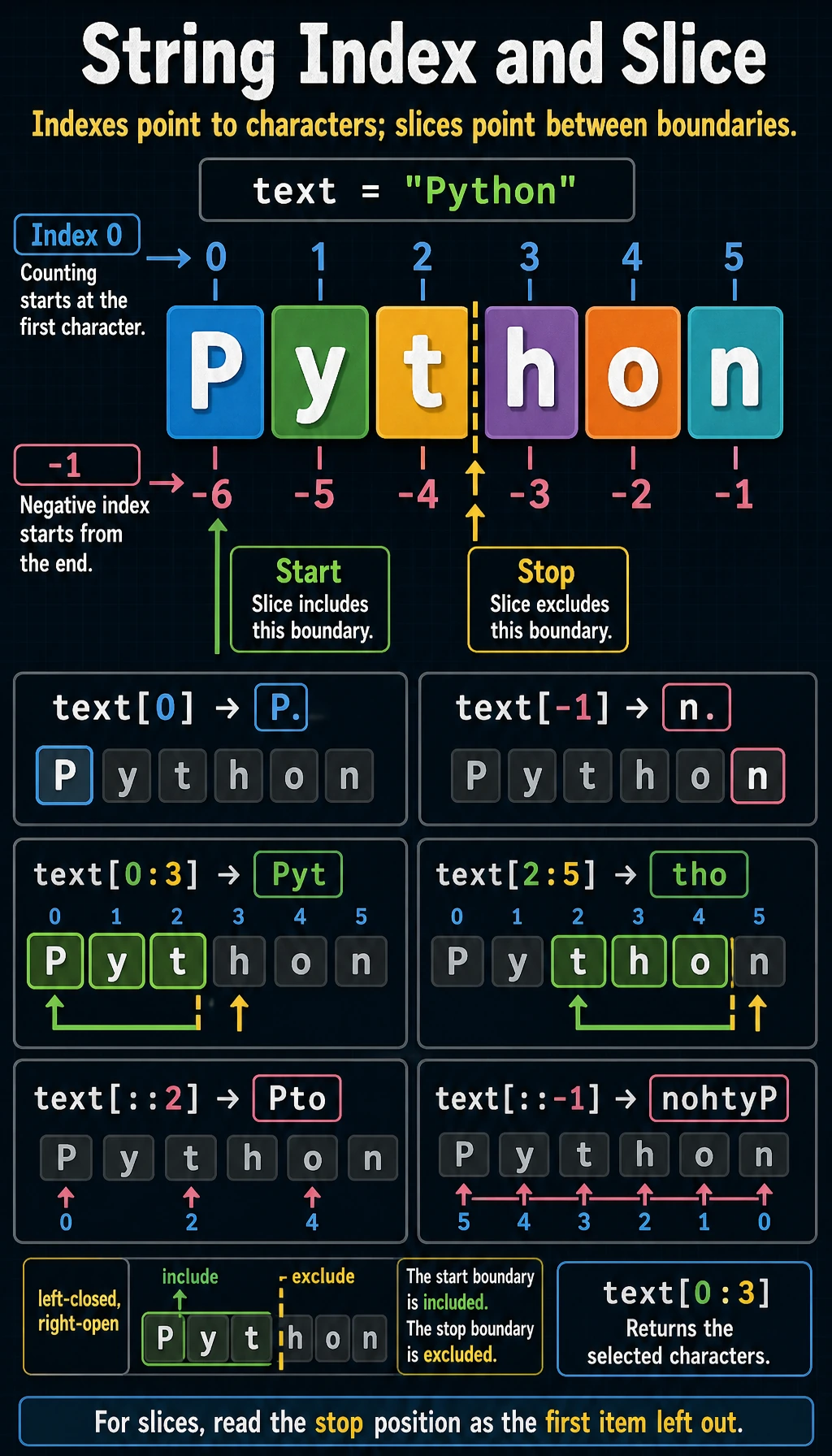
Each character in a string has a position number (index) starting from 0:
text = "Python"#       P y t h o n# index: 0 1 2 3 4 5# negative index: -6 -5 -4 -3 -2 -1
print(text[0])    # P (first character)print(text[5])    # n (sixth character)print(text[-1])   # n (last character)print(text[-2])   # o (second to last character)
Slicing lets you extract a substring:
text = "Python"
print(text[0:3]) # Pyt (from index 0 to index 3, excluding 3)print(text[2:5]) # thoprint(text[:3]) # Pyt (from the start; 0 can be omitted)print(text[3:]) # hon (to the end; the stop position can be omitted)print(text[:]) # Python (a copy of the whole string)print(text[::2]) # Pto (take every other character)print(text[::-1]) # nohtyP (reverse the string!)Strings Are Immutable
Section titled “Strings Are Immutable”text = "Hello"# text[0] = "h" # Error! TypeError: 'str' object does not support item assignment
# If you want to modify it, create a new stringtext = "h" + text[1:] # "hello"Booleans (bool)
Section titled “Booleans (bool)”A boolean has only two values: True and False. Note the capital first letter.
is_deployed = Truehas_errors = False
print(type(is_deployed))  # <class 'bool'>
Booleans often come from comparison operations:
print(5 > 3) # Trueprint(5 < 3) # Falseprint(5 == 5) # True (note the two equals signs; one equals sign is assignment)print(5 != 3) # True (`!=` means not equal)print("abc" == "abc") # TrueBooleans will be used heavily later when you learn control flow (if/else).
Truthy and Falsy Values
Section titled “Truthy and Falsy Values”In Python, many things can be used as boolean values. The following are considered “false”:
# All of the following are "falsy" valuesbool(0)        # Falsebool(0.0)      # Falsebool("")       # False (empty string)bool([])       # False (empty list)bool(None)     # False
# Everything else is "truthy"bool(1)        # Truebool(-1)       # True (any non-zero number is true)bool("hello")  # True (any non-empty string is true)bool([1, 2])   # True (any non-empty list is true)
None Type
Section titled “None Type”None is a special value in Python that means “nothing here”.
result = Noneprint(result) # Noneprint(type(result)) # <class 'NoneType'>None is often used to mean “no value yet” or “no result”:
# When a function has no return value, it returns None by defaultdef say_hello():    print("Hello!")
result = say_hello()   # Prints Hello!print(result)          # None
Type Conversion
Section titled “Type Conversion”Sometimes you need to convert one type into another.
# String → numberlatency_str = "185"latency_ms = int(latency_str)      # Convert string to integerprint(latency_ms + 10)             # 195
timeout_str = "2.5"timeout_seconds = float(timeout_str)  # Convert string to floatprint(timeout_seconds)                # 2.5
# Number → stringtask_count = 12task_count_str = str(task_count)   # Convert integer to stringprint("Tasks: " + task_count_str)  # Tasks: 12
# Integer ↔ floatx = int(3.7)    # 3 (directly truncates the decimal part, not rounding)y = float(5)    # 5.0
Common mistake: strings and numbers cannot be concatenated directly with +
latency_ms = 185# print("Latency: " + latency_ms)  # Error! TypeError
# Correct method 1: convert to stringprint("Latency: " + str(latency_ms))
# Correct method 2: use an f-string (recommended)print(f"Latency: {latency_ms}")
# Correct method 3: separate with commas (print will add spaces automatically)print("Latency:", latency_ms)
Quick Reference for Type Conversion
Section titled “Quick Reference for Type Conversion”| Conversion | Function | Example | Result |
|---|---|---|---|
| → Integer | int() | int("25") | 25 |
| → Float | float() | float("3.14") | 3.14 |
| → String | str() | str(100) | "100" |
| → Boolean | bool() | bool(0) | False |
Dynamic Typing
Section titled “Dynamic Typing”Python is a dynamically typed language — you do not need to declare a variable’s type in advance, and the same variable can change types at any time.
x = 10          # x is an integerprint(type(x))  # <class 'int'>
x = "hello"     # now x is a stringprint(type(x))  # <class 'str'>
x = True        # now x becomes a booleanprint(type(x))  # <class 'bool'>
This is flexible, but be careful — do not accidentally change a variable that was supposed to store a number into a string.
Compare this with Java, a statically typed language:
int x = 10; // Declare x as an integerx = "hello"; // Error! Java does not allow changing the typeMultiple Assignment
Section titled “Multiple Assignment”Python supports some convenient assignment patterns:
# Assign values to multiple variables at oncea, b, c = 1, 2, 3print(a, b, c)  # 1 2 3
# Swap the values of two variables (a concise Python-only style)a, b = b, aprint(a, b)  # 2 1
# Assign the same value to multiple variablesx = y = z = 0print(x, y, z)  # 0 0 0
This way of swapping variables is very Pythonic, and in other languages you usually need a temporary variable:
# Other languagestemp = aa = bb = temp
# Pythona, b = b, a  # Done in one line!
Hands-On Exercises
Section titled “Hands-On Exercises”Exercise 1: Service Status Card
Section titled “Exercise 1: Service Status Card”Create variables to store a service’s status, then print them with f-strings:
service = "Login API"latency_ms = 185timeout_seconds = 2.5is_ready = True
print(f"Service: {service}")print(f"Latency: {latency_ms} ms")print(f"Timeout: {timeout_seconds} seconds")print(f"Ready to demo: {is_ready}")print(f"Alert threshold: {latency_ms + 15} ms")
Exercise 2: Latency Unit Converter
Section titled “Exercise 2: Latency Unit Converter”Formula for converting milliseconds to seconds: seconds = milliseconds / 1000
latency_ms = 375.0latency_seconds = latency_ms / 1000print(f"{latency_ms} ms = {latency_seconds} seconds")Try changing the value of latency_ms and calculate a few different latency values.
Exercise 3: String Operations
Section titled “Exercise 3: String Operations”
# 1. Remove leading and trailing spaces# 2. Convert to lowercase# 3. Find the position of @# 4. Extract the username part (the part before @)Hint: You can combine .strip(), .lower(), .find(), and slicing.
Exercise 4: Type Detective
Section titled “Exercise 4: Type Detective”Use type() to check the type of each value below. Guess first, then verify:
print(type(42))print(type(3.14))print(type("3.14"))print(type(True))print(type(None))print(type(1 + 2))print(type(1 + 2.0)) # Integer + float = ?print(type("1" + "2")) # String + string = ?Reference implementation and walkthrough
- The service status card should use
str,int,float, andbool. f-strings should show variable values and an expression such aslatency_ms + 15. 375.0ms gives0.375seconds. Keep the formula in code so changinglatency_mschangeslatency_seconds.- The normalized email is
[email protected]. The@index after stripping and lowercasing is11, and the username issupport.api. - The type outputs are
int,float,str,bool,NoneType,int,float, andstr. - A common mistake is treating
"1" + "2"as arithmetic. It is string concatenation, so the result is"12".
Evidence to Keep
Section titled “Evidence to Keep”Keep this page’s proof of learning as a small evidence card:
- Concept
- variable, type, operator, input/output, branch, loop, structure, function, or module
- Code
- smallest runnable Python snippet for the concept
- Output
- printed value, type, branch result, loop trace, or returned value
- Failure Check
- type mismatch, indentation, off-by-one, mutable data, or import path issue
- Expected Output
- code plus printed result that proves the concept works
Summary
Section titled “Summary”| Type | Keyword | Example | Use |
|---|---|---|---|
| Integer | int | 42, -10, 0 | Counting, indexing |
| Float | float | 3.14, -0.5 | Precise values, scientific computing |
| String | str | "hello", 'world' | Text data |
| Boolean | bool | True, False | Conditional logic |
| Null value | NoneType | None | Represents “no value” |