
7.5.5 Prompt Engineering Practice
Learning Objectives
Section titled “Learning Objectives”- Learn how to judge why a prompt is bad
- Learn how to improve a prompt from four angles: goal, constraints, examples, and output format
- Understand the prompt iteration process for several typical tasks
- Build the habit of debugging Prompts instead of writing them by guesswork
The Most Common Misunderstandings About Prompt Engineering
Section titled “The Most Common Misunderstandings About Prompt Engineering”Misunderstanding: A prompt is just “writing more politely”
Section titled “Misunderstanding: A prompt is just “writing more politely””In fact, Prompt Engineering really cares about:
- Whether the task definition is clear
- Whether the output requirements are explicit
- Whether the constraints are executable
- Whether the examples provide enough guidance
Politeness is usually not the key point.
A more accurate sentence
Section titled “A more accurate sentence”A Prompt is the task interface documentation you write for the model.
If the documentation is vague, the model’s output will naturally be unstable.
First, Look at a “Bad Prompt”
Section titled “First, Look at a “Bad Prompt””Task: Sentiment classification for user reviews
Section titled “Task: Sentiment classification for user reviews”A very poor prompt might look like this:
Help me analyze this comment.What is wrong with it?
- It does not say what to analyze
- It does not specify the output format
- It does not define the label set
- It does not say whether an explanation is needed
A clearer version
Section titled “A clearer version”Please determine the sentiment of the review below. Only output positive or negative. Do not output anything else.
Review: This course is explained very clearly, and there are many examples.This version is much clearer because it defines:
- Task: sentiment classification
- Output set: positive / negative
- Output constraint: no extra content
The Four Core Dimensions of Prompt Debugging
Section titled “The Four Core Dimensions of Prompt Debugging”Is the task goal clear enough?
Section titled “Is the task goal clear enough?”First ask:
- Is the model supposed to classify, summarize, extract, or rewrite?
Is the output format clear enough?
Section titled “Is the output format clear enough?”Then ask:
- Is the output a sentence?
- A label?
- JSON?
- A table?
Are the constraints clear enough?
Section titled “Are the constraints clear enough?”For example:
- Do not hallucinate
- Do not output extra explanations
- Answer only based on the given text
Are the examples guiding enough?
Section titled “Are the examples guiding enough?”For some tasks, instructions alone are not enough. It is better to add few-shot examples.
These four questions basically form the main thread of Prompt practice.
A Runnable Prompt Practice Helper
Section titled “A Runnable Prompt Practice Helper”The example below does not call a real large model. Instead, it uses a “task specification object” to help you learn how to break down Prompt requirements.
prompt_spec = {    "task": "sentiment_classification",    "allowed_labels": ["positive", "negative"],    "output_format": "single_label",    "constraints": ["Do not output explanations", "Only output the label"]}
print(prompt_spec)
Expected output:
{'task': 'sentiment_classification', 'allowed_labels': ['positive', 'negative'], 'output_format': 'single_label', 'constraints': ['Do not output explanations', 'Only output the label']}This example looks simple, but it teaches you something very important:
Behind a good Prompt, there is usually a clearer task specification.
Prompt Iteration for a Typical Task
Section titled “Prompt Iteration for a Typical Task”Task: Text summarization
Section titled “Task: Text summarization”Version 1: Too vague
Section titled “Version 1: Too vague”Summarize this paragraph.Problems:
- It does not say how long the summary should be
- It does not say what style to use
- It does not say whether key points should be preserved
Version 2: More specific
Section titled “Version 2: More specific”Please summarize the text below into 3 bullet points in Chinese, with no more than 20 characters per point.This is much better.
Version 3: Add boundaries
Section titled “Version 3: Add boundaries”Please summarize the text below into 3 bullet points in Chinese, with no more than 20 characters per point.Keep only the facts, and do not add any information that is not in the original text.At this point, the prompt has moved from “able to respond” to “more stable and controllable.”
When Is few-shot Especially Useful?
Section titled “When Is few-shot Especially Useful?”When the task definition is not clear enough from language alone
Section titled “When the task definition is not clear enough from language alone”For example, if you ask the model to decide whether a sentence is:
- fact
- opinion
If you only provide definitions, the model may interpret them inconsistently. In this case, few-shot examples are very helpful.
An example
Section titled “An example”few_shot_examples = [ {"input": "Beijing is the capital of China.", "output": "fact"}, {"input": "This course is very interesting.", "output": "opinion"}]
for ex in few_shot_examples: print(ex)Expected output:
{'input': 'Beijing is the capital of China.', 'output': 'fact'}{'input': 'This course is very interesting.', 'output': 'opinion'}The role of few-shot is not “writing more words,” but:
Showing the model the judgment style you want.
How Can You Write Prompts More Stably for Structured Tasks?
Section titled “How Can You Write Prompts More Stably for Structured Tasks?”A typical scenario: Information extraction
Section titled “A typical scenario: Information extraction”If you only say:
Help me extract resume information.Then the model may:
- Miss fields
- Use inconsistent field names
- Output extra explanations
A better version
Section titled “A better version”Please extract the information from the resume below and output JSON.
Fields:- name: string- school: string- skills: list[string]
Do not output any extra explanation.This clearly explains the task, structure, and boundaries.
The “Minimal Experiment” Habit in Prompt Practice
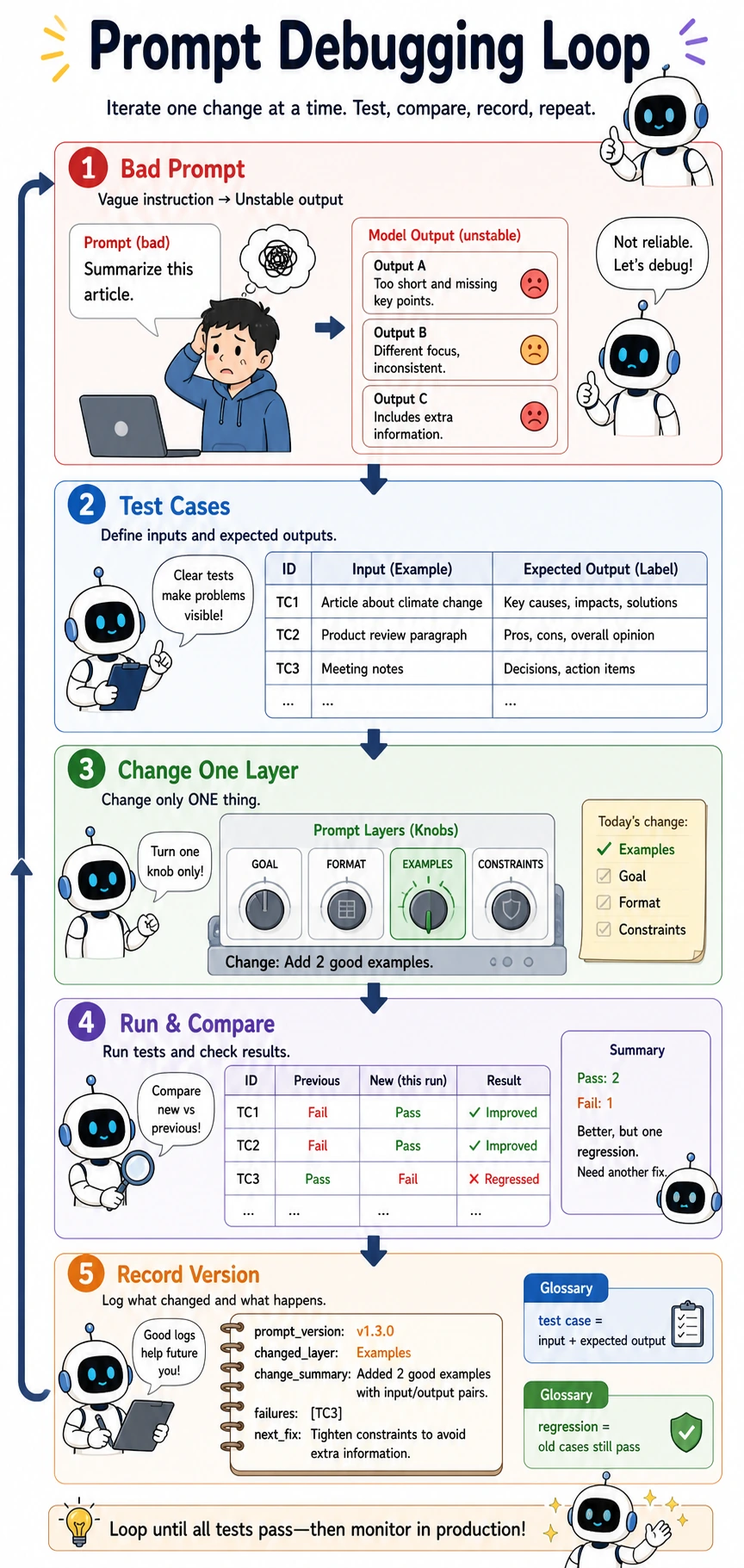
Section titled “The “Minimal Experiment” Habit in Prompt Practice”Do not change too many things at once
Section titled “Do not change too many things at once”The biggest trap in Prompt debugging is this:
- The task description changes
- The examples change
- The output format changes too
Then you have no idea which change actually mattered.
A better way
Section titled “A better way”Change only one variable at a time, for example:
- First add output constraints only
- Then add few-shot examples only
- Then change only the format requirements
This is very similar to tuning model hyperparameters.
A Small Prompt Evaluation Example
Section titled “A Small Prompt Evaluation Example”First define test samples
Section titled “First define test samples”test_cases = [ {"input": "This course is explained very clearly.", "expected": "positive"}, {"input": "The content is a bit messy.", "expected": "negative"}]
for case in test_cases: print(case)Expected output:
{'input': 'This course is explained very clearly.', 'expected': 'positive'}{'input': 'The content is a bit messy.', 'expected': 'negative'}Why is this step important?
Section titled “Why is this step important?”Because Prompt Engineering also needs evaluation. Without test samples, you can only judge whether a prompt is “good” based on feeling.
A more mature approach is:
- Have an input set
- Have expected outputs
- Check whether the prompt consistently matches expectations
Common Pitfalls for Beginners
Section titled “Common Pitfalls for Beginners”Not clearly defining the output when writing prompts
Section titled “Not clearly defining the output when writing prompts”This makes post-processing increasingly painful.
Thinking prompt tuning can only rely on inspiration
Section titled “Thinking prompt tuning can only rely on inspiration”In fact, it is very similar to ordinary engineering debugging: run small experiments, look at the results, and improve step by step.
Only looking at one successful case
Section titled “Only looking at one successful case”Getting one example right does not mean the prompt is stable.
Evidence to Keep
Section titled “Evidence to Keep”Keep this page’s proof of learning as a small evidence card:
- Baseline Prompt
- first version and failure
- Changed Variable
- one prompt dimension changed at a time
- Score
- simple pass/fail or rubric result
- Failure Bucket
- instruction, context, format, or ambiguity
- Next Iteration
- one concrete edit to try
Summary
Section titled “Summary”The most important thing in this section is not memorizing how many Prompt techniques you know, but building this habit:
Treat Prompt as a task interface to design, and as a system component to debug.
When you start iterating around the task goal, format, constraints, and examples instead of writing one sentence by intuition, Prompt Engineering truly begins to mature.
Exercises
Section titled “Exercises”- Choose a task you are familiar with, first write a “bad prompt,” then improve it step by step into a better version.
- Add a few-shot version for the “sentiment classification” task.
- Rewrite the “text summarization” task into a structured output format, such as JSON.
- Explain in your own words: Why is Prompt Engineering not “writing one nice sentence,” but “designing a task interface”?
Reference implementation and walkthrough
- A bad prompt is vague, such as “analyze this.” A better version names the task, input, expected output, labels, constraints, and at least one failure boundary.
- The few-shot version should include representative positive, negative, and neutral examples, then require the same label format for the new case.
- A structured summary could return
{"summary": "...", "key_points": ["..."], "risks": ["..."], "missing_info": ["..."]}. - Prompt engineering is interface design because it defines inputs, outputs, constraints, validation expectations, and failure handling between the model and the surrounding system.