
13.1 Compute Routes: Local CPU, Free Colab, Rented GPU
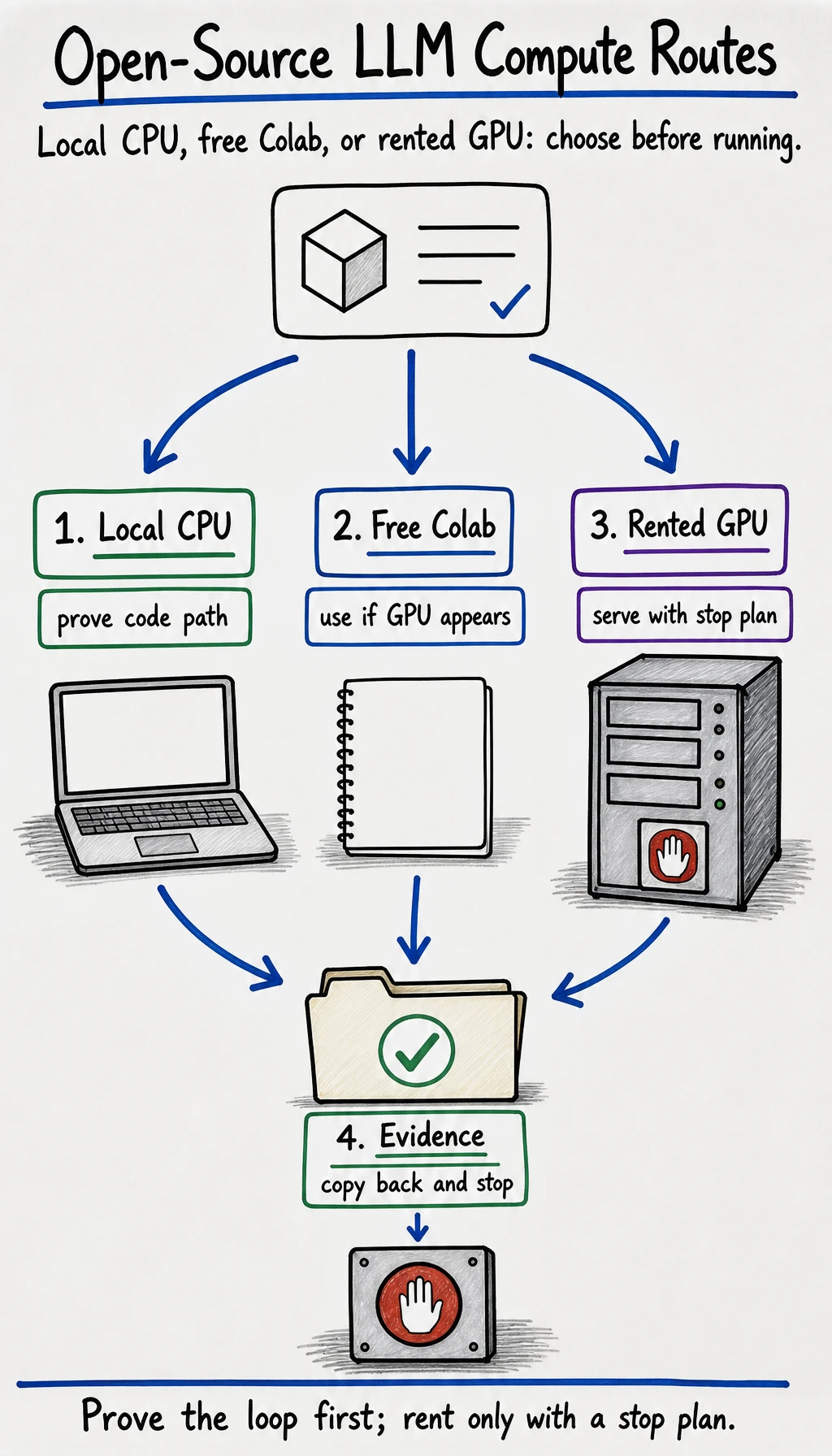
Before choosing a model name, choose the place where the experiment will run. A good compute route tells you what can be proven today, what should wait, what evidence to keep, and how to stop before cost or complexity runs away.
This page gives you three routes:
- Local CPU: safest first loop, no rental, proves code and evidence.
- Free Colab: useful when a free GPU is available, but not guaranteed.
- Rented GPU: best for vLLM-style serving or 7B-class models, but only with a written stop plan.
Route Comparison
Section titled “Route Comparison”Local CPU
- Use When
- You want the safest first run on your own machine.
- First Target
sshleifer/tiny-gpt2, quantized small model, evaluation script, local API skeleton.- Not For
- Proving 7B quality, high throughput, or long-context serving.
- Evidence
environment_report.txt,first_run.md,eval_results.csv.
Free Colab
- Use When
- You need a temporary notebook and a GPU may be available.
- First Target
- Small instruct model, tokenizer checks, short evaluation, tiny LoRA dry run.
- Not For
- Private data, long jobs, public services, or guaranteed-GPU planning.
- Evidence
- Notebook copy, runtime type,
nvidia-smior CPU note, saved outputs.
Rented GPU
- Use When
- You need predictable VRAM, SSH, serving, or a 7B-class test.
- First Target
- vLLM/SGLang server, fixed eval set, latency and memory check.
- Not For
- Starting without budget, exposing a public port, or training before eval.
- Evidence
gpu_plan.md,environment_report.txt, request/response log, shutdown proof.
Colab is a good learning route, but treat it as opportunistic. Google’s Colab FAQ says free compute resources can include GPUs and TPUs, but resources are not guaranteed or unlimited and usage limits can fluctuate. Write your plan so the lab still works on CPU if the free GPU is unavailable.
Start With The Smallest Proof
Section titled “Start With The Smallest Proof”Choose the route by the question you are trying to answer:
| Question | Route |
|---|---|
| ”Can my Python environment load a model and generate text?” | Local CPU |
| ”Can I run the same notebook on a temporary hosted machine?” | Free Colab |
| ”Can this model serve requests with known VRAM, latency, and shutdown?” | Rented GPU |
| ”Should I fine-tune?” | None yet; run fixed eval cases first |
The first useful proof is not a clever answer. It is a reproducible trace: environment -> model -> prompt -> output -> evaluation -> stop.
Write compute_route.md
Section titled “Write compute_route.md”Before running commands, write this file:
# Compute Route
goal: prove the open-source LLM deployment loop for one small projectroute: local_cpu / free_colab / rented_gpuselected_model:runtime:expected_runtime_limit:privacy_level:budget_limit:stop_time:fallback_route:
## Why this route
## What this route can prove
## What this route cannot prove yet
## Evidence to copy back
## Stop or rollback step
If stop_time, fallback_route, or evidence to copy back is empty, do not rent a GPU yet.
Route A: Local CPU
Section titled “Route A: Local CPU”Use this route first. It is enough to complete most of 13.2 Hands-on: Run and Serve an Open-Source LLM with the default tiny model.
mkdir openllm_labcd openllm_lab
python -m venv .venvsource .venv/bin/activatepython -m pip install -U pippython -m pip install "torch" "transformers>=4.41" "accelerate" "safetensors" "sentencepiece" "fastapi" "uvicorn"
Then run the lab with the default smoke-test model:
python environment_report.pypython run_local_llm.pypython eval_openllm.pyuvicorn serve_openai_like:app --host 127.0.0.1 --port 8000Stop with Ctrl+C. Your pass condition is not quality; it is whether the environment, inference, evaluation, API, and stop path all work.
Use this route when you want to change code quickly. Leave model quality claims for a better model and a fixed evaluation set.
Route B: Free Colab
Section titled “Route B: Free Colab”Use this route when you want a hosted notebook and a GPU may be available. Do not assume a GPU will always be assigned.
In the notebook:
!python -V!nvidia-smi || true!python -m pip install -U pip!python -m pip install "torch" "transformers>=4.41" "accelerate" "safetensors" "sentencepiece"Then copy the local inference and evaluation code from the hands-on page into cells. Start with:
MODEL_ID="sshleifer/tiny-gpt2" python run_local_llm.pypython eval_openllm.pyIf GPU is available and the notebook is stable, try a small instruct model:
MODEL_ID="Qwen/Qwen2.5-0.5B-Instruct" python run_local_llm.pyKeep these Colab-specific notes:
runtime_type:gpu_visible: yes/nonotebook_url_or_copy:install_cells:first_run_output:files_downloaded_back:what_would_break_if_runtime_resets:Do not put private documents, secrets, or long-running serving workloads into a free notebook. If you need stable serving, use the rented GPU route or a controlled local/server environment.
Route C: Rented GPU
Section titled “Route C: Rented GPU”Rent only after the local CPU or Colab path has produced a working evidence bundle. A rented machine should answer one bounded question, such as:
- Can a 7B-class instruct model serve through vLLM?
- Does the fixed eval set pass on a larger model?
- What latency and memory do we observe for this route?
Write gpu_plan.md first:
# GPU Plan
goal:model:runtime:instance_vram:disk:region:hourly_budget:hard_stop_time:ports_to_open:access_method: SSH keyevidence_to_copy_back:shutdown_proof:fallback_if_oom:
On the remote machine:
python -Vnvidia-smidf -hpython -m pip install -U pippython -m pip install "vllm"Bind to localhost first:
vllm serve Qwen/Qwen2.5-0.5B-Instruct --host 127.0.0.1 --port 8000From your local machine, connect through an SSH tunnel:
ssh -L 8000:127.0.0.1:8000 user@your-gpu-hostThen test the OpenAI-compatible endpoint:
curl http://127.0.0.1:8000/v1/chat/completions \ -H "Content-Type: application/json" \ -d '{ "model": "Qwen/Qwen2.5-0.5B-Instruct", "messages": [{"role": "user", "content": "Give one deployment rule for a rented GPU."}] }'After the test, copy back the evidence and stop or destroy the instance. A successful model demo that keeps billing silently is still a failed engineering run.
Route Decision Drill
Section titled “Route Decision Drill”Fill this before continuing:
I will use _____ because _____.This route can prove _____.This route cannot prove _____ yet.I will stop or fall back when _____.The evidence I must copy back is _____.How to judge your answer
A strong answer names constraints instead of enthusiasm. For example: local CPU can prove the code path but not service throughput; Colab can test a notebook path but cannot guarantee GPU availability; rented GPU can test serving but needs budget, SSH, ports, and shutdown proof. If the answer only says “because it is faster,” the route decision is not complete.
Evidence to Keep
Section titled “Evidence to Keep”- Compute Route
- local_cpu / free_colab / rented_gpu and why
- Environment
- Python, torch, CUDA/MPS/CPU, disk, runtime reset risk
- Budget Or Limit
- free quota caveat or rental stop time
- Security
- private data policy, secrets policy, exposed ports
- First Run
- model, command, prompt, output, latency or memory note
- Stop Proof
- Ctrl+C, notebook saved, or rented instance stopped
Pass Check
Section titled “Pass Check”You pass this lesson when you can choose one compute route, explain what it can and cannot prove, run the environment check, and name the exact stop or fallback step before moving to the hands-on lab.