
0.3 AI Full-Stack Capability Map
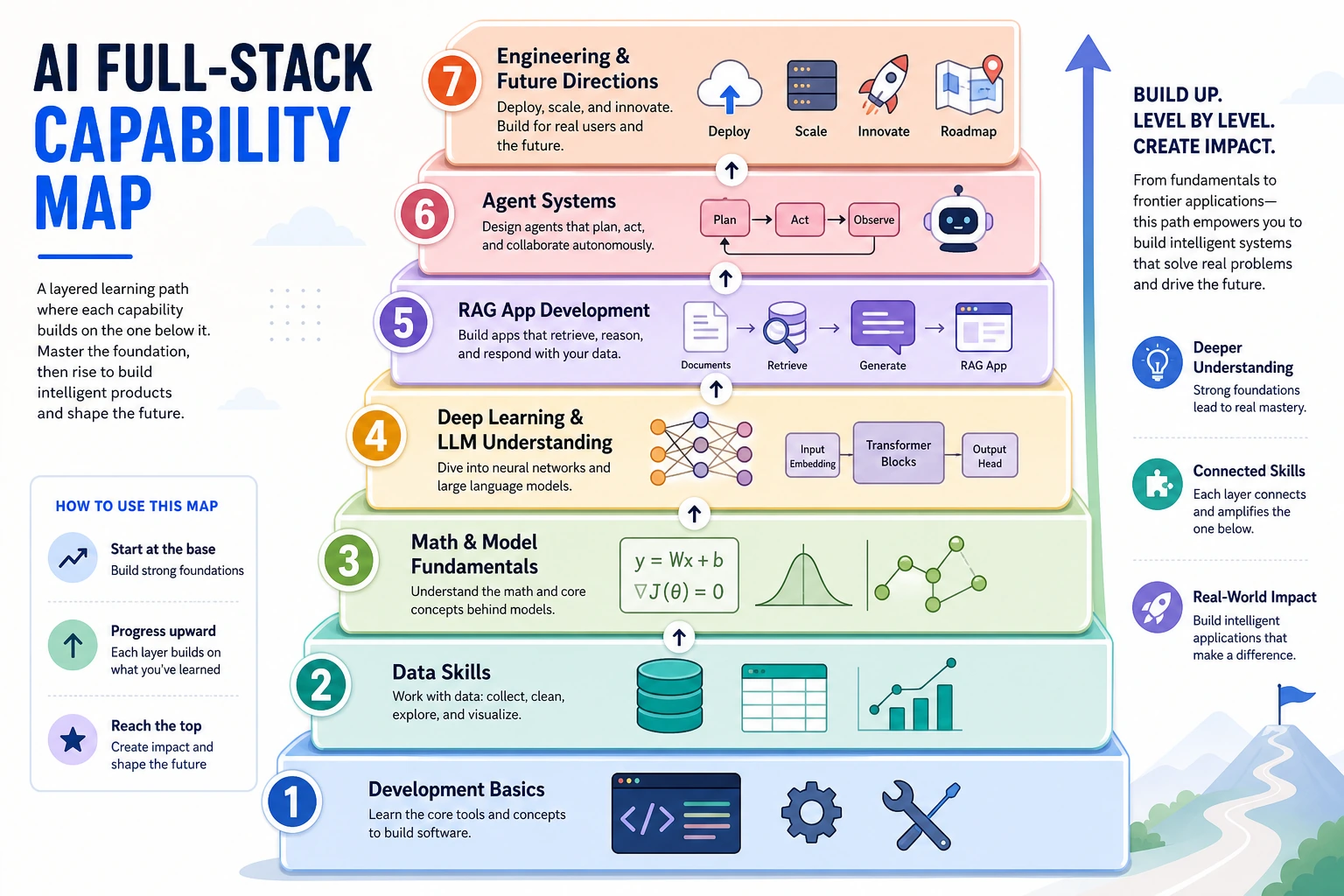
Read the picture first. The course is one engineering path:
You do not need every detail now. Just remember:
| If the problem is | Go back to |
|---|---|
| running code | tools and Python |
| messy inputs | data |
| unreliable answers | evaluation and RAG |
| uncontrolled actions | Agent traces and permissions |
The Seven Layers
Section titled “The Seven Layers”| Layer | Course chapters | First visible evidence | Deeper question |
|---|---|---|---|
| Tools | 1 | A reproducible project folder and Git history | Can another person rerun it? |
| Python | 2 | Small scripts with clear inputs and outputs | Is the code readable, typed, and testable? |
| Data | 3 | Clean tables, charts, and notes | Do you know where the data is wrong or biased? |
| Models | 4-6 | Trained or inspected model experiments | What metric would change your decision? |
| LLM | 7 | Prompt, tokens, embeddings, Transformer intuition | Which behavior comes from data, decoding, or context? |
| RAG | 8 | Retrieval trace and answer evaluation | Did the answer use the right evidence? |
| Agent | 9 | Tool traces, permissions, memory notes, deployment notes | What can fail when users, files, and actions are real? |
| Specialization / runtime delivery | 10-13 and electives | Vision/NLP/multimodal/open-source LLM demos, exported assets, deployment notes | Which domain and runtime constraints change the product decision? |
The course is not a pile of topics. It is a debugging stack and a portfolio stack. When an AI application behaves badly, the cause may live several layers below the feature you are looking at. When a reviewer asks what you built, your evidence should show which layers you controlled.
One Project Thread, Many Layers
Section titled “One Project Thread, Many Layers”A strong career-transition project can start as one small assistant or automation and become more credible chapter by chapter.
| Layer | Portfolio evidence to add |
|---|---|
| Tools | Repository, README command, screenshots, and clean file layout |
| Python | CLI or script with visible inputs, outputs, errors, and tests |
| Data | Sample dataset, cleaning notes, charts, and edge cases |
| Models | Baseline, metric table, comparison, and failure samples |
| LLM | Prompt variants, structured output, token/cost notes, and limitations |
| RAG | Documents, chunks, retrieval trace, citation check, and answer evaluation |
| Agent | Tool permission boundary, action trace, memory rule, and rollback note |
| Specialization / runtime delivery | Vision, NLP, multimodal, open-source LLM runtime, deployment, or product-specific review evidence |
Main Line And Expansion Tracks
Section titled “Main Line And Expansion Tracks”Use Chapters 1-9 as the default main line. After Chapter 9, you should be able to build a small LLM/RAG/Agent project with evidence, logs, and a safety boundary.
Then choose Chapters 10-13 by product need:
| Need | Choose | Why |
|---|---|---|
| Images, cameras, OCR, detection, segmentation | Chapter 10 Computer Vision | The output is visual: labels, boxes, masks, text, or video events |
| Text labels, extraction, summaries, linguistic evaluation | Chapter 11 NLP | The output is a text task with labels, fields, spans, or generated text |
| Images, PDFs, audio, video, creative assets, multimodal RAG | Chapter 12 Multimodal/AIGC | The workflow mixes modalities and needs source, prompt, review, and export records |
| Open-source model hosting, private deployment, runtime ownership | Chapter 13 Open-Source LLM Deployment | The project must control model files, serving API, licenses, cost, and fine-tuning decisions |
| Deployment, advanced Python, classic ML depth | Electives | The main project needs a specific engineering or algorithmic side skill |
How To Use The Map
Section titled “How To Use The Map”Before starting a project, mark the highest-risk layer. For example, a PDF question-answering app usually fails first in data cleaning and retrieval, not in the chat UI. An automation agent usually fails first in tool permissions, state, and evaluation, not in the prompt wording.
During each chapter, keep one artifact that proves the layer works. Screenshots are useful, but logs, README commands, small datasets, metric tables, and failure notes are stronger because they help you debug later.
Optional background: if you want the history behind these layers, skim the 15-stage AI development map.
Next, plan how you will pace the main route.
Pass Check
Section titled “Pass Check”You pass this map when you can mark your current layer, the highest-risk next layer, and one portfolio artifact that will prove progress.
Evidence to Keep
Section titled “Evidence to Keep”Keep this page’s proof of learning as a small evidence card:
- Capability Map
- tools, Python, data, math, ML, DL, LLM, RAG, Agent, specialization, and runtime links
- Project Thread
- one assistant, automation, analysis, or multimodal project idea
- Current Position
- what you already know and what you will postpone
- Next Step
- one concrete chapter or workshop to start next
- Risk Check
- learning everything at once, skipping evidence, or losing the main route
- Expected Output
- a marked personal course map with one project thread and one immediate action