
10.5.4 OCR Text Recognition [Optional]
Learning Objectives
Section titled “Learning Objectives”- Understand the difference between “detection” and “recognition” in OCR
- Understand why document layout further increases complexity
- Build intuition for an OCR pipeline through a runnable example
- Understand the special challenges of OCR in forms, receipts, and document scenarios
First, Build a Mental Map
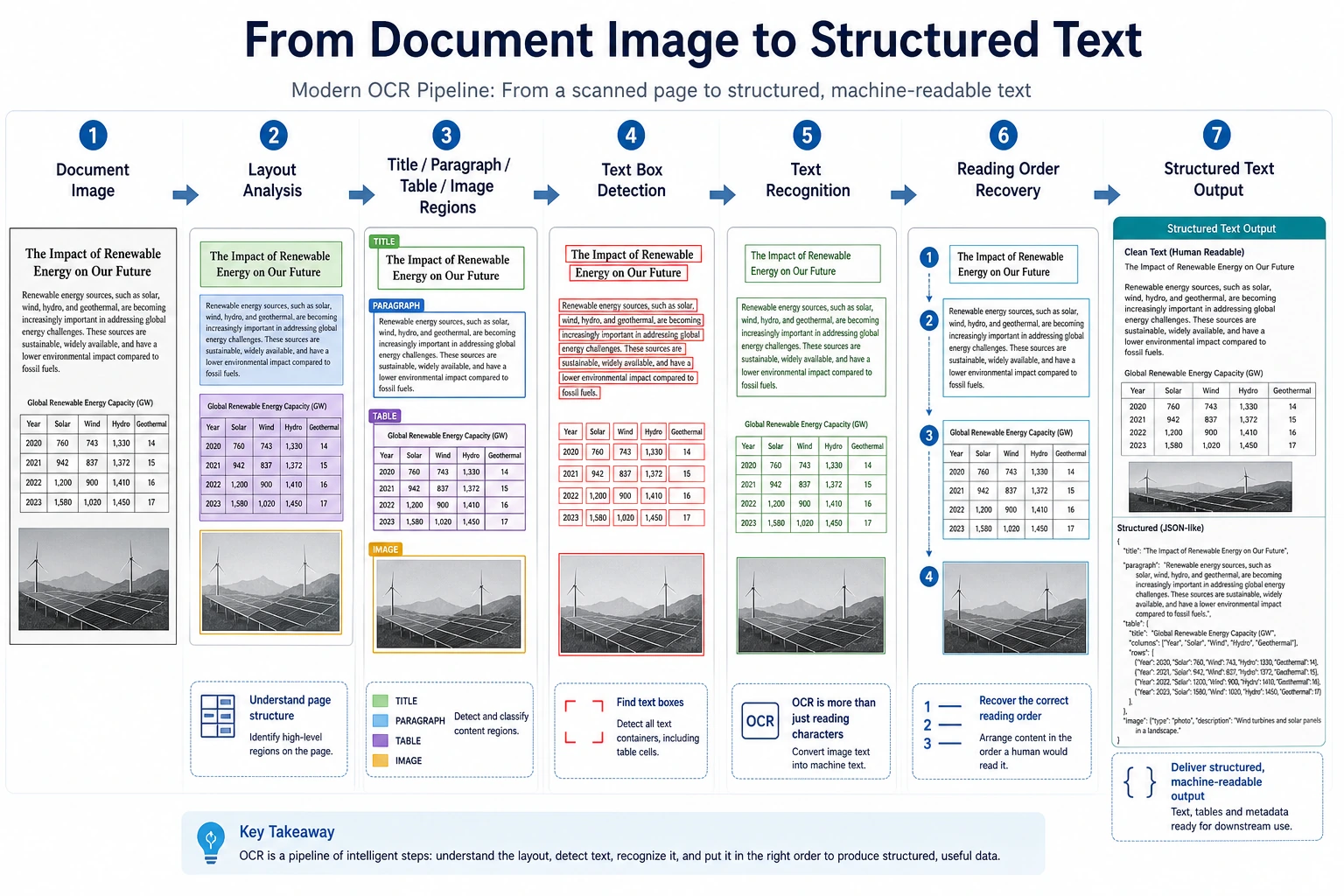
Section titled “First, Build a Mental Map”The best way for beginners to understand this OCR section is not to “look at the recognition result first,” but to first see the pipeline clearly:
flowchart LR A["Image / Document"] --> B["Text Detection"] B --> C["Text Recognition"] C --> D["Layout and Structure Understanding"]So what this section really wants to solve is:
- Why OCR is not a single model
- Why detection, recognition, and layout understanding should be separated
What Are the Usual Steps in OCR?
Section titled “What Are the Usual Steps in OCR?”Text Detection
Section titled “Text Detection”First, find where the text regions are.
Text Recognition
Section titled “Text Recognition”Then, convert each text region into a character sequence.
Layout and Structure Understanding
Section titled “Layout and Structure Understanding”In complex document scenarios, you also need to answer:
- Which part should be read first?
- Which part is a title?
- Which part belongs to a table or the main text?
A More Beginner-Friendly Overall Analogy
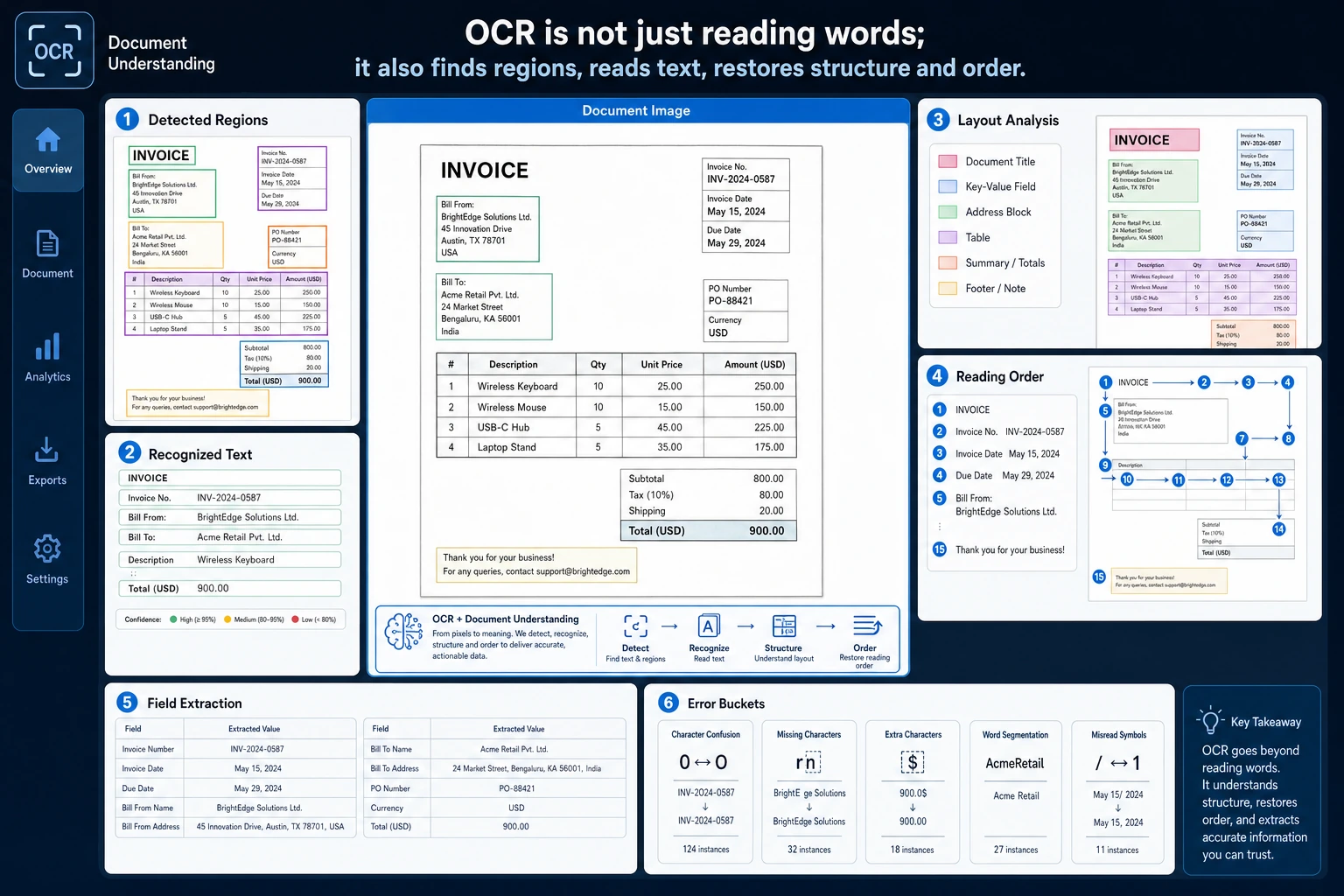
Section titled “A More Beginner-Friendly Overall Analogy”You can think of OCR as a three-person team handling an invoice:
- The first person circles all the text with a pen
- The second person reads out each circled text region
- The third person decides which text is the title, which is the amount, and which is the date
With this understanding, OCR no longer feels like:
- a mysterious black-box model
but more like:
- a pipeline with clear responsibilities
Let’s Look at a Minimal OCR Pipeline Example
Section titled “Let’s Look at a Minimal OCR Pipeline Example”image_blocks = [ {"box": (0, 0, 50, 20), "pixels": "INV-001"}, {"box": (0, 30, 80, 50), "pixels": "TOTAL 299"},]
def detect_text_regions(image_blocks): return [block["box"] for block in image_blocks]
def recognize_text(image_blocks): return [{"box": block["box"], "text": block["pixels"]} for block in image_blocks]
regions = detect_text_regions(image_blocks)texts = recognize_text(image_blocks)
print("regions:", regions)print("texts:", texts)Expected output:
regions: [(0, 0, 50, 20), (0, 30, 80, 50)]texts: [{'box': (0, 0, 50, 20), 'text': 'INV-001'}, {'box': (0, 30, 80, 50), 'text': 'TOTAL 299'}]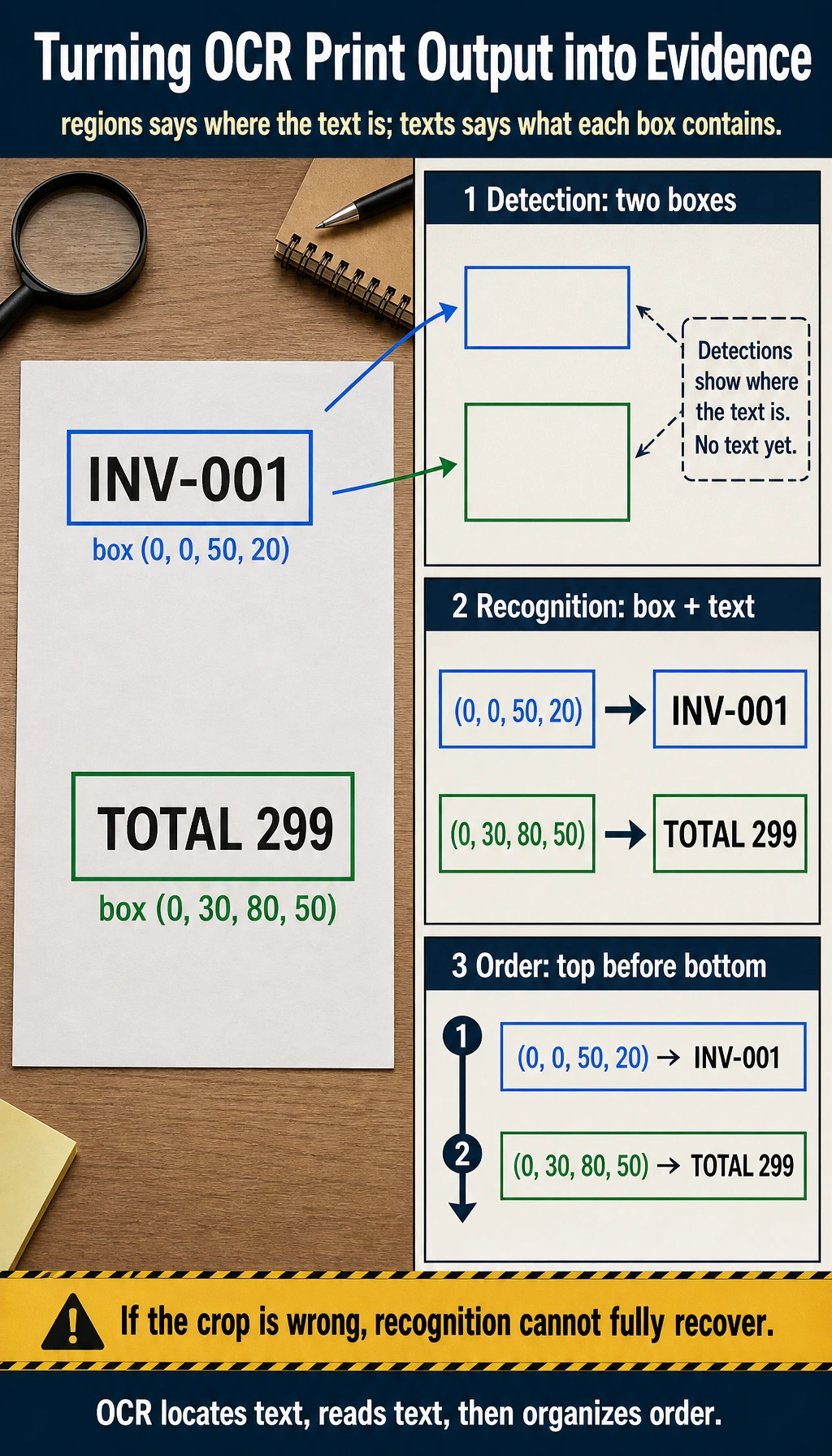
The first line is the detection result: where text regions are. The second line is the recognition result: what each detected region says.
What Is the Most Important Part of This Example?
Section titled “What Is the Most Important Part of This Example?”It clearly separates:
- where the text is
- what the text says
This is the most basic two-stage structure of OCR.
Why Do Many OCR Errors Not Come from the Recognition Model Itself?
Section titled “Why Do Many OCR Errors Not Come from the Recognition Model Itself?”Because if the detection stage cuts the text regions incorrectly:
- some text may be missed
- the order may get mixed up
Even a strong recognition model cannot fully recover from that.
What Should Beginners Remember First When Learning OCR?
Section titled “What Should Beginners Remember First When Learning OCR?”The most important things to remember are:
- Detection answers “where is the text?”
- Recognition answers “what is the text?”
- In document scenarios, you often also need to answer “what should be read first, and which block does it belong to?”
Why Is OCR Often Harder Than It Seems?
Section titled “Why Is OCR Often Harder Than It Seems?”Text Is Not Always in a Regular Layout
Section titled “Text Is Not Always in a Regular Layout”You may encounter:
- tilt
- perspective distortion
- blur
- occlusion
Documents Are Not Always Single-Column or Single-Line
Section titled “Documents Are Not Always Single-Column or Single-Line”For example:
- tables
- invoices
- medical forms
At this point, “recognizing text” is only the first step. The real challenge is structure understanding.
Character-Level Errors Can Affect Downstream Business Logic
Section titled “Character-Level Errors Can Affect Downstream Business Logic”Fields like numbers, amounts, and dates can directly impact business results if even one character is wrong.
Look at Another Minimal Example for “Reading Order Restoration”
Section titled “Look at Another Minimal Example for “Reading Order Restoration””lines = [ {"y": 80, "text": "TOTAL 299"}, {"y": 20, "text": "INVOICE"}, {"y": 50, "text": "INV-001"},]
def restore_reading_order(lines): return [item["text"] for item in sorted(lines, key=lambda x: x["y"])]
print(restore_reading_order(lines))Expected output:
['INVOICE', 'INV-001', 'TOTAL 299']The list was originally out of order, but sorting by the vertical coordinate restores the natural top-to-bottom reading order for this simple document.
This example is very small, but it helps beginners build an important intuition:
- OCR is not finished just because recognition is done
- Restoring text order and structure is often equally important
A Project Progression Order Beginners Can Copy Directly
Section titled “A Project Progression Order Beginners Can Copy Directly”A more stable order is usually:
- Start with clean, single-column sample data
- Then look at tilted and blurry samples
- Then add layout order and structure understanding
- Finally move on to more complex documents such as receipts and tables
This is usually easier than starting with a complex receipt system right away.
If You Want to Turn OCR into a Project, What Kind of Task Should You Choose First?
Section titled “If You Want to Turn OCR into a Project, What Kind of Task Should You Choose First?”A more stable starting point is usually:
- extracting fields from clear receipts
- recognizing simple single-column documents
- handling a small number of fixed-template forms
The advantages of these tasks are:
- text regions are clearer
- business fields are easier to evaluate
- failure cases are easier to analyze
If You Turn OCR into a Project, What Should You Show First?
Section titled “If You Turn OCR into a Project, What Should You Show First?”A presentation order that feels closer to a real project is usually:
- Original image
- Text detection boxes
- Recognized text blocks
- Restored fields or reading order
- Failure case analysis
In this way, readers can immediately see:
- which step went wrong
- which part of the pipeline your system is mainly optimizing
The Most Common Pitfalls
Section titled “The Most Common Pitfalls”Only Looking at Recognition Accuracy and Ignoring Detection Quality
Section titled “Only Looking at Recognition Accuracy and Ignoring Detection Quality”OCR is a multi-stage pipeline, and mistakes from one stage are passed to the next.
Only Doing Character Recognition and Not Restoring Structure
Section titled “Only Doing Character Recognition and Not Restoring Structure”What many document projects really need is:
- fields
- table structure
- reading order
Ignoring Image Preprocessing
Section titled “Ignoring Image Preprocessing”For example:
- binarization
- denoising
- skew correction
These are very important in many scenarios.
A Minimal Error Bucketing Table That Feels More Like a Real Project
Section titled “A Minimal Error Bucketing Table That Feels More Like a Real Project”errors = [ {"type": "detection_miss", "count": 4}, {"type": "wrong_character", "count": 7}, {"type": "reading_order", "count": 3},]
for item in errors: print(f"{item['type']}: {item['count']}")Expected output:
detection_miss: 4wrong_character: 7reading_order: 3This tiny table tells you where to look next: missed text boxes, wrong characters, or wrong document order. Each bucket usually needs a different fix.
Although this table is simple, it is very similar to the first step in a real OCR project:
- first distinguish whether the main error comes from detection, recognition, or structure restoration
If you do not separate them like this, it is easy to:
- keep replacing the recognition model over and over
- only to find that the real problem was actually detection or reading order
If You Turn This into a Portfolio Project, What Is Most Worth Showing?
Section titled “If You Turn This into a Portfolio Project, What Is Most Worth Showing?”- Original image
- Detection box results
- Recognized text results
- Restored field results
- A set of typical failure cases
This will feel much more like a real document AI project than simply showing “which words were recognized.”
Evidence to Keep
Section titled “Evidence to Keep”Keep this page’s proof of learning as a small evidence card:
- Scenario Boundary
- face, video, OCR, 3D, medical, or another vision scenario
- Input Sample
- source image/frame/document and the expected output type
- Result Artifact
- extracted text, tracked event, depth clue, diagnosis flag, or review note
- Failure Check
- privacy, lighting, temporal drift, layout, calibration, or domain risk
- Expected Output
- scenario-specific artifact with metric or human-review note
Summary
Section titled “Summary”The most important thing in this section is to build a pipeline-based understanding:
OCR is not a single “text recognition model,” but a multi-stage system that includes text detection, text recognition, and layout understanding.
Once this pipeline is clear, you will not only focus on the recognition model itself when building receipt, form, or document understanding projects.
What Should You Take Away from This Section?
Section titled “What Should You Take Away from This Section?”- The core of OCR is a pipeline, not a single model
- Many problems are already determined by the detection and structure stages
- Document OCR projects are especially worth analyzing separately for layout and field restoration
Exercises
Section titled “Exercises”- Add one more text block to the example and think about how the reading order should be restored.
- Why do detection-stage errors directly hurt the final OCR result?
- Think about this: for table receipts and ordinary street-view text recognition, which layer has the biggest difference in difficulty?
- If an amount field is always off by one character, would you first check detection, recognition, or post-processing? Why?
Solution approach and explanation
- After adding a text block, restore reading order by sorting regions top-to-bottom and then left-to-right, while handling multi-column or table layouts separately.
- Detection-stage errors hurt OCR because missed or badly cropped text never reaches the recognizer in a recoverable form.
- For receipts and tables, layout and reading-order reconstruction are often the hardest layer. For street-view text, detection robustness against angle, blur, and background may be harder.
- If an amount is always off by one character and the crop is complete, check recognition and post-processing first. If the crop cuts off the character, check detection.