
3.2.2 Array Basics
Learning Objectives
Section titled “Learning Objectives”- Master multiple ways to create arrays
- Understand the core array attributes (
shape,dtype,ndim,size) - Learn NumPy’s data type system
- Master array data type conversion
Creating Arrays
Section titled “Creating Arrays”Creating from a Python List
Section titled “Creating from a Python List”The most basic way is to use np.array() to convert a Python list into a NumPy array:
import numpy as np
# 1D arraya = np.array([1, 2, 3, 4, 5])print(a)         # [1 2 3 4 5]print(type(a))   # <class 'numpy.ndarray'>
# 2D array (matrix)b = np.array([    [1, 2, 3],    [4, 5, 6]])print(b)# [[1 2 3]#  [4 5 6]]
# 3D arrayc = np.array([ [[1, 2], [3, 4]], [[5, 6], [7, 8]]])print(c.shape) # (2, 2, 2)Quick Creation Functions
Section titled “Quick Creation Functions”NumPy provides many fast ways to create arrays, so you do not need to write every element by hand:
import numpy as np
# ========== Arrays of all 0s / all 1s ==========zeros_1d = np.zeros(5)print(zeros_1d)  # [0. 0. 0. 0. 0.]
zeros_2d = np.zeros((3, 4))   # 3 rows and 4 columnsprint(zeros_2d)# [[0. 0. 0. 0.]#  [0. 0. 0. 0.]#  [0. 0. 0. 0.]]
ones_2d = np.ones((2, 3))     # 2 rows and 3 columnsprint(ones_2d)# [[1. 1. 1.]#  [1. 1. 1.]]
# ========== Fill with a specified value ==========fives = np.full((2, 3), 5)    # Fill everything with 5print(fives)# [[5 5 5]#  [5 5 5]]
# ========== Identity matrix ==========eye = np.eye(3)                # 3×3 identity matrixprint(eye)# [[1. 0. 0.]#  [0. 1. 0.]#  [0. 0. 1.]]
Arithmetic Sequences: arange and linspace
Section titled “Arithmetic Sequences: arange and linspace”# arange: similar to Python's range, but returns a NumPy arraya = np.arange(10) # 0 to 9print(a) # [0 1 2 3 4 5 6 7 8 9]
b = np.arange(2, 10, 2) # Start at 2, stop before 10, step by 2print(b) # [2 4 6 8]
c = np.arange(0, 1, 0.2) # Supports decimal steps! (range does not)print(c) # [0. 0.2 0.4 0.6 0.8]
# linspace: specify the number of points, and NumPy calculates the step automaticallyd = np.linspace(0, 10, 5) # From 0 to 10 (inclusive), evenly sample 5 pointsprint(d) # [ 0. 2.5 5. 7.5 10. ]
e = np.linspace(0, 1, 11) # Sample 11 points between 0 and 1print(e) # [0. 0.1 0.2 ... 0.9 1. ]Creating Random Arrays
Section titled “Creating Random Arrays”# New NumPy code should prefer default_rng()rng = np.random.default_rng(seed=42)
# Uniformly distributed random numbers between 0 and 1rand = rng.random((3, 4)) # 3×4print(rand)
# Standard normal random numbers (mean 0, standard deviation 1)randn = rng.standard_normal((3, 4)) # 3×4
# Random integers within a specified rangerandint = rng.integers(1, 100, size=(3, 4)) # 3×4 integers between 1 and 99print(randint)Quick Reference Table for Creation Methods
Section titled “Quick Reference Table for Creation Methods”| Function | Purpose | Example |
|---|---|---|
np.array() | Create from a list | np.array([1, 2, 3]) |
np.zeros() | All-0 array | np.zeros((3, 4)) |
np.ones() | All-1 array | np.ones((2, 3)) |
np.full() | Fill with a specified value | np.full((2, 3), 7) |
np.eye() | Identity matrix | np.eye(4) |
np.arange() | Arithmetic sequence (specified step) | np.arange(0, 10, 2) |
np.linspace() | Arithmetic sequence (specified number of points) | np.linspace(0, 1, 100) |
rng.random() | Uniform random numbers in [0, 1) | rng.random((3, 4)) |
rng.standard_normal() | Standard normal distribution | rng.standard_normal((3, 4)) |
rng.integers() | Random integers | rng.integers(0, 10, size=(3, 4)) |
Array Attributes
Section titled “Array Attributes”Every NumPy array has some important attributes. Understanding them is the foundation for later operations:
import numpy as np
arr = np.array([    [1, 2, 3, 4],    [5, 6, 7, 8],    [9, 10, 11, 12]])
print(f"Shape:  {arr.shape}")    # (3, 4) → 3 rows and 4 columnsprint(f"ndim:   {arr.ndim}")     # 2 → 2D arrayprint(f"Total elements (size): {arr.size}")    # 12 → 3 × 4 = 12print(f"Data type (dtype): {arr.dtype}")  # int64print(f"Bytes per element: {arr.itemsize}") # 8 → int64 takes 8 bytesprint(f"Total bytes: {arr.nbytes}")         # 96 → 12 × 8 = 96
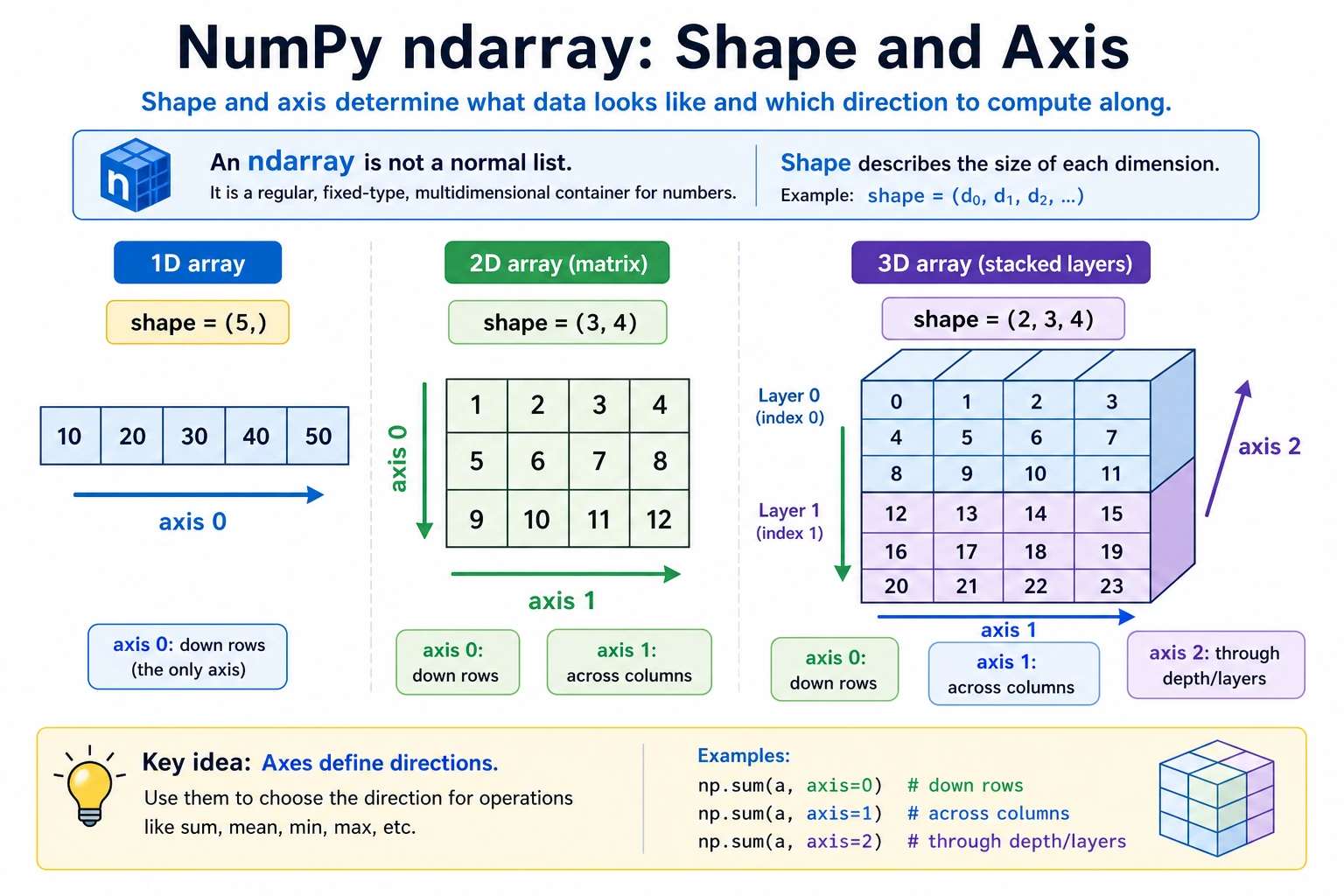
What shape Means
Section titled “What shape Means”shape is one of the most commonly used attributes. It tells you the array’s “shape”:
# 1D arraya = np.array([1, 2, 3])print(a.shape)      # (3,) → 3 elements
# 2D arrayb = np.array([[1, 2, 3], [4, 5, 6]])print(b.shape)      # (2, 3) → 2 rows and 3 columns
# 3D arrayc = np.ones((2, 3, 4))print(c.shape)      # (2, 3, 4) → 2 "matrices with 3 rows and 4 columns"
A good way to understand shape is: count layer by layer from outside to inside.
3D array shape = (2, 3, 4) ↓ ↓ ↓ │ │ └── Innermost layer: 4 elements per row │ └───── Middle layer: 3 rows in each matrix └──────── Outermost layer: 2 matrices in totalData Types (dtype)
Section titled “Data Types (dtype)”All elements in a NumPy array must be of the same type. This is one of the reasons NumPy can run operations so quickly.
Common Data Types
Section titled “Common Data Types”| dtype | Meaning | Example Values | Common Use |
|---|---|---|---|
int32 | 32-bit integer | -2147483648 ~ 2147483647 | Counting, indexing |
int64 | 64-bit integer (default) | Larger range | General integers |
float32 | 32-bit floating point | About 7 significant digits | Deep learning (saves memory) |
float64 | 64-bit floating point (default) | About 15 significant digits | Scientific computing (high precision) |
bool | Boolean | True / False | Conditional filtering |
str_ | String | ”hello” | Text labels (less common) |
Specifying a Data Type
Section titled “Specifying a Data Type”# Let NumPy infer the type automaticallya = np.array([1, 2, 3]) # int64 (all integers)b = np.array([1.0, 2.0, 3.0]) # float64 (contains decimal points)c = np.array([1, 2.5, 3]) # float64 (mixed types are promoted automatically)
# Specify the type manuallyd = np.array([1, 2, 3], dtype=np.float32)print(d) # [1. 2. 3.]print(d.dtype) # float32
e = np.zeros(5, dtype=np.int32)print(e) # [0 0 0 0 0]print(e.dtype) # int32Type Conversion: astype
Section titled “Type Conversion: astype”# Convert integers to floating-point numbersint_arr = np.array([1, 2, 3, 4])float_arr = int_arr.astype(np.float64)print(float_arr) # [1. 2. 3. 4.]print(float_arr.dtype) # float64
# Convert floating-point numbers to integers (truncates directly, not rounding!)float_arr2 = np.array([1.7, 2.3, 3.9])int_arr2 = float_arr2.astype(np.int32)print(int_arr2) # [1 2 3] ← Note: 3.9 becomes 3, not 4!
# Boolean conversionbool_arr = np.array([0, 1, 0, 2, -1]).astype(bool)print(bool_arr) # [False True False True True] ← 0 is False, non-zero is Truefloat32 vs float64: When Should You Use Each?
Section titled “float32 vs float64: When Should You Use Each?”# float64: default, high precisiona = np.array([1.0, 2.0, 3.0]) # Default float64, 8 bytes per element
# float32: memory-saving, commonly used in deep learningb = np.array([1.0, 2.0, 3.0], dtype=np.float32) # 4 bytes per element
# Memory comparisonrng = np.random.default_rng(seed=42)big_f64 = rng.random(1_000_000) # float64big_f32 = rng.random(1_000_000).astype(np.float32) # float32print(f"float64 memory usage: {big_f64.nbytes / 1024 / 1024:.1f} MB") # 7.6 MBprint(f"float32 memory usage: {big_f32.nbytes / 1024 / 1024:.1f} MB") # 3.8 MBCreating Arrays from Existing Arrays
Section titled “Creating Arrays from Existing Arrays”Sometimes you need to create new arrays based on the shape of an existing array:
original = np.array([[1, 2, 3], [4, 5, 6]])
# Create an all-0 array with the same shape as originalz = np.zeros_like(original)print(z)# [[0 0 0]#  [0 0 0]]
# Create an all-1 array with the same shape as originalo = np.ones_like(original)print(o)# [[1 1 1]#  [1 1 1]]
# Create an array filled with a specified value with the same shape as originalf = np.full_like(original, 99)print(f)# [[99 99 99]#  [99 99 99]]
# Create an uninitialized array (fast, but values are random)e = np.empty_like(original)# ⚠️ The values are random; do not use an empty array before assigning values!
Evidence to Keep
Section titled “Evidence to Keep”Keep this page’s proof of learning as a small evidence card:
- Array State
- shape, dtype, axis, and sample values before the operation
- Operation
- indexing, slicing, broadcasting, reshape, linear algebra, or random/stat function
- Output
- resulting array shape, values, or statistic
- Failure Check
- axis confusion, view/copy trap, broadcast mismatch, or wrong shape
- Expected Output
- printed shapes and values that make the array operation inspectable
Summary
Section titled “Summary” root((NumPy Array Basics)) Creating Arrays np.array Create from a list np.zeros / ones / full np.arange / linspace rng.random / standard_normal / integers np.eye Identity matrix Array Attributes shape Shape ndim Dimension count size Total elements dtype Data type Data Types int32 / int64 float32 / float64 bool astype Type conversionHands-On Practice
Section titled “Hands-On Practice”Exercise 1: Create Different Arrays
Section titled “Exercise 1: Create Different Arrays”import numpy as np
# 1. Create a 1D array containing 1 to 20arr1 = np.arange(1, 21)
# 2. Create a 4×5 all-zero matrixarr2 = np.zeros((4, 5))
# 3. Create a 3×3 matrix where all elements are 7arr3 = np.full((3, 3), 7)
# 4. Create 100 evenly spaced points between 0 and 2π (np.pi * 2)arr4 = np.linspace(0, np.pi * 2, 100)
# 5. Create a 5×5 random integer matrix (range 1~50)rng = np.random.default_rng(seed=42)arr5 = rng.integers(1, 51, size=(5, 5))Exercise 2: Check Attributes
Section titled “Exercise 2: Check Attributes”Create an all-1 array with shape (3, 4, 5) and answer the following questions:
- What is its dimension count (
ndim)? - How many elements does it have (
size)? - What is the default
dtype? - After converting it to
int32, how many bytes does each element take?
Exercise 3: Type Conversion
Section titled “Exercise 3: Type Conversion”# Given exam scores (floating-point numbers)scores = np.array([85.6, 92.3, 78.8, 95.1, 60.5, 73.9])
# 1. Round the scores to integersrounded = np.rint(scores).astype(int)
# 2. Determine whether each score is passing (>= 60) to get a boolean arraypassed = scores >= 60
# 3. Calculate the number of passing scores (hint: True counts as 1, False counts as 0)pass_count = passed.sum()Reference implementation and walkthrough
- The shape checks should be
arr1.shape == (20,),arr2.shape == (4, 5),arr3.shape == (3, 3),arr4.shape == (100,), andarr5.shape == (5, 5). - A
np.ones((3, 4, 5))array has 3 dimensions and 60 elements. Unless a dtype is specified, NumPy usually usesfloat64; anint32array hasitemsize == 4bytes. - For the score array, rounding gives integer-looking scores while preserving the idea that raw scores may be decimal. Count passing students from the original rule, for example
scores >= 60, so a value like60.5passes.