
2.1.8 Modules and Packages
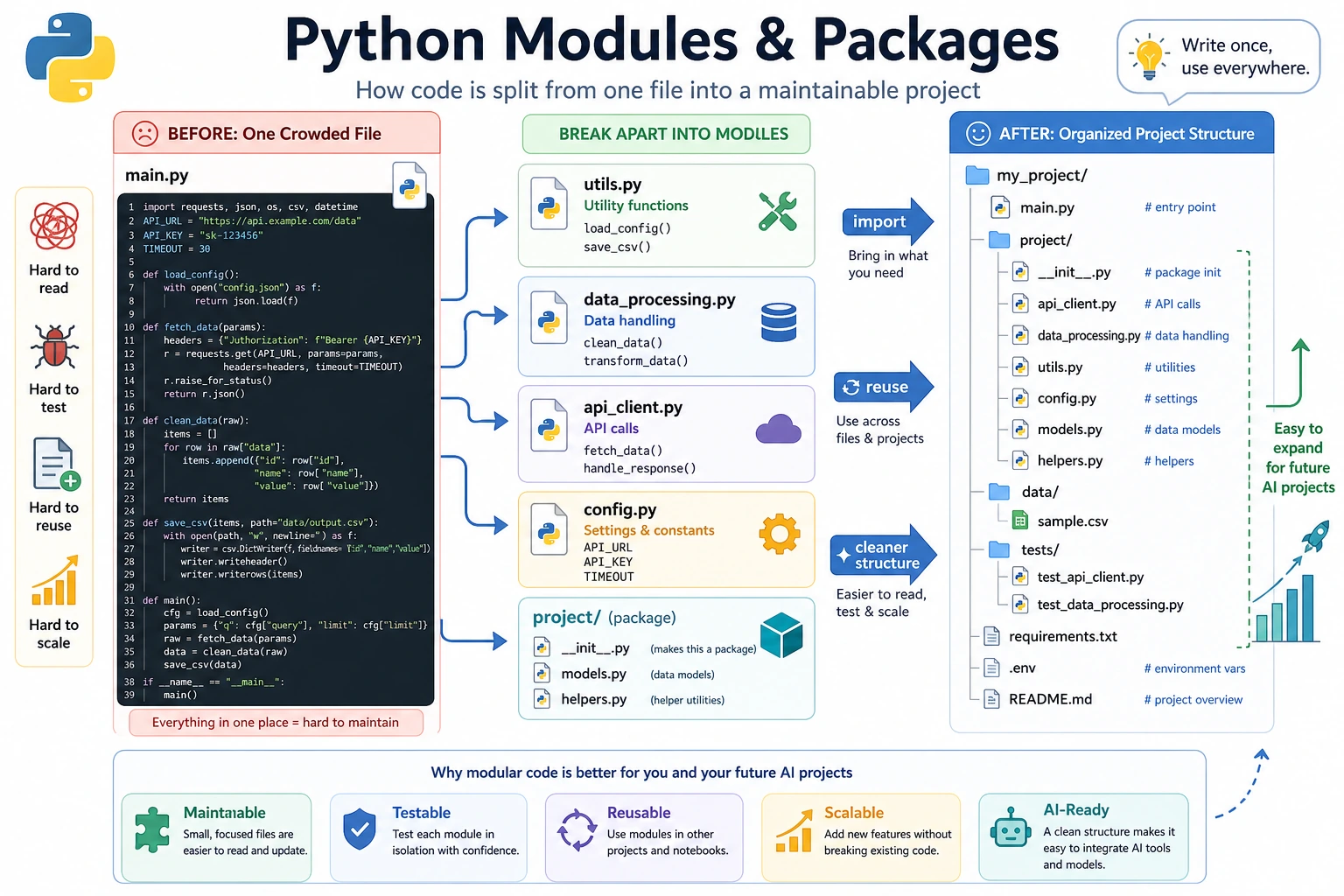
Where This Section Fits
Section titled “Where This Section Fits”In this section, you’ll learn how to split code into multiple files and reuse libraries written by others. Modules, packages, import, and pip are the gateway to the Python ecosystem. Once you understand them, you’ll be able to use tools like NumPy, Pandas, FastAPI, PyTorch, and more naturally.
Learning Objectives
Section titled “Learning Objectives”- Understand the concepts of modules and packages
- Master different uses of
import - Learn about commonly used Python standard libraries
- Learn how to use
pipto install third-party libraries - Be able to create and use your own modules
What Is a Module?
Section titled “What Is a Module?”So far, all of your code has been written in a single file. But when a project grows, one file can easily become thousands of lines long — and that becomes hard to manage.
A module is a .py file. You can put related functions, classes, and variables into a module, then import and use them in other files.
Think about moving house:
- Put clothes in one box (
clothes.py) - Put books in one box (
books.py) - Put kitchenware in one box (
kitchen.py)
Each box is a module. You open the one you need.
Basic Uses of import
Section titled “Basic Uses of import”Import an Entire Module
Section titled “Import an Entire Module”import math
# You need to use the module name as a prefixprint(math.pi) # 3.141592653589793print(math.sqrt(16)) # 4.0print(math.ceil(3.2)) # 4 (round up)print(math.floor(3.8)) # 3 (round down)Import Specific Items from a Module
Section titled “Import Specific Items from a Module”from math import pi, sqrt
# Use directly without the module name prefixprint(pi) # 3.141592653589793print(sqrt(16)) # 4.0Import with an Alias
Section titled “Import with an Alias”import numpy as np # give numpy a short aliasimport pandas as pd # standard alias for pandas
# Common aliases in the AI fieldimport matplotlib.pyplot as pltimport tensorflow as tfimport torchImport Everything from a Module
Section titled “Import Everything from a Module”from math import *
# You can use everything directlyprint(pi)print(sqrt(16))print(sin(0))Evidence to Keep
Section titled “Evidence to Keep”Keep this page’s proof of learning as a small evidence card:
- Concept
- variable, type, operator, input/output, branch, loop, structure, function, or module
- Code
- smallest runnable Python snippet for the concept
- Output
- printed value, type, branch result, loop trace, or returned value
- Failure Check
- type mismatch, indentation, off-by-one, mutable data, or import path issue
- Expected Output
- code plus printed result that proves the concept works
Common Python Standard Libraries
Section titled “Common Python Standard Libraries”Python comes with many useful modules built in. After installing Python, you can use them right away without any extra installation.
math — Mathematical Operations
Section titled “math — Mathematical Operations”import math
print(math.pi) # 3.141592653589793print(math.e) # 2.718281828459045print(math.sqrt(144)) # 12.0print(math.pow(2, 10)) # 1024.0print(math.log(100, 10)) # 2.0 (logarithm with base 10)print(math.sin(math.pi / 2)) # 1.0print(math.factorial(5)) # 120 (5! = 5×4×3×2×1)random — Random Numbers
Section titled “random — Random Numbers”import random
# Random integersprint(random.randint(1, 100)) # random integer between 1 and 100
# Random floating-point numbersprint(random.random()) # random float between 0 and 1print(random.uniform(1.0, 10.0)) # between 1.0 and 10.0
# Randomly choose from a listcolors = ["red", "green", "blue", "yellow"]print(random.choice(colors)) # choose one at randomprint(random.sample(colors, 2)) # choose 2 at random (no duplicates)
# Shuffle a listcards = list(range(1, 14))random.shuffle(cards)print(cards) # shuffled list
# Set a random seed (to make results reproducible — commonly used in AI training)random.seed(42)print(random.randint(1, 100)) # same result every time you run itos — Operating System Interaction
Section titled “os — Operating System Interaction”import os
# Get the current working directoryprint(os.getcwd())
# List files in a directoryprint(os.listdir("."))
# Check whether a file/directory existsprint(os.path.exists("hello.py"))
# Join paths (cross-platform)path = os.path.join("data", "train", "images")print(path) # data/train/images (macOS/Linux) or data\train\images (Windows)
# Get file name and extensionfilename = "model_v2.pth"name, ext = os.path.splitext(filename)print(f"File name: {name}, extension: {ext}") # File name: model_v2, extension: .pth
# Create directoriesos.makedirs("output/results", exist_ok=True) # exist_ok=True means no error if it already existsdatetime — Date and Time
Section titled “datetime — Date and Time”from datetime import datetime, timedelta
# Get the current timenow = datetime.now()print(now) # 2026-02-09 14:30:45.123456print(now.strftime("%Y-%m-%d")) # 2026-02-09print(now.strftime("%Y-%m-%d")) # 2026-02-09
# Time calculationstomorrow = now + timedelta(days=1)last_week = now - timedelta(weeks=1)print(f"Tomorrow: {tomorrow.strftime('%Y-%m-%d')}")print(f"Last week: {last_week.strftime('%Y-%m-%d')}")
# Parse a time stringdate_str = "2026-01-15"date = datetime.strptime(date_str, "%Y-%m-%d")print(date)json — JSON Data Handling
Section titled “json — JSON Data Handling”import json
# Python object → JSON stringdata = { "service": "Login API", "owner": "Mina", "latencies_ms": [120, 95, 180], "needs_review": False}
json_str = json.dumps(data, ensure_ascii=False, indent=2)print(json_str)
# JSON string → Python objectparsed = json.loads(json_str)print(parsed["service"]) # Login API
# Read and write JSON fileswith open("data.json", "w", encoding="utf-8") as f: json.dump(data, f, ensure_ascii=False, indent=2)
with open("data.json", "r", encoding="utf-8") as f: loaded = json.load(f) print(loaded)Standard Library Quick Reference
Section titled “Standard Library Quick Reference”| Module | Purpose | Common Functions |
|---|---|---|
math | Mathematical operations | sqrt, pi, sin, log |
random | Random numbers | randint, choice, shuffle |
os | Operating system | getcwd, listdir, path.join |
datetime | Date and time | now, strftime, timedelta |
json | JSON handling | dumps, loads, dump, load |
re | Regular expressions | search, findall, sub |
collections | Advanced containers | Counter, defaultdict |
pathlib | Path operations | Path, glob, mkdir |
sys | System parameters | argv, path, exit |
time | Time-related utilities | sleep, time |
Installing Third-Party Libraries
Section titled “Installing Third-Party Libraries”Python’s power comes largely from third-party libraries — modules written by others that you can install and use directly.
Install with pip
Section titled “Install with pip”# Install a single librarypip install requests
# Install a specific versionpip install requests==2.28.0
# Install multiple librariespip install numpy pandas matplotlib
# Upgrade an installed librarypip install --upgrade requests
# Uninstallpip uninstall requests
# List installed librariespip list
# Export all installed libraries (helpful for others to reproduce your environment)pip freeze > requirements.txt
# Install in batch from a filepip install -r requirements.txtCommon Third-Party Libraries for AI Development
Section titled “Common Third-Party Libraries for AI Development”| Library | Install Command | Purpose |
|---|---|---|
| NumPy | pip install numpy | Foundation for numerical computing |
| Pandas | pip install pandas | Data analysis and processing |
| Matplotlib | pip install matplotlib | Data visualization |
| Requests | pip install requests | Network requests |
| scikit-learn | pip install scikit-learn | Traditional machine learning |
| PyTorch | pip install torch | Deep learning framework |
| Transformers | pip install transformers | Hugging Face pretrained models |
| FastAPI | pip install fastapi | Web API framework |
Creating Your Own Modules
Section titled “Creating Your Own Modules”A Basic Module
Section titled “A Basic Module”Create a file called my_math.py:
PI = 3.14159
def circle_area(radius):    """Calculate the area of a circle"""    return PI * radius ** 2
def circle_perimeter(radius):    """Calculate the circumference of a circle"""    return 2 * PI * radius
def rectangle_area(width, height):    """Calculate the area of a rectangle"""    return width * height
Use it in another file:
import my_math
print(my_math.circle_area(5))       # 78.53975print(my_math.circle_perimeter(5))  # 31.4159
# Or:from my_math import circle_area, PIprint(f"Circle area: {circle_area(3)}")print(f"PI = {PI}")
What __name__ Does
Section titled “What __name__ Does”You may have seen this mysterious pattern in other people’s code:
if __name__ == "__main__": print("This file is being run directly.")What does it mean?
def circle_area(radius):    return 3.14159 * radius ** 2
# This code only runs when my_math.py is executed directly# It will not run when imported by another fileif __name__ == "__main__": # test code print("Testing circle_area:") print(circle_area(5)) # 78.53975 print("Test passed!")# Run my_math.py directly → __name__ is "__main__", so the test code runspython my_math.py# Output:# Testing circle_area:# 78.53975# Test passed!
# Import my_math in main.py → __name__ is "my_math", so the test code does not runThis is a clever Python design: a file can be both importable and directly runnable.
Packages
Section titled “Packages”When you have many modules, you can organize them into a package — a folder that contains an __init__.py file.
my_project/├── main.py└── utils/ ← this is a package ├── __init__.py ← this file tells Python that utils is a package ├── math_utils.py ├── string_utils.py └── file_utils.pyUsage:
from utils.math_utils import circle_areafrom utils.string_utils import clean_textfrom utils import file_utils
area = circle_area(5)text = clean_text("  Hello  ")file_utils.save_data(data, "output.json")
__init__.py can be an empty file, or it can define default behavior when the package is imported:
from .math_utils import circle_area, rectangle_areafrom .string_utils import clean_text
# This lets users import directly from the package# from utils import circle_area
Comprehensive Example: A Personal Utility Library
Section titled “Comprehensive Example: A Personal Utility Library”Create a module that contains several useful functions:
# tools.py — my personal utility library
import randomimport stringfrom datetime import datetime
def generate_id(length=8):    """Generate a random ID"""    chars = string.ascii_letters + string.digits    return ''.join(random.choice(chars) for _ in range(length))
def timestamp():    """Get the current timestamp string"""    return datetime.now().strftime("%Y%m%d_%H%M%S")
def format_number(num):    """Format a large number with thousands separators"""    return f"{num:,.0f}"
def flatten_list(nested):    """Flatten a nested list"""    result = []    for item in nested:        if isinstance(item, list):            result.extend(flatten_list(item))        else:            result.append(item)    return result
def timer(func):    """A simple timing decorator"""    import time    def wrapper(*args, **kwargs):        start = time.time()        result = func(*args, **kwargs)        end = time.time()        print(f"{func.__name__} took {end - start:.4f} seconds")        return result    return wrapper

if __name__ == "__main__":    # test    print(f"Random ID: {generate_id()}")    print(f"Timestamp: {timestamp()}")    print(f"Formatted: {format_number(1234567890)}")    print(f"Flattened: {flatten_list([1, [2, 3], [4, [5, 6]]])}")
Hands-On Practice
Section titled “Hands-On Practice”Exercise 1: Explore the Standard Library
Section titled “Exercise 1: Explore the Standard Library”Use math, random, and datetime to complete the following tasks:
# 1. Calculate how many digits are in 100!# Hint: math.factorial() and len(str(...))
# 2. Generate 10 unique random numbers from 1 to 100# Hint: random.sample()
# 3. Calculate how many days remain from today until January 1, 2027# Hint: datetime
Exercise 2: Create Your Own Module
Section titled “Exercise 2: Create Your Own Module”Create a string_tools.py module containing the following functions:
def count_words(text):    """Count the number of words in an English text"""    return len(text.split())
def reverse_words(text):    """Reverse the order of words, not letters"""    # "hello world" → "world hello"    return " ".join(reversed(text.split()))
def is_palindrome(text):    """Determine whether the text is a palindrome (ignore spaces and case)"""    # "A man a plan a canal Panama" → True    normalized = "".join(text.lower().split())    return normalized == normalized[::-1]
Then import and test it in another file.
Exercise 3: Practice pip Operations
Section titled “Exercise 3: Practice pip Operations”Run the following commands in the terminal:
# 1. Install the requests librarypip install requests
# 2. Write a simple script to test requestspython -c "import requests; print(requests.get('https://httpbin.org/get').status_code)"
# 3. Check which libraries are installed in the current environmentpip list
# 4. Export the dependency listpip freeze > requirements.txt
Operation guide and checkpoints
len(str(math.factorial(100)))returns158.random.sample(range(1, 101), 10)should produce 10 unique numbers. The order and values vary each run.- Use
date(2027, 1, 1) - date.today()for a countdown. The exact day count changes with the current date, so keep the computation in code. string_tools.pyshould be imported from a separate script in the same folder. Test examples such asreverse_words("hello world") == "world hello"and a palindrome check returningTrue.- The
requeststest should return status code200when network and SSL are working. If it fails, record the environment or network error and still keeppip listorrequirements.txt.
Summary
Section titled “Summary”| Concept | Description | Example |
|---|---|---|
| Module | A .py file | import math |
| Package | A folder containing __init__.py | from utils import helper |
| import | Import an entire module | import os |
| from…import | Import specific items | from math import pi |
| as | Create an alias | import numpy as np |
| pip | Install third-party libraries | pip install requests |
__name__ | Check whether a file is run directly | if __name__ == "__main__": |