
9.5.7 MCP, A2A, and the Agent Protocol Layer
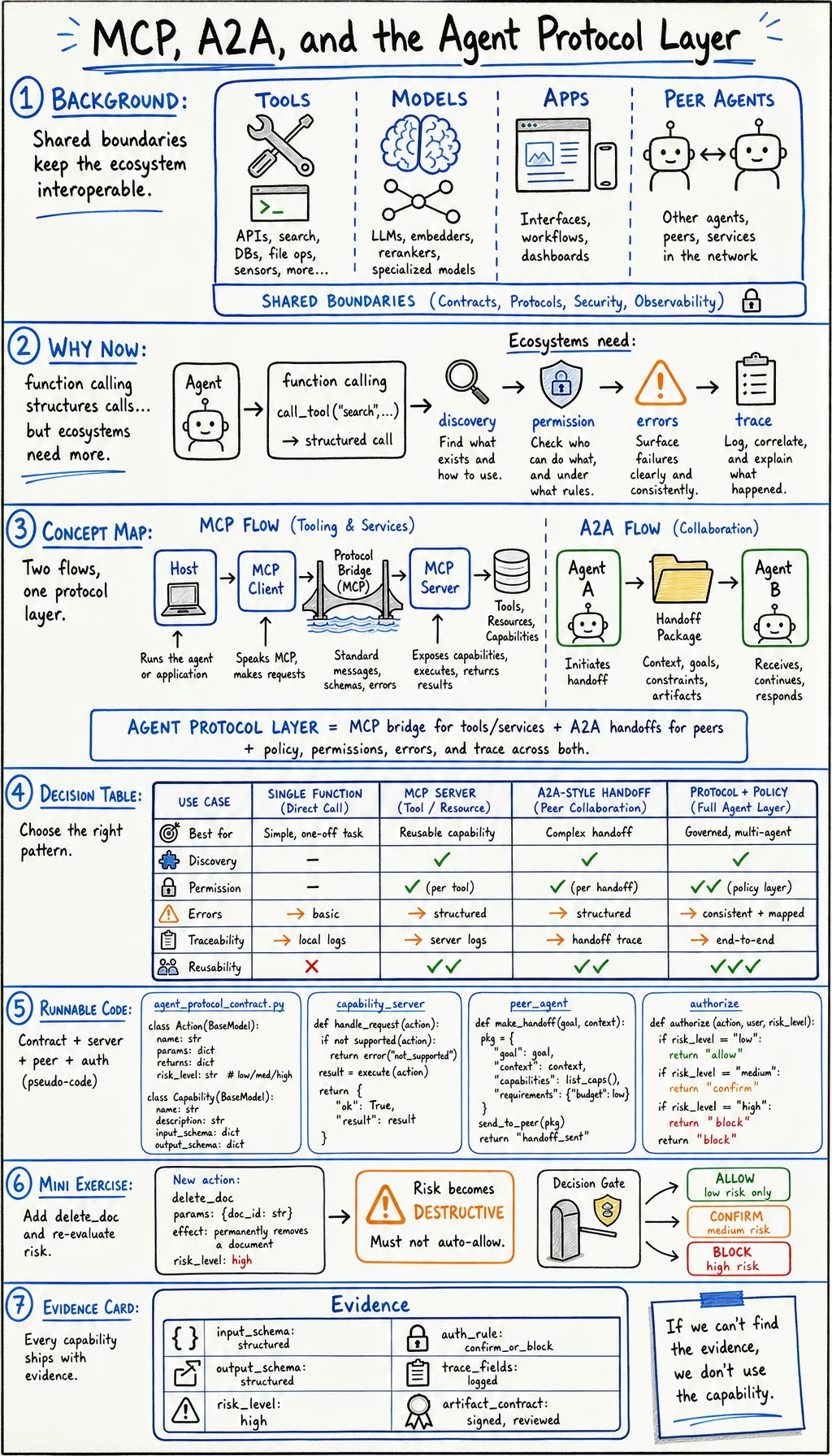
Agent systems become messy when every tool, model, app, and peer agent uses a custom integration shape. Protocols exist to make capability discovery, calling, permissions, and errors more predictable.
Model Context Protocol is a standard way to expose tools, resources, and prompts to model applications. Agent-to-agent patterns solve a neighboring problem: how one agent describes itself, receives work, returns status, and hands off artifacts to another agent or host.
Do not memorize product names first. Learn the boundary:
MCP-style boundary: app or host connects to capability serversA2A-style boundary: one agent or host negotiates work with another agentWhy This Appeared
Section titled “Why This Appeared”Function calling made tool use structured, but it did not solve the ecosystem problem. Every app still needed its own tool registry, auth rules, transport, error shape, and discovery mechanism.
Protocols appeared because teams needed to answer:
- What tools or resources are available?
- What schema does each capability accept?
- Who is allowed to call it?
- What happens when the call fails?
- Can another agent understand the same contract?
Without a protocol layer, agent systems turn into one-off glue code.
Concept Map
Section titled “Concept Map”| Layer | Main question | Typical object | Failure to watch |
|---|---|---|---|
| Tool schema | What can be called? | JSON schema, input/output type | Ambiguous arguments |
| MCP server | What capabilities are exposed? | Tools, resources, prompts | Over-broad server permissions |
| Agent card | What can this agent do? | Skills, limits, handoff format | Vague or inflated capability |
| Policy layer | Who may call what? | Allow/deny/confirm rules | Hidden privilege escalation |
| Trace layer | What happened? | Call log, artifact id, error | No debuggable handoff |
Decision Table
Section titled “Decision Table”| Need | Use this pattern | Why |
|---|---|---|
| Expose local files, database search, or browser actions to a model app | MCP server | Capability discovery and a stable host-client-server shape |
| Let one specialized agent hand work to another | Agent-to-agent contract | The receiving agent needs identity, task shape, status, and artifacts |
| Call a single function inside one app | Function calling | Simpler and enough for local tool use |
| Connect many tools with security requirements | Protocol plus policy layer | Discovery without permission control is unsafe |
| Debug a failed multi-agent run | Trace and artifact contract | You need more than the final answer |
Runnable Lab: Build a Capability Contract
Section titled “Runnable Lab: Build a Capability Contract”Create agent_protocol_contract.py and run it with Python 3.10 or later.
import jsonfrom pathlib import Path

capability_server = {    "name": "course-search-server",    "protocol": "MCP-style",    "tools": {        "search_docs": {            "input": ["query", "language"],            "output": ["title", "url", "snippet"],            "risk": "read",        }    },    "resources": ["course://chapter/{id}"],}
peer_agent = {    "name": "qa-review-agent",    "protocol": "A2A-style",    "accepts_tasks": ["review_lesson", "check_links"],    "artifact_contract": ["findings", "commands_run", "risk_notes"],}
request = {"caller": "course-builder", "action": "search_docs", "risk": "read"}

def authorize(requested_action, server):    tool = server["tools"].get(requested_action)    if not tool:        return {"allowed": False, "reason": "unknown action"}    if tool["risk"] != "read":        return {"allowed": False, "reason": "requires human confirmation"}    return {"allowed": True, "reason": "read-only capability"}

contract = {    "server": capability_server["name"],    "peer_agent": peer_agent["name"],    "authorization": authorize(request["action"], capability_server),    "handoff_required_fields": peer_agent["artifact_contract"],}
Path("agent_protocol_contract.json").write_text(json.dumps(contract, indent=2), encoding="utf-8")print(json.dumps(contract, indent=2))
Expected output:
{ "server": "course-search-server", "peer_agent": "qa-review-agent", "authorization": { "allowed": true, "reason": "read-only capability" }, "handoff_required_fields": [ "findings", "commands_run", "risk_notes" ]}Read the Code Line by Line
Section titled “Read the Code Line by Line”capability_server describes what a host can discover and call. The important parts are input shape, output shape, and risk.
peer_agent describes a worker-like agent. It is not only a tool. It accepts tasks and returns artifacts.
authorize() is the safety gate. A protocol can describe capabilities, but your app still needs policy.
contract is the bridge between discovery, authorization, and handoff evidence.
Mini Exercise
Section titled “Mini Exercise”Add a new tool:
capability_server["tools"]["delete_doc"] = { "input": ["doc_id"], "output": ["deleted"], "risk": "destructive",}request["action"] = "delete_doc"Then change request["action"] to "delete_doc". The authorization result should block or require confirmation. If it does not, your policy is too weak.
Evidence to Keep
Section titled “Evidence to Keep”Before connecting any external tool or agent, write this card:
- Capability Name
- tool, resource, prompt, or peer agent
- Input Schema
- required fields
- Output Schema
- returned fields
- Risk Level
- read, write, external, destructive
- Auth Rule
- allow, deny, or confirm
- Trace Fields
- request id, caller, target, result, error
- Artifact Contract
- what the receiver must return
Small Summary
Section titled “Small Summary”MCP and agent-to-agent contracts are not magic. They are ways to make capability boundaries inspectable. Use them to avoid hidden glue code, but always pair them with policy and trace evidence.
Check reasoning and explanation
You pass this lesson when you can explain the difference between a tool schema, an MCP server, and an agent handoff contract, and when you can identify where authorization belongs.