
7.6.3 LoRA and QLoRA
Learning Objectives
Section titled “Learning Objectives”- Understand the intuition behind LoRA’s low-rank increment
- Understand what QLoRA adds on top of LoRA
- Read a minimal matrix increment illustration
- Build a practical sense of when to consider LoRA and when to consider QLoRA
First, Build a Map
Section titled “First, Build a Map”For beginners, the best way to understand LoRA / QLoRA is not to memorize the acronym first, but to first clarify:
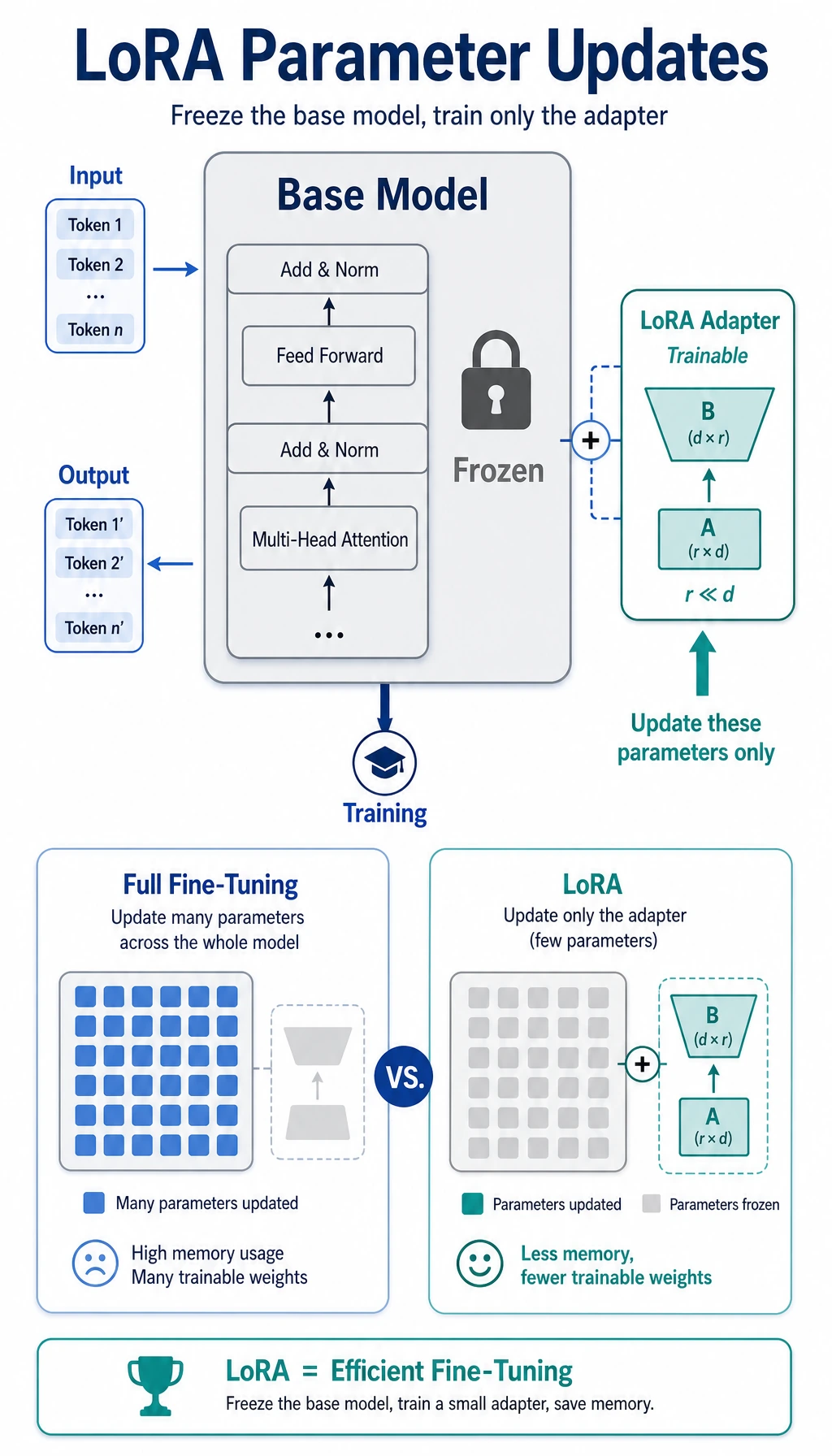
flowchart LR A["Don't want to fully modify the model"] --> B["LoRA: learn only a small increment"] B --> C["The base model is still very large"] C --> D["QLoRA: quantize the base model as well"]What this section really wants to answer is:
- What exactly is LoRA saving?
- What additional problem does QLoRA solve on top of LoRA?
A Better Analogy for Beginners
Section titled “A Better Analogy for Beginners”You can think of LoRA / QLoRA like this:
- Instead of rebuilding the whole machine, replace only a small but critical module
Full fine-tuning is more like:
- Taking the whole machine apart and retuning everything
LoRA is more like:
- Adding one small, trainable modification component
QLoRA goes one step further:
- First make the original machine more memory-efficient, then attach that modification component
Why Has LoRA Become So Important?
Section titled “Why Has LoRA Become So Important?”Because full fine-tuning is often too expensive for large models:
- Too many parameters
- Too much VRAM
- High training and storage cost
So people naturally ask:
Can we avoid changing the entire model and only modify a small part of what really matters?
LoRA is the answer to that question.
What Is the Core Intuition Behind LoRA?
Section titled “What Is the Core Intuition Behind LoRA?”Don’t Directly Change the Entire Weight Matrix
Section titled “Don’t Directly Change the Entire Weight Matrix”Suppose the original weight matrix is:
W
The LoRA idea is:
Don’t train
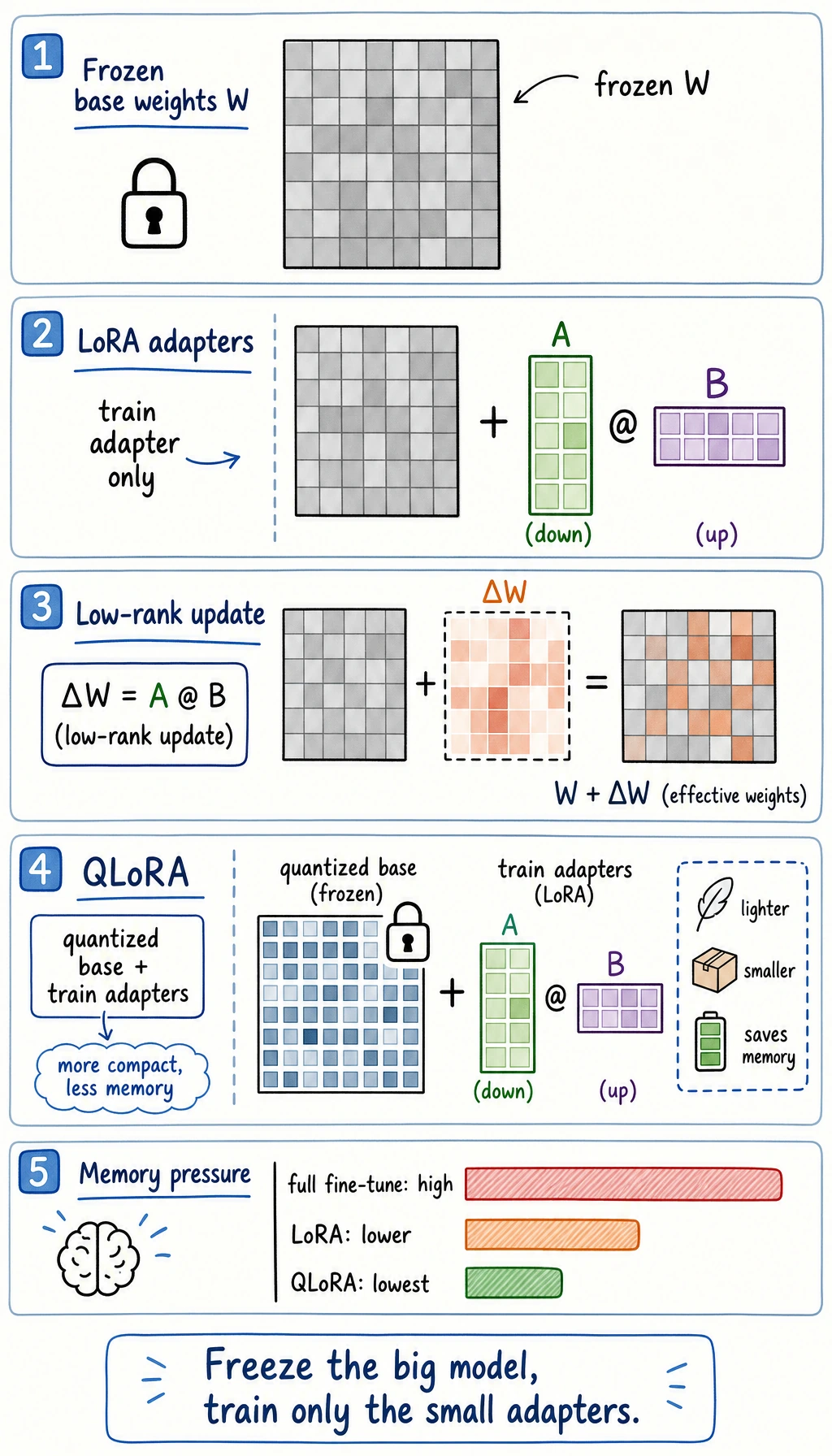
Wdirectly; instead, learn an incrementΔW
Then the model actually uses:
W + ΔW
Why Is It Called “Low-Rank”?
Section titled “Why Is It Called “Low-Rank”?”Because this increment is usually not learned as one full large matrix. Instead, it is often written as:
ΔW = A @ B
where:
AandBare much smaller than the original matrix
This is the core reason it is called “low-rank.”
Symbols and acronyms in this section
Section titled “Symbols and acronyms in this section”| Term | Meaning | Why it matters |
|---|---|---|
| LoRA | Low-Rank Adaptation | Instead of changing the full weight matrix, it learns a small low-rank update |
| QLoRA | Quantized LoRA | It keeps the LoRA adapter trainable while loading the base model in lower precision |
Rank r | The small inner dimension of A @ B | A larger rank can express more changes, but costs more memory and compute |
W | The original frozen weight matrix | Keeping it frozen reduces training cost and makes adapters easier to manage |
ΔW | The learned weight increment | This is the small task-specific change LoRA adds on top of the base model |
| Quantization | Storing weights with fewer bits, such as 4-bit | It reduces memory usage, especially when the base model is large |
A Minimal LoRA Matrix Illustration
Section titled “A Minimal LoRA Matrix Illustration”import torch
W = torch.randn(8, 8)A = torch.randn(8, 2)B = torch.randn(2, 8)
delta = A @ BW_new = W + delta
print("W shape :", W.shape)print("delta shape :", delta.shape)print("W_new shape :", W_new.shape)Expected output:
W shape : torch.Size([8, 8])delta shape : torch.Size([8, 8])W_new shape : torch.Size([8, 8])What Does This Code Teach?
Section titled “What Does This Code Teach?”It teaches you that:
- LoRA does not retrain the entire weight matrix
- Instead, it trains a smaller increment structure
That is the fundamental reason it saves resources.
A Beginner-Friendly Comparison Table
Section titled “A Beginner-Friendly Comparison Table”| Approach | Core action to remember |
|---|---|
| Full fine-tuning | Directly update all parameters of the original model |
| LoRA | Learn a small increment matrix |
| QLoRA | Learn a small increment + quantize the base model |
This table is especially useful for beginners because it compresses three easily confused approaches into one key sentence each.
Why Can This Greatly Reduce Training Cost?
Section titled “Why Can This Greatly Reduce Training Cost?”Because training the original large matrix in full is expensive. After low-rank decomposition, the trainable part becomes much smaller.
So the core engineering value of LoRA can be remembered as:
Use fewer trainable parameters to achieve sufficiently good task adaptation.
That is also why it is so popular in real projects.
What Additional Problem Does QLoRA Solve?
Section titled “What Additional Problem Does QLoRA Solve?”Why Isn’t LoRA Alone Always Enough?
Section titled “Why Isn’t LoRA Alone Always Enough?”Even if you only train the small increment parameters, the base model itself is still large. Once the model is loaded, VRAM pressure is still high.
The Key Point of QLoRA
Section titled “The Key Point of QLoRA”QLoRA adds one more step on top of LoRA:
Quantize the base model to a lower precision.
In other words:
- The base model uses less memory
- The adapter layers are still trainable
A Minimal Intuition Example
Section titled “A Minimal Intuition Example”config = { "base_model_precision": "4bit", "trainable_part": "LoRA adapters", "goal": "Fine-tune with lower VRAM usage"}
print(config)Expected output:
{'base_model_precision': '4bit', 'trainable_part': 'LoRA adapters', 'goal': 'Fine-tune with lower VRAM usage'}The most important meaning of this example is:
- LoRA: mainly saves training parameters
- QLoRA: further reduces the memory used by the base model
Another Minimal “Resource Constraint -> Solution Choice” Example
Section titled “Another Minimal “Resource Constraint -> Solution Choice” Example”constraints = { "gpu_memory_gb": 12, "want_larger_model": True, "task_boundary_clear": True,}
def choose_peft_route(c): if not c["task_boundary_clear"]: return "Don’t rush into fine-tuning yet; clarify the task boundary first." if c["gpu_memory_gb"] <= 12 and c["want_larger_model"]: return "Prioritize QLoRA." return "You can start with LoRA."
print(choose_peft_route(constraints))Expected output:
Prioritize QLoRA.This example is especially useful for beginners because it reminds you to:
- Look at constraints first
- Then choose the method
When Is LoRA or QLoRA More Appropriate?
Section titled “When Is LoRA or QLoRA More Appropriate?”LoRA Is Better When
Section titled “LoRA Is Better When”- Resources are still acceptable
- You do not necessarily need to push VRAM usage to the limit
- You want to quickly try parameter-efficient fine-tuning
QLoRA Is Better When
Section titled “QLoRA Is Better When”- VRAM is very tight
- You want to run a larger model on a smaller machine
In other words:
QLoRA is more like a practical engineering solution for resource-constrained scenarios.
If You Are Doing a Project for the First Time, How Should You Choose More Safely?
Section titled “If You Are Doing a Project for the First Time, How Should You Choose More Safely?”A practical decision order is:
- If resources are still okay, start with LoRA
- If VRAM is already clearly tight, prioritize QLoRA
- If you still have not clarified the task boundary, don’t rush into fine-tuning details
If You Turn This Into a Project or Proposal, What Is Most Worth Showing?
Section titled “If You Turn This Into a Project or Proposal, What Is Most Worth Showing?”What is usually most worth showing is not:
- “I used LoRA/QLoRA”
But rather:
- Why you did not choose full fine-tuning
- What your resource constraints were
- What LoRA or QLoRA solved
- Why this route is the most realistic for the current task
That way, others can more easily see that:
- You understand fine-tuning strategy selection
- You are not just familiar with a few acronyms
Why Do They Lower the Fine-Tuning Barrier?
Section titled “Why Do They Lower the Fine-Tuning Barrier?”Before LoRA / QLoRA became widely used, many people thought of large-model fine-tuning as something that only:
- Large teams could do
- Required extremely powerful hardware
Their important impact is:
They brought something with a very high barrier down to a range that more teams and developers can realistically try.
This is not a small optimization, but a change in engineering accessibility.
The Most Common Misunderstandings
Section titled “The Most Common Misunderstandings”Thinking LoRA / QLoRA Are “Free Improvements”
Section titled “Thinking LoRA / QLoRA Are “Free Improvements””They are powerful, but they are not completely free.
Thinking QLoRA Means You No Longer Need to Care About Resources
Section titled “Thinking QLoRA Means You No Longer Need to Care About Resources”It is lighter, but not infinitely light.
Memorizing the Method Name Without Understanding What Is Actually Being Changed
Section titled “Memorizing the Method Name Without Understanding What Is Actually Being Changed”What you really need to remember is:
- LoRA: learn increments
- QLoRA: learn increments + quantize the base model
Key Reminder
Section titled “Key Reminder”- The core of LoRA is “change fewer parameters”
- The core of QLoRA is “change fewer parameters + use less base model memory”
- These methods matter not because the names are new, but because they make fine-tuning more practical in real-world settings
Evidence to Keep
Section titled “Evidence to Keep”Keep this page’s proof of learning as a small evidence card:
- Base Model
- frozen base stays mostly unchanged
- Lora Params
- rank, target modules, trainable parameter count
- Qlora Reason
- quantized base reduces memory pressure
- Eval Delta
- before/after score or failure change
- Risk
- adapter quality depends heavily on data quality
Summary
Section titled “Summary”The most important thing in this section is not memorizing the acronyms, but understanding:
LoRA uses fewer parameters for task adaptation, while QLoRA further lowers the resource barrier for fine-tuning large models.
They matter not just because they are “new methods,” but because they truly changed the practical feasibility of large-model fine-tuning.
Exercises
Section titled “Exercises”- Explain in your own words: why is LoRA not “retraining the entire matrix”?
- Why is the key new addition in QLoRA the quantization of the base model?
- If you have limited VRAM but still want to try a larger model, why is QLoRA often worth prioritizing?
- Summarize in your own words: what is the most fundamental difference between LoRA and full fine-tuning?
Solution approach and explanation
- LoRA freezes the original weight matrix and learns small low-rank update matrices. The base matrix remains unchanged, and the learned update is added during adaptation or merged later.
- QLoRA keeps the base model in a quantized form to reduce memory while training LoRA adapters. The key idea is not that the adapter is magical; it is that the frozen base takes much less VRAM.
- With limited VRAM, quantizing the base can make a larger model fit where full precision would not. You still need to watch sequence length, batch size, optimizer memory, and evaluation quality.
- Full finetuning changes all or most model weights. LoRA changes a small trainable adaptation path while leaving the base model mostly frozen.