
2.2.6 Type Hints and Code Quality
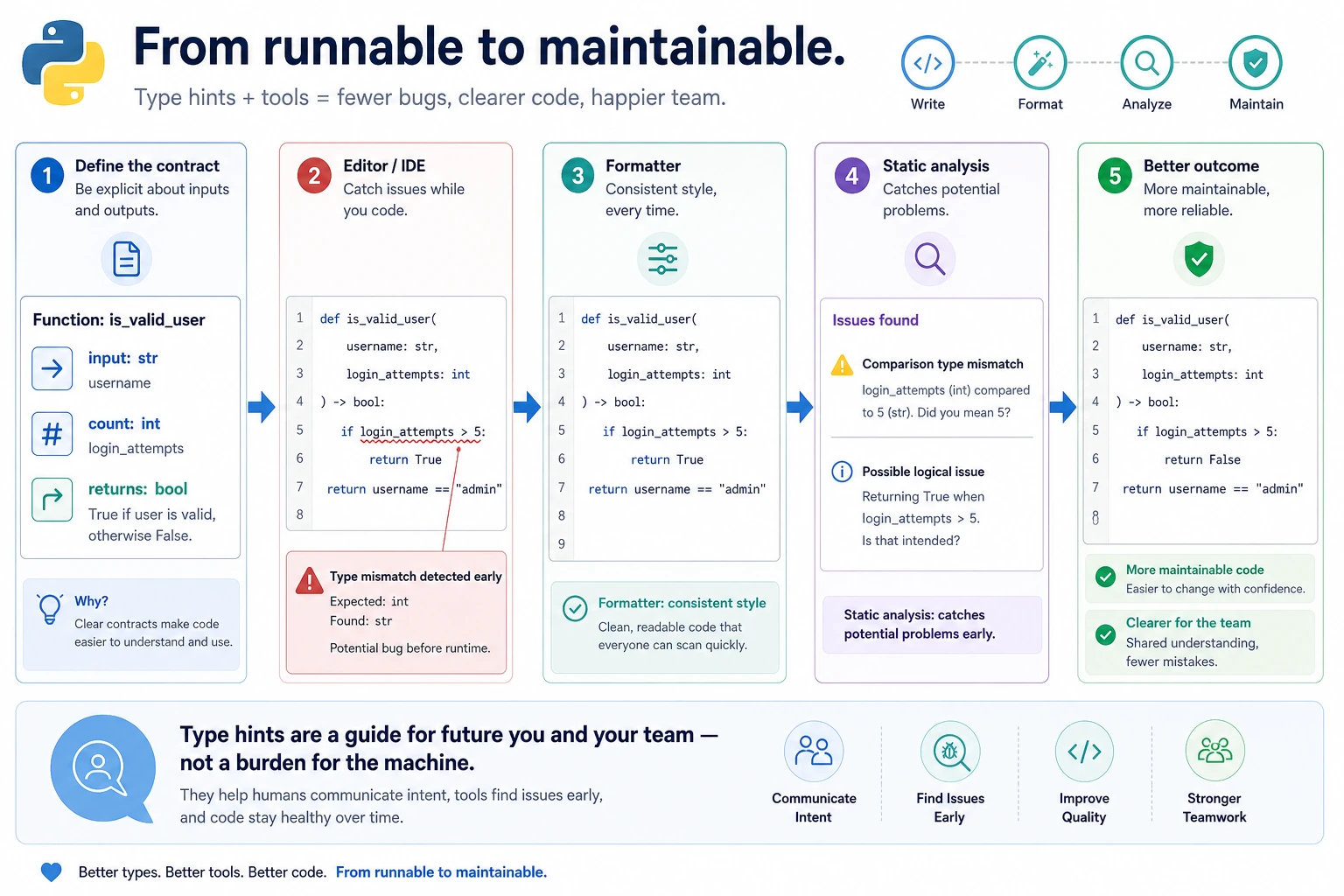
Where This Section Fits
Section titled “Where This Section Fits”This section shifts the focus from “code that runs” to “code that is easy to maintain.” Type hints, formatting tools, and code-checking tools help you make fewer mistakes as your project grows, as more people collaborate, and as you work with more complex libraries. They also help your future self understand the code faster.
Learning Objectives
Section titled “Learning Objectives”- Understand why type hints are needed
- Master the basic syntax of Python type hints
- Learn common code quality tools (linter, formatter)
- Build the habit of writing high-quality code
Why Do We Need Type Hints?
Section titled “Why Do We Need Type Hints?”Python is a dynamically typed language — variables do not need type declarations. This makes coding very flexible, but it also brings a problem:
def calculate_total(items, tax):    return sum(items) * (1 + tax)
# When using it, you have to guess:# What is items? A list? A tuple?# What is tax? 0.1? Or "10%"?# What does it return? A number? A string?
As projects get larger, code without type information is like a highway with no road signs — you have to rely on guessing.
The benefits of type hints:
| Benefit | Description |
|---|---|
| Self-documenting | You can tell at a glance what parameters a function needs and what it returns |
| IDE smart hints | VS Code can provide more accurate autocomplete |
| Static checking | Type errors can be found before the code runs |
| Team collaboration | Reduces communication cost; the code speaks for itself |
Basic Type Hints
Section titled “Basic Type Hints”Variable Hints
Section titled “Variable Hints”# Basic typesfeature_name: str = "Login API"retry_count: int = 3latency_ms: float = 125.5is_enabled: bool = True
# Python does not enforce type hints# The following code will not raise an error, but static analysis tools will warnretry_count: int = "three" # The type hint says int, but a str is assignedFunction Hints
Section titled “Function Hints”def greet(name: str) -> str: """ name: str → The type of parameter name is str -> str → The return type is str """ return f"Hello, {name}!"
def calculate_bmi(weight: float, height: float) -> float: """Calculate BMI""" return weight / (height ** 2)
def train_model(epochs: int = 10, lr: float = 0.001) -> None: """A function that returns None""" print(f"Training for {epochs} epochs, learning rate {lr}")With type hints, VS Code’s IntelliSense becomes much more accurate — when you type greet(, it can tell you that the parameter type is str.
Composite Type Hints
Section titled “Composite Type Hints”Lists and Dictionaries
Section titled “Lists and Dictionaries”# Python 3.9+: use built-in types directlyestimated_hours: list[int] = [8, 12, 5]task_hours: dict[str, int] = {"Login API": 8, "RAG demo": 12}coordinates: tuple[float, float] = (3.14, 2.71)unique_ids: set[int] = {1, 2, 3}
# Python 3.8 and earlier: import from typingfrom typing import List, Dict, Tuple, Set
estimated_hours: List[int] = [8, 12, 5]task_hours: Dict[str, int] = {"Login API": 8, "RAG demo": 12}Optional: Values That May Be None
Section titled “Optional: Values That May Be None”from typing import Optional
def find_task(name: str) -> Optional[dict]: """Look up a task; return None if not found""" tasks = {"Login API": {"hours": 8}, "RAG demo": {"hours": 12}} return tasks.get(name)
# Python 3.10+ can use a shorter syntaxdef find_task(name: str) -> dict | None: tasks = {"Login API": {"hours": 8}, "RAG demo": {"hours": 12}} return tasks.get(name)Union: Multiple Possible Types
Section titled “Union: Multiple Possible Types”from typing import Union
def process(data: Union[str, list]) -> str: """Accepts a string or a list""" if isinstance(data, list): return ", ".join(str(item) for item in data) return data
# Shorter syntax in Python 3.10+def process(data: str | list) -> str: if isinstance(data, list): return ", ".join(str(item) for item in data) return dataCallable: Function Types
Section titled “Callable: Function Types”from typing import Callable
def apply_func(func: Callable[[int, int], int], a: int, b: int) -> int: """Accepts a function as an argument""" return func(a, b)
result = apply_func(lambda x, y: x + y, 3, 5) # 8More Type Hints
Section titled “More Type Hints”from typing import Any, Literal
# Any: any typedef log(message: Any) -> None: print(message)
# Literal: only accepts specific valuesdef set_mode(mode: Literal["train", "eval", "test"]) -> None: print(f"Mode: {mode}")
set_mode("train") # ✅set_mode("play") # Static analysis will warnType Hints in Practice
Section titled “Type Hints in Practice”Add Type Hints to a Function
Section titled “Add Type Hints to a Function”def analyze_latencies( latencies: list[float], endpoint: str = "unknown", slow_line: float = 800.0) -> dict[str, float | int | str]: """Analyze API latencies and return summary statistics""" if not latencies: return {"error": "The latency list is empty"}
return { "endpoint": endpoint, "count": len(latencies), "average": sum(latencies) / len(latencies), "max": max(latencies), "min": min(latencies), "slow_count": sum(1 for ms in latencies if ms >= slow_line) }Add Type Hints to a Class
Section titled “Add Type Hints to a Class”class DataProcessor: def __init__(self, name: str, data: list[dict[str, Any]]) -> None: self.name: str = name self.data: list[dict[str, Any]] = data self._processed: bool = False
def filter_by(self, key: str, value: Any) -> list[dict[str, Any]]: """Filter data by condition""" return [item for item in self.data if item.get(key) == value]
def get_column(self, key: str) -> list[Any]: """Extract a column""" return [item[key] for item in self.data if key in item]Code Quality Tools
Section titled “Code Quality Tools”Good code should not only run, but also be readable, consistent, and bug-free. The following tools help you achieve that.
Code Formatter: black
Section titled “Code Formatter: black”black is the most popular Python code formatter. It automatically formats your code into a consistent style.
# Installpip install black
# Format a single fileblack my_script.py
# Format an entire directoryblack src/
# Check only, without modifying filesblack --check my_script.py
Before formatting:
x = { 'a':37,'b':42,'c':927}y = 'hello ''world'z = 'hello '+'world'a = [1,2,3,4,5,]After formatting:
x = {"a": 37, "b": 42, "c": 927}y = "hello " "world"z = "hello " + "world"a = [1, 2, 3, 4, 5]Code Checking: ruff
Section titled “Code Checking: ruff”ruff is a next-generation Python linter. It is extremely fast and can find many common problems.
# Installpip install ruff
# Check coderuff check my_script.py
# Auto-fixruff check --fix my_script.py
# Format (ruff can also replace black)ruff format my_script.py
Type Checking: mypy
Section titled “Type Checking: mypy”# Installpip install mypy
# Check typesmypy my_script.pydef add(a: int, b: int) -> int: return a + b
result = add("hello", "world") # mypy will raise an error: wrong argument types!$ mypy example.pyexample.py:4: error: Argument 1 to "add" has incompatible type "str"; expected "int"VS Code Integration
Section titled “VS Code Integration”Install the following extensions in VS Code to see code quality issues in real time:
| Extension | Feature |
|---|---|
| Pylance | Type checking and smart hints (recommended by VS Code by default) |
| Ruff | Real-time code checking and optional formatting |
| Black Formatter | Auto-format on save if you prefer Black as the formatter |
For new projects, using Ruff for both linting and formatting keeps the toolchain simple. Add the following to your VS Code settings:
{ "editor.formatOnSave": true, "editor.defaultFormatter": "charliermarsh.ruff", "[python]": { "editor.defaultFormatter": "charliermarsh.ruff" }}If your team already standardizes on Black, keep Black Formatter as the default formatter and use Ruff only for linting/import cleanup. Do not set Ruff and Black as competing default formatters for the same Python files.
Python Style Guide (PEP 8)
Section titled “Python Style Guide (PEP 8)”PEP 8 is the official Python style guide. Here are the most important rules:
Naming Conventions
Section titled “Naming Conventions”# Variables and functions: lowercase with underscores (snake_case)feature_name = "Login API"def calculate_average_latency(latencies): return sum(latencies) / len(latencies)
# Classes: CapitalizedWords (PascalCase)class DataProcessor: def __init__(self, source: str): self.source = source
# Constants: ALL_CAPS with underscoresMAX_RETRY = 3DEFAULT_TIMEOUT = 30API_BASE_URL = "https://api.example.com"
# "Private" attributes: underscore prefixclass MyClass: def __init__(self): self._internal_state = NoneBlank Lines and Spaces
Section titled “Blank Lines and Spaces”# Two blank lines between functionsdef function_one(): return "function one"
def function_two(): return "function two"
# Two blank lines between classesclass ClassOne: value = 1
class ClassTwo: value = 2
# Add spaces around operatorsx = 1 + 2 # ✅x = 1+2 # ❌
# Add spaces after commasitems = [1, 2, 3] # ✅items = [1,2,3] # ❌
# No spaces around default values in function parameters.# The second style is valid Python, but not recommended by PEP 8.def func(x=10): # ✅ return x
def func_not_recommended(x = 10): # ❌ style only return xLine Length
Section titled “Line Length”# A single line should not exceed 79 characters (or 88/120, depending on team standards)
# Long lines can be wrapped with parenthesesresult = ( first_variable + second_variable + third_variable)
# When a function has too many parametersdef complex_function( param1: str, param2: int, param3: float = 0.0, param4: bool = True,) -> dict: return { "param1": param1, "param2": param2, "param3": param3, "param4": param4, }Writing Docstrings
Section titled “Writing Docstrings”Good docstrings help other people (and your future self) quickly understand the code:
def train_model(    data: list[dict],    epochs: int = 100,    learning_rate: float = 0.001,    batch_size: int = 32) -> dict[str, float]:    """    Train a model and return training metrics.
    Args:        data: A list of training data, where each element is a sample dictionary        epochs: Number of training epochs, default is 100        learning_rate: Learning rate, default is 0.001        batch_size: Batch size, default is 32
    Returns:        A dictionary containing training metrics, for example:        {"accuracy": 0.95, "loss": 0.05}
    Raises:        ValueError: When data is empty        RuntimeError: When the GPU is unavailable
    Example:        >>> result = train_model(data, epochs=50)        >>> print(result["accuracy"])        0.95    """    if not data:        raise ValueError("Training data cannot be empty")    total = sum(len(str(sample)) for sample in data)    accuracy = min(0.99, 0.5 + total / 1000)    return {"accuracy": accuracy, "loss": 1 - accuracy}
Hands-On Exercises
Section titled “Hands-On Exercises”Exercise 1: Add Type Hints to Legacy Code
Section titled “Exercise 1: Add Type Hints to Legacy Code”Add complete type hints to the following code:
def process_tasks(tasks, max_hours):    results = []    for task in tasks:        if task["hours"] <= max_hours:            results.append({                "name": task["name"],                "hours": task["hours"],                "ready": True            })    return results
def calculate_stats(numbers):    if not numbers:        return None    return {        "mean": sum(numbers) / len(numbers),        "max": max(numbers),        "min": min(numbers),        "count": len(numbers)    }
Exercise 2: Install and Use Code Quality Tools
Section titled “Exercise 2: Install and Use Code Quality Tools”# 1. Install ruffpip install ruff
# 2. Create a Python file with formatting issues
# 3. Run ruff check to see the problems
# 4. Run ruff format to auto-format it
# 5. Compare the differences before and afterExercise 3: Write High-Quality Code
Section titled “Exercise 3: Write High-Quality Code”Use all the conventions you have learned to rewrite the following “bad” code:
# Bad codedef f(l,n): r=[] for x in l:  if x>n:r.append(x) return r
def g(d): s=0 for k in d:s+=d[k] return s/len(d)
Requirements:
- Use meaningful names
- Add type hints
- Add docstrings
- Follow PEP 8
Reference implementation and walkthrough
- For the legacy functions, add explicit parameter and return types, for example
process_tasks(tasks: list[dict[str, int | str]], max_hours: int) -> list[dict[str, object]]andcalculate_stats(numbers: Sequence[float]) -> dict[str, float] | None. The main goal is to make the input shape and empty-list case obvious. - The workflow with
ruffisruff checkfirst, thenruff format, then compare the diff. That keeps linting and formatting separate and makes review easier. - The rewritten code should use descriptive names, type annotations, docstrings, and PEP 8 spacing. Also guard the average function against empty input so it does not divide by zero.
Evidence to Keep
Section titled “Evidence to Keep”Keep this page’s proof of learning as a small evidence card:
- Pattern
- class, exception, file IO, functional pipeline, generator, or type hint
- Code Artifact
- minimal runnable example and one realistic use case
- Output
- printed object state, caught error, saved file, yielded values, or type-check note
- Failure Check
- hidden mutation, swallowed exception, file path issue, lazy iterator confusion, or misleading annotation
- Expected Output
- small advanced-Python example with a debugging note
Summary
Section titled “Summary”| Tool/Concept | Purpose | Recommendation |
|---|---|---|
| Type hints | Annotate parameter and return types | Strongly recommended |
| PEP 8 | Python code style standard | Must follow |
| black / ruff format | Automatically format code | Strongly recommended |
| ruff | Code quality checks | Strongly recommended |
| mypy | Static type checking | Recommended |
| docstring | Documentation strings | Required for public functions |