
0.4 Plan The Main Route
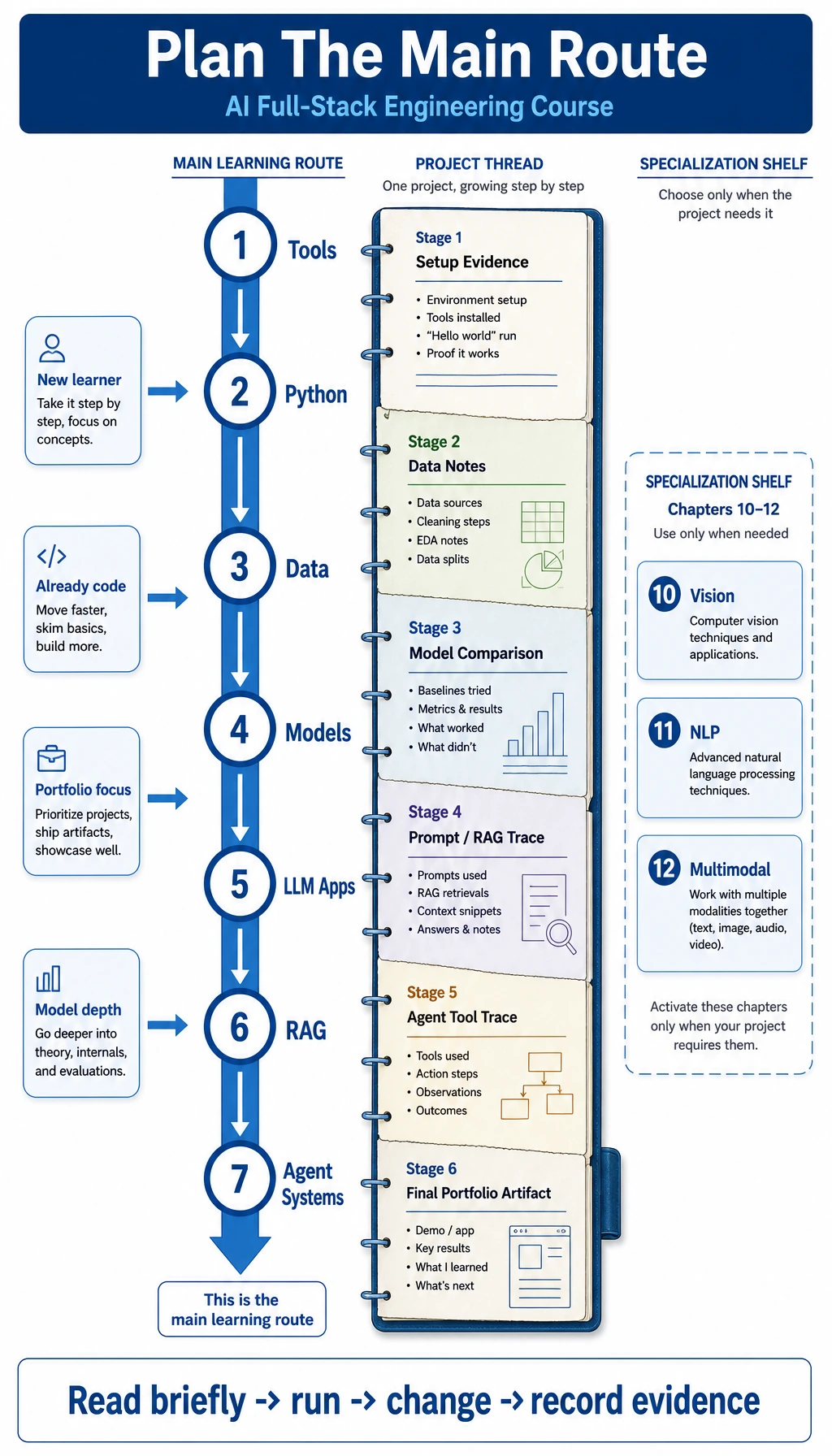
Do not start by creating many separate routes. Use one main route first: Chapter 1 -> Chapter 9 in order, one small output per stage, then choose a specialization from Chapters 10-12 or the open-source runtime path in Chapter 13 only when your project needs it.
| Your situation | How to pace the same route |
|---|---|
| I am new | Follow Chapters 1-9 without skipping the evidence cards |
| I already code | Move faster through 1-3, but still keep reproducible setup and data notes |
| I need a portfolio | Strengthen README, screenshots, logs, metrics, traces, and failure samples in every stage |
| I care about models | Spend more time on math, ML, DL, and Transformer, but still finish the LLM/RAG/Agent application loop |
Three Pacing Options
Section titled “Three Pacing Options”Fast route: 2-4 weeks For learners who already code and want the map first. Run each chapter’s first runnable loop and stage workshop, then keep the README, output, and failure notes. Pick only one Chapter 10-13 branch that matches the project.
Standard route: 8-12 weeks For learners building steadily from engineering foundations into AI applications. Follow Chapters 1-9 in order, finish each study guide and stage project, then choose 1-2 specialization chapters from 10-13.
Deep route: 16+ weeks For learners turning the course into a serious portfolio. Every stage should include before/after comparisons, a fixed eval set, failure samples, and decision notes. Chapter 13 should include a real small-model run or GPU serving path.
Choose One Project Thread
Section titled “Choose One Project Thread”Pick one simple project idea that can grow as you learn. It does not need to be impressive on day one.
| Project thread | How it can grow through the course |
|---|---|
| Study or document assistant | Python script -> data cleanup -> RAG -> Agent tools -> multimodal PDF review |
| Job-search or resume helper | structured data -> prompt tests -> retrieval from saved materials -> evaluation notes |
| Support or operations automation | scripts -> logs -> LLM classification -> Agent actions with permission boundaries |
| Domain analysis notebook | dataset -> charts -> baseline model -> LLM explanation -> deployable report |
The project thread is not a new path. It is the continuity device that turns separate chapters into one explainable body of work.
If you do not know what to choose, use 0.5 Capstone Project Thread: Course Knowledge Assistant. It turns the chapter outputs into one demonstrable AI application.
How To Choose Chapters 10-13
Section titled “How To Choose Chapters 10-13”After Chapter 9, you do not need to read Chapters 10-13 in order. Choose by product need:
- If the input is images, screenshots, video frames, OCR, or bounding boxes, start with Chapter 10.
- If the core task is classification, extraction, summarization, labeling, or text evaluation, start with Chapter 11.
- If the workflow mixes PDFs, images, audio, video, creative assets, or review steps, start with Chapter 12.
- If the project needs local deployment, rented GPUs, model files, open-source model evaluation, or LoRA decisions, start with Chapter 13.
There is also a runtime shortcut: if Chapter 7’s mini GPT-2 lab is what excites you most, take Chapter 7 -> Chapter 13 -> Chapter 8/9. That gives you model runtime intuition before attaching it to RAG and Agent systems.
Stage Exit Checks
Section titled “Stage Exit Checks”Do not judge progress by pages read. Judge it by evidence. Each stage should end with a small reviewable package, not just a memory that something worked.
| Stage | Chapters | Minimum evidence | Deeper evidence |
|---|---|---|---|
| Foundations | 1-3 | A reproducible project folder, Python scripts, cleaned data, charts | README rerun test, edge cases, data quality notes |
| Model understanding | 4-6 | One model experiment with a metric and failure samples | Bias/variance notes, ablation, training diagnosis, decision memo |
| LLM applications | 7-9 | Prompt tests, RAG retrieval trace, Agent tool trace | Fixed eval set, safety boundary, cost/latency notes, demo script |
| Specialization and runtime | 10-13 | One vision, NLP, multimodal, or open-source LLM runtime demo with saved inputs and outputs | Domain metric, review checklist, deployment/runtime constraint, portfolio write-up |
The specialization chapters are not a reward for finishing everything. They are a deliberate branch: choose them when the product needs images, text pipelines, multimodal assets, open-source model deployment, or domain-specific evaluation.
Stage Deliverable Rhythm
Section titled “Stage Deliverable Rhythm”At the end of each stage, package one small deliverable:
- What changed
- One new capability.
- How to rerun
- Exact command or
notebook cell. - What proves it
- Screenshot, metric, trace, or output file.
- What failed
- One failure sample or limitation.
- What comes next
- One controlled next experiment.
This rhythm makes the course useful for job transition and portfolio review: every stage leaves something another person can inspect.
Weekly Loop
Section titled “Weekly Loop”Use the same loop every week:
The reflection can be short. Good examples:
- What failed first?
- What input changed the output most?
- What evidence would convince another developer?
- What would break if this became a real user-facing feature?
When To Skip Or Slow Down
Section titled “When To Skip Or Slow Down”Skip only when you can pass the chapter check without guessing. Slow down when you cannot explain the output, cannot rerun the code, or cannot tell whether the result is good. Experienced learners should slow down on evaluation, failure modes, and production constraints even when the demo feels easy.
Do not redesign your learning plan every week. Read briefly, run something, keep evidence, then continue to Chapter 1.
Evidence to Keep
Section titled “Evidence to Keep”Keep this page’s proof of learning as a small evidence card:
- Target role
- AI application engineer, AI full-stack builder, or AI-enabled product engineer.
- Weekly budget
- Realistic hours for reading, running code, and recording evidence.
- Project thread
- One project idea that can grow across chapters.
- First artifact
- One runnable result to finish this week.
- Risk check
- Skipping foundations, over-reading, setup friction, or unclear goal.
- Expected output
- A written main-route plan plus the next concrete page to open.